Panda Games: Baby Girls Care
- 140.00
- 4.2
- Installs
- 10.00M
- Price
- Free

Screenshots
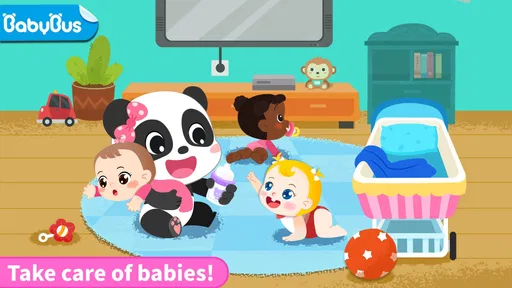

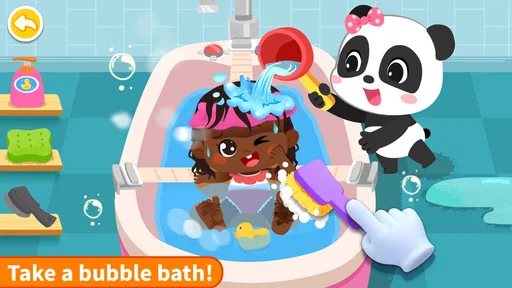

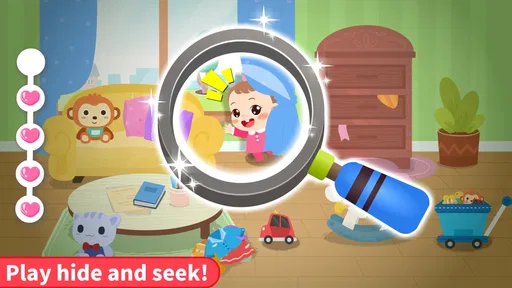
Analysis by Reviewed
When a young child wants to play “looking after a baby,” a caring role-play game can be an easy way to turn that interest into a little guided activity. Panda Games: Baby Girls Care is an educational game from BabyBus built around that pretend-nanny idea. I’d treat it as a casual, child-focused diversion rather than a serious learning course: its appeal is imaginative play, simple caregiving themes, and a familiar, approachable setup.
The game is free to download and is rated Everyone. It has an average rating of 4.2 from around 33,000 ratings, with more than 10 million installs. Those figures suggest broad appeal, though they can’t tell you whether its pace or style will suit your particular child. The useful question is whether your child enjoys pretend care and can play comfortably with a phone or tablet nearby.
Getting started without turning playtime into a struggle
For a first session, I’d keep the setup simple: install the game, open it yourself, and spend a minute checking that the child can see and tap the play area comfortably. The game is designed around taking care of baby girls, so a child who already enjoys dolls, family role-play, or helping with pretend routines has an obvious starting point. A child who prefers racing, building, or open-ended drawing may lose interest quickly.
One practical tip is to introduce it when you have time to sit beside the child, rather than handing over the device during a rushed transition. That gives you a chance to see how the game presents its activities and whether the child understands what to do next. It also makes it easier to help without taking over. With young players, a calm first minute often matters more than explaining the whole game in advance.
The game is free, but it includes optional in-app purchases priced from $0.99 to $3.99 per item. I recommend checking the device’s purchase controls before a child plays independently. That is a sensible precaution for any free children’s game with paid items, not a reason to assume a child will encounter a purchase prompt during every session. If you prefer to avoid unexpected spending, set up the device so purchases require an adult’s approval.
It runs on Android 6.0 or later, and the current version is 8.72.00.02. If installation fails or the game will not open, check the device’s available storage and software compatibility first, then try closing and reopening the app. These are ordinary first checks, not a guarantee that they will resolve every problem. When a device is shared, it’s also worth confirming that the child is using the intended profile and that the game has finished installing before handing it over.
Where a young player may get stuck
Care-themed play can sound self-explanatory to an adult, but a child may not immediately understand what an activity is asking them to do. I’d watch for signs such as repeated tapping, abandoning a screen, or asking what to do next. Instead of completing the task for them, try describing the on-screen situation in plain language and let the child choose what to try. That keeps the play theirs while making the first steps less frustrating.
More From Our News Desk

Weather by Xiaomi Review: Clear at a Glance, Less Clear Up Close

X Under Pressure: Can It Recover When Posting Goes Wrong?

Clash of Clans Is Won Between the Battles

Android Auto Makes the Case for Quieter Car Software

MobiOffice: Transforming Mobile Productivity with Seamless Integration

EA SPORTS FC™ Mobile Soccer: Redefining Mobile Sports Gaming
This is also where age and temperament matter. The Everyone rating makes the game broadly suitable, but it does not mean every child will find every interaction obvious or engaging. Some children enjoy repeating a familiar pretend-care routine; others want rapid changes and may get impatient. If your child becomes upset when an activity does not respond as expected, pause and explore together rather than treating persistence as a learning goal.
A non-obvious way to make the game more useful is to connect its pretend-care theme to a real, low-pressure conversation. You might ask what the baby in the game needs or what the child thinks a caring helper would do. Keep the exchange playful: it can encourage language and imaginative thinking, but it should not be presented as proof that the game teaches childcare skills. The value is in the conversation you build around the play, not in claiming a formal lesson.
Another practical trade-off is screen sharing. On a small phone, a young child may find it harder to notice details or tap accurately than on a larger screen. If play feels fiddly, try the device the child handles most comfortably, and check that it is held steadily. Avoid changing several things at once; that makes it easier to tell whether the difficulty came from the display, the child’s grip, or confusion about the activity.
Recovering a session when play loses its rhythm
If the child gets stuck, I’d first stop rapid tapping and give the screen a moment to respond. Then close and reopen the game if it appears frozen, and check whether the device itself is responding normally in other apps. This simple sequence helps distinguish a temporary app hiccup from a broader device slowdown without relying on guesswork about a particular feature.
If the game opens but the child seems lost, return to the current activity and invite them to describe what they see. A short prompt such as “What do you think the baby needs?” can be more helpful than giving a sequence of instructions. If the child is no longer interested, ending the session is a perfectly good recovery. A game intended for casual play does not need to become a test of patience.
For everyday use, I’d make the game one option in a small play routine rather than the default answer to every quiet moment. For example, a parent could offer a short turn while preparing a meal, then invite the child to talk about the pretend-care activity afterward. That approach gives the game a clear place in the day and makes it easier to notice whether it genuinely holds the child’s interest. It also avoids expecting a mobile game to occupy a child indefinitely.
If installation or loading remains troublesome after basic checks, restart the device and confirm that the operating system meets the minimum requirement. If other apps are also behaving badly, the issue may be the device rather than this game. If the problem appears only here, checking for an available update through the device’s app store is a reasonable next step. I would avoid deleting saved app information or changing unfamiliar device settings unless you understand the consequences.
When the problem may be the fit, not the app
Not every moment of reluctance is a technical fault. A child may simply be tired, may not enjoy pretend caregiving, or may want to play alongside an adult instead of using a touchscreen alone. Try once at a different time or offer another kind of activity; if interest still does not return, there is little benefit in insisting. A good fit should feel inviting, not like another task to manage.
Compared with educational games that focus on letters, counting, puzzles, or structured quizzes, this one is better suited to imaginative role-play. If you want a clear practice exercise with a defined academic skill, a dedicated early-learning game will be a more direct choice. If your child loves dolls and caring routines, the role-play approach may feel more natural than a lesson screen. That difference is important: “educational” can describe a broad style of play, not a promise of measurable progress in a particular subject.
It is also not the best choice if your priority is a game children can explore without adult setup or oversight. For a young child, I’d still check purchase controls and observe the first session. Likewise, if the child tends to become absorbed in screens and has difficulty stopping, set a clear stopping point before play begins. The game can fit into a short break, but it should not be expected to manage screen-time boundaries on its own.
BabyBus is the developer, and its child-oriented presentation is part of the game’s appeal for families looking for approachable pretend play. Still, popularity is not a substitute for matching the game to your child. The rating and install count can offer a rough sense of how widely it is used, but your own child’s response during a brief supervised session is a better guide to whether it belongs on your device.
My practical verdict for families
I’d recommend Panda Games: Baby Girls Care to families whose children enjoy nurturing pretend play and who want a free, simple activity to explore together. The strongest use case is a short, supervised session where an adult can help the child get oriented, keep purchases under control, and turn the role-play into a conversation. It is not my pick for a child seeking fast action or for a parent wanting a focused academic lesson.
The main friction is not complicated setup so much as fit: a young player may need help understanding what to do, and a child who does not connect with caregiving play may move on quickly. Optional purchases also make a quick check of device controls worthwhile. If the game runs poorly, start with the device and installation basics; if it works but the child is disengaged, try a different activity rather than troubleshooting a problem that may not exist.
Overall, I see it as a modest role-play option, not a replacement for hands-on play or adult interaction. Its free entry point makes it easy to try, while the in-app purchases are a reason to prepare the device before passing it to a child. If your child enjoys looking after dolls or inventing family stories, it is worth a supervised trial. If they prefer puzzles, number games, or more open-ended creative play, another educational game is likely to be a better match.
Panda Games: Baby Girls Care Frequently Asked Questions
What is Panda Games: Baby Girls Care about?
Panda Games: Baby Girls Care is a child-friendly pretend-play game centered on looking after baby characters. Players can take on everyday caregiving activities, such as helping a baby get ready, choosing outfits, and responding to basic needs. The experience is designed to feel playful and accessible rather than challenging, making it suitable for short sessions. Specific activities and available characters can vary by version.
Is Panda Games: Baby Girls Care suitable for young children?
The game is aimed at children and uses simple interactions, colorful visuals, and familiar caregiving scenarios. Its straightforward play style can make it approachable for younger players, though age suitability also depends on a child’s individual needs and the current app version. Parents should review the store’s age rating and privacy details, and it is sensible to check the game’s settings and content before allowing a child to play.
Is Panda Games: Baby Girls Care free to download, and does it include ads or purchases?
The app may be available to download without an upfront charge, but that does not necessarily mean every part of the experience is free. Some versions of children’s games include advertisements, optional purchases, or content that can be unlocked. These details may differ by platform, region, and update. Check the Google Play or App Store listing before installing, and use parental controls to manage purchases if a child will play.
Can you play Panda Games: Baby Girls Care offline?
Whether the game works offline can depend on the version and on which features you want to use. Basic play may be available without a continuous connection, while advertisements, downloads, updates, or other online features may require internet access. If offline use matters, install the game and test it while connected first, then check its behavior in airplane mode. The store listing may also describe any connectivity requirements.
What should parents check before downloading Panda Games: Baby Girls Care?
Before downloading, parents should confirm that the app is compatible with the child’s device and review its current age rating, permissions, privacy information, advertisements, and in-app purchase options. Store listings and app features can change over time, so details from older reviews may no longer apply. It is also helpful to try the game first, check whether it functions offline, and set device-level purchase and screen-time controls.
Pros
- Simple tap-based controls are easy for young children to understand.
- Care activities offer gentle
- familiar pretend-play scenarios.
- Bright visuals make characters and objects easy to distinguish.
- Short activities suit quick play sessions.
- Can encourage imaginative role-play about caring for a baby.
Cons
- Repetitive tasks may lose their appeal after several play sessions.
- Some children may need help navigating menus and choosing activities.
- Touch interactions can be imprecise on smaller screens.
- In-app ads or purchases may interrupt play
- depending on the version.
- The care scenarios offer limited challenge for older children.













