Granny Color By Number Game
- 204.00
- 4.7
- Installs
- 100.00K
- Price
- Free

Screenshots



Analysis by Reviewed
I find Granny Color By Number Game works best when I want a quiet activity that gives my hands and attention something simple to do. It is a coloring game in the trivia category, built around filling numbered sections rather than choosing every color freely. That structure makes it easy to begin, though it also means the experience is more about following a pattern than making a picture entirely your own.
What the current version offers
Art Coloring Group’s game is free to download, and its current version is 1.1.2. It has a 4.7 average from around 1.3K ratings, with over 100K installs. Those figures suggest that many players have found it approachable, but they do not tell you whether its particular style will suit you. I would choose it for a low-pressure coloring break, not as a substitute for a drawing app or a demanding puzzle game.
The game is rated for Everyone and runs on Android 7.1 or later. That makes it an option for a broad range of Android users, including people using older compatible devices. It is free, while optional in-app purchases range from $0.99 to $59.99 per item, so it is worth checking purchase prompts carefully if you share a device or want to keep spending under control.
How the coloring feels in practice
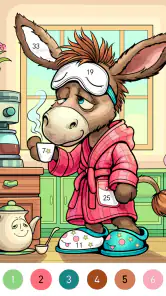
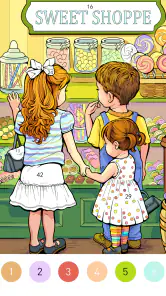
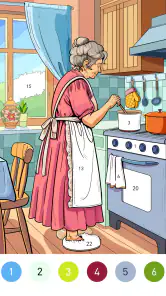
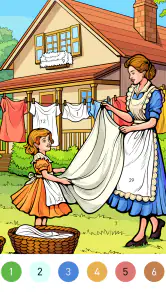
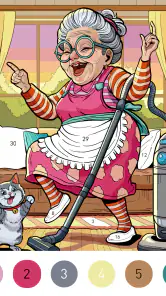
Remember those days when you’d sit down with crayons and a coloring book, letting your imagination run wild? Well, Granny Color By Number Game offers just that, but with a more structured approach that makes it incredibly satisfying. Each image is divided into tiny, numbered sections, and your job is to color them according to the palette provided. It’s like a puzzle and coloring book rolled into one!
Easy to Use, Hard to Put Down
The app’s user interface is sleek and straightforward, making it super easy to navigate. You don’t need to be a tech whiz to get started. Just pick an image, follow the numbers, and watch as a beautiful picture emerges. And the best part? The app’s feedback sound when you complete a section is oddly satisfying. It’s like getting a little pat on the back every time you finish a part of the picture.
For those who worry about making mistakes, fear not! The app is forgiving. You can easily undo any mishaps, and there’s even a hint feature if you get stuck. It’s perfect for anyone who wants to unwind without the stress of messing up.
A Variety to Keep You Hooked
One of the standout features of this game is the vast variety of images you can choose from. Whether you’re into landscapes, animals, or abstract designs, there’s something for everyone. The developers regularly update the library, so there’s always something fresh to look forward to. Plus, with varying levels of difficulty, it caters to all skill levels. So, whether you’re a newbie or a seasoned colorer, you’ll find plenty of challenges to keep you entertained.
More From Our News Desk

Weather by Xiaomi Review: Clear at a Glance, Less Clear Up Close

X Under Pressure: Can It Recover When Posting Goes Wrong?

Clash of Clans Is Won Between the Battles

Android Auto Makes the Case for Quieter Car Software

MobiOffice: Transforming Mobile Productivity with Seamless Integration

EA SPORTS FC™ Mobile Soccer: Redefining Mobile Sports Gaming
Moreover, the Granny Color By Number Game has a nifty feature that lets you save your completed works. You can even share them with friends or on social media. It’s a fantastic way to showcase your creativity and perhaps even inspire others to give it a go.
Making it fit a real day
I’d use this in short, deliberate sessions rather than expecting it to fill an entire evening. For example, if I have a few minutes while waiting for an appointment, I can open a picture, finish a small area, and stop without needing to remember a complicated game state. At home, it can also be a gentle wind-down after work, especially if I turn the sound down or off when I want a quieter break. The numbered format gives me a clear next step, which is useful when I’m tired and don’t want to invent a design from scratch.
A practical tip is to treat hints as a way to get past a stubborn patch, not as the default way to color. The satisfaction comes from locating the right numbered areas yourself; leaning on hints too quickly can make the activity feel more like tapping through a checklist. Undo is useful when a touch lands on the wrong spot, but it does not change the basic trade-off: you are following the app’s palette, not choosing your own colors for every region.
Who will enjoy it—and who may not
This is a good fit for people who like calming, guided activities, including beginners who want the reassurance of numbered sections and anyone who enjoys seeing a picture gradually come together. It may also suit families looking for a simple, age-accessible game, though I would keep an eye on purchase prompts when a child is using a shared device. The Everyone rating is reassuring as a broad content label, but it does not replace an adult’s judgment about spending controls or screen time.
I would skip it if I wanted a true creativity tool, a competitive trivia challenge, or a game with strategic decisions and a strong sense of progression. Compared with a physical coloring book, this is tidier and easier to carry, but it gives up the feel of paper and the freedom to choose any color. Compared with open-ended digital painting, it is much less demanding and less expressive. That is not a flaw for the right mood; it simply defines what kind of relaxation it offers.
A few useful choices before settling in
For a first session, I would pick a picture that looks manageable rather than choosing solely by its finished appearance. A dense image can be rewarding, but it asks for more close attention, and that may not be what I want during a short break. Starting with an image that has clearer sections gives me a chance to learn the tapping rhythm before deciding whether I enjoy the finer, more fiddly work.
Screen size changes the feel of numbered coloring more than it might seem. On a smaller phone, I would work in brief stretches and pause if I start missing narrow sections; on a larger screen, it may be easier to keep the surrounding picture in view while tapping. If a session feels frustrating, switching to a simpler image is a more sensible test than concluding that the whole format is not for me.
The sound feedback can make finishing sections feel pleasantly deliberate, but it is also the first thing I would adjust for a quiet public place. A useful routine is to decide before opening the game whether I want an audible reward or a silent activity, then keep the session short enough that the repeated taps remain relaxing. That small choice helps the game fit a waiting room or shared space without turning a calm pastime into a distraction for people nearby.
For households sharing a device, I would treat the free download and optional purchases as separate decisions. An adult can set expectations about spending before handing over the phone, and a child can still enjoy the basic coloring idea without being encouraged to tap through purchase prompts. The listed purchase range makes that a practical consideration rather than a reason to dismiss the game outright.
Compared with a standard quiz app, the trivia label does not mean I should expect questions, timed answers, or a test of general knowledge. The actual draw is the numbered coloring process. If I want a brain-teasing round of questions, a conventional quiz game is the better match; if I want a low-pressure task with a visible result, this is more fitting. That difference matters when choosing an app for a particular mood.
It also occupies a middle ground between paper coloring and a full drawing tool. Paper offers tactile materials and complete freedom, while a painting app gives more control over strokes, layers, and personal choices. This game removes much of that setup and decision-making, which is convenient when I want to begin quickly, but the trade-off is less authorship. I would not judge it by the standards of a sketchbook: its value is in making the next small action obvious.
What to expect as you keep playing
The game was released on May 17, 2024, and the version available now is 1.1.2. That gives a useful snapshot of its present state, but I would not assume a particular update schedule from it. The image library is described as receiving additions, which is a reason to return if you enjoy the existing format; for an established player, fresh pictures matter more than a new label or version number unless they improve the day-to-day coloring experience.
For someone who already likes the game, the current version is best judged by the routine it supports: choosing a picture, working through its numbered areas, and saving the finished result. A new version number alone would not change my recommendation. I would pay more attention to whether future changes make those everyday steps clearer or make it easier to find an image that suits the time and attention I have available.
One remaining limitation is that the appeal depends heavily on whether you like numbered coloring itself. If tiny sections strain your eyes or feel fiddly on your screen, the same precision that makes a finished image satisfying may become tiring. I’d try a short session before settling in for a long one, and take a break if you find yourself repeatedly zooming or tapping the wrong area. Players who prefer broad brush strokes will likely be happier with a freeform art app.
There is a similar trade-off in how much control the format gives you. Hints and undo can lower the pressure of a mistake, but they do not turn a guided image into a personal composition. If I want to choose a palette, alter a shape, or build an image from a blank page, I would switch to a drawing app rather than keep wishing this one worked differently. If I want a simple task with a defined finish, that restriction is part of the appeal.
For someone deciding whether to install it, the useful question is not whether it has the most elaborate feature set, but whether its guided pace fits the moment you want to fill. I’d keep it as an easy option for waiting rooms, quiet evenings, or a brief mental reset, while choosing a drawing app for creative control and a conventional quiz game for trivia. If future versions make the image selection and coloring flow smoother, that would be a meaningful improvement; until then, the strongest reason to try it is the uncomplicated pleasure of completing one picture at your own pace.
Why You Should Give It a Try
In a world filled with hustle and bustle, finding a moment of calm can be challenging. This app offers the perfect escape. It’s therapeutic, rewarding, and most importantly, fun. Whether you’re looking to kill time on your commute, relax after a long day, or simply indulge in a bit of nostalgia, the Granny Color By Number Game is your ticket to tranquility.
So, if you haven’t already, give it a whirl. You might just find yourself hooked, eagerly waiting for the next update to see what new images await. Happy coloring!
Granny Color By Number Game Frequently Asked Questions
What kind of game is Granny Color By Number Game?
Granny Color By Number Game is a trivia-category coloring game with a cozy coloring-world theme. It uses the familiar color-by-number format: choose an illustration, follow its numbered sections, and fill them with the corresponding colors. The simple activity can suit players looking for a relaxed creative pastime, while the granny theme gives the experience its distinct character.
Who developed Granny Color By Number Game?
Granny Color By Number Game is developed by Art Coloring Group. Its store summary describes it as “A cozy coloring world!”, reflecting the calm, creative focus of the game. If you are deciding whether to try it, the basic appeal is its accessible color-by-number activity, which lets you work through an illustration one section at a time rather than requiring drawing skills.
What is Granny Color By Number Game?
Granny Color By Number Game is a unique and engaging coloring application designed for both children and adults. It combines the classic appeal of color-by-number activities with a spooky granny theme. By following the numbers, users can fill in illustrations with vibrant colors, creating a relaxing and enjoyable experience that also enhances focus and creativity.
Is Granny Color By Number Game suitable for children?
Yes, Granny Color By Number Game is suitable for children. It offers a straightforward interface and easy-to-follow instructions. The app is designed to be family-friendly, ensuring that content is appropriate for younger users. However, parental guidance might be recommended for very young children due to the spooky granny theme. Its content rating is Everyone, though families can still decide whether the theme suits their child.
What features does Granny Color By Number Game offer?
Granny Color By Number Game offers a variety of features including a wide range of illustrations to color, various color palettes, and a user-friendly interface. The app also allows users to save and share their completed artwork. Additionally, it provides a relaxing, stress-free environment, making it perfect for unwinding after a long day. The color-by-number approach also gives each picture a clear, guided way to completion.
Pros
- Engaging gameplay for all ages.
- Wide variety of color palettes.
- Frequent updates enhance experience.
- Simple controls
- easy to use.
- Offline mode available.
Cons
- Ads can be intrusive.
- Limited free features.
- Requires in-app purchases.
- Battery consumption is high.
- No multiplayer option.
- Category
- Trivia
- Version
- 1.1.2