Baby Panda's House Games
- 243.00
- 4.2
- Installs
- 50.00M
- Price
- Free

Screenshots
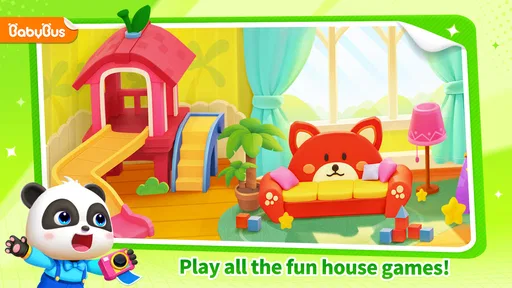



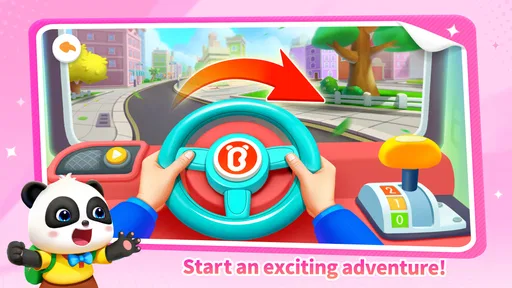

Analysis by Reviewed
When I think about a useful game for a young child, I look for something that gives them a simple reason to act, not just bright screens to stare at. Baby Panda's House Games puts pretend play, driving and short learning activities together in a home setting. That mix makes it easier for a child to move from one kind of play to another, while giving a grown-up a natural chance to talk about everyday tasks. I see it as a playful option for a quiet stretch at home, rather than a replacement for hands-on play or a structured preschool lesson.
Picking a starting point for a short play session
For a first try, I would keep the setup simple: sit with the child, let them choose a familiar-looking activity, and watch how they approach it before offering instructions. That gives you a better sense of whether they enjoy exploring independently or prefer having someone narrate what is happening. It also avoids turning the first few minutes into a test of whether they can navigate everything alone.
A useful way to make the game feel less like a collection of taps is to connect one activity to something happening nearby. If the child is playing at home, for example, you might talk about what makes a room comfortable or what happens before a meal. I would keep the conversation light and follow the child’s interest; the point is to create a small bridge between screen play and ordinary life, not to quiz them.
A World of Adventure at Home
Imagine your toddler being the hero of their own story, navigating through various rooms in a house filled with interactive games and activities. Baby Panda's House Games is all about exploring different environments, each packed with unique adventures. From cooking in the kitchen to cleaning up the living room, these games are crafted to instill responsibility and creativity in young minds.
Early goals that make sense to children
The appeal of a house-based game is that its activities start from familiar ideas: preparing food, caring for a space, and exploring through play. I would use those themes as conversation starters rather than assume a child will automatically learn a real-life routine from tapping a screen. A parent can ask what the panda is doing, then connect it to setting the table or putting toys away. That small bit of shared attention gives the activity a purpose beyond keeping a child busy.
The game also brings together role play, driving and educational mini-games, so it can suit a child whose interest shifts quickly. Instead of insisting on one long puzzle, I’d let the child choose an activity and see whether they want to continue or switch. A practical tip is to agree on a simple stopping point before handing over the device, such as finishing the current activity; it makes the transition away from play less abrupt without relying on a reward system the game may not have.
Interactive Learning
One of the coolest things about this app is how it seamlessly blends fun with learning. The activities are designed to boost cognitive skills through simple puzzles and problem-solving tasks. Your child can learn the basics of cooking, understand the importance of tidying up, and even get a sneak peek into gardening. It’s like having a mini preschool right at your fingertips.
More From Our News Desk

Weather by Xiaomi Review: Clear at a Glance, Less Clear Up Close

X Under Pressure: Can It Recover When Posting Goes Wrong?

Clash of Clans Is Won Between the Battles

Android Auto Makes the Case for Quieter Car Software

MobiOffice: Transforming Mobile Productivity with Seamless Integration

EA SPORTS FC™ Mobile Soccer: Redefining Mobile Sports Gaming
Progress signals and a gentle challenge curve
I’d judge progress here less by a score and more by whether a child can follow an activity, make a choice, and stay engaged long enough to complete a small task. That is a useful distinction for preschool-age play: the satisfying moment may be figuring out what to do next, not beating a timer or another player. If a child gets stuck, sitting alongside them and asking what they notice is often a better first move than taking over the screen.
Because the experience combines different types of play, its challenge may feel uneven from one activity to another. A child who enjoys pretend routines could find a familiar task easy, then need more help with a puzzle or a driving activity. I would treat that variation as a reason to explore together, not as a promise of a carefully graded curriculum. If you are looking for formal lessons with measurable stages, a dedicated learning app may be a better fit.
Making variety work for different moods
The mix of activities is most helpful when a child’s attention changes from day to day. One afternoon they may want to explore a pretend household task; another time, driving may be what catches their eye. Rather than trying to steer every session toward a particular learning objective, I’d let the child’s mood guide the choice and keep the adult role to gentle support. This makes the game easier to use as a flexible option, though it also means parents should not expect a consistent lesson sequence.
If the child seems restless, the variety may help them find something that interests them, but it does not replace a movement break. I’d use a natural pause between activities to ask whether they want to keep playing or put the device down. That small check-in is more useful than treating a longer session as automatically better, especially when the game is being used to fill a brief gap in the day.
Vibrant Graphics and Engaging Soundtracks
Kids love colors, and this app doesn’t disappoint. The vibrant graphics are eye-catching and sure to grab your child's attention. Coupled with catchy soundtracks, each game feels like a new adventure. The app's design is intuitive, making it easy for kids to navigate without constant supervision. Trust me, you might find yourself getting hooked on the adorable panda animations too!
Who will get the most from it?
I’d recommend it most to families with a young child who likes pretend play and benefits from having several kinds of activity in one place. BabyBus develops the game, which is in the educational category, and its Everyone age rating makes it broadly suitable for family use. It is free to start, runs on Android 5.1 or later, and its current version is 8.71.32.61. The game has a 4.4 average from around 52,000 ratings and over 50 million installs, so it has reached a large audience, though popularity alone cannot tell you whether its style suits your child.
For a realistic use case, I’d bring it out while dinner is being prepared, with the child nearby and a grown-up available to help if navigation or a task becomes confusing. I would set a short play window and invite the child to describe one thing they did afterward. That turns a spare few minutes into a shared moment, while avoiding the expectation that a phone or tablet should manage the whole evening.
Compared with a single-purpose alphabet or number app, this game appears more varied and imaginative; compared with open-ended toys, it offers less room for physical movement and inventing rules from scratch. That trade-off matters. Choose it when a child wants colorful digital role play, but reach for blocks, drawing or outdoor play when the goal is movement, tactile practice or a screen break.
Choosing it over other kinds of children’s games
Parents deciding between this and a focused learning app should think about what they want a session to accomplish. A number- or letter-focused app is usually the clearer pick when the child is ready to practice one skill repeatedly. This game makes more sense when the aim is imaginative variety and familiar domestic themes, with learning woven into play rather than presented as a structured course. For a child who loses interest in repetitive drills, that difference can be a real advantage.
On the other hand, a physical toy or a pretend-play set is better when the child needs to handle objects, move around, or invent a story without a screen guiding the action. I would not treat the game as a substitute for those experiences. Its strength is convenience: it brings several digital play styles together in one place, which can be useful during a short indoor pause, but it cannot offer the sensory feedback or free movement of hands-on play.
Retention, purchases and practical limits
Variety can help hold a child’s interest, but it can also make a session feel like hopping between activities rather than following one sustained story. I would not count on unlocks or a steadily rising challenge to keep play compelling; the useful question is whether the child enjoys returning to the familiar activities. The game is free, with in-app purchases ranging from $0.99 to $49.99 per item, so I’d check purchase settings before handing over a device and supervise any store prompts. That is especially sensible for a child who taps quickly or shares a device with family members.
There are other limits to consider: a child may need help choosing what to do, and digital pretend cooking or tidying is not practice with real utensils or household responsibilities. The game is also a weaker choice for older children seeking competitive play, deep strategy or a demanding progression system. If your priority is a quiet, accessible mix of familiar themes, it makes more sense; if you need a robust curriculum, tightly controlled independent play, or a no-purchase environment, compare alternatives carefully and stay involved.
Keeping the experience manageable at home
One practical detail worth planning is who holds the device and how the child is allowed to interact with it. For a young player, I’d keep the device within reach of an adult during the first sessions, not because every activity needs supervision, but because a child may ask for help or tap around without understanding what a prompt means. It also gives the grown-up a chance to end play calmly instead of trying to reclaim the device once the child is deeply absorbed.
If several children share a tablet, the game’s open choice of activities can be a plus, since each child may find a different kind of play appealing. It can also create friction if one child wants to keep exploring while another is waiting. I’d take turns by agreeing on a simple activity boundary in advance, rather than trying to settle the question after someone has started playing. That is a household routine, not a feature of the game, but it can make the experience more peaceful.
Safe and Kid-Friendly Environment
As a parent, I understand that safety is a top priority. The developers of Baby Panda's House Games have ensured a safe, ad-free environment for kids to play. There’s no need to worry about accidental clicks leading to unwanted purchases or inappropriate content. The app is designed to let kids explore freely while you enjoy peace of mind.
My progression verdict
For me, the strongest reason to try this game is its low-pressure blend of home-themed role play, car driving and educational mini-games. It gives a child several ways to engage without requiring a grown-up to turn every moment into a lesson, although occasional shared play helps make the activities more meaningful. I would keep expectations modest: enjoy it as a colorful option for short sessions, not as a complete learning plan or a guarantee of independent play. If that balance suits your household, it is worth trying; if you want a clear ladder of goals and measurable mastery, another kind of educational game will serve you better.
In conclusion, Baby Panda's House Games is more than just an app; it’s a gateway to a world where your child’s imagination can run wild. It offers a perfect blend of entertainment and education, making it an excellent choice for parents looking to add value to their child's screen time. So, if you’re on the hunt for an engaging and educational app for your little one, I’d say give Baby Panda’s House Games a try. Who knows, you might find yourself joining in on the fun!
Baby Panda's House Games Frequently Asked Questions
What does a child do during a typical play session?
The game combines role play, car driving and educational mini-games in a creative 3D setting. Children can move between different kinds of activities rather than following a single, fixed style of play, which makes it suitable for exploring at their own pace. If your child enjoys pretending and trying interactive tasks, this mix is likely to be the main draw.
Is the game suitable for children who are just beginning to use apps?
Baby Panda's House Games is an educational game aimed at children, with playful activities presented through role play and mini-games. The Everyone content rating may reassure families looking for a game intended for a broad audience, but a child’s comfort with touchscreen games varies. It can be useful to sit with a first-time player, show them how to begin, and see whether the activities feel manageable.
How much space should I leave on my device for the game?
It is sensible to check the available storage on your phone or tablet before downloading Baby Panda's House Games. The space needed can depend on the device and on updates, so keeping some room free can help the installation and later updates proceed smoothly. If your device is nearly full, clearing unused downloads or apps first may prevent avoidable installation issues.
Can parents manage spending before a child starts playing?
The game is free to download, but it includes optional in-app purchases. Families can use the purchase controls available through their device or app-store settings to require approval or prevent a child from buying accidentally. It is also worth explaining that purchases involve real money before play begins, especially if the child is using a shared phone or tablet.
What should I look at before deciding whether this game suits my child?
Consider whether your child enjoys creative role play, driving activities and short educational mini-games, since those are central parts of the experience. The game is rated Everyone, but children differ in their interests and in how they respond to screen-based play. A parent can preview the activities and try the game alongside the child to decide whether its pace and themes are a good fit.
Pros
- Engaging for young children.
- Colorful and interactive graphics.
- Educational content included.
- Easy navigation for kids.
- Variety of mini-games.
Cons
- In-app purchases can be frequent.
- Requires internet for some features.
- Might be too simple for older kids.
- Advertisements can interrupt play.
- Limited parental controls.













