ZoZo Player - URL Video Player
- 105.00
- 3.9
- Installs
- 1.00M
- Price
- Free

Screenshots





Analysis by Reviewed
If you’re like me, constantly on the hunt for a video player for remote links, you might want to check out ZoZo Player - URL Video Player. It is a focused option for people who already have a video address and want to try playing it directly, rather than first looking through a phone’s saved files. I’d approach it as a practical utility, not a complete entertainment hub: its value depends on whether the links you use are compatible and reachable.
What to expect from a URL-focused player
The useful distinction to keep in mind is that this is an app for opening remote video sources, rather than a general-purpose editing tool or a replacement for every streaming service. ZoZo Player is a free video player from ZoZo, and it is aimed at people who already have a media URL or use a network stream. If your routine starts with a link, that focus can make the app more convenient than searching through a phone’s local library.
It is also worth setting expectations before you install it: a player can handle playback, but it cannot make an unavailable or restricted source work. A link may depend on the source being online and accessible, and the result can vary with the connection and the way the video is delivered. I’d treat it as a practical tool for compatible sources, not a promise that every link on the internet will play.
Who this particular workflow suits
I can see the appeal if you are sent direct video addresses for a class, a work task, or a personal media source and want a dedicated place to try them. The key is that you bring the address yourself. That makes the app a better match for someone comfortable copying a link than for someone who expects to open a catalog and browse for something to watch.
It may also be useful when you want to keep browser tabs uncluttered. For example, if a colleague sends a training clip in a chat, you can test the video address in a player rather than leaving the message thread to search across several open tabs. I would still keep the original message handy: if the address is actually a webpage or requires access through the sender’s service, the player may not be able to replace that route.
User-Friendly Interface
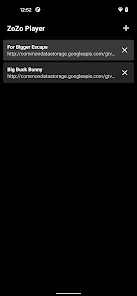
First off, let's talk about the interface. One of the things I immediately loved about ZoZo Player is how user-friendly it is. The layout is clean and intuitive, making it super easy to navigate. Even if you’re not tech-savvy, you’ll find your way around this app without a hitch. The developers clearly put a lot of thought into the design, ensuring that users can access their favorite videos quickly and effortlessly.
Making the first setup less uncertain
For a first try, I’d have the source ready before opening the app. Copy the address from the message or page where you found it, then paste or enter it using the player’s URL workflow. Starting with one source is more informative than testing several at once: if the first attempt fails, you have fewer possible causes to check. This is a simple way to learn whether your usual kind of link is a good fit.
More From Our News Desk

Clash of Clans Is Won Between the Battles

Android Auto Makes the Case for Quieter Car Software

MobiOffice: Transforming Mobile Productivity with Seamless Integration

EA SPORTS FC™ Mobile Soccer: Redefining Mobile Sports Gaming

How Microsoft OneDrive Became a Mobile Productivity Giant

How Google Translate Breaks Language Barriers Effortlessly
Think of the first successful play as a compatibility check, not a guarantee about every link you may encounter later. A direct video address can behave differently from a page that embeds a video, and network streams can depend on how the source is set up. If you get a working result, try another link from the same source before relying on it for an important viewing session.
Starting with a first successful play
For a first session, I’d keep the test simple: choose a video URL you trust, copy it carefully, and try that single source before adding more links to your routine. This makes it easier to tell whether a problem comes from the address, the source, or the player. If playback starts, you have a clear baseline; if it does not, check that the link points to a playable video rather than a webpage, and that the source is reachable on your current network.
A realistic use is opening a work or study clip shared in a message when you would rather watch it in a dedicated player than hunt through a browser tab. It can also suit someone who keeps legitimate network media links for occasional viewing. I would save or organize links using whatever method already works for you, rather than assuming the player is a full media library or link manager.
Seamless URL Integration
Now, onto the feature that sets this app apart: URL integration. If you like streaming videos from various sources, this app is your new best friend. All you have to do is paste the URL, and boom, you’re watching your video. It supports a wide range of video formats, which means you won't run into annoying compatibility issues. It’s like having a universal remote for all your video needs.
When a link does not behave as expected
The word “URL” can cover quite different things: a direct media address, a page containing a video, or a stream that needs a particular network setup. Those are not always interchangeable. When a link fails, I would first open it in the source you received it from and confirm it still works, then copy the address again without extra spaces or punctuation. That small check saves time and avoids blaming the player for a broken or inaccessible source.
It is also worth checking whether the link is intended for public access or depends on being signed in somewhere. A browser may have an existing session that lets a page open, while a separate player may not have the same context. In that situation, returning to the original service is the sensible option rather than repeatedly trying the same address in different forms.
Network viewing has a practical trade-off
For everyday reliability, network conditions matter as much as the app. A stream that starts quickly on home Wi-Fi may stutter on a weak mobile connection, while a source can become unavailable independently of the player. If you need dependable offline viewing during travel, a download-capable video app is a better fit than relying on remote playback.
For a long video, I would test the connection and source before settling in, especially if you are away from your usual network. A short opening test can reveal whether the stream begins and continues under the conditions you actually plan to use. It is a modest precaution, but it is more useful than assuming that a link that worked once will always be available.
Performance and Reliability
Performance-wise, ZoZo Player doesn’t disappoint. I’ve tested it with multiple video formats and haven’t experienced any lag or buffering issues. The playback is smooth, and the quality is top-notch. Whether you're watching a high-definition movie or a quick YouTube clip, the app handles it like a champ. Plus, it doesn’t hog your device’s resources, so you can multitask without worrying about your phone slowing down.
How it compares with the usual choices
Compared with a phone’s built-in player, ZoZo Player’s appeal is the emphasis on remote and network sources instead of only files already stored on the device. Compared with a browser, a dedicated player can feel more direct when all you have is a playable media address. But if you mainly watch videos inside major streaming services, their own apps are usually the simpler choice: they handle accounts, catalogs, and service-specific playback in one place. This player makes more sense when you bring the source yourself.
That distinction matters in a shared-link situation. If tapping a link in a message already opens the video correctly in its original service, switching apps may add an unnecessary step. If you have a direct address that is awkward to watch in a browser, a dedicated player is more appealing. I’d choose based on the kind of link I actually receive, rather than expecting one app to replace every way I watch video.
Where I would draw the line
It is not the right choice for everyone. Someone who wants editing tools, a curated entertainment catalog, or a polished offline collection should look elsewhere. It is more appealing to a curious, practical viewer who is comfortable copying a link and checking whether the source is valid. That small bit of hands-on effort is the trade-off for a player centered on remote media.
I would also skip it if your main requirement is a guaranteed way to play any online video. Compatibility depends on the source, and access rules belong to the source as well. A player is not a workaround for a video that is private, unavailable, or delivered through a service that expects its own app. Keeping that boundary in mind helps set a fair expectation and avoids wasting time troubleshooting something outside the player’s control.
Customization Options
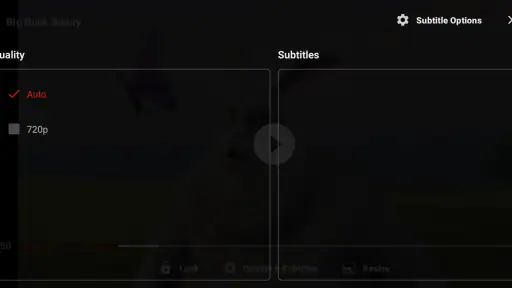
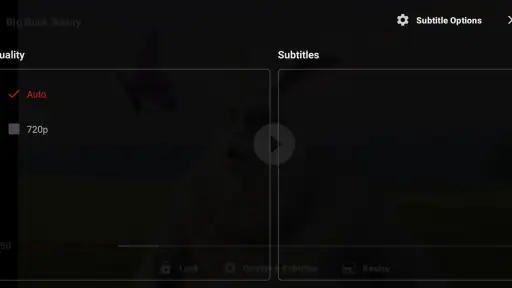
Another thing I appreciate about this app is the customization options. You can tweak the playback settings to suit your preferences, from adjusting the playback speed to changing the subtitle appearance. It’s these little touches that make the user experience more enjoyable and personalized. Plus, the app supports multiple languages, which is a thoughtful addition for non-English speakers.
A careful routine for recurring links
If you use the same source regularly, I’d keep a small note of which link format has worked and where you got it. That does not need to become a complicated library; even a clear label in your existing notes can save you from guessing later. Keep the source name alongside the address, so you can tell whether a failure is likely to be a changed link or a temporary access issue.
For subtitles or playback speed, I would adjust only after confirming the video plays normally. That order makes troubleshooting easier: first establish that the source loads, then change viewing preferences. If something looks wrong after an adjustment, you can return to the basic playback setup instead of wondering whether the URL or a setting caused the problem.
Who will get the most from it
I’d recommend it most to people who regularly receive video links, keep track of legitimate network streams, or want a separate place to try remote media without relying on a browser each time. If that describes you, start with one known-good link, then make a note of which sources behave consistently. That simple habit helps distinguish a dependable stream from one that only works intermittently.
On the other hand, if you mostly tap videos saved on your phone, the built-in player may already be enough. If you expect a link player to fix source-side restrictions, play every webpage, or guarantee smooth viewing on any connection, you may find the experience frustrating. I’d choose the app for the specific URL workflow, not as an all-purpose video solution.
Compatibility and a sensible next step
The app is rated for Everyone and runs on Android 7.0 or later. Its current version is 4.0.6, and it has passed one million installs; the average rating is 3.9 from around 5,300 ratings, with 105 written reviews. Those figures suggest a widely tried utility with mixed enough feedback that I would test my own sources before making it part of a daily routine. The best next step is simply to try one link you already trust and decide whether that focused workflow suits you.
It is free, which makes a low-commitment test straightforward: install it, try a link whose source you recognize, and judge the result against your normal browser or player. ZoZo Player was released on May 3, 2023, and the developer is ZoZo. Those details place it as an established, focused utility rather than a new service you need to build your viewing habits around. I would let a successful real-world test, not the install count alone, decide whether it belongs on your phone.
My take after weighing the trade-offs
For me, the strongest reason to try this app is its clear remote-video purpose. When I already have a usable address, a dedicated player can make that one task feel more direct. Its limitations are equally clear: a URL is only useful if it points to accessible media, and network viewing is not the same as having a saved offline copy. The app is best judged on that narrower job.
If your first attempt works, keep the workflow simple: use it for sources that have already proved reliable, and keep the original page or service in reach when a link needs its own sign-in or player. If it does not work, check the address and connection once before deciding whether the source belongs in a browser or its official app instead. That is the practical way I’d recommend approaching ZoZo Player: as a useful option to test, not a universal fix for every video link.
ZoZo Player - URL Video Player Frequently Asked Questions
What devices and operating systems can run ZoZo Player?
ZoZo Player is an app in the Video Players & Editors category, developed by ZoZo. The Android version requires Android 7.0 or later, so it can suit users with a range of devices that meet that requirement. The app is free and rated for Everyone. Before downloading, check that your device’s operating system meets the minimum requirement.
What is ZoZo Player and what makes it unique?
ZoZo Player is an innovative URL video player that allows users to stream videos directly from web URLs without downloading them. What sets it apart from other video players is its seamless integration with various online platforms, providing smooth streaming and enhanced playback controls. Its ability to handle a wide range of video formats and its user-friendly interface make it a popular choice for users who prefer online streaming over offline viewing. Its focus is on playing remote multimedia videos and network streaming protocols.
Is ZoZo Player available for both Android and iOS platforms?
Yes, ZoZo Player is available for both Android and iOS devices. Users can download it from the Google Play Store for Android devices and the Apple App Store for iOS devices. Its cross-platform availability ensures that users can enjoy a consistent streaming experience regardless of the device they are using. Additionally, both versions are regularly updated to include new features and improvements.
What kinds of video sources can I use with ZoZo Player?
ZoZo Player is intended for remote multimedia video playback and network streaming protocols, so it is aimed at users who want to play content from URLs rather than rely only on files stored on their device. The source needs to be accessible to your device and compatible with the player. As with any streaming app, the quality of playback can depend on the source and your network connection.
Does ZoZo Player support subtitle integration for videos streamed online?
Absolutely, ZoZo Player supports subtitle integration for a better viewing experience. Users can load subtitle files directly into the player while streaming content from URLs. This feature is particularly useful for viewers who prefer watching videos in a different language or require subtitles for better comprehension. The player supports various subtitle formats, ensuring compatibility and ease of use.
Pros
- Supports various video formats.
- User-friendly interface.
- Seamless URL video streaming.
- Customizable playback settings.
- Low memory usage.
Cons
- Contains ads in free version.
- Limited offline features.
- Occasional buffering issues.
- Subscription required for premium features.
- No subtitle support.
- Category
- Video Players & Editors
- Version
- 4.0.6











