Zoom Workplace
- 73.85K
- 4.1
- Installs
- 1.00B
- Version
- Varies with device

Screenshots

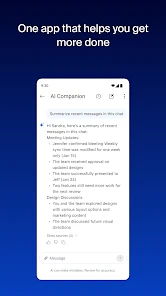




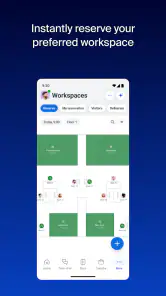

Have you ever found yourself juggling multiple communication tools at work and wished for a single platform to handle it all? Well, let me introduce you to Zoom Workplace, a comprehensive solution that aims to streamline your work life by combining video conferencing, chat, and collaboration tools into one seamless application.
All-in-One Communication Hub
When I first downloaded Zoom Workplace, I was a bit skeptical. I mean, how can one app effectively replace all the different tools I use? But, boy, was I in for a pleasant surprise! As soon as I navigated through the interface, it became apparent how intuitive and user-friendly it was. The app’s design is sleek, with everything you need just a click away. Whether you're setting up a meeting, initiating a chat, or sharing a document, everything is integrated so smoothly.
Video Conferencing Made Easy
The video conferencing feature is top-notch, mirroring the high standards we’ve come to expect from Zoom’s regular app. The video quality is crisp, and even with a shaky internet connection, it somehow manages to deliver a decent experience. There are options for virtual backgrounds, screen sharing, and even recording meetings for later. It’s like having a virtual meeting room right in your pocket!
Chatting Like a Pro
Gone are the days of switching between apps to send a quick message to your colleague. The chat function in Zoom Workplace is robust, allowing for private and group chats with ease. You can even create channels for different projects, making it simple to keep track of conversations. Plus, the integration with email and calendar apps is a lifesaver, ensuring you never miss a beat.
Latest News
Collaboration at Its Best
One of the standout features of this app is its collaboration tools. Whether you’re brainstorming ideas or working on a shared document, Zoom Workplace provides a platform that supports real-time collaboration. The ability to annotate documents during meetings and the seamless integration with other productivity tools enhances the collaborative experience significantly.
In conclusion, if you’re looking for a way to simplify your work communications and collaboration, Zoom Workplace is definitely worth considering. It not only combines multiple functionalities into one app but also does so with an ease that’s hard to beat. So, if you're ready to elevate your work efficiency, give it a try. You might just find it becomes the most essential tool in your digital arsenal.
Pros
- High-quality video conferencing.
- Seamless integration with calendars.
- User-friendly interface.
- Wide range of collaboration tools.
- Efficient screen sharing feature.
Cons
- Security concerns over data privacy.
- Occasional connectivity issues.
- Limited features in free version.
- Requires stable internet connection.
- Complex setup for beginners.