zmNinja
- 9.00
- 3.2
- Installs
- 1.00K
- Price
- $4.99

Screenshots
Analysis by Reviewed
Ever found yourself juggling between different apps to manage your home security cameras? Well, you’re not alone! Let me introduce you to zmNinja, a nifty little app that’s got you covered in the security department. Whether you’re tech-savvy or just getting started, this app brings the world of home surveillance right to your fingertips. Here’s my take on it!
Getting Started with zmNinja
First things first, setting up zmNinja is a breeze. The app is designed to work seamlessly with Zoneminder, a well-known open-source security camera management system. You’ll need to have Zoneminder set up on your server, and once that’s sorted, you’re just a few taps away from connecting it to zmNinja. The app supports both Android and iOS, so no matter what device you’re using, you’re good to go. It even has a wizard to guide you through the setup process, which is super helpful if you’re new to this whole thing.
User Interface and Features
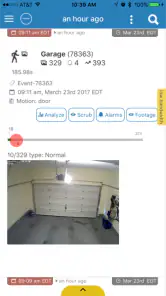
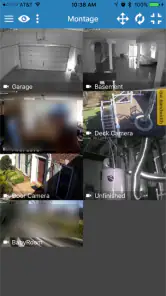
The user interface is clean and intuitive, which is always a win in my book. You get a dashboard that displays all your connected cameras, each with a live feed. The video quality is surprisingly good, and the app lets you zoom in with a simple pinch gesture. One feature I absolutely love is the ability to receive push notifications. Whenever the motion detection system triggers, you get an instant alert on your phone. This means you can act immediately if there’s any suspicious activity around your home.
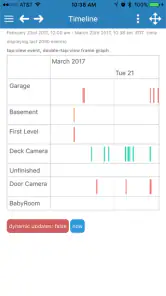
Another cool aspect is the event playback feature. Missed something important? No worries! zmNinja keeps a record of all events, so you can easily go back and view any footage you missed. Plus, it supports both landscape and portrait modes, which is great for those who like flexibility in how they view their feeds.
The Performance Edge
Performance-wise, zmNinja doesn’t disappoint. The app runs smoothly without any noticeable lag or crashes, which is crucial for something as important as home security. It’s lightweight yet packed with features, striking a nice balance between functionality and performance. Whether you’re on a stable Wi-Fi connection or using mobile data, the app adapts well, ensuring you stay connected to your cameras.
Battery consumption is another aspect where zmNinja excels. Unlike some other surveillance apps that drain your battery like there’s no tomorrow, zmNinja is optimized to consume minimal power, so you can keep it running in the background without worrying about your phone dying on you.
Final Thoughts
In a nutshell, zmNinja is a solid choice for anyone looking to enhance their home security setup. It’s easy to use, reliable, and packed with features that make managing your surveillance system a whole lot easier. Whether you’re at home or halfway across the world, you’ll have peace of mind knowing you can check in on your property anytime, anywhere. So, if you’re in the market for a new security app, give zmNinja a try—I promise you won’t regret it!
Pros
- Intuitive user interface
- Supports multiple camera brands
- Regular software updates
- Customizable alerts
- Low resource consumption
Cons
- Limited free version features
- Complex setup for beginners
- Occasional connection issues
- Requires constant internet
- No cloud storage option

- Category
- House & Home
- Version
- 1.8.000