Zintego - Invoice Maker
- 53.00
- 4.6
- Installs
- 100.00K
- Price
- Free

Screenshots
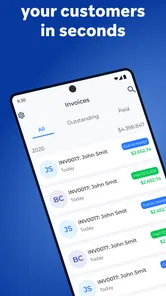
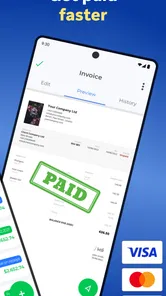
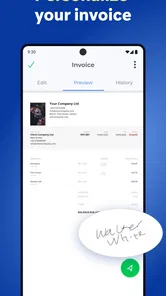
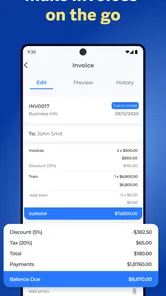
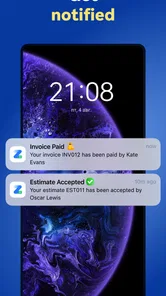
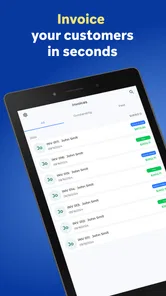
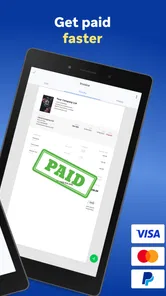
Analysis by Reviewed
Writing an invoice after finishing a job is one of those small business tasks that can consume far more time than it deserves. I have often seen people postpone it, search through old messages for customer details, or send an informal note that leaves the total, payment terms, or service description unclear. Zintego - Invoice Maker is built for that exact recurring problem: creating a presentable invoice without turning the process into a full accounting project.
My first impression is that this is a focused business invoicing app rather than an all-purpose finance suite. That focus is useful when I need to prepare a document quickly from a phone. It is available free of charge, with optional in-app purchases ranging from $6.99 to $199.99 per item, so I would approach it as a convenient starting point and check the available upgrade choices before relying on it for a larger workflow.
How Zintego fits into real invoicing work
I find the best way to judge an invoice tool is to look beyond how quickly it fills a page: the important question is whether it helps me keep each billing decision deliberate. In this section, I’m focusing on the practical choices involved in preparing an invoice and the points where I would pause to check my work. That makes it easier to see where a simple workflow is useful—and where I would want more oversight.
A practical starting point for independent work
The app comes from Monster Brain Studios Limited and has reached over 100 thousand installs, with an average rating of 4.6 from around 1.6 thousand ratings. Those figures suggest that it has found an audience among people who want a straightforward way to prepare invoices, especially when a desktop accounting package feels excessive for occasional or small-scale work.
I would place it between a blank document and a full bookkeeping platform. A blank document gives me complete freedom but forces me to remember every useful invoice detail and arrange it neatly. A larger accounting service may handle recurring billing, reports, tax workflows, payment tracking, and business records, but it can also demand more setup than a freelancer wants for a single job. Zintego is most appealing in the middle: more structured than typing an invoice manually, but less intimidating than managing an entire accounting system.
That distinction matters. If I only need to bill a few customers, the main benefit is not advanced financial analysis. It is reducing the number of decisions between finishing the work and sending a readable request for payment. The app’s store summary, “Invoice Maker: Easy & Simple,” reflects that purpose, while the short store description identifies it simply as Zintego.
What I would prepare before creating the first invoice
The smoothest setup starts outside the app. I would gather my business name, contact details, preferred payment instructions, customer information, service descriptions, and any tax or fee details that apply to my work. Having those details ready prevents the first invoice from becoming a hunt through email, messaging apps, and notes.
More From Our News Desk

Weather by Xiaomi Review: Clear at a Glance, Less Clear Up Close

X Under Pressure: Can It Recover When Posting Goes Wrong?

Clash of Clans Is Won Between the Battles

Android Auto Makes the Case for Quieter Car Software

MobiOffice: Transforming Mobile Productivity with Seamless Integration

EA SPORTS FC™ Mobile Soccer: Redefining Mobile Sports Gaming
I would also decide on a consistent description style. For example, instead of writing “design work,” I would use a clearer phrase such as “logo revision and final export.” Specific descriptions make an invoice easier for the customer to understand and easier for me to recognize later. This is a small workflow improvement, but it prevents the app from becoming a place where vague line items are simply reproduced more neatly.
On a phone, the first useful test is not a real customer invoice. I would create a sample, inspect the total, review the wording, and see how the finished document looks before sending anything. That test is especially worthwhile because mobile typing makes it easy to miss a digit or select the wrong customer field. A minute spent checking the result can save a much more awkward correction later.
Using it when the job is fresh in my mind
A realistic example would be a freelance photographer who finishes a small event assignment in the afternoon. Instead of waiting until the evening to open a laptop, the photographer can prepare the invoice while the service details are still clear: the event date, the agreed work, any extra editing, and the final amount. The value here is not just speed. It is accuracy created by timing.
I would use the same approach after a repair visit, a tutoring session, a writing assignment, or a short consulting job. The key is to create the invoice immediately after the work, before several other tasks blur the details. A simple routine—finish the job, open the app, enter the customer, describe the work, check the total, and review the final document—turns invoicing into a closing step rather than a weekly backlog.
For occasional users, that routine is likely more valuable than a long list of advanced options. The app can help make billing a habit because the task stays close to the moment when the information is easiest to verify.
Where it can remove everyday friction
The biggest friction removed is the need to design the invoice from scratch each time. A structured invoice tool gives the process a repeatable shape, which is helpful when I am working from a phone and do not want to format tables, align totals, or decide where each piece of information belongs.
It also reduces the mental load of switching between tools. Without a dedicated invoice app, I might draft the document in a notes app, calculate the amount separately, find the customer’s address in a contact list, and then export or share the result through another service. Keeping the invoice task in one focused place makes the workflow easier to repeat.
That does not mean every part becomes automatic. I still need to enter correct information and check the finished invoice. A tool can organize my input, but it cannot know whether I charged for the right number of hours or whether a customer’s details have changed. The practical lesson is to treat the app as a reliable form-building assistant, not as a replacement for reviewing the transaction.
Useful habits for avoiding invoice mistakes
One non-obvious advantage of a mobile invoicing workflow is that it encourages immediate verification. When I create an invoice directly after a job, I can compare the amount with the original agreement while the conversation is still accessible. If I wait several days, I may remember the broad scope but forget an extra service or a small adjustment.
I would also keep descriptions consistent across similar jobs. Consistency makes repeated invoices faster and helps customers understand what they are paying for. If two invoices use completely different wording for the same kind of service, the customer may ask unnecessary questions even when the amount is correct.
Another useful habit is separating the invoice total from personal notes. I would not rely on an informal reminder in a description field to track whether someone has paid. An invoice can request payment clearly, but I would still maintain a separate record of payment status if my work depends on regular follow-up. This is one of the points where a dedicated accounting platform may be better for a growing operation.
Who benefits most from this approach
I think Zintego is a good match for freelancers, solo service providers, independent contractors, and small operators who need professional-looking invoices without building a complicated financial system. It is particularly suitable for people who work away from a desk and want to finish administrative tasks from an Android phone.
The Everyone content rating also makes it broadly approachable from an audience perspective. The current version is 1.6.1 and works from Android 6.0 onward, which gives it compatibility with a wide range of Android devices. I would still check the app’s current behavior on my own phone before moving an entire billing routine into it, especially if the device is older or has limited storage.
It is less convincing for a company that needs several staff members to share customer records, detailed financial reporting, inventory management, automated reminders, or a complete tax workflow. In that situation, the convenience of a simple invoice creator may be outweighed by the need for centralized records and stronger business controls.
How it compares with familiar alternatives
The usual alternative is a document editor or spreadsheet. Those tools can work well when I send very few invoices and already have a carefully designed template. They offer flexibility, but they also leave me responsible for maintaining formatting, formulas, numbering, and copy accuracy. A purpose-built invoice app is more attractive when I want the same basic process every time.
Another alternative is a full accounting service. That route makes more sense when invoicing is connected to expenses, bank reconciliation, taxes, payroll, stock, or detailed reports. The trade-off is setup time and complexity. I would not choose a lightweight invoice maker to replace a complete accounting system, but I would choose it when the immediate problem is simply producing clear bills without opening a large financial dashboard.
There is also the option of sending a payment request through a marketplace or payment platform. That can be convenient when both sides already use the same service, but it may not provide the kind of standalone invoice document a customer expects for business records. Zintego’s appeal is the invoice itself: a separate document that can fit into a more traditional client workflow.
Where the simple design may stop being enough
The same focus that makes the app approachable can become a limitation. If I need a detailed overview of unpaid invoices, automatic recurring billing, customer history, expense categorization, or tax-ready reporting, I would look beyond a basic invoice maker. Those needs are not minor extras once a business has many transactions; they affect how reliably the whole operation can be managed.
I would also be careful about treating in-app purchases as an afterthought. The app is free to start, but the listed purchase range runs from $6.99 to $199.99 for an individual item. That wide range means I would review what each optional purchase provides, whether it is a one-time choice or part of a broader paid workflow, and whether the features are necessary for my volume of work before committing.
Another trade-off is mobile entry. A phone is excellent for a short invoice, but less comfortable for entering a large catalogue of services or correcting many line items. For a business with complex invoices, a larger screen and a desktop-oriented system may save more time overall, even if the phone app feels quicker for occasional jobs.
My recommended workflow for dependable results
I would begin with a sample invoice and check four things before sending a real one: the customer’s name, the service description, the total, and the payment instructions. I would then create invoices as close as possible to the completed work, rather than waiting for a monthly administrative session. This keeps the details fresh and makes missing charges easier to spot.
For repeated customers, I would use the same wording and review the stored details each time rather than assuming they remain correct. Addresses, contact information, and agreed rates can change. A fast workflow is only useful when the final document is accurate.
I would also keep a separate backup habit for important business records. Even when an app makes creation easy, I would not let it become the only place where I know what I billed, what was paid, and what still needs attention. That extra discipline is especially important for anyone using the app as the main invoicing tool for a growing business.
My final view after weighing convenience against control
Zintego - Invoice Maker is strongest when the problem is delayed, messy, or unnecessarily complicated invoicing. I like the idea of opening a focused tool after a job, entering the essentials, checking the result, and moving on with the day. For a freelancer or small operator, that can remove just enough friction to make billing consistent instead of something repeatedly postponed.
I would recommend it to someone who wants a free entry point, prefers working from an Android phone, and does not need a complete accounting platform. The combination of a business-focused purpose, broad device compatibility from Android 6.0, and a straightforward workflow makes it worth trying for simple client billing.
I would skip it as a primary system if my business depends on deep reporting, shared team access, complex tax handling, inventory, or a large history of transactions. In those cases, a full accounting solution will probably save more time in the long run, even if it takes longer to learn.
Overall, my opinion is positive but deliberately practical. This is not the kind of app I would choose because it promises to manage every financial detail. I would choose it because it can make one recurring task—preparing a clear invoice—less annoying and easier to complete on time. As long as I keep my own records, review every document, and understand the optional purchase structure, it is a sensible tool for straightforward invoicing.
Zintego - Invoice Maker Frequently Asked Questions
What devices and operating systems can run Zintego – Invoice Maker?
Zintego – Invoice Maker is a mobile app for business invoicing, and its minimum operating system requirement is 6.0. Before downloading, check that your device meets this requirement and has enough available storage for the app. The app is free to download, while some features are offered through in-app purchases, so consider both compatibility and potential costs when deciding whether it suits your needs.
Who develops Zintego – Invoice Maker, and is it intended for general users?
Zintego – Invoice Maker is developed by Monster Brain Studios Limited and is categorized as a business app. Its content rating is Everyone, making it suitable for a general audience. The app is aimed at people who need a mobile way to handle invoicing, including freelancers and small businesses. Its straightforward focus may also appeal to users who want a dedicated billing tool rather than a broader business platform.
What is Zintego – Invoice Maker used for?
Zintego – Invoice Maker is designed to help freelancers, independent professionals, and small businesses create and manage invoices from a mobile device. You can generally prepare professional-looking invoices, add customer and business details, include products or services, apply taxes or discounts, and share the finished document digitally. It is especially useful for users who need a simple invoicing tool without relying on desktop accounting software.
Can I create professional invoices with my own business information and branding?
Yes, Zintego is intended to let users personalize invoices with essential business information, such as a company name, address, contact details, customer information, invoice numbers, dates, item descriptions, prices, taxes, and payment terms. Depending on the version and selected plan, customization options may also include logos, colors, and templates. It is worth checking the available features before downloading if branding is important to your business.
Does Zintego support sending or sharing invoices with customers?
The app is built around creating invoices that can be shared with clients, commonly through email, messaging applications, or by exporting the document in a convenient format such as PDF. This makes it practical for freelancers and small businesses that need to send an invoice immediately after completing a job. Sharing methods and export options can vary according to the device, operating system, and subscription level.
Pros
- Creates professional invoices quickly from your phone.
- Supports customizable invoice details
- branding
- and payment terms.
- Helps organize clients
- products
- and invoice records in one place.
- Useful for freelancers and small businesses managing billing on the go.
- Simplifies sending invoices digitally instead of using paper documents.
Cons
- Advanced features may require a paid subscription or in-app purchase.
- Some features may depend on an internet connection.
- Not ideal for complex accounting or full business financial management.
- Invoice customization may be limited compared with desktop software.
- Users may need to verify local tax and invoice compliance requirements.











