

ЖД Билеты Онлайн
- 27.00
- 4.3
- Installs
- 1.00M
- Price
- Free

Screenshots
Analysis by Reviewed
I usually judge a railway ticket app by one simple question: does it make a stressful journey easier, or does it merely move the same confusion onto a phone screen? ЖД Билеты Онлайн makes a useful case for the first option. It is a free Travel & Local app from UFS ltd. for buying train tickets in Russia, including services such as Sapsan, Lastochka, and Strizh. After spending time with it, I found its strongest quality is not flashy design but a practical booking flow that suits people who already know roughly where and when they need to travel.
The app has been around since Mar 10, 2013, and that history shows in its focused purpose. It is not trying to become a general travel planner, social guide, or hotel marketplace. Its job is narrower: help me search railway journeys, compare available options, and complete a purchase online. That focus is valuable when I am standing in a busy station, arranging a family trip, or checking a return journey before seats disappear.
How I use ЖД Билеты Онлайн for a normal train booking
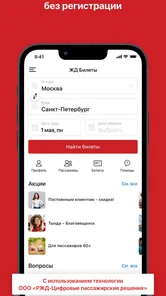
The baseline workflow is pleasantly familiar. I begin with the departure and arrival stations, choose a travel date, and inspect the available trains. For a simple trip, this is quicker than switching between a railway website, a search engine, and a separate payment process. The app’s store summary specifically points to online railway ticket purchases, and in practice that narrow purpose is exactly what makes it approachable.
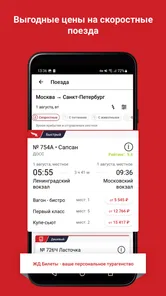
I recommend starting with the route rather than immediately chasing the cheapest result. A low price is not much help if the departure time is awkward, the train arrives too late, or the journey requires a compromise that was not obvious at first glance. I look at the departure and arrival times together, then compare the train name and seating or carriage information shown during selection. This habit prevents the common mistake of choosing a result based on one attractive detail.
For high-speed travel, the support for Sapsan, Lastochka, and Strizh is especially relevant. These services are often chosen because timing matters, so I pay attention to the full schedule rather than treating every train as interchangeable. Someone booking a business trip may value an earlier arrival, while a family may prefer a departure that avoids an exhausting early start. The app helps put those choices in one booking flow, but the final decision still needs human attention.
One useful habit is to search the return journey immediately after checking the outbound trip. I do not assume that a convenient train in one direction will have an equally convenient counterpart on the way back. Looking at both legs before paying gives me a better picture of the whole itinerary and reduces the chance of building a trip around only one excellent departure.
Passenger details deserve careful checking. Railway bookings are less forgiving of spelling mistakes or incorrect identity information than ordinary local transport purchases. I slow down at this stage, compare each passenger’s details with the travel document, and review the selected train before confirming. The best time to catch an error is before payment, not at the station. This is not a criticism unique to this app; it is a practical rule that becomes important whenever a mobile booking form is completed in a hurry.
More From Our News Desk

 Weather - By Xiaomi
Weather by Xiaomi Review: Clear at a Glance, Less Clear Up Close
Xiaomi’s weather app makes everyday forecasts quick to scan, but its calm surface can leave useful details and recovery paths harder to find than they should be.

 X
XX Under Pressure: Can It Recover When Posting Goes Wrong?
A resilience-focused review of X, examining setup, mistaken posts, interruptions, weak connections, and the gaps that matter when recovery needs to be dependable.

 Clash of Clans
Clash of Clans Is Won Between the Battles
Its raids are quick; its community is a long-term project of coordination, teaching, rivalry, and shared responsibility—with all the friction that entails.

 Android Auto
Android Auto Makes the Case for Quieter Car Software
The car interface is no longer judged by how much it can do, but by how quietly it helps. Android Auto shows what drivers now expect—and what still gets in the way.

 MobiOffice: Word, Sheets, PDF
MobiOffice: Transforming Mobile Productivity with Seamless Integration
MobiOffice: Word, Sheets, PDF is redefining mobile productivity with a surprising blend of functionality and innovation.

 EA SPORTS FC Soccer Mobile 26
EA SPORTS FC™ Mobile Soccer: Redefining Mobile Sports Gaming
Dive into EA SPORTS FC™ Mobile Soccer, where immersive gameplay and strategic depth transform mobile sports gaming.
Latest News



After purchasing, I treat the confirmation as something to organize rather than something to ignore. I keep the booking information easy to find and take a moment to verify the route, date, passenger, and departure time. A screenshot or saved record can be useful when connectivity is poor, although I would still follow the official travel requirements associated with the ticket. A phone display is convenient, but it should not replace reading the conditions attached to a particular journey.
What I check before trusting a search result
Search results can look simple while containing several decisions. I check whether the station name is the one I actually need, especially when a city has more than one railway station or when a familiar city name appears in several forms. I also compare the duration and departure time rather than selecting the first acceptable-looking option.
I look at the carriage and seat choices with realistic expectations. A seat map may offer several possibilities, but the best seat depends on who is travelling. A solo passenger may prioritize a window, a couple may want adjacent places, and a parent may care more about keeping a child nearby. The app can make selection more convenient, but it cannot decide which compromise will make the journey comfortable for my group.
I also avoid booking while distracted. The interface is designed for a practical transaction, not for a long explanation of every railway rule. If I am unsure about a fare condition, passenger requirement, or change procedure, I take the time to read the relevant information before proceeding. The app is strongest when I bring a clear travel plan to it; it is less suitable as a substitute for understanding an unusual or complicated itinerary.
Settings and phone habits worth checking
There is no reason to treat every setting as something that must be changed. I prefer a light-touch approach: check the app’s available preferences, make sure notifications or account-related options suit the way I travel, and then leave the rest alone. The useful setting is the one that reduces repeated work without creating more alerts than I can realistically follow.
My first practical check is device readiness. I keep the app updated when an update is available through the relevant store, and I make sure the phone has enough battery and a stable connection before starting a purchase. The current version is 47.0.10687, and the app supports devices running Android 6.0 or later. That makes it accessible on many older Android phones, although an older handset may still feel slower when switching between screens or handling a weak connection.
I also check whether the app is signed in as expected before I begin a time-sensitive booking. Re-entering personal information on a small screen is exactly the kind of friction that encourages mistakes. If the app offers passenger or booking conveniences within the account experience, I use them only after confirming that the stored details are correct. Convenience is helpful here, but outdated information can be more dangerous than typing carefully from scratch.
Notification habits matter as well. I do not rely on every alert as my only reminder of a journey. Instead, I put the departure into my own calendar and keep the booking information accessible. This creates a second layer of organization, which is particularly useful for early trains, return trips booked separately, or journeys arranged for another person.
Privacy and permission prompts are another area where I stay deliberate. I read what the phone asks for and allow only what makes sense for the app’s use. A railway ticket purchase should not encourage me to approve prompts automatically. This is a small habit, but it helps keep control of the device and makes it easier to understand what the app is doing.
Repeatable shortcuts for frequent travellers
Experienced users can make the process faster without pretending the app has magical hidden tools. I keep a short personal checklist: route, date, departure window, passenger details, carriage preference, total cost, and final confirmation. Repeating the same checks in the same order is faster than relying on memory, especially when booking while commuting or arranging travel for several people.
Another efficient pattern is to decide the acceptable travel window before searching. For example, I may know that I need to arrive before lunch and that an extremely early departure is unsuitable. With those boundaries set, I can evaluate results quickly instead of opening every option. This is a better shortcut than choosing the first train displayed.
For a family booking, I prepare the passenger information before opening the app. I also decide in advance whether sitting together is essential or whether a small separation is acceptable if the preferred train is otherwise ideal. That trade-off prevents a long search from becoming an emotional negotiation at the payment screen.
When arranging a trip for someone else, I send them the itinerary details in plain language after the purchase: departure station, arrival station, date, time, train, and seat information. I do not assume that forwarding a confirmation alone is enough. A traveler who is unfamiliar with the route benefits from a short summary, and I can catch discrepancies while writing it.
For repeat routes, I compare more than the ticket price. I notice which departure times fit my routine, which trains reduce waiting, and which options leave enough margin for reaching the station. The app is useful as a decision tool because it puts alternatives together, but the real speed improvement comes from learning my own priorities.
Where the app is convenient, and where it needs caution
The biggest advantage over visiting a ticket office is immediacy. I can search at home, on a break, or while changing plans without standing in a queue. Compared with a general travel search engine, the focused railway purpose is also helpful: I am less likely to be distracted by flights, hotels, or unrelated offers when my only goal is a train ticket.
Compared with using a railway website in a desktop browser, the phone app is more convenient for short, familiar bookings. I can complete the process from wherever I am and return to the booking context without opening a laptop. A website may still be better for a large group, extensive comparison, or a traveler who wants a bigger screen while checking several details at once.
A ticket office remains valuable in situations that need personal assistance. If my route is unusual, my passenger circumstances are complicated, or I need help interpreting a specific rule, a human conversation may be more reassuring than a compact mobile interface. The app is not a replacement for every form of railway support; it is a strong self-service option when I know what I am trying to buy.
The app also depends on the quality of the connection and the accuracy of the information I enter. A slow network can turn a quick transaction into a frustrating one, and a rushed user can overlook a station, date, or passenger detail. I therefore avoid waiting until the last possible moment when the journey is important. Digital convenience is most useful when I leave enough time to recover from a failed payment, a changed plan, or a need to repeat the search.
Another limitation is that a focused ticket app may not answer every broader travel question. It can help me choose and purchase a train, but I still need to think about getting to the station, changing transport after arrival, luggage, and the timing of the day around the journey. I use it as the railway part of my plan, not as the entire trip organizer.
A realistic booking scenario
Imagine I need to travel from Moscow to Saint Petersburg for a meeting and return the following evening. I first set the arrival requirement, then compare Sapsan departures that leave enough margin for reaching the meeting. I check the return options before buying either leg, because a late meeting could make the fastest-looking return impractical.
Once I find suitable trains, I review the passenger information and seat choices carefully. I check that the outbound and return dates have not been confused, then confirm the total purchase details. Afterward, I add both journeys to my calendar and send the essential itinerary to the person expecting me. The app handles the ticket search and purchase; my checklist handles the parts that a booking screen cannot manage for me.
For a family travelling on Lastochka, my priorities change. I search for options that fit the children’s routine, inspect the seating arrangement, and decide whether staying together is worth choosing a slightly less convenient departure. I would rather make that choice deliberately than discover at the station that everyone is scattered across the carriage.
Who should use it, and who should choose another approach
I think ЖД Билеты Онлайн is a good fit for independent travelers who regularly use Russian trains and want a direct mobile route to tickets. It is particularly suitable for people who already understand their departure and arrival points, can compare schedules confidently, and prefer arranging a journey without visiting a ticket office.
It is also useful for occasional travelers who want a straightforward way to book Sapsan, Lastochka, or Strizh services. The age rating is Everyone, and the free price removes a common barrier to trying it. Its broad reach is reflected in more than one million installs and a 4.3 average from roughly twenty-three thousand ratings, which suggests that many people find the basic purpose worthwhile.
I would be more cautious about recommending it as the only tool for complicated travel. Someone coordinating a large group, handling unusual passenger requirements, or needing detailed personal assistance may prefer a desktop railway site or a staffed ticket office. A general travel app can also be better when the journey involves flights, hotels, transfers, and several destinations that need to be viewed together.
The app has a Everyone content rating, which fits its everyday transport purpose. Still, the rating should not be confused with simplicity in every situation. Buying a ticket is easy when the route and passenger details are clear; the responsibility for checking those details remains with the traveler.
My verdict after building a reliable routine
What I like most is the balance between focus and speed. This is not an app I open for entertainment or broad travel inspiration. I open it when I need to make a railway decision, and that clear purpose keeps the useful parts close to the surface. The developer, UFS ltd., has built a tool that makes sense for a phone because the main task is time-sensitive and often completed away from a computer.
My recommendation comes with one condition: use it with a repeatable checking routine. Search both directions when possible, compare the complete journey rather than one attractive result, inspect passenger details, and save the final itinerary somewhere you can reach quickly. Those habits turn a merely convenient ticket app into a dependable part of travel planning.
The current version, 47.0.10687, and the Android 6.0 minimum make it practical for users who are not carrying the newest phone. I would still keep the device updated and avoid making an important booking with a nearly empty battery or unstable connection. These are ordinary precautions, but they matter more than chasing a perfect interface.
After a balanced look, I would recommend ЖД Билеты Онлайн to travelers who want a focused, free way to buy Russian railway tickets online. I would not choose it as my only travel companion for a complex multi-city itinerary, and I would not skip the final review just because the booking flow feels familiar. For the right use case, though, it removes unnecessary steps and gives me a practical way to arrange train travel from my phone.
My final view is simple: use it for confident, self-service railway bookings, and pair it with your own calendar and checking habits. That combination makes the app most valuable. It handles the ticket task well, while thoughtful preparation handles the exceptions, timing decisions, and personal details that no compact booking screen can decide for me.
ЖД Билеты Онлайн Frequently Asked Questions
Does ЖД Билеты Онлайн let me compare train schedules before booking?
Yes. You can enter your departure and arrival stations along with your travel date to see available train options and compare their schedules. This is useful when you are deciding between different services or departure times. Availability depends on the journey you search for, so check the results for your specific route before choosing a train.
Is ЖД Билеты Онлайн free to download, and which devices can run it?
ЖД Билеты Онлайн is free to download and is intended for Android devices running version 6.0 or later. Before installing, check that your device meets this requirement and has enough available storage. The app is developed by UFS ltd. and is rated for Everyone, so its content is suitable for a general audience.
Which trains and routes can I search for in ЖД Билеты Онлайн?
The app is designed for online railway ticket purchases for trains in Russia, including Sapsan, Lastochka, and Strizh. Route availability depends on the service and the journey you search for, so enter your departure and arrival stations and travel date to see the options available for that trip. Comparing the displayed schedules can help you choose a suitable train.
What is ЖД Билеты Онлайн and what can I use it for?
ЖД Билеты Онлайн is a railway ticket-search and booking app designed for travelers who want to find train routes and purchase tickets online. After entering the departure and arrival stations, travel date, and passenger details, you can compare available trains, review schedules, check carriage and seat options, and manage your booking without visiting a railway ticket office.
Can I buy train tickets directly through ЖД Билеты Онлайн?
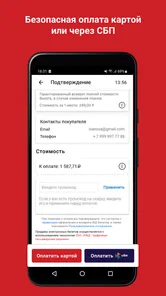
In most cases, the app allows users to search for available train services and proceed with online ticket booking and payment. The exact purchase process may depend on the railway operator, route, and region supported by the service. Before confirming your order, carefully check passenger names, passport details, travel dates, train numbers, and the final price because mistakes can make ticket changes or refunds difficult.
Pros
- Search and compare train routes quickly across Russia.
- Digital tickets are stored in the app for easy access.
- Useful filters help select seats
- times
- and train types.
- Trip details and ticket information are available in one place.
- Convenient for planning journeys without visiting a ticket office.
Cons
- Some features may require a stable internet connection.
- Ticket availability and prices can change rapidly.
- The interface may be less intuitive for first-time users.
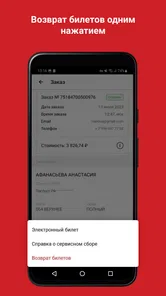
- Refund rules and fees can be difficult to understand.
- Support options may not always provide immediate assistance.











