

Zenlit: Drive, Earn and Save
- 330.00
- 4.3
- Installs
- 100.00K
- Price
- Free

Screenshots
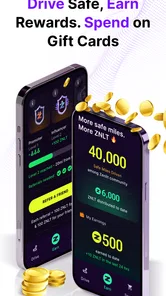
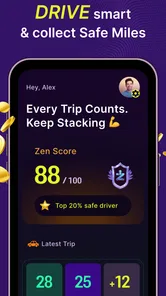
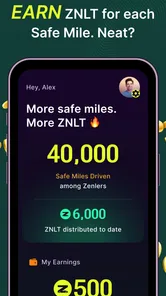
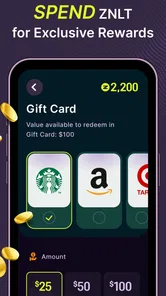
Analysis by Reviewed
I approached Zenlit: Drive, Earn and Save as a first-time driver rather than as someone already familiar with reward apps. Its promise is easy to understand: everyday driving can lead to practical perks, with safe trips at the center of the experience. That sounds appealing, but the real question is whether the app fits naturally into a normal routine or turns each journey into another task to manage.
After spending time with it, I see Zenlit as a focused travel and local app for people who want their driving habits to have some added value. It is free, aimed at everyone, and developed by Telenav, Inc. The current release is version 2.4.35, and it requires Android 10 or later. Those details make it accessible to many recent Android users, although anyone with an older phone should check compatibility before planning around it.
The app has built a modest but visible audience, with an average rating of 4.3 from around 1,100 ratings and more than 100,000 installs. I would not treat those figures as a guarantee that it will suit every driver, but they do suggest that Zenlit is more than an untested idea. My overall impression is positive, especially for commuters and regular drivers who are comfortable letting a driving-focused app become part of their routine.
What the first use actually feels like
The most important thing to understand is that Zenlit is not simply a navigation replacement. If your main need is turn-by-turn directions, live traffic information, or a broad local-search database, a conventional navigation app may remain the better tool. Zenlit’s appeal is different: it connects driving behavior with rewards, so the value grows from repeated, ordinary trips rather than from a single search.
That distinction matters because it changes how I judge the app. I do not open it expecting an instant discount or a dramatic result after one short drive. Instead, I think of it as a companion for journeys I was already going to make. A commute, a school run, a grocery trip, or a regular visit to family is a better test than an occasional road trip. The less effort required to keep using it, the more convincing the reward idea becomes.
For a new user, the safest expectation is simple: install it, understand what it needs from you, complete a normal trip responsibly, and then inspect what the app records or makes available. The first meaningful success is not driving farther; it is completing a routine journey without changing your safe habits. That mindset prevents the common mistake of treating rewards as a reason to rush, check the phone, or take unnecessary trips.
I also like that the audience is broad. The Everyone content rating makes it suitable for a general audience, though suitability in an app store is not the same as safe use behind the wheel. The phone should be set up before moving, and the driver should not interact with the screen while driving. Zenlit works best when it stays in the background of your routine rather than competing with your attention.
More From Our News Desk

 Weather - By Xiaomi
Weather by Xiaomi Review: Clear at a Glance, Less Clear Up Close
Xiaomi’s weather app makes everyday forecasts quick to scan, but its calm surface can leave useful details and recovery paths harder to find than they should be.

 X
XX Under Pressure: Can It Recover When Posting Goes Wrong?
A resilience-focused review of X, examining setup, mistaken posts, interruptions, weak connections, and the gaps that matter when recovery needs to be dependable.

 Clash of Clans
Clash of Clans Is Won Between the Battles
Its raids are quick; its community is a long-term project of coordination, teaching, rivalry, and shared responsibility—with all the friction that entails.

 Android Auto
Android Auto Makes the Case for Quieter Car Software
The car interface is no longer judged by how much it can do, but by how quietly it helps. Android Auto shows what drivers now expect—and what still gets in the way.

 MobiOffice: Word, Sheets, PDF
MobiOffice: Transforming Mobile Productivity with Seamless Integration
MobiOffice: Word, Sheets, PDF is redefining mobile productivity with a surprising blend of functionality and innovation.

 EA SPORTS FC Soccer Mobile 26
EA SPORTS FC™ Mobile Soccer: Redefining Mobile Sports Gaming
Dive into EA SPORTS FC™ Mobile Soccer, where immersive gameplay and strategic depth transform mobile sports gaming.
Latest News



Who is likely to get the most from it
Zenlit makes the most sense for people who drive frequently enough to form a pattern. A daily commuter can evaluate it over several ordinary journeys. A parent who makes repeated local trips may appreciate the possibility of earning something from driving that already happens. Someone who spends much of the week at home and drives only occasionally may find the benefit less noticeable, simply because there are fewer opportunities to build a useful record of trips.
It is also a better match for drivers who are willing to read the app’s explanations and check their progress from time to time. Reward systems often become frustrating when users assume every journey should produce an immediate result. I found it more helpful to treat the app as a long-term habit tracker with a benefit attached, not as a vending machine that pays out after every ignition.
On the other hand, I would skip it if you dislike driving-related apps in principle, do not want another service involved in your travel routine, or need a single application that combines navigation, public transport, bookings, and local discovery. Zenlit has a narrower purpose. Its strength comes from that focus, but the same focus means it should not be expected to replace every travel tool on a phone.
Setting it up without creating confusion
The first setup deserves a calm few minutes. I recommend installing Zenlit before a journey, not while standing in a parking space with the engine running and a schedule to keep. Open it at home, read each prompt, and make sure you understand what the app is asking you to enable or confirm. A rushed setup is where people usually accept settings without knowing how they affect the experience.
Use an Android device running version 10 or newer, then follow the on-screen account and app instructions. I would keep the phone charged and make sure the app is ready before leaving. If your phone aggressively limits background activity, it is worth checking the system’s battery controls so the app can operate as intended. I am not treating that as a special Zenlit feature; it is simply a practical Android issue that can affect any app expected to notice activity during a journey.
Another useful preparation step is deciding where the phone will stay. A fixed mount is preferable to holding it, and the screen should be positioned so it does not block the road. If you already use a separate navigation app, keep the arrangement simple: navigation should handle navigation, while Zenlit should not tempt you into switching between screens. The best setup is the one you can leave alone once the trip begins.
Before your first drive, take a moment to identify the part of the interface that shows trip activity and the part that relates to rewards. The exact wording may change between releases, but the principle remains useful: know where you will later verify whether a journey was recognized and where you will look for the result. This small preview makes the first completed trip much less mysterious.
Because Zenlit is free, there is no purchase decision blocking the first experiment. That is helpful, but free does not mean costless in every sense. Your time, attention, battery, and comfort with sharing driving-related activity still matter. I would give the app a fair trial only if those trade-offs feel acceptable to you. If they do not, no reward is likely to make the experience feel worthwhile.
How to reach the first useful result
For the first test, choose a familiar trip of reasonable length that you would make anyway. A regular commute is ideal because you know the route, the usual stops, and the normal time required. Avoid using a special journey as your first experiment; if something behaves unexpectedly, you will not know whether the issue came from the app or from the unusual route.
Complete the setup before starting the car. Once you begin, drive as you normally would and resist the urge to monitor the app. Safe driving is more important than collecting a reward, and a phone-based reward system should never change that priority. When you arrive, park first and then review the trip status. This is the moment to learn whether the app recognized the journey and where Zenlit presents the next action.
If the first trip appears correctly, you have already learned more than a store description can tell you: the app fits your phone, your routine, and your driving pattern well enough to be tested further. I would then repeat the same kind of journey rather than immediately experimenting with every possible use case. Consistency helps reveal whether Zenlit is dependable in your normal environment.
A useful habit is to check the result at the end of the trip instead of repeatedly opening the app during the day. That reduces distraction and gives you a clear review point. If the app presents a reward or progress update, read the wording carefully so you understand whether it is available now, accumulating, or dependent on another step. Reward interfaces can be easy to misread when users focus only on the headline number or visual indicator.
One of the less obvious advantages of this approach is that it separates two questions. First, can Zenlit recognize your ordinary driving? Second, are the resulting perks valuable enough to justify continued use? Answering them separately prevents you from abandoning the app because of a setup issue, or continuing indefinitely just because the concept sounds good.
Where first-time drivers may misread the experience
The phrase “earn and save” can create an expectation of immediate, predictable returns. I would be careful with that assumption. A driving reward app is more likely to reward a pattern than a single isolated action, and the practical value depends on how often you drive and how clearly you understand the app’s current reward flow. In my view, the right measure is whether the benefit accumulates naturally without changing your behavior.
Another point of confusion is the difference between recording a trip and completing a reward-related action. Seeing a journey in the app does not automatically mean that every possible benefit has already been claimed. After each meaningful update, look for any clear next step and read the accompanying text. Do not assume that a visual confirmation means money, a discount, or another perk is instantly ready to use.
Location and background activity can also make results feel inconsistent. Phones manage battery and background processes differently, and a weak or interrupted connection can affect what you see until the app catches up. If a trip does not appear right away, I would wait until the vehicle is parked, reopen the app once, and check again later rather than repeatedly changing settings while traveling.
There is also a behavioral trap worth mentioning. Once users see that safe driving can be connected to rewards, they may start thinking about the reward while driving. That is exactly backward. Zenlit should reinforce a calm routine, not turn every braking decision or route choice into a game. If the app makes you look at the phone, hurry, or take a longer route solely for progress, I would stop using it during trips.
Privacy and comfort are personal decisions as well. Before committing to regular use, read the app’s own explanations and the permissions shown during setup. I cannot tell you what level of data sharing will feel right for you, but I can say that this is not a detail to skip. A free service can still be a poor fit if its operating model makes you uncomfortable.
How it compares with familiar alternatives
Compared with Google Maps or Apple Maps, Zenlit has a different job. Those established navigation tools are usually the obvious choice when you need directions, route planning, traffic context, or a broad map interface. They are built around getting you somewhere. Zenlit is more interesting when you already know where you are going and want driving itself to connect with a benefit.
Compared with a standard fuel-saving or mileage tracker, Zenlit’s emphasis is not merely on showing your consumption or helping you calculate trip costs. Its appeal is the possibility of real-world perks tied to safer driving. That can feel more motivating than a graph, but it may also feel less useful if you prefer precise vehicle statistics and detailed control over every measurement.
Compared with cash-back services that reward shopping, Zenlit is tied to a different routine. You do not need to remember to scan a receipt after buying something, but you also cannot create value simply by making a purchase. The app depends on driving being part of your life. For a frequent driver, that can be convenient; for someone who rarely travels by car, a shopping or general rewards service may produce a more visible result.
This is why I would not install Zenlit as a universal replacement for other travel apps. I would place it alongside the tool that already handles directions, then judge whether it adds enough value without adding too much attention or maintenance. The best combination is complementary: one app helps you travel, while Zenlit quietly supports the reward side of regular driving.
A realistic routine after the first trip
Imagine a weekday commute. Before leaving home, you confirm that Zenlit is ready and place the phone in its mount. You start the navigation app you trust for the route, then drive without touching either screen. At the office, you park, put the phone away, and later check Zenlit during a break. You see whether the trip was recorded, review any progress, and note what the app expects next.
The following day, you repeat the same process. This second trip is important because it tests whether Zenlit belongs in your routine rather than merely working once. If the experience remains quiet and understandable, you can continue for a longer period and decide whether the available perks justify keeping it installed. If it demands frequent intervention, drains your patience, or produces unclear results, you have learned that early without reorganizing your life around it.
For families, I would use the same principle but with extra care. The driver should remain the only person handling the phone, and passengers should not turn the reward process into a distraction. For occasional road trips, I would install and test Zenlit before departure rather than relying on an unfamiliar setup during a long drive. Regular local trips are still the fairest way to judge its everyday usefulness.
One practical tip is to review your progress at a fixed time, perhaps after arriving home, instead of after every journey. This creates a simple weekly checkpoint. You can then ask whether the app recognized your trips consistently, whether the reward information was clear, and whether using it changed your driving behavior. That last question is crucial: if the answer is yes in a negative way, the app is not earning its place on your phone.
What I would do next
My recommendation is to start small. Install Zenlit on a compatible Android phone, complete the setup while stationary, and use one familiar trip as a controlled first test. Do not judge it by the excitement of the concept alone. Judge it by three practical points: whether it works quietly in the background of your routine, whether the reward information is understandable, and whether the potential benefit feels worthwhile after repeated normal driving.
I would continue using it if I drove regularly, valued safe-driving incentives, and was comfortable with the app’s setup and data explanations. I would not continue simply because it is free or because its rating is encouraging. A 4.3 average and an audience of over 100,000 installs provide useful context, but your own commute is the more relevant test.
The app’s strongest idea is also its clearest limitation: it is built around driving, not around every part of travel. That makes it pleasantly focused for the right person and unnecessary for the wrong one. If you want a reward layer for journeys you already make, Zenlit is worth a careful trial. If you need navigation first, detailed vehicle analytics, or rewards unrelated to driving, another app will probably serve you better.
In the end, I see Zenlit as a low-pressure experiment rather than an essential travel tool. Its best use is almost invisible: set it up correctly, drive responsibly, check the result only when parked, and let repeated everyday trips show whether the perks have real value for you. That quiet, consistent workflow is where this free app has its best chance of becoming genuinely useful.
Zenlit: Drive, Earn and Save Frequently Asked Questions
Is Zenlit available for my phone?
Zenlit is a Travel & Local app for Android, and its listed minimum operating-system requirement is version 10. Check your device’s software version before downloading to make sure it meets that requirement. Zenlit is free to download, and its Everyone content rating indicates that it is intended for a broad audience.
Who makes Zenlit, and how established is the app?
Zenlit is developed by Telenav, Inc. It was released on July 14, 2025, and its current version is 2.4.35. The app has over 100,000 installs, around 1,100 ratings, and 328 written reviews, giving prospective users a useful sense of its reach and user feedback. Ratings and reviews can change as more people use it.
What is Zenlit: Drive, Earn and Save?
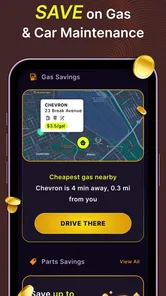
Zenlit: Drive, Earn and Save is an app designed to help users turn eligible driving activity into potential rewards while also encouraging smarter saving habits. Depending on the current program and your location, the app may track driving-related information, present earning opportunities, and provide tools or offers connected with saving money. Features, eligibility, and reward availability can vary by region, so checking the latest in-app terms before joining is important.
How does Zenlit track driving activity, and what permissions are required?
Zenlit may need access to information such as location, motion, or driving activity to determine when and how you drive. During setup, the app can request permissions for location services, notifications, and possibly background activity. These permissions may affect battery and mobile data usage. Before accepting them, review the privacy policy and your device settings, and disable access if you are uncomfortable with the information being collected.
Can everyone earn money or rewards with Zenlit?
Not necessarily. Earning opportunities may depend on your country, age, driving profile, vehicle, account status, promotional campaigns, and whether your activity meets Zenlit’s requirements. The app should not be treated as a guaranteed income source. Rewards can also be subject to minimum balances, verification procedures, expiration dates, or other restrictions. Read the applicable terms carefully so you understand how rewards are calculated and redeemed.
Pros
- Combines driving rewards with savings tools in one app.
- Can make routine trips feel more rewarding over time.
- Useful for tracking earnings and available discounts in one place.
- Simple concept that is easy for new users to understand.
- May help motivate users to compare costs and save while commuting.
Cons
- Rewards may vary depending on location
- partners
- and driving activity.
- Earnings are unlikely to replace significant fuel or travel expenses.
- Some features may require account verification or personal information.
- Background location access could affect battery life and privacy comfort.
- Redemption rules and minimum thresholds may limit immediate benefits.











