

Yapsody YapTickets
- 4.00
- 3.0
- Installs
- 10.00K
- Price
- Free

Screenshots


Analysis by Reviewed
When I need to keep an event ticket ready on my phone, I prefer a focused ticket wallet over searching through email threads or switching between several event pages. Yapsody YapTickets is built around that simple situation: getting access to tickets and sharing them when necessary. I tested it with that practical mindset, and my impression is that it can be useful for people attending events handled through the Yapsody ecosystem, although its narrow purpose matters a lot when deciding whether it deserves a place on your phone.
This is a free Events app from Yapsody, LLC, available for everyone and designed for Android devices running version 7.0 or later. Its current version is 3.5.13, and the app has passed the early adoption stage with over ten thousand installs. That reach is encouraging, but the public response is still modest: it holds a 3.0 average from around seven ratings and four written reviews. I would therefore treat it as a practical tool to try for a specific ticketing need, rather than as a universally proven event companion.
How the ticket experience feels in everyday use
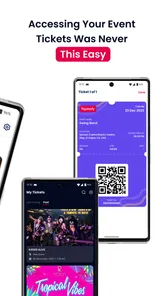
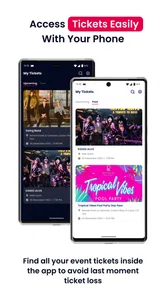
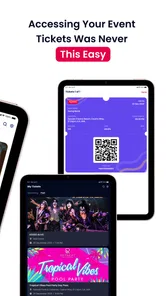
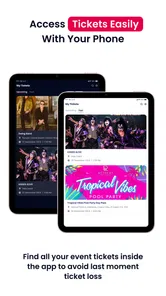
The main appeal is straightforward access. Instead of treating a ticket as a message that must be found again, YapTickets presents itself as a place where that ticket can be reached when the event day arrives. That distinction sounds small, but it changes the way I prepare. I can think about the ticket as an item to retrieve, not as an attachment buried among confirmations, promotional mail, and unrelated notifications.
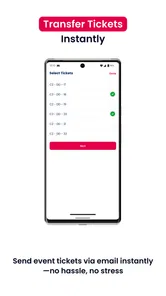
The sharing angle is just as important. Tickets are not always used by the person who bought them. A friend may be attending, a family member may need entry, or a group may divide responsibilities before meeting at the venue. A dedicated transfer and sharing workflow is more natural in those cases than forwarding an entire purchase email and asking someone to identify the correct code or attachment.
My strongest practical tip is to organize the ticket before leaving for the event, not while standing in a queue. Open the app at home, check that the relevant ticket is accessible, and decide who needs it if you are sharing. This reduces the risk of relying on a weak venue connection or trying to interpret a long confirmation message under pressure. The app’s value is not only the transfer action itself; it is the preparation habit that comes with having a separate ticket destination.
There is also a useful distinction between sharing access and casually sending a screenshot. A screenshot may be easy, but it can create uncertainty about whether the recipient has the right ticket, whether the image is readable, or whether the original holder still needs access. A purpose-built ticket-sharing flow is a better fit when responsibility for entry is changing between people. I would still review the recipient and event carefully before confirming anything, especially for group bookings.
What free access means here
YapTickets is free to download and use as an app. That makes the decision uncomplicated for someone who already has a ticket connected to its service: there is no app purchase standing between the user and the basic reason for installing it. In value terms, the free price removes the financial risk of trying it for one event.
More From Our News Desk

 Gmail
GmailGmail in a Busy Inbox: Who Benefits Most?
From first account to crowded workday, Gmail earns its place through dependable search and flexible sorting—but its best fit depends on how much inbox maintenance you can tolerate.

 Prime Video
Switching to Prime Video: What Changes in Your Viewing Routine
Prime Video can make a compelling second home for streaming, but switching means learning a different catalog, rental layer, and route from browsing to playback.

 Universal TV Remote Control
Universal TV Remote Control Works Best as a Reliable Backup
A phone remote earns its place through quick setup and reliable habits. Here is how to get more from Universal TV Remote Control—and where its limits show.

 Weather - By Xiaomi
Weather by Xiaomi Review: Clear at a Glance, Less Clear Up Close
Xiaomi’s weather app makes everyday forecasts quick to scan, but its calm surface can leave useful details and recovery paths harder to find than they should be.

 X
XX Under Pressure: Can It Recover When Posting Goes Wrong?
A resilience-focused review of X, examining setup, mistaken posts, interruptions, weak connections, and the gaps that matter when recovery needs to be dependable.

 Clash of Clans
Clash of Clans Is Won Between the Battles
Its raids are quick; its community is a long-term project of coordination, teaching, rivalry, and shared responsibility—with all the friction that entails.
Latest News



That should not be confused with the cost of the event itself. The app is a ticket-access tool, not evidence that admission is free. Any ticket purchase, venue charge, booking fee, or other event expense belongs to the event transaction rather than the app’s download price. I would judge YapTickets as free software that supports ticket handling, not as a way to obtain complimentary admission.
This distinction matters when comparing it with a venue’s own app or a general digital wallet. Those alternatives may also be free to install, but their usefulness depends on where the ticket was issued and what formats they accept. YapTickets has a clearer value proposition when the ticket is already associated with Yapsody. If your event organizer uses another system, the fact that this app costs nothing does not automatically make it the better choice.
Small workflows that make a difference
For a couple attending together, I would use the app to decide early whether both people should retain access or whether one person should transfer a ticket. That avoids the familiar problem of one phone holding everything while the group separates at the entrance. For a parent sending a child to an event with another adult, the sharing function can make the handoff more deliberate than forwarding a purchase receipt.
For a larger group, I would avoid making last-minute transfers one after another. First identify who is actually attending, then share only what each person needs. This is a simple organizational advantage, but it prevents duplicate messages and reduces the chance of sending a ticket to the wrong contact. The app cannot solve poor group planning, yet its purpose encourages a cleaner process than treating tickets as ordinary files.
Another useful habit is keeping the app available even after the ticket has been shared. If plans change, the original holder may need to check what was sent or help a recipient locate the access again. I would not assume that a screenshot or forwarded message provides the same clarity. A dedicated app is most helpful when everyone involved understands which person currently controls each ticket.
Where the experience has limits
The focused design is also the biggest limitation. I would not install YapTickets expecting a complete event-discovery service, a broad calendar, venue guides, or a replacement for every ticket provider on the phone. Its role is much narrower: ticket access and sharing. That is good when the need is specific, but it can feel unnecessary if your tickets already arrive reliably in a wallet or a well-organized email account.
The 3.0 average from a small pool of ratings suggests that experiences are mixed enough to deserve caution. I would not interpret that score as proof that the app is unreliable, because the number of responses is limited. Still, it is a reason to test the workflow before event day rather than assuming everything will be effortless. A ticket app is judged at a stressful moment, so even minor confusion matters more than it would in a casual utility.
There is also a practical dependence on the ticket’s source. If your booking was not issued through a compatible Yapsody flow, the app may not become useful simply because it is installed. This is the first question I would answer before spending time setting it up: is the ticket connected to the service this app is intended to support? If the answer is no, a general wallet or the organizer’s own application is likely the more sensible route.
I would also keep a backup plan for the entrance. That does not mean printing everything automatically, but it does mean knowing where the original confirmation is and ensuring the phone is charged. Any mobile ticket workflow can be affected by a dead battery, a damaged screen, or poor connectivity. A dedicated ticket app can make retrieval cleaner, but it cannot remove those ordinary event-day risks.
What its version history means to users
The current release is 3.5.13, following an initial release on June 1, 2023. That gives the app a defined history rather than making it a brand-new arrival, but a version number alone does not tell me which screens or transfer steps have changed. I would not assume that a particular feature was recently added or that a specific issue has been fixed without evidence of the change.
For an existing user, the sensible takeaway is modest: keep the app current, then check your ticket well before departure, especially if you have not opened it since a previous event. Updates can change how familiar an interface feels, so a quick pre-event check is more useful than discovering a different flow at the venue. The release information is a reason to treat YapTickets as an evolving app, not a guarantee that every past inconvenience has been resolved.
When assessing future releases, I would pay attention to whether the everyday essentials become clearer: finding an upcoming ticket, understanding who has access after a transfer, and recovering from a sign-in or loading problem. Those are the points that matter most to a ticket holder under time pressure. Until a change is visible in the app, I would treat improvements in those areas as things to watch, not promises.
Who will get the most value
YapTickets makes the most sense for someone who has received a Yapsody-linked ticket and wants a separate place to access it. It is especially suitable for people who regularly forward tickets to friends, divide group bookings, or dislike searching through email when approaching a venue. Since the app is free, trying it for one relevant event is a reasonable experiment rather than a major commitment.
It can also help less technical family members if the ticket handoff is prepared in advance. Instead of explaining which email contains the confirmation and which attachment matters, I would give the recipient a clear instruction to use the ticket app and check access before leaving. The simpler the handoff, the more useful the app becomes.
On the other hand, I would skip it if all of my tickets already live comfortably in a trusted digital wallet and I never transfer them. Adding another app would then create another place to check without solving a real problem. I would also choose a different option for events managed entirely by another ticket provider, or when I need a broader event-management tool rather than a ticket-access utility.
My verdict on value and whether to try it
My recommendation is conditional but positive. The free price makes YapTickets easy to test, and its focused approach can be genuinely convenient when a Yapsody ticket needs to be accessed or passed to someone else. The strongest benefit is organizational: it gives the ticket a clear home and makes sharing feel like an intentional part of the process instead of an improvised forwarding task.
I would not call it an essential app for every event-goer. Its value depends on the ticket source, and the modest 3.0 average means I would verify access before the event rather than relying on it blindly. Users who want discovery features, broad wallet support, or a single app for many unrelated providers should look elsewhere.
For a realistic example, imagine buying several tickets for a weekend performance and later learning that one friend will arrive separately. I would install the free app, open the ticket ahead of time, transfer the friend’s ticket before leaving, and keep the original confirmation available as a fallback. That workflow is more orderly than sending screenshots in a hurry. If your situation looks like that, the app earns its place by reducing ticket-handling friction, not by trying to do everything.
Overall, I see YapTickets as a practical companion for a particular ticketing relationship rather than a general-purpose Events platform. Try it when your ticket is tied to Yapsody and sharing is part of the plan. Skip it when another wallet already handles your tickets well or when you need features beyond access and transfer. That is a narrower recommendation than a blanket endorsement, but it is also the fairest way to judge this free tool.
Yapsody YapTickets Frequently Asked Questions
Is Yapsody YapTickets free, and what devices can run it?
Yapsody YapTickets is free to download and is suitable for a general audience. It requires iOS 7.0 or later, so check your device’s software version before installing. The app is developed by Yapsody, LLC and is focused on event tickets, making it most useful if you attend events whose organizers use the Yapsody platform.
Can I transfer tickets to someone else using Yapsody YapTickets?
The app’s summary highlights instant ticket transfers and easy ticket sharing, which can be useful when plans change or another person needs access to a booking. Before sharing, check the event’s rules and the options shown for that specific ticket. Transfer eligibility and any steps required may depend on the event organizer, so make sure the recipient receives the ticket successfully before relying on it for entry.
What is Yapsody YapTickets used for?
Yapsody YapTickets is a mobile ticketing app designed to help users discover events, purchase tickets, and access their bookings from a smartphone. It is connected to the Yapsody event platform, so the available concerts, performances, classes, festivals, or community events depend on the organizers using that service. Before downloading, check whether the event you want to attend supports YapTickets and confirm the date, venue, ticket type, and entry requirements.
How do I buy and access tickets in Yapsody YapTickets?
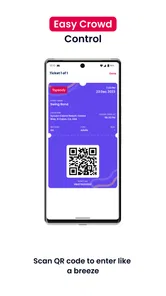
After finding an event, you can generally select the available ticket category, choose the quantity, and complete the purchase through the checkout process. Once payment is confirmed, your booking should appear in the app or be delivered through the account information used during checkout. Keep the ticket available on your phone when arriving at the venue, and make sure the device has enough battery and that the ticket barcode or QR code can be displayed clearly.
Does Yapsody YapTickets support refunds, cancellations, or ticket transfers?
Refunds, cancellations, exchanges, and ticket transfers are not necessarily controlled entirely by the app. These conditions usually depend on the individual event organizer’s policy and the terms shown before payment. We recommend reading the event’s refund and cancellation information carefully before completing an order. If a problem occurs, use the contact details provided for the event or Yapsody support and include your booking reference.
Pros
- Simple ticket purchasing experience for supported events
- Useful digital ticket storage reduces the need for printed tickets
- Event details and ticket information are kept in one place
- Convenient access to tickets while attending participating events
- Can help organizers manage admissions more efficiently
Cons
- Availability depends heavily on events using the Yapsody platform
- Some features may vary between different event organizers
- Refunds and ticket changes may require contacting the organizer
- Account or network issues could make ticket access inconvenient
- Not all venues may support mobile entry or digital ticket scanning











