Xcel Energy
- 415.00
- 4.3
- Installs
- 100.00K
- Price
- Free

Screenshots
Analysis by Reviewed
In a shared home, energy bills and power updates can quickly become one person’s job simply because they handle the account. I see the Xcel Energy app as a practical way for the account holder to keep key details close at hand, while making it easier to discuss usage and bills with other people in the household. It is a free business app from Xcel Energy Inc, and its focus is straightforward: managing an Xcel Energy account from a phone.
One account, several people to coordinate
A useful household routine is for the person responsible for the utility account to check the bill and usage, then share the relevant information with roommates or family members. The app can make that check-in easier because billing and usage information are available in one place. I would still treat the account as belonging to its named holder: having the app on a shared tablet or phone should not be taken to mean that everyone has the same account access or responsibility.
For example, if a household is trying to understand why a bill changed, the account holder can look at usage over different periods and use that as a starting point for a conversation. That is more useful than guessing based on one unusually cold evening or a run of laundry. It does not tell you by itself which person or appliance caused a change, so I would use the figures to guide questions rather than treat them as a detailed audit of everyone’s habits.
Set up around the account, not the whole household
Before installing it on a device other people use, I would decide who should sign in and who should simply be told what the account shows. Keep account credentials private, especially on a shared device, and avoid leaving a payment or account screen open for someone else to pick up. That is ordinary account-care advice, not a special household-control feature; the app should not be mistaken for a way to assign family roles or manage separate users.
This distinction matters for roommates as much as for families. If one person pays the bill and others reimburse them, the app can help the account holder check the amount and timing before sending a reminder. It will not settle how a household splits costs or replace an agreed method for tracking contributions. For that, a shared note or budgeting tool may be a better companion.
Getting to Know the Xcel Energy App
First things first, downloading the Xcel Energy app is a breeze. It's available on both Android and iOS, so no worries if you're team Apple or team Android. Once installed, you'll be greeted with a clean and user-friendly interface, which is always a plus. No one likes apps that make you feel like you need a degree in rocket science just to navigate them, right?
Features That Make Life Easier
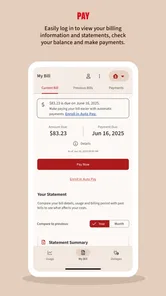
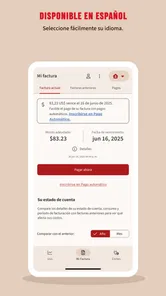
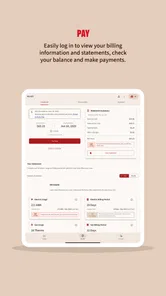
Now, what can you actually do with this app? Quite a bit, actually. The app allows you to view and pay your energy bills seamlessly. I mean, who has time to sit down at a computer these days? With just a few taps, you can check your account balance, view past bills, and make payments without breaking a sweat.
More From Our News Desk

Weather by Xiaomi Review: Clear at a Glance, Less Clear Up Close

X Under Pressure: Can It Recover When Posting Goes Wrong?

Clash of Clans Is Won Between the Battles

Android Auto Makes the Case for Quieter Car Software

MobiOffice: Transforming Mobile Productivity with Seamless Integration

EA SPORTS FC™ Mobile Soccer: Redefining Mobile Sports Gaming
For a household with a predictable routine, keeping the bill check and payment in the same mobile session can reduce the chance of losing track of the task among other errands. I would still make a point of checking the amount and account details before confirming a payment, particularly if I were using a device shared with someone else. Convenience is useful, but it should not replace a quick final review when money and account information are involved.
If you are moving into a place where someone else has been responsible for the utility account, the app is not a substitute for clarifying whose name is on the account and who is expected to pay. I would sort out that arrangement first, then use the app only with the appropriate account access. That keeps a practical tool from becoming a source of confusion about responsibility.
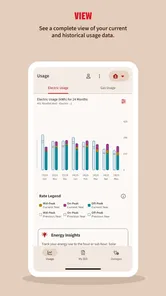
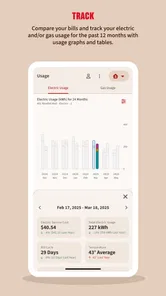
One of the standout features is the usage monitoring. You can track your energy usage over time, which is super helpful if you're trying to cut down on your energy consumption. It even gives you a breakdown of usage by day, week, or month. It's like having a little energy detective in your pocket, helping you uncover patterns and maybe even save a few bucks!
Reading usage without jumping to conclusions
For a more useful comparison, I would check usage over a consistent stretch of time rather than react to a single day. A weekly view can help you notice a recurring pattern, while a monthly view is more suitable for stepping back and discussing a bill with the household. If you are testing a change—such as adjusting when you run a major appliance—make one change at a time and compare similar periods. That approach makes the information easier to interpret, though it still cannot explain every cause behind a shift.
A small but worthwhile habit is to note the date when the household changes a routine, then revisit the usage view later instead of relying on memory. For instance, if roommates agree to run laundry less often or shift a regular task, the account holder can use the app to see whether the broader pattern moved in the expected direction. Treat that as a clue, not proof: weather, time at home, and other changes can influence consumption too.
Another trade-off is that account-level usage is most helpful when the people sharing the home are willing to discuss it without turning it into a scorecard. I would present a trend as a shared household question—“What changed this month?”—rather than use it to accuse one person. The app can support a more informed conversation, but it cannot identify who used the energy or explain the cause on its own.
Compared with checking a paper statement or signing into an account through a browser, a phone app is convenient when you need a quick balance check or want to handle a payment while away from home. A browser may be more comfortable for someone who prefers a larger screen, and paper records may suit people who do not want to manage bills on a phone. I would choose the app for regular account checks, not assume that it replaces every way of reviewing or keeping household records.
Keeping You Informed
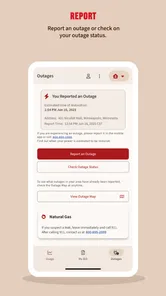
Another neat aspect is the outage information. Ever been caught off guard by a power outage and left wondering what's going on? The app sends you real-time updates in case of outages, letting you know when you can expect your power to be restored. It's these little conveniences that really make a difference in our busy lives.
In a shared home, outage information can help one person pass along a clearer update instead of having everyone independently search for news. I would still keep a backup plan for essential communication and practical needs; an app is useful for checking information, but it cannot keep a phone charged or restore electricity. If a household member does not use a smartphone, agree on another way to relay important updates.
For a realistic example, imagine coming home to find the lights out while another person is still on the way back. The account holder can check the outage information and pass along what it says, rather than forwarding a guess from a neighbor. If the phone battery is low, though, I would prioritize essential calls and messages instead of repeatedly refreshing an update. A household plan works best when it includes a non-app way to communicate, too.
I would also think about who needs to receive an outage update and how it will reach them before an outage happens. A quick agreement—who checks, who informs anyone away from home, and where to look for updates if the phone is unavailable—avoids scrambling during a disruption. The app can be one useful source in that plan, not the whole plan.
Security and Support
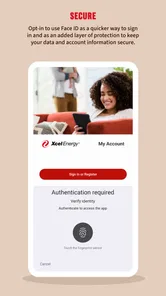
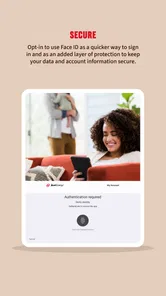
Security is always a concern when it comes to managing your bills online. Rest assured, the app uses advanced encryption to safeguard your information. Plus, if you ever run into any issues, customer support is just a tap away. There's an in-app help section and a contact option for those times when you need a human touch.
For a shared phone or tablet, I would keep the account holder’s sign-in separate from the household’s general use of the device. Sign out when appropriate, avoid saving access where other users can reach it, and do not treat a convenient screen lock as a reason to share credentials. These are simple boundaries, but they matter when an app can display billing information and support payment tasks.
It is also sensible to decide what information the account holder wants to share, rather than passing around account access simply because several people contribute to the bill. A roommate may need to know the amount due and the agreed share without needing to inspect the account. The app helps the account holder look up details; a household agreement determines what gets shared and how.
The app is rated for Everyone, but that age label is not a reason to hand over the account to a child. Bills, payments, and account details are better handled by the person responsible for them, with younger household members included in conversations about saving energy where appropriate. The app is best for an Xcel Energy customer who wants mobile access to account tasks; it is not useful as a general energy tracker for someone without an Xcel Energy account.
Who will get the most from it?
The app has an average rating of 4.6 from around 2,500 ratings, with over 100,000 installs. It was released in June 2024, and version 1.6.1 is listed with a minimum operating-system requirement of 8.1. Those details suggest an established mobile option, but they do not guarantee that every account task will feel equally convenient on every device. If the app is slow or a task is easier on a computer, using the account website instead is a sensible fallback.
That makes it a better fit for the person who has a real reason to check the account regularly than for someone looking for a broad energy dashboard. Its usefulness depends on having an Xcel Energy account and wanting to manage that relationship on a phone. If you are comparing energy providers, looking for a tool that combines several utility accounts, or simply do not handle the household bill, this is probably not the app I would choose for that job.
In the usual utility-app category, this kind of provider-specific app has a clear advantage over a generic budgeting tool: it is oriented around the account itself, including bills, usage, and outage information. A budgeting app may be better for splitting expenses or tracking several household bills together, while a browser can be preferable for longer account sessions. I would use each for the task it handles best rather than expect one app to replace all three.
For someone who prefers paper, the app need not change that whole routine. A practical middle ground is to use the phone for a quick account check or payment and keep household records in the format everyone already understands. The important point is that the account holder can get to the relevant information conveniently; other household members do not have to become app users for coordination to work.
The app is free, which makes trying it a low-commitment choice for an eligible customer, but I would still consider the device and account context before installing it. If the phone is used by several people, the privacy habits matter more than the download itself. If the account holder is comfortable managing bills on a computer and only checks them occasionally, there may be little reason to add another app to the routine.
I would recommend it most to the person who regularly checks the household’s Xcel Energy bill, pays it, or wants to keep an eye on usage and outage updates. Someone who only needs an occasional statement may be perfectly happy with a browser or paper bill instead. The main trade-off is simple: mobile access makes routine checks easier, but it also puts sensitive account activity on a personal device, so careful sign-in habits matter.
Overall, the Xcel Energy app packs quite the punch for anyone looking to streamline their energy management. With its easy navigation, comprehensive features, and reliable support, it truly stands out in the world of utility apps. So, if you're like me and appreciate anything that makes life a tad bit easier, this app is definitely worth checking out!
Xcel Energy Frequently Asked Questions
Who is the Xcel Energy app intended for?
The Xcel Energy app is intended for people who want to manage an Xcel Energy account from a mobile device. Its focus is practical account management rather than general energy news or entertainment, so it is most relevant if you already use Xcel Energy services and want a convenient way to handle account tasks. The app is free to download and is listed for everyone.
What should I know about the app before downloading it?
Xcel Energy is a business app developed by Xcel Energy Inc, with the straightforward aim of helping customers manage their accounts. It is free to download, and its current version is 1.6.1. The app was released on June 19, 2024, and requires Android 8.1 or later. Its store description is brief: “Manage Your Xcel Energy Account.”
What is Xcel Energy's main purpose or function?
Xcel Energy is an app designed to help users manage their energy consumption and accounts with ease. It allows users to view and pay bills, monitor energy usage, and access a variety of energy-saving tips. The app is particularly beneficial for those who want to stay informed about their energy consumption patterns and make cost-effective decisions.
Is the Xcel Energy app free to use?
Yes, the Xcel Energy app is free to download and use. However, users must have an active account with Xcel Energy to utilize the app’s features fully. There may be fees related to the services provided by Xcel Energy itself, but the app does not charge for its usage.
What features does the Xcel Energy app offer?
The Xcel Energy app provides a comprehensive set of features including bill payment options, energy usage monitoring, outage alerts, and personalized energy-saving recommendations. It aims to simplify the management of your energy account and provides easy access to important information and notifications, enhancing your overall user experience.
Pros
- User-friendly interface.
- Real-time energy usage data.
- Customizable notifications.
- Integration with smart devices.
- Secure login and data protection.
Cons
- Limited to Xcel Energy customers.
- Occasional login issues.
- No dark mode available.
- Infrequent app updates.
- Some features need internet access.











