

Wyndham Hotels & Resorts
- 19.42K
- 4.7
- Installs
- 1.00M
- Price
- Free

Screenshots



Analysis by Reviewed
If you’re opening a hotel app for the first time, the useful question is not whether it has a long list of options, but whether it can help you make a confident booking without turning a quick task into a research project. I see Wyndham Hotels & Resorts as most useful when you already have a destination and dates in mind and want to check Wyndham stays in one place. It is a free travel app from Wyndham Hotel Group, and its focus is narrower than a general hotel-search service: it is designed around the company’s own properties and booking journey.
What to expect from a hotel-brand app
The app gives you a direct route to searching Wyndham hotels rather than a broad comparison across unrelated chains. That can be a real advantage if you tend to choose Wyndham properties, or if you want to see whether one fits a particular trip. The trade-off is important: if your priority is comparing every hotel brand in a neighborhood, a general travel-booking app is likely a better first stop. I would use this one to investigate Wyndham options, not assume it is a complete view of the lodging market.
The company’s store summary describes a worldwide selection of more than 8,900 hotels. That scale makes the app worth considering for travelers whose plans take them beyond one familiar area, though the most useful result still depends on the destination and dates you search. It has a 4.6 average from around 62,000 ratings, and more than a million installs. Those figures suggest many travelers find a reason to keep it, but they cannot tell you whether a specific hotel will suit your needs.
Booking Made Simple
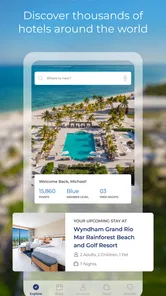
The first thing I noticed about the Wyndham Hotels & Resorts app is its user-friendly interface. Seriously, even if you're not tech-savvy, you'll find it a breeze to navigate. Everything is laid out clearly, and the booking process is straightforward. You can easily search for hotels by entering your destination, dates, and the number of guests. Within seconds, a list of available options pops up, each with clear images and detailed descriptions.
Start with a useful search
For a first booking, I’d decide on the dates and guest count before searching, then compare the results with the actual shape of the trip: where you need to be, how much time you’ll spend at the hotel, and whether a particular property is practical for your plans. A low-looking rate is not much help if the location adds a difficult commute. Open the property details and read them with that in mind instead of choosing from a thumbnail alone.
A realistic example: if I had an early appointment in another city, I would search the night before, check which Wyndham options appear near the destination, and compare the property descriptions before booking. If nothing looks convenient, I would switch to a broader hotel search rather than forcing a poor fit. That small decision is one of the app’s useful boundaries: it can simplify a brand-specific search, but it cannot make an unsuitable location right for your itinerary.
Rewards Galore
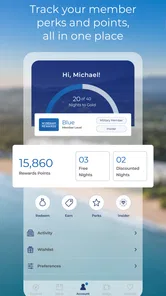
One of the standout features of this app is the Wyndham Rewards program. If you travel frequently, this is something you definitely want to take advantage of. The app allows you to track your points effortlessly. Plus, redeeming them for free nights or discounts is as easy as pie. It’s a sweet deal for loyal customers and adds significant value to the app.
More From Our News Desk

 Weather - By Xiaomi
Weather by Xiaomi Review: Clear at a Glance, Less Clear Up Close
Xiaomi’s weather app makes everyday forecasts quick to scan, but its calm surface can leave useful details and recovery paths harder to find than they should be.

 X
XX Under Pressure: Can It Recover When Posting Goes Wrong?
A resilience-focused review of X, examining setup, mistaken posts, interruptions, weak connections, and the gaps that matter when recovery needs to be dependable.

 Clash of Clans
Clash of Clans Is Won Between the Battles
Its raids are quick; its community is a long-term project of coordination, teaching, rivalry, and shared responsibility—with all the friction that entails.

 Android Auto
Android Auto Makes the Case for Quieter Car Software
The car interface is no longer judged by how much it can do, but by how quietly it helps. Android Auto shows what drivers now expect—and what still gets in the way.

 MobiOffice: Word, Sheets, PDF
MobiOffice: Transforming Mobile Productivity with Seamless Integration
MobiOffice: Word, Sheets, PDF is redefining mobile productivity with a surprising blend of functionality and innovation.

 EA SPORTS FC Soccer Mobile 26
EA SPORTS FC™ Mobile Soccer: Redefining Mobile Sports Gaming
Dive into EA SPORTS FC™ Mobile Soccer, where immersive gameplay and strategic depth transform mobile sports gaming.
Latest News



If you are new to the rewards program, I’d treat points as a potential benefit rather than the reason to book a hotel that does not otherwise work for you. Check the redemption choices against your plans, and consider whether you are likely to stay with the brand again. Occasional travelers may still appreciate keeping track of rewards, but people who regularly choose whichever chain has the best location may get less practical value from focusing on one program.
Check the offer in context
Another thing I love is the special offers section. The app often has exclusive deals that you won't find anywhere else. It’s like getting VIP treatment without having to pay extra for it, and who doesn’t love a good bargain?
I would compare an offer with the full booking details before deciding, rather than treating the word “special” as proof that it is the best fit. Look at the dates and the stay you actually need, then weigh the deal against location and convenience. This is especially helpful when a trip is flexible: checking a few possible dates may reveal an option that suits your schedule better, while a fixed work trip leaves less room to chase a promotion.
All Your Reservations in One Place
Forget about frantically searching through emails for confirmation numbers. With this app, all your bookings are stored in one convenient location. You can view past and upcoming reservations, making it super easy to manage your travel itinerary. It’s like having a personal travel assistant in your pocket.
For a smoother travel day, I’d check the upcoming reservation in the app before leaving, then keep the confirmation email as a second reference. The app’s reservation view is handy for finding a booking again, while an email can be useful if you need to forward details or search your inbox. Keeping both available is a simple backup, particularly when plans change and you need to confirm which stay you are discussing.
Where it fits—and where it doesn’t
The app is aimed at everyone, and the current version is 5.10.2, with Android support beginning at version 9. The developer is Wyndham Hotel Group. Its focus makes it a sensible choice for a Wyndham regular, someone comparing the brand’s hotels for an upcoming trip, or a traveler who values having reservations and rewards together. It is less compelling if you want one app to compare independent hotels and multiple chains side by side; in that case, I’d start with a general booking service and use this app only if a Wyndham property makes the shortlist.
One practical point for first-time users is to separate searching from committing. Enter the trip details, inspect the property information, and confirm that the dates and guest count match your plans before completing a reservation. That habit prevents the most avoidable booking mistake: finding a suitable hotel but selecting the wrong stay details in a hurry. If you are unsure about a property, compare it with alternatives before you book rather than expecting the app itself to judge what matters most to you.
Make the first search count
When installing a hotel app, it is tempting to browse without a particular trip in mind. I find that a destination and approximate dates make the first session much more useful: you can see whether Wyndham has options where you actually travel, rather than judging the app from a generic browse. If your dates are not settled, use an initial search to learn what properties are available, then come back to make the decision once the schedule is firmer.
Before you begin, have the spelling of the destination and the number of guests clear. For a city with several possible areas, search the place you need to reach rather than a broad region, then inspect where each property sits in relation to your plans. This is a small but meaningful workflow improvement: it turns the results into a shortlist for your itinerary instead of a list of hotels that merely share a destination label.
Choose by trip shape, not just by rate
A property that works well for a late arrival may not be the one I would choose for a weekend spent exploring on foot. Likewise, a work stay centered around one appointment has different priorities from a family visit where the hotel is mainly a place to sleep. I would decide which part of the trip matters most—location, the property itself, or the booking terms—before comparing options. That keeps a tempting offer from distracting me from the practical reason I need a room.
For a family coordinating several travelers, I would also pause on the guest count and dates before moving through the booking steps. A search is only useful when it represents the actual stay. If one person is arranging the trip for others, sharing the property details and confirming the schedule before booking can prevent a rushed choice based on assumptions. The app can make the brand’s options easier to review, but the group still needs to agree on what makes a hotel suitable.
What the app can and cannot replace
I see the app as a brand-specific booking tool, not a replacement for every travel resource. A general booking service is better for broad discovery when you have no preference about the hotel company or want to compare different chains and independent properties at once. Wyndham’s app makes more sense after you have decided that its properties are worth considering, or when you already use the brand and want a more direct route to its stays.
That distinction matters most when a destination has limited choices or when you need a very particular location. If the results do not line up with your plans, I would widen the search rather than repeatedly adjusting dates or settling for a hotel that creates extra travel. The strongest use of a focused app is not that it answers every lodging question; it is that it helps you answer one clear question efficiently: whether a Wyndham stay suits this trip.
Customer Support That Actually Helps
Now, let’s talk about something that can make or break a travel app—customer support. I had a minor issue with a booking, so I decided to test out the app’s support feature. To my delight, the response was quick, and the staff was genuinely helpful. It’s reassuring to know that if something goes wrong, you have a team ready to assist you. It’s a feature that further enhances the app’s reliability.
For a new user, my advice is to keep the trip details close when asking for help, so you can explain which reservation needs attention without digging around. I would still review the booking carefully before reaching that point: support is a useful safety net, not a substitute for checking the dates, guest count, and property. The app is free and rated for Everyone, so there is little barrier to trying it; the more meaningful question is whether Wyndham’s selection suits the trip you are planning.
A sensible next step after booking
Once a reservation is made, I would treat the app as one part of my travel organization rather than the only place I keep information. Check the booking details again as the trip approaches, and keep the confirmation email available alongside the reservation view. If you are traveling with someone else, make sure they have the essential details too, especially if the person who booked may not be the one arriving first.
This approach is particularly helpful when a schedule changes. Instead of relying on memory, check the reservation you intend to discuss and have its details ready before contacting support or coordinating with your travel companion. It also makes it easier to spot a mismatch early, when there is still time to work out what to do. I value this kind of simple organization more than treating a travel app as a magic solution to every last-minute problem.
Who will get the most from it
I would recommend trying it if you already stay with Wyndham, are considering one of its hotels for an upcoming trip, or would like to keep brand reservations and rewards in one place. It can also be a useful second search for someone who has started with a broad booking service and wants to inspect Wyndham options directly. The app’s focused scope is a strength when that is the choice you want to investigate.
I would skip it as my only hotel-search tool if I were starting with no brand preference, comparing independent accommodation, or looking for the widest possible range of lodging in one pass. It may still be worth checking a Wyndham property if one appears in another search, but the app is not designed to remove the need to compare alternatives. In my view, the best first-time experience comes from using it with a real trip in mind and being willing to look elsewhere when its selection does not match the plan.
In conclusion, the Wyndham Hotels & Resorts app is a must-have for anyone who frequently stays at hotels. Its ease of use, combined with the rewards program and excellent support, makes it stand out in a crowded market. Whether you're planning a business trip or a leisurely getaway, this app simplifies the hotel booking process and offers perks along the way. Give it a try; you might just find it becomes your go-to travel companion.
Wyndham Hotels & Resorts Frequently Asked Questions
How much does the Wyndham Hotels & Resorts app cost, and what is its age rating?
The app is free to download and is rated Everyone, making it suitable for a broad audience. It is a travel and local app developed by Wyndham Hotel Group. If you are considering installing it, the main value is having Wyndham hotel search and booking tools available on your device, alongside the account and trip features described below.
What features does the Wyndham Hotels & Resorts app offer?
The Wyndham Hotels & Resorts app allows you to search and book hotels from their extensive network easily. You can manage your reservations, check your Wyndham Rewards points, and access exclusive member rates. The app also offers features like mobile check-in and checkout, digital room keys, and personalized stay experiences to enhance your travel convenience.
How does the Wyndham Rewards program work within the app?
Wyndham Rewards is a loyalty program that lets you earn points for every stay at participating hotels. Through the app, you can track your points, redeem them for free nights or gift cards, and access member-only discounts. The app provides a seamless way to manage your rewards and make the most out of your stays.
Is the Wyndham Hotels & Resorts app available on both Android and iOS?
Yes, the Wyndham Hotels & Resorts app is available for download on both Android and iOS platforms. You can find it on the Google Play Store for Android devices and the Apple App Store for iOS devices. The app is designed to provide a consistent and user-friendly experience across both platforms.
Can I use the app to make last-minute hotel bookings?
Absolutely, the Wyndham Hotels & Resorts app is equipped to handle last-minute bookings efficiently. You can search for available rooms in real-time and secure your stay with just a few taps. This feature is particularly useful for spontaneous travelers looking for convenient accommodation solutions.
Pros
- User-friendly interface for easy navigation
- Wide range of locations for global travelers
- Loyalty program with exclusive benefits
- Secure booking and payment systems
- 24/7 customer support for immediate assistance
Cons
- Occasional app crashes reported by users
- Limited features in offline mode
- Some users find booking process slow
- Room availability not always up-to-date
- Push notifications can be overwhelming











