WFLA News Channel 8 - Tampa FL
- 386.00
- 3.4
- Installs
- 100.00K
- Price
- Free

Screenshots
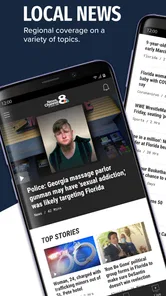
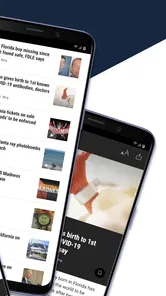
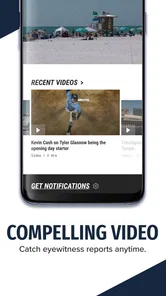
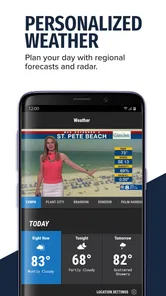
Analysis by Reviewed
I approached WFLA News Channel 8 as a practical local-news tool rather than something I would open for entertainment. Its purpose is straightforward: keep Tampa Bay news close at hand, especially when a story is developing and I want a quick update without sorting through a national news feed. The app is free, aimed at everyone, and comes from Nexstar Inc., so it fits the familiar local-station model rather than trying to replace every news source on a phone.
That focus is its main reason to exist. If you live in the Tampa Bay area, work there, commute through it, or have family there, local reporting can matter more than a polished national headline. A road problem, severe weather update, school-related announcement, public safety story, or change affecting a nearby community may be easy to miss in a broad news app. This application gives those subjects a more visible place in my daily routine.
My first impression is that the app makes the most sense when I treat it as a quick check-in point. I would not install it expecting a deep research library, a personalized magazine, or a replacement for every local source. I would install it because WFLA News Channel 8 is a Tampa Bay-focused news outlet and because a station-centered app can be useful when speed and local relevance matter more than variety.
What makes the first week useful
The first week is usually when a local-news app feels most valuable. There is a small learning curve: I open it, scan the main headlines, and decide whether anything affects my route, household, workday, or plans. That routine is more efficient than repeatedly searching the web for Tampa Bay news, because the app puts the local editorial focus in one place.
I found the strongest use case to be the short morning check. Before leaving home, I can look for major local developments and then decide whether I need more detail. This is not a substitute for checking official instructions during an emergency, but it can act as an early signal that something deserves attention. The practical benefit is not that every headline changes my plans; it is that I spend less time wondering whether I missed an important local story.
The same approach works in the evening. Instead of scrolling through a large national feed filled with stories that have no effect on me, I can make a quick pass through Tampa Bay coverage. That narrower scope is a strength for residents who are tired of filtering irrelevant headlines. It is also a limitation for readers who want international reporting, business analysis, technology coverage, or a broad mix of subjects in one place.
One useful habit is to separate scanning from reading. I would first look at the headlines, then open only the stories connected to my day. That keeps the app from becoming another endless scroll. Local news can be emotionally heavy, and a deliberate routine helps me use the application for awareness rather than letting it dictate my mood throughout the day.
More From Our News Desk

Weather by Xiaomi Review: Clear at a Glance, Less Clear Up Close

X Under Pressure: Can It Recover When Posting Goes Wrong?

Clash of Clans Is Won Between the Battles

Android Auto Makes the Case for Quieter Car Software

MobiOffice: Transforming Mobile Productivity with Seamless Integration

EA SPORTS FC™ Mobile Soccer: Redefining Mobile Sports Gaming
The app is free, which removes the main barrier to trying it. Its content rating is Everyone, so it is positioned as a general-audience news application rather than a service built for a narrow age group. It was released in September 2017 and has remained part of the local-news app landscape, giving it more practical history than a brand-new experiment.
Where it fits beside ordinary alternatives
The usual alternative is a general news app. Those services are better when I want a wide range of national and international stories, personalized topics, or a single place for several publications. They are often less efficient for a Tampa Bay resident who wants local headlines first. A national feed may show a major regional story eventually, but it can bury it beneath subjects that are more popular across the country.
Another alternative is opening the station’s website in a mobile browser. A browser is convenient when I do not want another app installed, and it may be preferable on a shared device or when storage is tight. The dedicated app becomes more worthwhile when I expect to check local news repeatedly. The advantage is not necessarily a dramatic change in the reporting itself; it is the reduced friction of having the station’s news destination ready to open.
Social media is a third option, but I would be cautious about making it my main source. Social feeds are quick, yet context can be inconsistent, and unrelated posts compete for attention. A station app gives me a more focused starting point. I still prefer to verify urgent instructions through official local authorities, but the app can help me notice which topics need that extra check.
During my first week, I would also decide whether the local focus is genuinely enough. If I already use a trusted regional news routine that covers the same needs, adding another app may not improve anything. The application earns its place when it reduces searching, not when it simply duplicates a source I already follow closely.
Small workflows that make it more useful
A realistic example is a weekday commute across the Tampa Bay area. I would check the app before leaving, note any headline that could affect the route, and then use a navigation tool or official transportation source for the actual travel decision. This division of labor matters: the news app provides context and alerts my attention, while a dedicated traffic service is better for turn-by-turn conditions.
For weather-related coverage, I would use the same two-step method. The app can help me recognize that a local situation is developing, but I would not rely on a headline alone for safety decisions. I would open the full report, look for the latest details, and consult official emergency information when the situation is serious. That makes the app useful without asking it to perform a role it was not designed to handle alone.
A less obvious benefit is memory. Local stories often develop over several days, and a focused source makes it easier for me to notice how a situation changes. Instead of seeing one isolated post in a broad feed, I can return to the local coverage and understand that a headline is part of an ongoing story. For community issues, that continuity can be more valuable than a quick burst of attention.
I also recommend avoiding constant checking. If I open any breaking-news app every few minutes, its value quickly turns into distraction. A morning scan, an afternoon check, and an evening review are enough for many users. The best routine depends on the person, but the general principle is simple: use the app at intentional points rather than allowing every headline to interrupt the day.
Whether it keeps earning space after the novelty
I’d judge whether it deserves a lasting place by looking beyond how often I open it and asking whether it helps me notice the right local story at the right time. For Tampa Bay readers, a short, deliberate check can be more useful than another stream of constant updates. The next question is how comfortably that routine fits different reading habits and abilities.
Month-to-month value depends on local relevance
After the first week, the question changes from “Is this convenient?” to “Do I still need it?” For a Tampa Bay resident, the answer can be yes because local news is not a one-time interest. Community decisions, weather developments, public safety stories, local events, and regional changes keep the subject matter relevant. The recurring value comes from the geographic focus, not from novelty.
The app has an average rating of 3.4 from around 862 ratings, with about 386 written reviews. I read that as a sign to keep expectations practical. It is not a universal favorite, and a rating like this suggests that the experience may feel uneven for some people even when the local coverage is useful. I would judge it by whether the reporting focus fits my needs, not by assuming that the app will feel perfect on every phone or for every reading style.
Its reach is also meaningful without being enormous: it has passed 100 thousand installs. That indicates a real audience for the station’s mobile presence, while still presenting it as a regional tool rather than a mass-market news platform. For me, that distinction reinforces the right expectation. I am choosing local usefulness over a huge content ecosystem.
The current version is 510.0.1, and the app supports Android 7.0 or later. That makes it accessible to many older Android devices, which is helpful for someone who does not upgrade phones frequently. At the same time, older operating systems and older hardware can affect how comfortable any modern app feels. I would keep the application updated when possible and judge its day-to-day performance on the specific phone I use, rather than assuming that the experience is identical everywhere.
Month-to-month, I would keep it installed if I regularly use local headlines to plan my day or stay connected to the area. I would remove it if I only open it during a major event and otherwise forget it exists. That is not a criticism of the app; it is a reminder that a location-specific news service has a narrower recurring audience than a general news reader.
The maintenance burden is low, but attention is the real cost
Because the app is free, the main maintenance question is not a subscription decision. It is whether the app deserves a permanent place in my attention. Every news application competes with other notifications, feeds, and messages. Even a useful local source can become tiring if I check it automatically rather than intentionally.
I would manage it with a simple routine. I would keep it available for planned checks, avoid treating every headline as urgent, and periodically decide whether it is still helping me. If I am not using it for several weeks, that is evidence that a browser bookmark or occasional visit may be enough. On the other hand, during periods when local developments matter to my household, keeping the app close can save time.
The application is also easier to maintain when I give it a clear job. Its job, in my view, is local awareness. It should not be my only source for emergency instructions, my complete national-news reader, or my research archive. Defining that boundary prevents disappointment and makes the app feel more reliable because I am evaluating it against a realistic purpose.
One practical trade-off is notification fatigue. Breaking-news notifications can be useful when I need fast awareness, but too many interruptions can make me mute the app entirely. I would choose a notification approach that matches my life: someone with family, work, or travel concerns in Tampa Bay may want faster updates, while someone who prefers quiet may be better served by opening the app manually. The right choice is less about maximizing alerts and more about preserving a sustainable habit.
What may cause fatigue over time
The most obvious source of fatigue is repetition. Local news naturally returns to major stories as they develop, and a reader who checks frequently may feel that the same subject is appearing again and again. That repetition can be valuable when facts change, but it can also make the feed feel less rewarding. I would avoid judging the app after a single repetitive news cycle and instead ask whether the updates add meaningful context.
Another possible frustration is scope. If I want a broad daily digest, the local focus may feel too narrow. I may open the application and find that the stories are relevant to Tampa Bay but not personally relevant to me. In that situation, a general news reader with topic controls may be a better primary tool, while this app remains a secondary local check.
There is also an emotional cost to staying close to breaking news. A station-centered app is most noticeable when something serious is happening, which means the habit can become associated with worry. I would protect against that by choosing specific times to read and by avoiding headline-only conclusions. Reading the complete story before reacting is especially important when the first version of a developing event may not contain all the context.
Readers who prefer long-form journalism may find the experience less satisfying than a newspaper or magazine app. Those alternatives are usually better for investigations, essays, and carefully edited background pieces. WFLA News Channel 8 makes more sense for timely regional awareness. That difference is not a weakness in itself, but it determines who will keep returning after the initial installation.
Who should install it, and who should skip it
I would recommend it to people living in Tampa Bay who want a direct local-news habit, especially those who find national feeds too noisy. It can also suit former residents with close family in the area, commuters who need regional context, and readers who want a quick station-based source before checking official information or another publication.
I would be more hesitant to recommend it as a main news app for someone outside the region. The geographic focus is the point, so its value drops sharply when Tampa Bay stories are not part of the reader’s daily life. I would also suggest a different option for someone seeking international coverage, deep analysis, a highly customized multi-source feed, or a quiet reading experience with minimal breaking-news emphasis.
People who dislike installing separate apps for individual news organizations may prefer the mobile web. Someone with an older Android device can at least see that the minimum requirement is Android 7.0, but actual comfort will still depend on the phone. And anyone who expects every local update to be enough for a safety decision should pair the app with official emergency and public-service channels.
My long-term verdict
After the novelty fades, the lasting value comes from a repeatable local-news habit, not from opening the app constantly. WFLA News Channel 8 earns space on my phone when I want Tampa Bay coverage to be the first filter for local events. Its free access, general-audience positioning, and established presence make it easy to try, while the moderate average rating is a reason to keep expectations grounded rather than expecting a flawless experience.
I see it as a focused companion to broader news and official sources. It is strongest for quick regional awareness, following developing local stories, and deciding when I need to investigate an issue further. It is weaker as an all-purpose news library, a replacement for specialized traffic or emergency tools, or a destination for readers who mainly want long-form national reporting.
My recommendation is therefore conditional but positive: install it if Tampa Bay is part of your everyday life and give it a defined role. Check it at useful moments, control how much attention it receives, and use other sources when a decision requires official or highly specialized information. Used that way, the app has a reasonable chance of surviving past the first-week curiosity and becoming a small, dependable part of a local-news routine.
WFLA News Channel 8 - Tampa FL Frequently Asked Questions
Is WFLA News Channel 8 - Tampa FL available for both Android and iOS?
The app is intended for mobile devices, and its supported operating systems include Android 7.0 or later. Before downloading, check the app store on your device to confirm that your phone or tablet is compatible and that the current version is available for your platform. The app is published by Nexstar Inc. and is designed to bring WFLA News Channel 8 content to mobile readers.
Who is the app best suited for?
WFLA News Channel 8 - Tampa FL is most relevant to people who want local news and information focused on Tampa Bay and nearby communities. It may also interest visitors looking for area coverage while traveling. As a News & Magazines app, it offers a way to follow station reporting on a mobile device, though the usefulness of its local coverage depends on whether Tampa Bay is an area you care about.
What is the WFLA News Channel 8 - Tampa FL app?
WFLA News Channel 8 - Tampa FL is a local news app focused on Tampa Bay and surrounding communities. It typically provides breaking news, live updates, weather forecasts, radar information, traffic reports, video clips, and coverage of local events. The app is designed for readers who want quick access to news from the WFLA News Channel 8 team while using an Android or iOS device.
What type of news and information can I find in the app?
The app covers a broad range of Tampa Bay topics, including local and regional news, weather, hurricanes and severe storms, traffic, crime, politics, sports, entertainment, and community stories. Content can change throughout the day as new reports are published. Users should remember that availability of specific sections, videos, live broadcasts, and features may depend on their location, device, internet connection, and current station coverage.
Does the WFLA News Channel 8 app provide weather alerts and forecasts?
Weather is one of the app’s most useful features for people living in or visiting the Tampa Bay area. Depending on the current version, users may access forecasts, radar maps, severe weather information, storm coverage, and notifications about important conditions. Notifications may require permission in the device settings, and they should not be considered a replacement for official emergency instructions from local authorities during dangerous weather.
Pros
- Fast updates on Tampa Bay breaking news and local events.
- Useful weather forecasts
- radar
- and severe-weather alerts.
- Live newscasts help users follow major stories as they develop.
- Covers local traffic
- sports
- politics
- and community news.
- Simple navigation makes important stories easy to find.
Cons
- Some alerts may feel frequent or repetitive during busy news cycles.
- Video playback can use significant mobile data without Wi-Fi.
- Advertising may interrupt browsing or appear alongside news content.
- Coverage is mainly regional and less useful outside the Tampa area.
- Certain features may depend on a stable internet connection.













