World of Books
- 43.00
- 4.3
- Installs
- 100.00K
- Price
- Free

Screenshots

Analysis by Reviewed
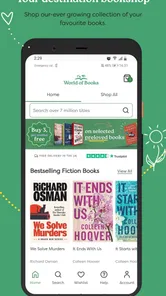
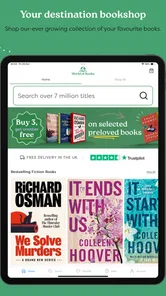
I approached World of Books as a practical reading companion rather than a traditional reading app. Its focus is simple: helping people browse new and used books from a phone. That makes it most interesting when you already have a title in mind, want to compare editions, or need a quick way to turn a spare moment into a book hunt. I found the experience easier to understand when treated as a mobile shop for readers, not as an e-reader or a digital library.
The app comes from World of Books and sits in the Books & Reference category. It is free to install, open to Everyone, and works on Android devices running version 7.1 or later. The current version is 80, and the app has passed the 100K-install mark. Those details make it accessible to a broad range of Android users, including people with older phones who may not want to replace a perfectly usable device just to browse books.
My overall impression is positive, with one important qualification: the quality of the experience depends heavily on your connection and on how clearly you know what you are looking for. When the network is behaving, browsing feels natural. When it is slow or unreliable, the app becomes less useful because its main purpose is tied to loading current book information. I would recommend it to readers who enjoy buying pre-owned books, but I would not confuse it with an app designed for reading downloaded novels.
How World of Books feels when the connection is doing the work
The first thing to understand is that this is a connected shopping experience. Searching, opening book details, checking availability, and moving through listings all rely on the app communicating with its service. That is not a criticism by itself; a catalog for new and used books needs current information. Stock can change, editions can differ, and a useful listing has to reflect what is available at the moment you are looking.
In practice, this makes the app particularly handy when I have a specific author, title, or subject in mind. Instead of wandering through a physical shop hoping to find a particular book, I can begin with a targeted search and then inspect the results. This is also where used-book shopping becomes more appealing than it may sound. A reader who is happy with a pre-owned copy can approach a title as a practical purchase rather than waiting for a sale on a new edition.
The connected nature of the app also changes how I browse casually. In a bookshop, I can pick up a book, read a few pages, and judge its physical condition immediately. On a phone, I am making decisions from the information presented in the listing and from the way the catalog is organized. That is convenient, but it asks me to slow down before committing. I pay closer attention to the exact title, author, format, and edition instead of assuming that every result represents the same physical book.
That habit is one of my most useful tips for this particular app: treat every result as an individual item, not merely as a title. This matters especially with older books, textbooks, collected works, and series where several editions may appear similar at a glance. A quick check before adding anything to a purchase can prevent the common mistake of choosing the wrong volume or an edition that does not match the one you wanted.
More From Our News Desk

Weather by Xiaomi Review: Clear at a Glance, Less Clear Up Close

X Under Pressure: Can It Recover When Posting Goes Wrong?

Clash of Clans Is Won Between the Battles

Android Auto Makes the Case for Quieter Car Software

MobiOffice: Transforming Mobile Productivity with Seamless Integration

EA SPORTS FC™ Mobile Soccer: Redefining Mobile Sports Gaming
The service has earned a 4.3 average from around 600 ratings, with more than 40 written reviews. I see that as a reassuring sign of general usefulness, but not as a guarantee that every search or purchase will feel equally smooth. Book catalogs are naturally uneven: popular titles are easier to recognize, while obscure works may require more patient searching and closer inspection.
When a short browsing session works best
World of Books fits well into small pockets of time. I can imagine using it while waiting for an appointment, sitting on a train with a stable connection, or checking a recommendation immediately after someone mentions a book. The app makes more sense in those moments than opening a general web search, because the intention is already clear: find a book rather than research the entire internet.
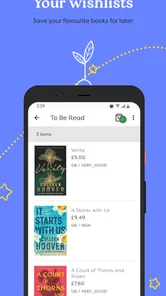
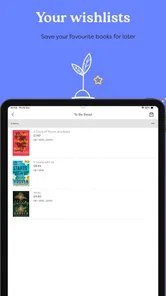
It is also useful for building a reading list around a theme. I might start with one history title, then explore related authors or subjects through the catalog. This kind of browsing is more deliberate than scrolling through a social feed because each search begins with a reading goal. Still, I would keep a note of books I want to revisit. A connected catalog is excellent for discovery in the moment, but I would not rely on it as my only long-term reading tracker.
That distinction answers a question many readers may have: can this replace a reading app? In my view, no. It is better suited to finding and choosing physical books than recording pages read, managing a personal library, or replacing a dedicated e-reader. If your main need is digital reading, annotations, synchronized progress, or a personal bookshelf, another category of app will serve you better.
Using it on mobile without making rushed choices
A phone is convenient for book shopping, but its small screen can encourage fast decisions. I found it better to use a two-stage process. First, I search and shortlist. Then I return to the promising items and inspect the details more carefully. This is especially worthwhile when buying used books, because the appeal of a low-cost or pre-owned copy can make it tempting to tap through before checking whether the listing matches the intended format.
My everyday example would be a student looking for a novel required for a class. During a lunch break, the student can search the title, compare the available options, and keep the promising result in mind for a later purchase. The important part is not to treat the first matching cover as automatically correct. Course reading often depends on a particular volume, translation, or edition, so the mobile workflow should include a deliberate verification step.
For a parent buying children’s books, the Everyone content rating is reassuring from an app-access perspective, but it should not be mistaken for a judgment about every book sold through the catalog. The rating describes the application’s suitability, not the subject matter of each individual title. I would still check the book itself when choosing material for a child.
The same applies to older users or anyone with limited phone storage. Because the app is free and supports an older Android baseline, it is an approachable option for browsing without a major commitment. However, a smaller screen and slower device can make catalog navigation feel less immediate. I would use a reliable connection and avoid rushing through several searches at once, particularly if the phone is already handling other demanding tasks.
What happens when the network is weak
The main weakness is also the unavoidable consequence of the app’s purpose: poor connectivity interrupts the parts that matter most. A weak signal can make search results take longer to appear, delay the opening of a listing, or leave me uncertain whether a tap registered. Since the app is centered on current book information, I would not assume that a previously viewed page represents the present state of a listing.
This is where the app differs from a downloaded reading application. An e-reader can often remain useful after a book has been saved to the device. World of Books is more like a live catalog, so its value is greatest while it can reach the service. I would not choose it as my only tool for a journey where connectivity is unpredictable and I need dependable access to book information throughout the trip.
There is a simple recovery routine that helps. If a result does not load, I avoid repeatedly tapping the same control. I first check whether other apps are also struggling, then retry the search once the connection improves. If a listing opens partially, I return to the results rather than assuming that every detail has loaded. This sounds basic, but it prevents a common mobile mistake: acting on incomplete information because the screen appears to have stopped changing.
I also recommend recording the exact title and author when a search produces a promising result. That small step makes recovery easier if the app closes or the connection drops. I can search again without trying to remember a long title, and I am less likely to confuse two similar books. For series, I would note the volume number as well. This is a particularly useful workflow for used books, where several related editions may appear close together.
Another practical trade-off is timing. If I am browsing casually, a slow connection is merely irritating. If I am trying to act on a recommendation before leaving a location with good signal, the delay matters more. In that situation, I would focus on a short list rather than opening every interesting result. World of Books rewards purposeful browsing more than endless catalog exploration when the network is unreliable.
Keeping mobile data use sensible
Book browsing is not usually the kind of activity that makes me worry about large media files, but repeated searches and image-heavy listings can still be inconvenient on a limited mobile plan. I prefer to do broad discovery while connected to trusted Wi-Fi, then use mobile data for a small number of focused searches. That approach also makes the experience calmer because I am not trying to research an entire reading list while watching a data allowance.
A good data-conscious workflow is to decide what I want to investigate before opening the app. For example, I might write down three authors, a series name, or a subject and then search those terms in one deliberate session. I avoid refreshing a page simply out of habit. If the result is already clear enough for my shortlist, I move on instead of repeatedly reopening it.
I would also avoid assuming that a cached screen, if one remains visible, is current. A book listing can be useful as a reminder, but I would refresh the relevant information before making a final decision. This is less about technical detail and more about good shopping practice: connected catalogs can change, and a screen left open on a phone should not be treated as a permanent snapshot.
Readers who often shop in places with weak coverage should plan around the app rather than expecting it to solve the connectivity problem. I would make a shortlist at home, save the important titles in a separate note, and do the final browsing or purchase steps when the connection is dependable. That workflow preserves the app’s strength while reducing the frustration caused by trying to do everything in an inconvenient location.
Where it beats ordinary alternatives, and where it does not
Compared with visiting several physical bookshops, World of Books is faster for checking whether a particular title is worth pursuing. It is also more convenient when I want to browse new and used options from one place instead of traveling between stores. For readers who already know the author or subject they want, the phone-based search is a real advantage.
Compared with a general marketplace, the app feels more focused on books. That narrower purpose can reduce distraction: I am not moving through unrelated products before reaching the reading material. The trade-off is that a general marketplace may offer a wider range of sellers, formats, or non-book accessories, depending on what the shopper needs. If I want a very specific edition and the focused catalog does not present it clearly, I may still compare elsewhere.
Compared with a local independent bookshop, the app lacks the personal conversation that can lead to an unexpected recommendation. A bookseller may understand my taste from a short discussion, while a mobile catalog depends more on the terms I enter and the results I choose to explore. I would use World of Books for efficient searching and a local shop for human guidance, browsing atmosphere, or a title I want to inspect physically.
Compared with a library app, the purpose is different. A library service is usually the better choice when I want to borrow rather than buy, especially for temporary reading. World of Books makes more sense when I want to own a physical copy, build a personal collection, or look for a used alternative to buying new. Neither replaces the other; they answer different questions.
Who will appreciate it most
I think the app is strongest for readers who are comfortable buying physical books and who enjoy the value of pre-owned copies. It suits people searching for older titles, building a personal library gradually, or looking for a practical alternative to buying every book new. It can also help families and students who need to compare possibilities quickly from a phone.
It is less suitable for someone who wants an all-in-one reading system. If your priority is instant access to digital books, offline reading, detailed notes, audiobook playback, or automatic progress tracking, I would look at an e-reading or library-focused app instead. The free installation should not create the expectation that the app itself is a complete digital reading environment.
I would also be cautious if you dislike checking editions and formats. Used-book shopping rewards attention. The app can help me find a title, but I remain responsible for confirming that the result is the version I actually want. That small amount of effort is a fair trade for broader choice and the possibility of finding a pre-owned copy, but it may feel tedious to anyone who expects every search result to be self-explanatory.
My final view on the connected shopping experience
World of Books is a focused, approachable app for discovering new and used books on Android. The free entry point, Everyone rating, broad device compatibility, and growing install base make it easy to try, while the 4.3 average suggests that many users find the service worthwhile. I like it most when I have a clear reading goal and a dependable connection.
Its limitations are practical rather than surprising. The experience is tied to live browsing, so weak connectivity can interrupt searches and make recovery inconvenient. The small-screen format also means I need to verify titles, authors, series order, and editions instead of relying on a quick glance. Those are not reasons to dismiss it; they are the habits that make the app more reliable in everyday use.
My recommendation is straightforward: use it as a connected catalog and shopping tool, not as a replacement for an e-reader, library service, or personal reading tracker. Plan broad searches around Wi-Fi, keep a short note of promising titles, and slow down before selecting a used edition. With that approach, World of Books becomes a useful companion for readers who want convenient access to a wider physical-book hunt without giving up the option of finding pre-owned copies.
World of Books Frequently Asked Questions
Is the World of Books app free to download?
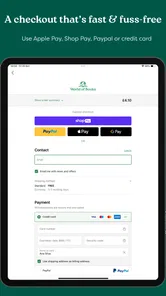
Yes, World of Books is free to download and is listed for everyone. It is a Books & Reference app from the World of Books developer, built around the service’s focus on new and used books. You can browse the app before deciding whether to place an order; any shopping costs depend on the items and checkout terms.
Which devices can run the World of Books app?
The app requires Android 7.1 or later, so check your device’s operating system before downloading. Its current version is 80, and the app is available on Android. If your device meets the minimum requirement, you can install it and explore the World of Books shopping experience, including its selection of new and pre-owned books.
What is World of Books?
World of Books is an online marketplace and book retailer focused primarily on new and pre-owned books. Through its mobile-friendly website or shopping experience, users can browse titles by author, genre, format, and price, then order books for delivery. It is especially useful for readers looking for affordable second-hand editions, older titles, and books that may be difficult to find in regular stores.
Can I buy used books in good condition through World of Books?
Yes. World of Books offers a large selection of pre-owned books, and listings generally include a description of the item’s condition. Used copies may show normal signs of previous ownership, such as shelf wear, creased covers, or markings, depending on the edition. Before ordering, check the condition information and product details carefully, particularly if you need a specific cover, format, or publication edition.
Does World of Books sell more than physical books?
World of Books is best known for physical books, including fiction, non-fiction, children’s books, academic titles, and collectible or out-of-print editions. Depending on the region and current inventory, the service may also offer other media products, such as DVDs, CDs, or similar items. Availability can change frequently because much of the stock comes from used and surplus inventory.
Pros
- Large selection of new and used books across many genres.
- Used titles can be significantly cheaper than buying new.
- Book condition is usually described clearly before purchase.
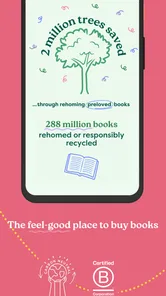
- Supports more sustainable reading through book reuse.
- Search and browsing tools make finding specific titles simple.
Cons
- Stock availability can change quickly for popular or older titles.
- Used book condition may vary despite the listed description.
- Delivery times can be longer than major retail marketplaces.
- International shipping options and costs may be limited.
- The app may offer fewer community features than dedicated reading apps.












