Sell books with World of Books
- 913.00
- 4.2
- Installs
- 100.00K
- Price
- Free

Screenshots


Analysis by Reviewed
Some apps are useful because they save time, while others are useful because they make an awkward everyday task feel manageable. Sell books with World of Books belongs to the second group. I see it as a practical lifestyle app for people who have books taking up space and would rather turn them into money than leave them in a box. Its focus is straightforward: helping you sell books and textbooks through a mobile experience connected to World of Books.
I tested it with a realistic question in mind: would I actually use this when clearing a shelf, preparing for a move, or dealing with old study materials? My answer is yes, with a few important qualifications. The app is most appealing when you already know which books you want to pass on and can give the process a little attention. It is less suitable if you expect instant cash, a local marketplace conversation, or a completely effortless way to sell a single low-value book.
World of Books, the developer behind it, has made this a free app in the lifestyle category, with an Everyone age rating. It has been available since June 12, 2019, and the current release is version 6.9.0, build 16985. Those details matter less than the basic experience, but they show that this is an established selling tool rather than a newly launched experiment.
How the selling experience feels on a phone
The first thing I noticed is that the app makes more sense as a focused workflow than as a general book marketplace. You are not primarily browsing for a rare title, building a social profile, or negotiating with several interested buyers. The useful mindset is closer to sorting, identifying, checking, and submitting books in a batch.
That distinction changes how I would use it. If I had one unwanted novel, I would first consider whether the effort of preparing and sending it was worthwhile. If I had a box of textbooks after finishing a course, the app would become much more interesting. A batch gives the process a clear purpose and makes the time spent checking each item feel more reasonable.
The app’s store summary is “Sell Your Books & Textbooks,” and that narrow focus is a strength. It avoids the clutter found in broad classified apps, where books sit alongside furniture, electronics, clothing, and local services. I prefer a dedicated flow when I already know what I am trying to do. The trade-off is that you should not expect the same kind of personal buyer interaction or local pickup flexibility that a community marketplace may offer.
In my experience, the most important preparation happens before opening the app. Put the books in a sensible order, keep editions together, and inspect the covers and pages. Textbooks deserve extra attention because a newer edition can be materially different from an older one, even when the title looks almost identical. A quick check of the ISBN or other identifying information can prevent the most frustrating kind of mistake: thinking you are selling one version while actually handling another.
More From Our News Desk

Weather by Xiaomi Review: Clear at a Glance, Less Clear Up Close

X Under Pressure: Can It Recover When Posting Goes Wrong?

Clash of Clans Is Won Between the Battles

Android Auto Makes the Case for Quieter Car Software

MobiOffice: Transforming Mobile Productivity with Seamless Integration

EA SPORTS FC™ Mobile Soccer: Redefining Mobile Sports Gaming
Connectivity matters most during identification and submission
The app is built around an online selling journey, so the quality of your connection shapes the experience. When the network is stable, moving through the process feels much more natural. Information can load when needed, and you can continue checking items without wondering whether a screen is still working or simply waiting.
This is especially relevant if you are scanning or entering several books in one sitting. A weak signal can turn a quick sorting session into a stop-and-start routine. I would not begin a large batch in a basement, on a train, or in a room where mobile coverage is unreliable unless I had plenty of patience. The app is better suited to a place with dependable Wi-Fi or a strong mobile connection.
That does not mean connectivity is only a technical detail. It affects your decisions. If a result takes too long to appear, you may be tempted to skip a book, enter information twice, or lose track of which items you have already checked. My practical tip is to create a physical staging area: one pile for books ready to process, one for books waiting for a result, and one for titles you decide not to include. That simple arrangement reduces confusion when the network interrupts your rhythm.
I also found it sensible to avoid rushing through a batch while walking around or multitasking. A selling app needs more concentration than a casual shopping app because an incorrect identifier can lead to the wrong item being assessed. A stable connection helps, but careful attention is still the real safeguard.
A realistic mobile scenario: clearing a student shelf
Imagine finishing a course and ending up with a mixture of textbooks, revision guides, and ordinary reading. You have limited storage, but you do not want to throw everything into a donation bag without checking whether some items are worth selling. This is where the app has a clear role.
I would begin by separating textbooks from general books, then group titles by subject. With the app open, I would process the most clearly identifiable items first and keep the condition of each book in mind. For textbooks, I would check the edition carefully rather than relying on the cover design. If the connection slowed down, I would pause instead of repeatedly tapping through the same step.
Once the list was complete, I would review the result before packing anything. This is an overlooked part of the workflow. Selling is not finished just because a book has been recognized. You still need to make sure the physical item matches what you entered, that damaged copies are treated honestly, and that you understand the next practical step shown by the app.
This scenario also reveals who benefits most. Someone clearing a shelf in one deliberate session can get real value from the focused process. Someone trying to sell a random paperback while waiting for a bus may find the experience disproportionate to the likely return.
What happens when the connection fails?
A connectivity problem is most annoying when it appears after you have already invested time in a batch. The sensible response is to preserve your physical organization and avoid assuming that a stalled screen means an action was never sent. I would wait briefly, check whether the app has caught up, and then verify the visible state before repeating anything.
This is one reason I recommend processing books in small groups rather than creating an enormous pile and trying to remember every step. Small groups make recovery easier. If the app becomes unresponsive, you know which items were being handled and which are still untouched. It also limits the amount of rechecking required when you reconnect.
For a large clear-out, I would keep a simple handwritten note of the books already submitted or reviewed. That may sound old-fashioned, but it is useful when the phone loses signal, the app needs to be reopened, or you need to step away. A note with the title and edition is enough to prevent duplicate work. This is not a feature claim about the app; it is a workflow I would use because online processes are easier to manage when the physical items remain traceable.
The same caution applies to final decisions. If a confirmation screen appears slowly, do not immediately press the same control several times. Give the connection time, then look for a changed status or completed step. Repeated actions are a common source of uncertainty in any network-dependent app, and book selling is not a good place to create a duplicate entry by accident.
Using it without wasting mobile data
For most people, the app will not be a heavy daily service, but a batch session can still consume more mobile data than a quick one-item check. If I were processing a full shelf, I would use Wi-Fi where possible, partly for speed and partly to avoid turning a simple clear-out into an unnecessary mobile-data task.
There is also a behavioral way to reduce data use: prepare first, connect second. Sorting books, checking condition, and grouping textbooks can all happen before the app becomes central to the process. Then the connected part is reserved for identification and submission rather than repeated browsing and backtracking.
I would also avoid restarting a search repeatedly just because a result takes a moment to load. That wastes time and may create extra network requests without improving the outcome. A calm, one-item-at-a-time approach is more efficient than tapping impatiently. If you are using mobile data, this habit is particularly worthwhile.
People who are very data-conscious should choose a planned session rather than casually opening the app throughout the day. The service is more useful as a tool for a specific household task than as something that needs constant checking. That makes it easy to fit around a Wi-Fi connection and reduces the temptation to keep refreshing.
Where it beats ordinary alternatives
The obvious alternative is a broad marketplace app. Those services can be better when you want to set your own asking price, meet a buyer nearby, bundle unrelated items, or sell a particularly collectible book through direct conversation. They may also suit people who enjoy negotiating and are willing to answer messages.
World of Books takes a different path. I prefer its focused approach when I want less social interaction and a more organized route for ordinary books or textbooks. The app is not trying to turn you into a full-time seller. It is better for reducing clutter through a structured process than for maximizing every possible pound from a rare or desirable title.
A physical bookshop is another alternative. A local shop gives you human advice and may be more reassuring if you have unusual editions or questions about condition. However, it may require a trip, and its process may not be convenient for a box of mixed books. The app is more appealing when you want to start from home and handle the initial sorting yourself.
Donation is the simplest option when the books have little resale value or when your priority is speed. I would not use this app for every unwanted book automatically. If a title is heavily worn, outdated, incomplete, or unlikely to justify the effort of processing and sending, donating it may be the more sensible decision. The app helps you assess a selling route; it does not make every book worth selling.
Small habits that make the process better
My first useful habit is to separate “sellable” from “sentimental” before scanning anything. Once a book is in a selling workflow, it is easy to think only about clearing space. Decide first whether you are genuinely ready to let it go, especially with annotated textbooks, signed copies, or books connected to a particular stage of life.
Second, process the books with the highest practical value first. Textbooks, recent study materials, and books in clean condition deserve attention before a shelf of common paperbacks. This lets you stop early if the process is not worthwhile, rather than spending the same effort on every item.
Third, inspect the physical copy after the app identifies it. Look for missing pages, writing, water damage, torn covers, and supplementary materials that may matter for a textbook. The app can help with the selling workflow, but it cannot replace your responsibility to describe the actual copy accurately.
Fourth, keep your batch size manageable. I would rather complete three careful groups than create one chaotic pile. This is particularly helpful when connectivity is inconsistent because recovery becomes straightforward. You can also pack or set aside completed groups without mixing them with books still awaiting a decision.
Finally, treat the app as one part of the selling decision, not as an automatic promise of the best possible outcome. If a book is rare, valuable, or in demand locally, compare the focused World of Books route with a specialist or direct-sale option. Convenience has value, but it may not always be the same as maximum return.
Who should use it, and who should skip it?
I would recommend it to people clearing a home library, reducing possessions before a move, or dealing with a collection of textbooks after study. It is also a good fit for anyone who dislikes negotiating with strangers and prefers a dedicated book-selling environment. The free price makes it easy to try without committing money to the app itself, and the Everyone rating keeps it accessible for a broad audience.
The app has a visible user base, with over one hundred thousand installs, and its average rating is 4.2 from around one thousand six hundred ratings. I read that as a sign of generally positive reception rather than proof that every selling experience will be smooth. The number of written reviews is also substantial, at roughly nine hundred, so prospective users can get a sense of recurring reactions before deciding whether the workflow suits them.
I would skip it if your main goal is to sell one ordinary book immediately, set a high personal price, or arrange a face-to-face exchange. I would also look elsewhere for collectible books where photographs, detailed descriptions, and direct communication are central to the sale. Those cases need a marketplace or specialist channel more than a streamlined book-buying workflow.
People with unreliable internet should not necessarily rule it out, but they should plan around that limitation. Use a reliable connection, work in small groups, and keep a physical record of progress. If you cannot give the process that attention, a local shop or donation center may be less frustrating.
My verdict on the connected experience
Sell books with World of Books is a sensible app when your goal is organized decluttering rather than maximum-effort selling. I like its focused identity, especially for textbooks and ordinary books that would otherwise remain boxed up. The experience is most convincing when used at home, with a prepared batch and a stable connection.
Its main weakness is not that it lacks ambition; it is that the online workflow demands a little discipline. Slow connectivity, uncertain progress, or careless identification can make a simple task feel more complicated. The app rewards users who sort first, check editions, process manageable groups, and review each physical book honestly.
After using it, I would describe it to a friend as a practical first option for a shelf clear-out, not a universal answer for every book. If convenience and a focused selling route matter more to you than negotiating for the highest possible price, this app is worth trying. If you need local pickup, specialist valuation, or instant cash for a single title, a different route will probably serve you better.
Overall, the connectivity-dependent nature of the experience is manageable rather than deal-breaking. Plan the session around Wi-Fi or dependable mobile coverage, keep your books organized, and give the app time to respond instead of repeating actions. Used that way, World of Books turns a vague “I should do something with these books” task into a clear, realistic household project.
Sell books with World of Books Frequently Asked Questions
Can I use Sell books with World of Books on my device?
Sell books with World of Books is a Lifestyle app from World of Books for people looking to sell books and textbooks. Before downloading, check that your device runs Android or iOS version 10 or later, as the app requires that minimum operating-system version. The app is free to download and is intended for a general audience.
What is World of Books, and how does selling books through it work?
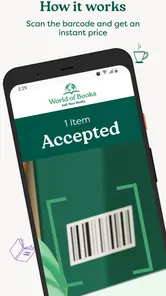
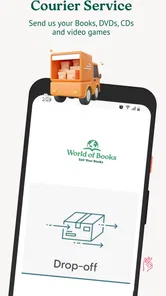
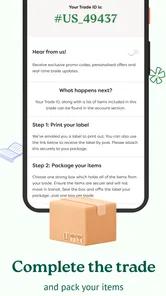
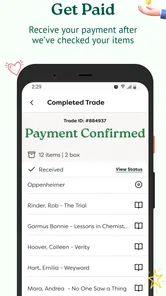
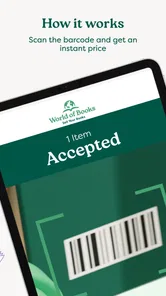
World of Books is an online second-hand book retailer that allows users to sell eligible books through its book-buying service. You generally enter an ISBN or scan a book’s barcode to receive an estimated offer, add accepted titles to your selling list, and follow the instructions for sending them. The final payment can depend on the books arriving and passing the company’s condition checks.
How do I find out how much my books are worth?
To check a book’s value, search for its ISBN or use the barcode-scanning feature when available. The service matches the edition and format against its current demand and stock requirements, then displays an offer if the title is being accepted. Prices can vary considerably between editions, so check the ISBN carefully and make sure the result matches the book you actually own.
What condition do books need to be in before I send them?
Books should normally be complete, readable, and in a reasonable resale condition. Avoid sending titles with missing pages, severe water damage, heavy mould, strong odours, excessive writing, or badly damaged covers. The condition requirements may differ by title and service policy, so review the instructions shown with your offer. Books that do not meet the requirements may be rejected or affect your final payment.
Is postage free when selling books with World of Books?
Postage arrangements depend on the selling service, your location, the size of the shipment, and the instructions provided after you accept an offer. In some cases, World of Books may provide a prepaid shipping option or cover eligible delivery costs, while other situations may require you to follow specific packaging and postage rules. Always confirm the current shipping terms before sending your books.
Pros
- Supports sustainable shopping by giving used books a second life.
- Large selection across fiction
- nonfiction
- children’s books
- and more.
- Book condition details help set expectations before ordering.
- Convenient browsing with search and category filters.
- Often offers lower prices than buying new editions.
Cons
- Used-book condition can vary despite the listed grading.
- Some titles may arrive with notes
- stamps
- or library markings.
- Popular or older editions can go out of stock quickly.
- Delivery times may vary depending on item availability.
- International shipping options and costs may be limited.












