WorkWhile
- 1.61K
- 4.4
- Installs
- 500.00K
- Price
- Free

Screenshots



Analysis by Reviewed
Finding flexible work through a phone sounds simple until the practical details get in the way: the right shift has to appear, the location has to make sense, and the app needs to remain useful while you are moving between home, transport, and a workplace. I spent time looking at WorkWhile from that everyday point of view. It is a free business app from WorkWhile built around finding jobs in your area, and its strongest value is convenience rather than a promise of replacing a full employment search.
My overall impression is that it makes the first step less intimidating. Instead of opening several job sites and sorting through permanent roles, I can use one focused place to look for nearby opportunities. That focus will appeal most to people who want flexible work or need to investigate local options quickly. It is less convincing for someone seeking a long-term professional role, detailed career planning, or a complete replacement for speaking with an employer directly.
How WorkWhile fits into a real job search
The app sits in the business category, but I would not approach it like a conventional office productivity tool. Its purpose is much more immediate: help me discover work opportunities in my area from a mobile device. That changes how I judge it. I am not looking for document editing, scheduling for a team, or a large professional profile system. I am looking for a practical route from “I need work” to “I found something worth considering.”
That narrow purpose is a strength. A general job board can bury nearby, short-term, or flexible possibilities under corporate listings and roles that require a long application process. WorkWhile feels more suitable when location and availability matter as much as the job title. For a person who has recently moved, is between jobs, wants extra shifts, or simply needs to see what is available locally, that can make the search feel more manageable.
It is also worth setting expectations early. Seeing a job in an app is not the same as being hired. The usefulness of any listing depends on whether the role fits my schedule, travel distance, experience, and personal requirements. I would still read every detail carefully and keep other job-search methods open. The app can shorten discovery, but it cannot remove the judgment needed before accepting work.
The audience response suggests that this focused approach has found a substantial user base. WorkWhile has an average rating of 4.4 from around 7,400 ratings, with roughly 1,600 written reviews, and it has passed 500,000 installs. I see those figures as evidence that the concept is attracting real interest, while not treating them as a guarantee that every local search will be equally productive.
Where connectivity becomes part of the experience
The network connection is not just a background technical detail here. The central task depends on current information: I need to open the app, look for opportunities, and judge what is relevant at that moment. When I am at home on a stable connection, browsing is straightforward. I can take my time comparing locations and deciding whether a role deserves attention.
More From Our News Desk

Weather by Xiaomi Review: Clear at a Glance, Less Clear Up Close

X Under Pressure: Can It Recover When Posting Goes Wrong?

Clash of Clans Is Won Between the Battles

Android Auto Makes the Case for Quieter Car Software

MobiOffice: Transforming Mobile Productivity with Seamless Integration

EA SPORTS FC™ Mobile Soccer: Redefining Mobile Sports Gaming
The experience changes when I am outside. Imagine finishing a shift, walking toward a bus stop, and checking for another opportunity nearby. That is exactly the kind of situation in which a mobile job app can be useful, but it is also when a weak connection can become frustrating. A listing may take longer to load, a page may need to be opened again, or I may have to postpone a decision until the signal improves. I would not rely on a quick glance as my only record of an important opportunity.
My practical habit would be to do the serious comparison before leaving a reliable connection. I would note the workplace area, expected timing, and any requirements that affect whether the role is realistic. Then I could use the phone while travelling for checking rather than trying to complete the entire decision under pressure. This is a small change, but it prevents a poor connection from turning a promising search into a rushed one.
People often ask whether an app like this is useful during commuting. My answer is yes, but with a condition: use travel time for discovery and review, not as the only moment for important submissions or decisions. A train platform, crowded bus, or basement workplace is not a dependable environment for careful reading. The app is most comfortable when I treat connectivity as something to plan around rather than assume will always be perfect.
Using it in mobile situations without creating extra stress
WorkWhile makes the most sense on a phone because the need it addresses is often immediate. I may not be sitting at a desk with a résumé open; I may be between errands, considering a change in income, or checking options after a schedule changes. That mobility is one of the app’s clearest advantages over a traditional in-person search, where I would need to wait until an office is open or physically visit several places.
Still, mobile convenience can encourage impulsive choices. A nearby listing can look attractive simply because it appears at the right moment. Before treating it as a good opportunity, I would check the full practical picture: how long the journey takes, whether transport is reliable, whether the timing conflicts with existing responsibilities, and whether the work suits my experience. “Nearby” is helpful, but it is not the same as “easy.”
A useful workflow is to separate browsing from commitment. During a short break, I might scan local opportunities and identify two or three worth revisiting. Later, with enough time and a dependable connection, I would compare them properly. This avoids making a decision because a phone screen is small or because I am trying to finish before my break ends. It also gives me a clearer basis for deciding which option deserves an application.
The app’s Everyone content rating makes it approachable for a broad audience, though that should not be confused with every job being suitable for every person. Age, legal requirements, physical demands, experience, and scheduling still matter at the opportunity level. I would use the rating as a sign that the app itself is broadly accessible, not as a shortcut around reading individual job conditions.
WorkWhile requires Android 8.0 or later, so anyone using an older phone should check compatibility before planning around it. On a supported device, the current version is 2.66.0. Keeping the app current is sensible for a service where loading and account-related behavior matter, but I would still avoid assuming that an update alone can solve every network problem. Device age, signal quality, and the particular location all affect the experience.
What happens when a connection or plan fails?
The most realistic test is not a perfect search. It is the moment something goes wrong. A listing may stop loading, a connection may disappear, or I may discover that the travel time is not as convenient as it first appeared. In those moments, I would rather have a simple recovery routine than depend on memory.
My routine would be to stop before repeatedly tapping the same screen, move to a stronger signal if possible, and reopen the relevant part of the app once the connection is stable. If I had already found a promising role, I would keep a private note of the key details I had legitimately viewed, such as the general location and timing, so that a temporary interruption did not make me forget what I wanted to check. I would then verify everything again before acting.
This is especially important if I am applying while travelling. A failed connection can create uncertainty about whether an action went through. Rather than submitting repeatedly, I would wait for the app to show a clear result or check the relevant status once service returns. Duplicate attempts waste time and can make the process feel more confusing than it needs to be.
There is also a human side to recovery. If a role disappears or no longer fits, I would not interpret that as proof that the whole app is useless. Local work searches naturally change. I would refresh the search later, widen the area only if the travel cost remains sensible, and compare new options rather than chasing one listing. WorkWhile is best treated as an ongoing source of possibilities, not a single guaranteed answer.
This is where it differs from asking a local contact or visiting an employer. A personal conversation can sometimes clarify a role immediately, while a mobile listing gives me independence and speed. The trade-off is that I may need to do more verification myself. For quick discovery, the app has the advantage; for nuanced questions about a specific workplace, direct communication may still be better.
Keeping mobile data use under control
Someone looking for work may also be trying to control phone costs, so data-conscious use matters. I would avoid leaving the app open while travelling without a purpose. Instead, I would choose a short search session, review the most relevant opportunities, and close it when I have enough information to make the next decision. This is more efficient than repeatedly refreshing out of habit.
Searching from a stable Wi-Fi connection when convenient is another sensible approach, especially for a longer session. I would use mobile data for targeted checks rather than broad, repeated browsing. That does not make the app less mobile; it simply reserves mobile connectivity for moments when it provides genuine value, such as checking whether a newly available opportunity is worth investigating.
I also prefer to prepare before opening a search. Knowing my available days, acceptable travel range, and preferred type of work helps me reject unsuitable listings quickly. That reduces time spent loading pages that I would never consider. More importantly, it protects me from accepting something merely because it is the first result I see.
A less obvious trade-off is that being data-conscious can make the search more deliberate, but it may reduce spontaneity. If I only check at home, I could miss the convenience of discovering an opportunity while already near the relevant area. My compromise would be to browse thoroughly on Wi-Fi and perform brief, purposeful checks when away. That gives me the best balance between cost, speed, and awareness.
Who gets the most value from it?
I would recommend WorkWhile first to people who value local, flexible job discovery more than elaborate career tools. It could suit someone looking for extra income, a person returning to work, or anyone who wants to explore nearby options without committing to a lengthy search across multiple services. The free price also lowers the barrier to trying it, which matters when I am not yet sure how useful the local opportunities will be.
It may also help people who think better in terms of practical availability than job titles. Instead of beginning with a highly specific career plan, I can ask what is accessible in my area and what fits my current circumstances. That makes the app useful during transitions, although I would still use a more specialized service when qualifications, portfolio work, or a carefully developed professional profile are central to the search.
I would skip it as my primary tool if I needed executive recruitment, extensive company research, academic employment, or a detailed long-term career path. A broad professional network may be stronger for relationship-building, while a conventional job board may provide more depth for permanent roles. WorkWhile’s value comes from focus and immediacy, so it is not automatically the best answer for every kind of employment.
It is also not ideal for someone who cannot tolerate uncertainty around travel or scheduling. The app can help me find possibilities, but I remain responsible for checking whether the work is genuinely practical. If I need guaranteed hours, a fixed location, or very specific employment conditions, I would combine the app with direct confirmation rather than relying on discovery alone.
My final view on connected job searching
After looking at how it behaves in realistic mobile situations, I see WorkWhile as a useful starting point rather than a complete employment solution. Its clear purpose, free access, and local focus make it easy to understand. The developer, WorkWhile, has kept the concept centered on helping people find jobs in their area, and that simplicity is more valuable than a crowded collection of unrelated tools.
The main limitation is that the experience depends on timely access to information and on my ability to verify what I find. Weak connectivity can interrupt browsing, mobile conditions can encourage rushed decisions, and a convenient location does not guarantee a convenient job. These are not reasons to dismiss the app; they are reasons to use it with a sensible routine.
My recommendation is to install it if you are actively exploring nearby or flexible work and want a focused mobile option. Start from a reliable connection, define your realistic travel and schedule limits, and treat each listing as something to investigate rather than an automatic match. Keep another search method available when you need deeper employer information or a long-term professional route.
In connectivity terms, my verdict is positive but practical: WorkWhile is most helpful when the phone gives me quick access to local possibilities, while my own preparation handles the uncertainty that a connection or a listing cannot solve. Used that way, it can make the first stage of a job search faster and less scattered without pretending to replace careful judgment.
WorkWhile Frequently Asked Questions
Is WorkWhile free to download and use?
WorkWhile is a free business app for people exploring flexible hourly work. You can install it without paying an upfront download price, then create a profile and look through opportunities that may suit your area and schedule. Before accepting a shift, review its terms and compensation details in the app so you understand the commitment involved.
What is WorkWhile, and how does the app work?
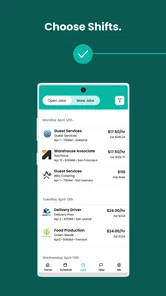
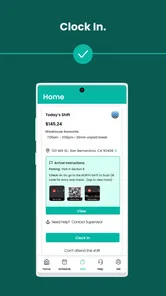
WorkWhile is a flexible work platform that connects people looking for hourly shifts with businesses that need temporary or on-demand staff. After creating a profile, you can browse available opportunities, review shift details, and apply for work that matches your location, schedule, and qualifications. The exact experience may vary depending on your city and the types of jobs currently offered.
What types of jobs can I find on WorkWhile?
WorkWhile generally focuses on hourly and flexible roles, which may include warehouse support, fulfillment, event staffing, hospitality, retail assistance, delivery-related work, or other operational positions. Available jobs depend heavily on local demand, employer requirements, and your profile. Before accepting a shift, carefully check the job description, location, required skills, dress code, pay information, and expected duties.
What are the requirements to use WorkWhile as a worker?
Requirements can vary by location and position, but workers typically need to meet the applicable minimum age, have legal authorization to work, provide accurate identity and contact information, and complete any required verification or screening. Some shifts may also require previous experience, transportation, certifications, or specific equipment. Review the app’s current eligibility rules before registering.
How and when do workers get paid through WorkWhile?
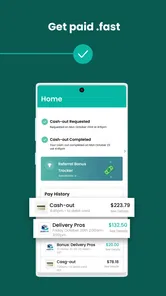
WorkWhile displays compensation information for available shifts, but payment timing and methods may depend on the platform’s policies, your location, the employer, and whether a shift is completed and approved successfully. Check the payment section and shift terms before accepting an assignment. Also confirm whether taxes, fees, adjustments, cancellations, or attendance issues can affect the final amount.
Pros
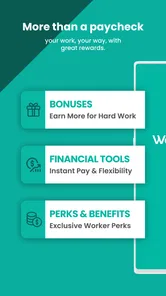
- Flexible shift options make it easier to fit work around your schedule.
- Useful for finding short-term and same-day work opportunities.
- Clear job details help you compare pay
- location
- and shift requirements.
- Mobile notifications can alert you when suitable shifts become available.
- Helpful option for earning extra income without a long-term commitment.
Cons
- Job availability may vary considerably by location and time of day.
- Some shifts can fill quickly
- requiring frequent app checks.
- Earnings may not be consistent enough to replace regular employment.
- Certain jobs may require transportation
- certifications
- or prior experience.
- Account approval and onboarding requirements can delay access to shifts.











