Workvivo
- 118.00
- 4.3
- Installs
- 1.00M
- Price
- Free

Screenshots

Analysis by Reviewed
I find Workvivo easiest to judge as a shared workplace space rather than a replacement for every tool a team already uses. Its value depends on whether people have a reason to check in, share useful updates, and recognize one another there. If those habits already exist, it can give them a visible home; if not, another app alone is unlikely to create a lively company culture.
Readability and navigation in a busy workday
The moment I stumbled upon Workvivo, I was intrigued by its promise to revolutionize the way we engage in our workspaces. As someone who's always on the lookout for tools that can optimize my working experience, I had to give it a try. So, here's my take on this app that's creating quite a buzz in the professional world.
Getting Started with the App
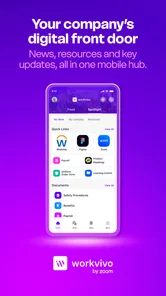
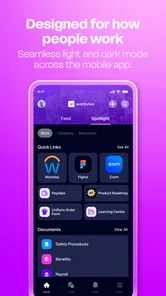
Downloading and setting up Workvivo was a breeze. Available on both Android and iOS, the app's interface is sleek and intuitive, making navigation a piece of cake. Upon launching the app, you're greeted with a vibrant dashboard that does wonders in terms of setting a positive tone for the workday.
In practical terms, that dashboard matters most when it helps me answer a simple question quickly: what has changed since I last checked? A stream of announcements and colleague posts can be welcoming, but it can also become noisy if every item feels equally urgent. I’d use the main view for a brief daily scan, then rely on the organization’s own habits to make important messages easy to distinguish. The app is free, and Workvivo is developed by Workvivo; it is a business app for employees, not a general social network to browse without a workplace context.
Features That Stand Out
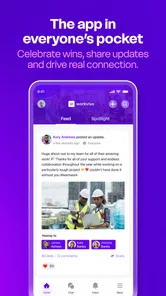
One of the standout features of Workvivo is its focus on employee engagement. The platform feels like a delightful blend of a social media network and a productivity tool. Employees can share updates, celebrate achievements, and even voice concerns—all within the app. It's like having a digital bulletin board where everyone's opinions matter.
That mix suits a distributed team especially well: a colleague who rarely crosses paths with another department can still see a project milestone or a recognition post. A useful habit is to make updates specific and easy to act on—what changed, who it affects, and whether a response is needed—rather than treating the feed as a place for vague announcements. This makes the social side more helpful without asking it to replace direct conversations about sensitive or urgent issues.
Another aspect that caught my attention was the integration capability with other tools. Whether you're using Slack, Microsoft Teams, or any other collaboration software, Workvivo seamlessly ties them all together, turning into a one-stop-shop for all your communication needs.
More From Our News Desk

Weather by Xiaomi Review: Clear at a Glance, Less Clear Up Close

X Under Pressure: Can It Recover When Posting Goes Wrong?

Clash of Clans Is Won Between the Battles

Android Auto Makes the Case for Quieter Car Software

MobiOffice: Transforming Mobile Productivity with Seamless Integration

EA SPORTS FC™ Mobile Soccer: Redefining Mobile Sports Gaming
Motor and sensory considerations
The user experience on Workvivo is nothing short of impressive. The app runs smoothly without any noticeable lags, which is crucial for maintaining productivity. The personalized notifications ensure that you never miss an important update, yet it doesn't overwhelm you with unnecessary alerts.
For someone checking in between tasks, keeping notifications selective is a practical way to reduce interruption and make the phone easier to manage. I would also treat visual posts as optional context rather than the only way to communicate something important: a clear written summary can help colleagues who cannot readily view or listen to media, or who are in a quiet setting. A social feed still asks people to scroll, tap, and compose; employees who find those actions tiring may prefer shorter posts and fewer routine check-ins.
Situational access and everyday use
Moreover, the app's emphasis on visual storytelling is a game-changer. Employees can post pictures, videos, and even podcasts to share their experiences, making work communication more engaging and less mundane.
Imagine starting a shift away from a desk and opening the app during a short break. A concise team update can help you catch up without joining a meeting, while a photo or audio post may give a sense of what colleagues are doing. On the other hand, someone working in a noisy environment, with limited time or a small screen, may not be able to take in every format. I’d save richer media for stories that benefit from it and keep essential instructions in text that can be scanned quickly.
Workvivo is most useful when an employer actively uses it for recognition, internal news, and everyday connection. It may be a poor fit for a solo worker, a team that already communicates comfortably through a simple chat channel, or anyone expecting a personal productivity planner. A messaging app is often better for quick back-and-forth, while email can be more suitable for formal records; this platform makes more sense as the shared community layer alongside those tools.
Remaining barriers and practical trade-offs
One point I would settle with an employer before relying on the app is which messages are genuinely expected to be read there. If people must monitor a social feed for urgent instructions, important information can be easy to miss among celebrations and informal posts. Clear posting norms—where urgent notices go, how often employees should check in, and whether a response is expected—make the experience more predictable for people with different schedules and attention needs.
The audience also matters. A recognition post can build connection, but public participation may not feel comfortable for everyone, and not every concern belongs in a broad company feed. I’d keep sensitive conversations private and make participation welcoming rather than treating frequent posting as proof of engagement. Those choices are workplace practices, not something an app can solve by itself.
For context, Workvivo has a 4.1 average from around 3,600 ratings, with roughly 90 written reviews and more than 500,000 installs. It is rated Teen, first released in 2017, and version 7.645 supports Android 6.0 and later. That gives a prospective user a quick sense of its established presence and device baseline, though day-to-day usefulness still comes down to how thoughtfully an organization puts it to work.
Who should give it a try
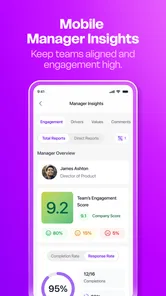
If you’re someone who values community and engagement in the workplace, this app is definitely worth a shot. It not only boosts morale but also fosters an inclusive culture where everyone feels heard. The ability to track engagement metrics is an added bonus for managers looking to enhance team dynamics.
My practical advice is to look at the company’s communication routine before installing it: will Workvivo carry announcements and recognition, or will it become one more place to check? For a large or distributed organization that wants employees to feel connected across teams, it can be a useful shared space. For a small group that needs only task assignment, document editing, or fast private messages, a purpose-built work tool may be clearer and less demanding.
In conclusion, Workvivo is not just another app cluttering your phone’s home screen; it’s a valuable tool that can transform how you connect with your colleagues. By promoting a sense of community, it elevates workplace interaction to a whole new level. So, if you’re keen on bringing some vibrancy into your work life, give Workvivo a try. Who knows, it might just be the change you’re looking for!
Inclusive verdict
I’d recommend it with one condition: the organization should make the feed useful for people who read quickly, participate quietly, or cannot engage with every kind of media at every moment. The app’s social approach can make workplace communication feel more human, but it works best when accessibility is considered in the way posts are written and when other channels remain available for urgent, private, or highly structured work. If that balance is in place, it is worth trying; if not, a simpler channel may serve the team better.
Workvivo Frequently Asked Questions
Is Workvivo free to download, and who can use it?
Workvivo is free to download and is a business app for employee engagement and internal communication. It is generally intended for people whose organizations use the platform, so downloading it alone may not provide access to a company’s workspace. Whether it is useful to you depends on your employer or organization using Workvivo and providing the appropriate way to join.
What devices and operating systems can run Workvivo?
Workvivo is available for Android, and the minimum supported Android version is 6.0. Before downloading, check that your device meets that requirement and has enough room for the app. Workvivo is also available on iOS, so employees can access the platform on compatible Apple devices as well. Keeping your device’s operating system up to date can help with compatibility.
What is Workvivo and how does it function?
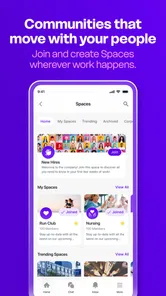
Workvivo is an internal communications platform designed to enhance employee engagement and streamline workplace communication. It functions as a social network for companies, allowing employees to share updates, celebrate achievements, and connect with colleagues across various departments. The app integrates with existing tools and provides a centralized hub for company news, events, and resources, making it easier for employees to stay informed and engaged.
Is Workvivo suitable for small businesses or only large enterprises?
Workvivo is suitable for businesses of all sizes, including small and medium-sized enterprises (SMEs) as well as large corporations. The platform is scalable and can be customized to meet the unique needs of different organizations, regardless of their size. It offers features that support both growing teams and established enterprises, helping them improve communication and foster a positive company culture.
What are the key features of Workvivo that enhance employee engagement?
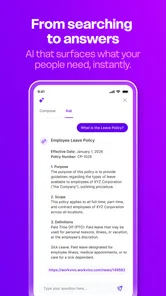
Workvivo boasts several key features designed to boost employee engagement, including an activity feed for sharing updates, recognition tools for celebrating achievements, and communication channels for team collaboration. It also offers event management, survey tools for gathering feedback, and analytics to measure engagement levels. These features work together to create a dynamic and interactive workplace environment that encourages participation and connection.
Pros
- User-friendly interface.
- Seamless communication tools.
- Great for employee engagement.
- Easy integration with other platforms.
- Offers mobile access for convenience.
Cons
- Limited customization options.
- Occasional bugs and glitches.
- Could improve customer support.
- Pricing might be high for small teams.
- Limited analytics and reporting features.











