Workstream US
- 52.00
- 3.1
- Installs
- 50.00K
- Price
- Free

Screenshots
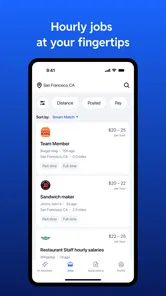
Analysis by Reviewed
Managing an hourly team rarely fails because people lack effort. It usually fails in the gaps between a shift change, a late message, an updated task, and the moment someone needs a clear answer. I approached Workstream US as a practical business app for those gaps rather than as a complete replacement for every HR system. Its focus is on bringing on-the-go HR closer to the people who work away from a desk, which makes the idea immediately useful for restaurants, retail teams, field crews, and other workplaces built around hourly schedules.
My overall impression is cautiously positive. The app is free, aimed at Everyone, and developed by Workstream.is. It has passed the early adoption stage with more than fifty thousand installs, while its average score sits at 3.2 from just over a hundred ratings. That combination tells me it is worth trying, but not something I would roll out blindly across a whole organization. I would test it with one team first, establish a simple routine, and see whether it actually reduces scattered HR conversations.
Building a calmer hourly-work workflow
Before using an app like this, I would first look at what the team is already doing. If staff members receive information through a mixture of personal messages, paper notes, verbal reminders, and several unrelated tools, adding Workstream US without changing the routine may simply create another place to check. The useful starting point is to decide which HR moments deserve one dependable path: communicating with hourly workers, keeping routine information visible, and giving managers a more consistent way to stay connected while moving around.
This matters because an hourly team does not work like an office team. A supervisor may be opening a location, helping customers, covering a break, and answering an employee question within the same hour. A desk-based HR platform can be powerful, but it often assumes that users have time to sit down and navigate a large system. Workstream US makes more sense when the priority is access during the working day, especially for managers and employees who are rarely in front of a computer.
I would not treat it as a magic fix for unclear policies or poor scheduling habits. The app can support a process, but the process still needs an owner. Someone should decide what belongs in the app, how quickly managers respond, and where formal records live. Without those decisions, a mobile HR tool can become a stream of unread updates instead of a useful workplace habit.
What I would organize first
My first step would be to separate urgent information from reference information. A shift-related change may need attention quickly, while a general workplace instruction should remain easy to find without interrupting everyone. Keeping those purposes distinct makes the app easier to live with. It also prevents the common mistake of sending every small thought to the entire team.
A second step would be to define the audience for each message. Hourly workers do not all need the same information, and a manager may need a different view of a situation than a new employee. Even when an app offers convenient communication, convenience can encourage over-sharing. I would use the smallest practical audience and keep wording direct: what changed, who needs to act, and by when.
More From Our News Desk

Weather by Xiaomi Review: Clear at a Glance, Less Clear Up Close

X Under Pressure: Can It Recover When Posting Goes Wrong?

Clash of Clans Is Won Between the Battles

Android Auto Makes the Case for Quieter Car Software

MobiOffice: Transforming Mobile Productivity with Seamless Integration

EA SPORTS FC™ Mobile Soccer: Redefining Mobile Sports Gaming
The third step is deciding what should happen outside the app. Sensitive employee matters, formal documentation, payroll questions, and policy decisions may require a more controlled company process. Workstream US is best judged as a front-line HR companion, not automatically as the sole system for every employment record.
Capturing information without creating noise
The strongest reason to try this app is the possibility of capturing everyday HR needs while they are still fresh. A manager who notices a recurring question or needs to pass along a practical update can use a mobile-first workflow instead of waiting until the end of a shift. That small reduction in delay can matter more than a long list of advanced functions, because forgotten follow-ups are one of the quiet costs of hourly operations.
I found the most sensible approach is to create a small number of repeatable categories in the team’s own language. For example, a manager might mentally separate shift communication, employee questions, onboarding reminders, and operational notices. The point is not to build a complicated filing system. It is to make the next action obvious when returning to the app after a busy period.
The practical advantage is not simply having HR on a phone; it is shortening the distance between noticing a people issue and giving it a clear next step. That is a more useful way to evaluate the app than asking whether it contains every feature found in a large HR suite.
There is also a trade-off. Mobile access makes participation easier, but it can blur the boundary between work and personal time. If employees are expected to monitor updates constantly, the app may increase pressure rather than improve coordination. I would agree on reasonable response expectations before introducing it, particularly for teams with early starts, late finishes, or irregular shifts.
A repeatable routine is more valuable than constant checking
I would not ask a team to keep opening Workstream US throughout the day just in case something appears. That creates notification fatigue and makes the tool feel like another obligation. A better routine would be a short check at the beginning of a shift, a deliberate moment for managers to review outstanding items, and a final pass when something needs to be handed over to the next person.
For a small retail team, a realistic routine might begin with the opening supervisor reviewing the day’s relevant information, then capturing questions that cannot be answered immediately. During the busiest period, the manager can focus on customers rather than trying to write perfect updates. At handover, the next supervisor receives a concise picture of what remains open. This is where a mobile HR app can earn its place: not by adding more communication, but by making handoffs less dependent on memory.
For a field team, the routine would look different. A worker may need access between locations, while a coordinator may need to collect several small updates before deciding what requires escalation. In that setting, I would keep entries brief and action-oriented. Long explanations are harder to read on a phone and more likely to be ignored when the user is moving between tasks.
One useful habit is to close the loop visibly. If a question has been answered, mark it as handled in whatever workflow the team has agreed to use, or communicate the outcome clearly. Otherwise, the same issue may be raised repeatedly by different people. This is a workflow recommendation rather than a claim about a particular button or feature, and it is important because no app can compensate for unresolved ownership.
I would also schedule a weekly review for managers. The purpose is not to inspect every interaction, but to identify repeated questions, missed handoffs, and information that should become a clearer instruction. Over time, this turns the app from a reactive inbox into a source of small process improvements. That is the sustainable productivity angle I appreciate most: use daily friction to improve the system, rather than merely responding faster forever.
Where the experience may break down
The modest average rating deserves attention. It does not prove that the app will fail for a particular team, but it is a reminder to test the complete experience with real workers rather than relying on the concept alone. A manager may like the idea of mobile HR while employees find the routine confusing, or a team may adopt it quickly but stop using it once the initial enthusiasm fades.
Adoption is the first likely failure point. Hourly employees have little patience for an app that feels like an extra administrative task. If the team must duplicate information across Workstream US, a scheduling tool, a payroll system, and private messages, the benefit can disappear. Before launch, I would choose one or two jobs for the app and explicitly tell people what should remain elsewhere.
Clarity is another risk. Short messages are useful, but overly short messages can create misunderstandings. A note such as “new process today” leaves too much work for the reader. I would include the effective time, the affected group, and the action required. That standard keeps mobile communication concise without making it vague.
There is also the question of scale. A small team may benefit from a lightweight HR channel because everyone understands the context. A larger organization may need stronger role separation, reporting, auditing, integrations, and formal document management. If those needs dominate, a full HR information system may be a better foundation, with Workstream US considered only if it fits alongside that system without forcing duplicate entry.
Another limitation is cultural rather than technical. Some employees may prefer speaking directly with a supervisor, especially about sensitive concerns. A mobile app should not become a wall between people and management. I would preserve a human route for questions that need empathy, discretion, or a conversation rather than a quick update.
Device access can shape the result as well. A team with reliable smartphones and regular connectivity is a natural fit for a mobile HR workflow. A workplace where employees share devices, have limited data access, or cannot check phones during shifts may need printed backup instructions or an alternative channel. The app should support inclusion, not quietly assume that every worker has the same access pattern.
How it compares with familiar alternatives
The usual alternative is a combination of messaging, spreadsheets, email, and a larger payroll or HR platform. That combination can work, especially when the team is tiny and the manager already knows where everything belongs. Its weakness is fragmentation: a useful answer may be buried in a conversation, while a spreadsheet can show information without making the next action obvious.
Workstream US is more appealing when the problem is front-line coordination rather than deep administration. Its business positioning and emphasis on hourly teams give it a clearer purpose than a generic chat app. I would choose it over ordinary messaging when the team needs a more deliberate HR routine and wants to reduce dependence on individual managers’ private inboxes.
On the other hand, I would choose a broader HR platform when the organization needs a central employee record, complex compliance workflows, extensive reporting, or a mature payroll connection. A general collaboration suite may also be better for teams whose main challenge is project work rather than hourly HR communication. The right choice depends on the bottleneck: Workstream US is most convincing when access and consistency are the bottlenecks.
The free price makes experimentation easier, especially for a small operation that wants to validate a workflow before budgeting for a larger system. Free does not mean costless, though. Training, setup, policy decisions, and time spent maintaining information still count. I would measure success by fewer repeated questions and cleaner handoffs, not by the number of people invited.
Who should adopt it, and who should wait
I can see this app working well for an hourly team with managers who spend most of their day away from a desk. Retail supervisors, hospitality leads, service coordinators, and small operations teams are the kinds of users I would put through a trial. It is especially suitable when the company wants one mobile-oriented place to reinforce everyday HR communication without immediately committing to a heavyweight platform.
I would also consider it for a growing business that has outgrown informal messages but is not ready to redesign its entire HR stack. In that situation, the app can act as a bridge, provided the organization clearly defines what it handles and what remains in the existing system. The bridge should have an exit plan: if the company grows, review whether the workflow still fits instead of allowing temporary habits to become permanent confusion.
I would ask a few practical questions before adoption. Can every intended user access the app during the moments when information matters? Will managers actually review it as part of a shift routine? Is there a clear person responsible for unanswered questions? Can the team avoid copying the same update into several places? If the answers are uncertain, a short pilot is more sensible than a full launch.
I would skip it, at least for now, if the organization mainly needs payroll, complex compliance administration, detailed analytics, or a formal document repository. I would also hesitate if employees are already overwhelmed by workplace apps. Adding another channel without removing an old one is not productivity; it is relocation of clutter.
On my device, the app’s current release is v2.12.8, and it supports Android 8.0 or later. That makes it accessible to many users with older Android phones, which is relevant for teams that do not replace devices frequently. I would still test it on the actual phones used by employees, because practical usability depends on the real working environment, not only on the minimum operating-system requirement.
My recommendation after using it as a system component
Workstream US is not the kind of app I would recommend because every business needs another communication channel. I recommend it when a specific problem exists: hourly employees and managers need a more dependable way to stay aligned while away from desks. Its free entry point, business focus, and mobile orientation make a controlled trial reasonable, particularly for smaller teams.
I would begin with one location or one shift group, define a narrow purpose, and run the routine for long enough to see whether behavior changes. Track practical signals such as repeated questions, missed handovers, and whether managers can find current information without asking several colleagues. Do not judge the pilot by downloads or by how active the app looks; judge it by whether the work feels less scattered.
My final view is that this is a useful candidate for a sustainable hourly-team workflow, but only when paired with clear ownership and restraint. It can bring HR communication closer to the people who need it, yet it cannot replace good judgment, respectful management, or a proper system for formal records. If your team needs a focused mobile layer for everyday HR coordination, I think it is worth testing. If you need a complete enterprise HR foundation, I would look elsewhere first and use this only if it fits cleanly into that larger plan.
Workstream US Frequently Asked Questions
Can I use Workstream US if I do not work for a company that uses it?
Workstream US is intended for workplace use, so its value depends on whether your employer or organization has an account and has set you up as a user. Without that connection, you may be able to install the app but will not have the same access to schedules, updates, or other employee tools. Check with your workplace before downloading if you are unsure whether it uses Workstream.
What should I check before signing in to Workstream US?
Before signing in, make sure you have the correct company account or employee invitation and use the login details provided by your workplace. Workstream US is built around an employer’s setup, so access and available tools can differ from one organization to another. If you have trouble getting started, your manager or workplace administrator is the best person to ask about account activation and sign-in steps.
What is Workstream US, and who is it designed for?
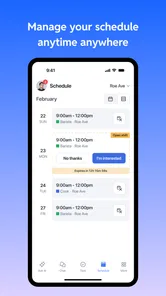
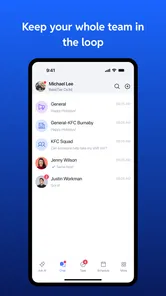
Workstream US is a workforce management app designed to help employees and employers coordinate daily work activities. Depending on the organization’s setup, employees may use it to view schedules, receive workplace updates, communicate with managers, complete assigned tasks, and manage availability. Access is generally intended for people connected to a participating company rather than for completely independent users.
Do I need an invitation or company account to use Workstream US?
In most cases, yes. Workstream US is typically connected to an employer or organization that has already created a workplace account. You may need an invitation, employee credentials, or a verification process before you can use the main features. If you download the app without being associated with a supported organization, some sections may be unavailable until your employer activates your account.
What features can employees use in Workstream US?
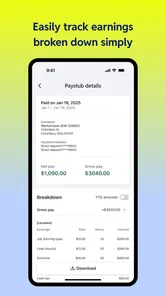
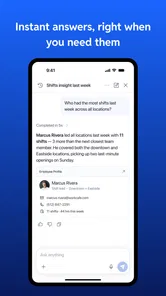
Available features can vary according to the employer’s subscription and configuration, but the app may include work schedules, shift information, clock-in or clock-out tools, time-off requests, task management, announcements, and workplace communication. Some users may also see payroll-related information or training resources. Because administrators control access, the exact tools shown can differ between companies.
Pros
- Centralizes work chats
- tasks
- and updates in one place.
- Helps teams stay organized with structured project communication.
- Useful for coordinating remote and distributed employees.
- Makes it easier to track discussions and follow up on assignments.
- Can reduce reliance on long email chains for daily work.
Cons
- May feel overwhelming when many channels and notifications are active.
- Requires consistent team adoption to deliver its full value.
- Some features may depend on an organization’s subscription plan.
- New users may need time to learn the workspace and workflows.
- Performance can vary with weak internet connections or older devices.











