WorkJam
- 1.04K
- 4.6
- Installs
- 1.00M
- Price
- Free

Screenshots
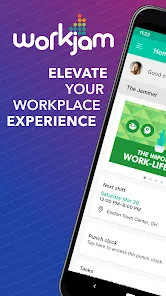
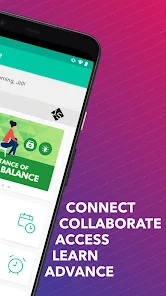
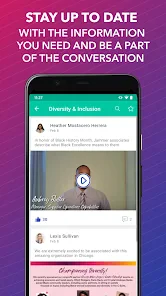

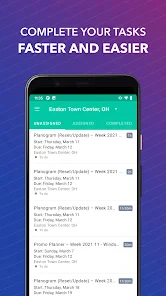


Analysis by Reviewed
When a shift is approaching and the details are scattered across messages, calendars, and memory, it is easy to miss something important. WorkJam is a business app from WorkJam, Inc. built around hourly work and shift management. I see its strongest appeal in bringing work-related tasks into one place, though how useful it feels depends on how an employer has it set up and how consistently the team uses it.
Where people can get stuck
The first hurdle may not be learning the interface; it may be knowing what to do when the app does not show the information you expected. A schedule or workplace message is only useful if the right details have been made available to your account. If a shift seems missing, I would check that I am signed into the correct work account and look for any in-app instructions before assuming the schedule itself has changed.
That distinction matters because a workplace app is not a personal calendar that automatically knows your hours. It is a shared tool whose usefulness depends on the employer’s setup and the team’s habits. I would treat WorkJam as a place to check work information, not as the only record of an important change until I know how my workplace handles schedule updates.
Getting Started with WorkJam
First off, installing WorkJam is a breeze. Available on both Android and iOS, it takes a couple of taps and you’re ready to dive into its features. The app’s interface is pretty intuitive, so even if you’re not tech-savvy, you’ll find your way around in no time. I was pleasantly surprised by how quickly I was able to set up my profile and start exploring.
Scheduling Made Simple
One of the standout features of WorkJam is its scheduling capabilities. I can’t stress enough how much easier it is to manage shifts. With just a few taps, you can view your schedule, swap shifts, or pick up extra hours. For someone like me who often forgets their shift timings, getting notifications directly on my phone was a game-changer.
For a practical routine, I would check the upcoming shifts at the start of the week, then revisit the schedule before making personal plans around a workday. If your workplace supports shift swaps or extra hours, check the status in the app rather than treating a request as approved before it is confirmed. That small habit can prevent a misunderstanding when another person’s schedule is involved.
Seamless Communication
Another feature that caught my attention is the communication tool. Forget about those endless email chains or lost text messages. WorkJam centralizes all team communications, making it easy to chat with coworkers or managers. You can even set up group chats for specific projects or announcements. It’s like having a mini workspace in your pocket.
More From Our News Desk

Clash of Clans Is Won Between the Battles

Android Auto Makes the Case for Quieter Car Software

MobiOffice: Transforming Mobile Productivity with Seamless Integration

EA SPORTS FC™ Mobile Soccer: Redefining Mobile Sports Gaming

How Microsoft OneDrive Became a Mobile Productivity Giant

How Google Translate Breaks Language Barriers Effortlessly
Keeping work conversations in a shared workplace channel can be more useful than relying on personal texts: the context stays tied to the team, and it is easier to separate a shift question from messages meant for friends and family. The trade-off is that coworkers need to use the same channel consistently. For urgent changes, I would follow the communication method my manager has asked the team to use rather than assume everyone will see a new message immediately.
Learning and Development
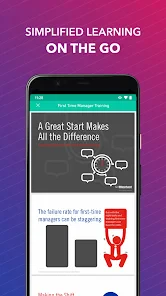
But wait, there's more! WorkJam isn’t just about schedules and chats. It also offers training modules right within the app. Whether you want to brush up on company policies or learn a new skill, WorkJam has got you covered. I found these learning resources particularly helpful and engaging, making it less of a chore to keep up with training requirements.
This combination is especially practical for hourly teams that need to check a shift, read a workplace update, and complete assigned learning without jumping between unrelated tools. I would use a quieter moment to work through training rather than leave it until the start of a shift, when time and attention are already tight. If your employer does not use the learning area, though, that part will matter less than the schedule and communication tools.
Setup checks and everyday use
WorkJam is free to download, is rated for everyone, and has a 4.6 average from around 15,000 ratings. It has over 1 million installs, and its current version is 2025.11.16. Those figures suggest it is an established workplace app, but they do not guarantee that every employer uses the same features or setup.
If something looks out of date, I would start with simple checks: confirm I am in the right account, refresh the view, and make sure the app is current on my device. If the issue concerns a shift, access, or a workplace-specific process, asking a manager or the person who administers the system is more useful than repeatedly changing phone settings. Avoid relying on a notification alone for a critical schedule detail; open the app and check the actual information.
Making the most of a shift-based routine
A useful way to adopt the app is to give it a short, predictable place in the day instead of checking it constantly. I would look at the schedule before the week gets busy, then check again before leaving for work. That routine is especially helpful when shifts vary, because it catches a changed detail before I have already built errands or childcare plans around the old one.
For example, imagine I am arranging a ride home after an evening shift. I would verify the shift in the app before confirming the pickup, then check again if a coworker has asked about a swap. The key is to distinguish a request from a settled schedule. This is a small but important workflow: it prevents a message or tentative plan from becoming the version I rely on without checking the current work information.
There is also a practical boundary to keep in mind. A phone notification can be a helpful prompt, but it is not a substitute for opening the relevant screen and reading the details. If I am on a weak connection or moving between tasks, I would wait until I can check the information properly rather than making a decision from a notification preview. That habit is more reliable for any work change that affects attendance or another person’s plans.
How it compares with familiar alternatives
Compared with a collection of texts, email threads, and a personal calendar, WorkJam’s main advantage is that it can keep work coordination in a workplace-specific setting. A personal calendar remains better for seeing shifts alongside medical appointments, school runs, and other commitments. I would use both when needed: WorkJam to check the work-side details and a calendar to understand how those hours fit into my life.
Email can be preferable for a long explanation or a message that needs to be easy to search later, while a team chat is more natural for a quick question. WorkJam makes more sense when the employer and coworkers actually use its shared tools; it is less compelling as an extra destination if everyone still sends schedule changes elsewhere. Before relying on it, I would learn which channel is considered the source of truth at that workplace.
This distinction also helps answer whether it can replace other apps. I would not expect one workplace tool to become my complete personal organizer or to cover every formal conversation. Its value is narrower and more practical: work information can be easier to find when the team has a consistent place for it. If the team’s habits are split across several channels, the app cannot resolve that inconsistency by itself.
Who is likely to benefit
I would point hourly workers toward WorkJam when their employer actively uses it for schedules and team communication, and when they want a convenient way to check those items from a phone. It may be especially useful for people whose hours change from week to week, who need to keep up with workplace notices, or who have assigned learning to complete alongside regular shifts.
It is a weaker fit for someone whose workplace does not use the app, whose shifts are already managed reliably elsewhere, or who only wants a private calendar. In those cases, installing another tool may add a login and another place to check without removing any existing steps. The decision is less about whether the app has useful workplace functions and more about whether those functions match the way a particular team operates.
For a new employee, I would ask a manager which account or sign-in route to use and what information the team expects workers to check there. That is more useful than guessing at setup if access does not appear as expected. For an established employee moving to the app, I would clarify when the workplace considers a schedule change final and where urgent notices are sent. Those questions make the transition smoother without assuming every organization follows the same process.
When another tool may fit better
Compared with a personal calendar, WorkJam is more suited to workplace coordination than to planning every part of life. A calendar is still better for combining work shifts with appointments and family plans, while email may suit longer messages that need careful documentation. WorkJam’s advantage is the shared work context; its limitation is that it is not a replacement for every communication or planning tool.
I would recommend it most to hourly employees whose workplace actively uses its scheduling, team communication, and training tools. It may be less useful for someone whose employer handles shifts elsewhere, or for a worker who only wants a private calendar and has no reason to check workplace updates in an app. The developer, WorkJam, Inc., has kept the focus on workplace use, and that focus is also the main condition for getting value from it.
When the app may not be the cause
If access fails, a schedule is incomplete, or a message is missing, it is tempting to treat every issue as a phone problem. I would first identify what is affected: the whole account, one screen, or only a particular work item. A general loading problem calls for basic connection and restart checks; a missing shift or workplace-specific instruction is more likely to need clarification from the manager or administrator who handles the team’s setup.
It helps to describe the problem precisely when asking for help. Rather than saying only that the app is broken, I would explain which account I am using, what information I expected to see, and whether the issue happens again after reopening the app. That gives the person responsible for workplace access a clearer starting point. I would avoid sharing passwords or sensitive account details in a team chat while trying to resolve it.
If a coworker sees different information, that is another reason to pause before assuming the phone is at fault. The accounts may not have the same work access, or the relevant schedule detail may still need attention from someone at the workplace. I would compare only the necessary information and ask the appropriate person to confirm what is current. Repeatedly reinstalling or changing device settings is unlikely to solve a workplace-side issue on its own.
User Experience
Let’s talk about the overall user experience. The design is clean and modern, which I appreciate. Everything is organized logically, so you don’t feel lost navigating through the app. I did encounter a slight lag during peak hours, but it was nothing that hindered my ability to use the app effectively. Plus, the support team is quite responsive if you ever run into any issues.
If a screen stalls or a detail fails to appear, I would first distinguish a temporary app hiccup from a workplace account or information issue. Closing and reopening the app, checking the connection, and trying again are sensible first steps. If the same problem continues, note what you were trying to do and contact the relevant workplace support route; a repeated login or schedule problem may need attention beyond the phone itself.
My practical verdict
In conclusion, if you’re looking for an app that can help streamline your work responsibilities, WorkJam is definitely worth a shot. It combines scheduling, communication, and training in one neat package, making it a valuable tool for both employees and employers. So go ahead, give it a try, and take control of your work life like never before!
My recommendation comes with one practical caveat: it works best when your employer has made it part of the team’s routine. If that is the case, checking schedules and workplace updates in one place can reduce the small bits of daily uncertainty that make shift work harder to organize. If your team rarely uses it, a familiar calendar and the communication channel your workplace already relies on may be the more dependable choice.
WorkJam Frequently Asked Questions
Does WorkJam need to be set up by my employer before I can use it?
WorkJam is most useful when your employer has adopted it for workplace operations. The app is intended to connect employees with work-related schedules, communications, and tasks, so your experience depends on your organization’s setup. Before downloading, it is sensible to check whether your workplace uses WorkJam and how employees are expected to access it.
What is WorkJam’s age rating, and is it suitable for general use?
WorkJam is rated Everyone, making it suitable for a broad audience from an age-rating perspective. It is a business app rather than a general social or entertainment platform, however, and its practical purpose is workplace coordination. Its relevance will depend on whether you are an employee or manager whose organization uses WorkJam for hourly work and shift management.
Is WorkJam free to download, and who is it intended for?
WorkJam is a free business app for employees and managers who need to coordinate hourly work and shifts. Its content rating is Everyone, so it is suitable for a broad audience. The app is most useful when an employer uses WorkJam as part of its workplace operations; employees can then use it to stay connected with schedules, colleagues, and workplace tasks.
What is WorkJam and how does it benefit employees?
WorkJam is a workforce management application designed to streamline employee scheduling, communication, and task management. It benefits employees by allowing them to view and manage their schedules, swap shifts, and communicate with colleagues and management seamlessly. This leads to improved work-life balance, enhanced team collaboration, and increased job satisfaction, making it a valuable tool for both employees and employers.
Is WorkJam available on both Android and iOS platforms?
Yes, WorkJam is available for download on both Android and iOS platforms. Users can find it in the Google Play Store for Android devices and the Apple App Store for iOS devices. The app ensures cross-platform compatibility, allowing users to access their schedules and communicate with their teams from any device, providing flexibility and convenience.
Pros
- User-friendly interface enhances productivity.
- Seamless integration with existing systems.
- Effective communication between teams.
- Customizable schedules boost flexibility.
- Accessible on both mobile and desktop.
Cons
- Limited offline functionality.
- Occasional sync issues with updates.
- Some features require premium subscription.
- Initial setup can be time-consuming.
- Limited customization for notifications.

- Category
- Business
- Version
- 2025.11.16











