Wonolo
- 6.13K
- 4.3
- Installs
- 1.00M
- Price
- Free

Screenshots
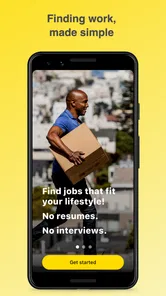
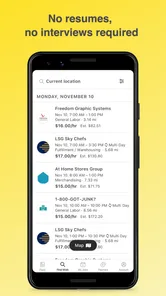
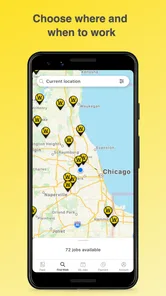
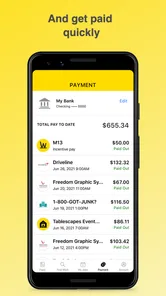
Analysis by Reviewed
I’d keep Wonolo on a personal phone rather than treat it as a shared household job board. It is a business app from Wonolo inc, built around finding temporary work, so its usefulness depends on the individual worker’s location, availability, and interest in the shifts they can see. For someone who needs flexible work, that can make it worth exploring; for a family trying to coordinate everyone’s employment in one account, it is a poor fit.
One phone, one worker’s choices
A realistic use is a person checking for a shift between other commitments, then deciding whether the job and timing are workable before applying. I would avoid having several people browse through one signed-in profile: job choices and applications belong to the account holder, and mixing people’s details or availability would make it harder to keep responsibilities clear. If a household shares a device, sign out or use separate device profiles where available rather than assuming the app provides family accounts or shared scheduling.
Set boundaries before browsing
Before looking for work, I’d agree on a few practical limits: which days are genuinely free, how far the worker is willing to travel, and what kinds of tasks they are prepared to accept. Those decisions help prevent an appealing-looking opening from becoming a rushed commitment that clashes with school, caregiving, or another job. Read each posting carefully and check that its duties and schedule suit the person applying; a broad range of opportunities is useful, but it also means not every listing will be a good match.
Navigating the Gig Economy
Let's dive into how Wonolo works. The app is designed to connect businesses with temporary workers. Whether you're an employer needing last-minute staff or a job seeker looking for immediate work, this app has got you covered. The best part? You can browse through available gigs and apply for the ones that match your skills and schedule. It's like flipping through a job catalog at your convenience!
A User-Friendly Experience
The interface is straightforward and user-friendly. Upon opening the app, you'll be greeted with a clean layout that makes job hunting a breeze. I was pleasantly surprised to find how easy it was to set up my profile and start browsing jobs. Plus, the app offers detailed job descriptions so you know exactly what you're signing up for. No more unpleasant surprises when you show up for work!
Variety at Your Fingertips
One of the standout features of Wonolo is the variety of jobs available. From warehouse work to administrative tasks, there's something for everyone. The app caters to a wide range of industries, which is a huge plus if you're looking to try out different fields or simply want to mix up your work routine. I found myself exploring opportunities I hadn't considered before, which was both exciting and refreshing.
Flexible work takes coordination
Flexibility is most useful when it is paired with a plan. If you are balancing shifts with another job or household duties, I’d check your calendar before applying and keep the details of each commitment in one place you can access quickly. Wonolo can help you find opportunities, but it should not be treated as a household calendar or a guarantee that a shift will fit around everyone else’s plans. A partner or roommate can help with practical logistics, while the worker remains responsible for the application and work commitment.
More From Our News Desk

Weather by Xiaomi Review: Clear at a Glance, Less Clear Up Close

X Under Pressure: Can It Recover When Posting Goes Wrong?

Clash of Clans Is Won Between the Battles

Android Auto Makes the Case for Quieter Car Software

MobiOffice: Transforming Mobile Productivity with Seamless Integration

EA SPORTS FC™ Mobile Soccer: Redefining Mobile Sports Gaming
Age, trust, and expectations
The app’s Everyone content rating describes its app-store age classification; it does not mean every job is suitable for every age or circumstance. I’d have the person doing the work read the posting and make their own decision, with a trusted adult helping a younger household member assess whether an opportunity is appropriate. The app is free to download, has a 4.3 average from around 18,000 ratings, and has been installed over a million times. Those figures may help someone judge whether it is established, but they do not replace checking the details of a particular job or deciding whether gig work suits their needs.
Where it fits among job-search options
Compared with a traditional job board, which is often used to search for ongoing roles and move through a longer hiring process, Wonolo is aimed at temporary work and quick applications. That focus is helpful if you want to explore individual shifts rather than commit to a conventional schedule. The trade-off is that short-term opportunities may not provide the predictability of a regular job. If steady hours, a long-term position, or a single employer relationship is your priority, a standard job site or direct application may be a better starting point.
Make each application a considered choice
A useful habit is to compare a listing’s duties and timing against your real availability before you apply, not after. I’d also keep a simple record of applications and confirmed commitments outside the app, especially if you are juggling several responsibilities. That small bit of organization helps avoid double-booking and makes it easier to follow up on what you have agreed to do. The app’s range can help you discover work you might otherwise overlook, but deciding which options are worth pursuing still takes judgment.
Flexibility and Freedom
Flexibility is the name of the game with Wonolo. You can choose jobs based on your availability, making it perfect for students, part-timers, or anyone with a busy schedule. The freedom to pick and choose when and where you work is liberating. I love that I can balance work with other commitments without feeling overwhelmed.
Who should give it a try?
Wonolo is a reasonable choice for workers who are comfortable with temporary assignments and want to browse opportunities that may fit around their existing routine. It is less suitable if you need guaranteed, consistent hours or want one shared account for several people. It is a free business app, with version 5.53.1 and a minimum operating system requirement of 8.0, so it is also worth checking that your device can run it before making it part of your job search.
In conclusion, if you're in need of a quick gig or looking to diversify your work experience, Wonolo is a fantastic option. It's a reliable app that delivers on its promise to connect workers with employers swiftly and efficiently. So, next time you're in a pinch for work, give Wonolo a try. You might just find the perfect gig to fit your lifestyle!
A household-level verdict
My recommendation is to use it as an individual tool within a household, not as a family coordination system. Keep applications tied to the person who will take the work, discuss schedule effects with anyone sharing responsibilities, and judge each listing on its own terms. With that approach, Wonolo can be a useful route into flexible temporary work; if stability or shared management matters more, I’d look at other employment options instead.
Planning around a real week
Imagine a worker with a changing timetable who has a free weekday but also shares school pickup and errands at home. I’d start by marking the non-negotiable commitments, then check Wonolo during a quiet moment rather than applying while rushing between tasks. If a listing seems promising, the worker can compare its schedule and duties with the week before deciding. That sequence makes the app useful as an opportunity finder without letting a possible shift quietly become a family promise before the worker has checked the practical details.
For shared households, the useful coordination happens outside the account: agree who can cover a task, tell the people affected when an application becomes a commitment, and keep the worker’s own schedule current. A calendar entry should distinguish an opportunity being considered from work that has actually been accepted. That small distinction is easy to overlook when browsing quick openings, but it prevents other household members from planning around a shift that is not confirmed.
Choosing work with the whole shift in mind
A listing’s headline is only a starting point. I would look at the duties and timing together, then consider the trip to the work location, preparation time, and what happens immediately before or after the shift. For example, a job that fits the hours on paper may still be impractical if it leaves no room for a caregiving handoff or another commitment. This is not a reason to reject flexible work; it is a reminder that the worker is choosing the whole commitment, not just a block of time.
One non-obvious advantage of browsing across different kinds of temporary work is that it can help a person test what suits them before narrowing their search. Someone curious about warehouse tasks but uncertain about that environment can use the description to assess whether a particular assignment sounds appropriate, rather than assuming every role under one broad category will be alike. I would treat each opening as its own decision and avoid applying simply because a job title sounds familiar.
What quick applications can and cannot solve
The appeal of a temporary-work app is speed and choice, but neither should be confused with certainty. Finding a listing is not the same as having a dependable weekly schedule, and applying is not a substitute for checking the full commitment. If your income planning depends on a fixed number of hours, I would keep looking at regular employment options rather than relying on shift-by-shift browsing alone. Wonolo makes more sense as one channel in a broader search when flexibility is valuable and the worker can tolerate variation.
It is also worth thinking about how you will track the process. I’d note the date and role when applying, then update the record only when the situation changes, such as learning that a shift is confirmed or no longer being considered. That record can be a basic calendar or personal note; it does not need to be another complicated system. The benefit is clarity when several applications are in motion, especially if a household member asks whether a particular day is still available.
Who benefits most from the format
I see the strongest fit for someone who can make independent decisions, has room in their schedule for temporary assignments, and is willing to evaluate each opportunity rather than expecting a permanent role to emerge immediately. It can also suit a worker exploring different kinds of tasks while keeping other commitments in view. A person who wants one employer, a predictable routine, or a clearly shared family work plan may find a conventional job search more useful and less uncertain.
For a first-time user, I’d make the initial browsing session exploratory: learn how listings describe the work, notice which schedules are realistic, and resist treating every visible option as a good match. That helps set expectations before urgency takes over. If a household member is helping, they can discuss travel and timing, but the applicant should make the choice and understand the duties personally. Support is useful; passing account decisions between people is not.
Trust starts with the person doing the work
Because the app connects people with work, a household should not treat a general app age label as permission for any person to accept any assignment. The person applying needs to understand what the posting asks of them and whether they can meet those expectations. A trusted adult can help a younger person think through safety, transport, and schedule questions, but that conversation should not replace careful reading or local requirements that may apply to work.
On a shared phone, privacy and account clarity deserve the same attention as scheduling. Keeping one worker’s profile and applications distinct from another person’s avoids confusion over who is considering a role and whose availability is being represented. If different household members want to explore work, I’d have each use their own account and device access where practical, rather than treating one profile as a communal inbox. That is a sensible boundary even when everyone trusts one another.
A practical choice, not a household system
Wonolo is free to download and is listed as a business app for everyone, while its actual purpose is work-related and personal to the worker. It was released in 2014, and version 5.53.1 requires Android 8.0 or later. Those basics make it straightforward to assess whether it is relevant and compatible, but the more important question is whether temporary work matches your needs. I would try it when flexibility and the possibility of varied assignments are useful, and look elsewhere when stable hours or shared management are essential.
My bottom line remains practical: use the app to find and consider temporary opportunities, then coordinate household effects through direct conversation and a separate calendar. It can give an individual worker a focused place to explore shifts, but it cannot make an unsuitable schedule workable or remove the uncertainty that comes with short-term work. If you approach it with clear boundaries, careful reading, and realistic expectations, it is worth considering; if your household needs a common employment account or your budget requires dependable hours, I would choose a different route.
Wonolo Frequently Asked Questions
Can I browse Wonolo jobs before creating an account?
Wonolo is built around finding local work, and the opportunities shown can depend on your location and the businesses posting shifts nearby. If you are considering the app, think about whether you are comfortable setting up a profile and using a mobile marketplace to explore openings. Once you have access, you can review listings and decide whether the available work suits your needs.
Is Wonolo available where I live?
Wonolo is designed around local work opportunities, so the jobs you can browse depend on whether businesses are posting work in your area. Before downloading, consider whether you are looking for nearby, flexible shifts rather than a single nationwide list of openings. Once you have access to the app, you can check the listings available to you and see whether they fit your location and schedule.
What should I check before accepting a job through Wonolo?
Read each listing carefully before applying or accepting work. Pay attention to the job’s location, timing, duties, and any requirements the employer has included, then make sure you can meet them. Since short-term jobs can differ from one another, reviewing the details in advance helps you decide whether a particular opportunity fits your availability and expectations.
What is Wonolo and how does it work?
Wonolo is a job marketplace app that connects businesses with on-demand workers. It allows companies to post temporary jobs that need to be filled quickly, and workers can browse these listings to find work that fits their schedule. Users can apply for jobs directly through the app, making it convenient for both employers and job seekers.
Is Wonolo free to use for job seekers?
Yes, Wonolo is free for job seekers to use. Workers can download the app, create a profile, and start browsing available jobs without any cost. Businesses looking to hire workers through Wonolo have to pay a fee to post jobs and access the platform’s pool of potential employees.
Pros
- Flexible job scheduling options.
- Wide range of job categories available.
- User-friendly interface for easy navigation.
- Real-time job alerts and notifications.
- Quick and easy application process.
Cons
- Limited availability in some regions.
- Inconsistent job availability.
- No guaranteed minimum hours.
- Potential for low pay rates.
- Occasional app glitches.











