

WISH ESS
- 41.00
- 4.0
- Installs
- 10.00K
- Price
- Free

Screenshots
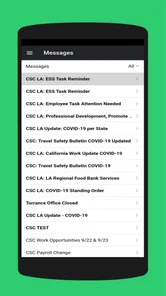
Analysis by Reviewed
For employees who need a straightforward way to stay connected with workplace information, WISH ESS makes a sensible first impression. I reviewed it as an employee self-service app rather than as a general event-discovery tool, and that distinction matters: its value depends on whether your organization uses the WISH workplace system. When it fits that setting, it can put routine employee tasks closer at hand than a browser bookmark or a chain of messages. When it does not, there is little reason for a casual user to install it.
The app is listed in the Events category, but I would not approach it like a public calendar or a ticketing service. Its store summary identifies it as the WISH Employee Portal, and the short description presents it as WISH ESS. In practical terms, I see it as a work-focused doorway into employee services. That makes the experience more useful for staff members than for customers, visitors, or people simply looking for things to do.
How WISH ESS fits into an employee’s routine
The strongest part of this app is its narrow purpose. Instead of trying to be a complete workplace suite for every possible communication need, it gives employees a mobile route to the WISH environment. I find that focus helpful because employee portals are often used in short bursts: checking something before a shift, confirming a workplace detail, or handling a small administrative task when a computer is not nearby.
A realistic example would be an employee leaving home for work and realizing that an important detail needs checking. Opening a dedicated portal app is usually less awkward than searching through old email, locating a browser bookmark, and signing into a web page that may not be optimized for a phone. If WISH ESS is already the portal your organization expects you to use, having it installed can turn that moment into a quick routine rather than a desktop-only chore.
I also like the separation between a work portal and personal apps. Keeping employee-related activity in its own application makes it easier to remember where workplace information belongs. That may sound minor, but it reduces the chance of mixing work notices with personal calendars, messaging threads, or unrelated event apps. For staff who move between locations or do not spend the whole day at a desk, that separation is especially practical.
The developer, ProtaTECH Inc., has kept the identity of the product clear enough that an employee can recognize its role before installing it. The app is free, which removes one obvious barrier for workers who are expected to access their organization’s portal from a mobile device. It is also marked suitable for Everyone, so the store presentation does not position it as an age-restricted product.
What I would check before relying on it
The first question is not whether the interface looks appealing; it is whether your employer actually uses WISH. This is an organization-specific portal, so installation alone will not make it useful. I would confirm the correct workplace system, sign-in details, and any internal instructions before treating the app as part of my daily routine. That simple check avoids the common frustration of downloading a legitimate app that is not connected to your workplace.
More From Our News Desk

 Gmail
GmailGmail in a Busy Inbox: Who Benefits Most?
From first account to crowded workday, Gmail earns its place through dependable search and flexible sorting—but its best fit depends on how much inbox maintenance you can tolerate.

 Prime Video
Switching to Prime Video: What Changes in Your Viewing Routine
Prime Video can make a compelling second home for streaming, but switching means learning a different catalog, rental layer, and route from browsing to playback.

 Universal TV Remote Control
Universal TV Remote Control Works Best as a Reliable Backup
A phone remote earns its place through quick setup and reliable habits. Here is how to get more from Universal TV Remote Control—and where its limits show.

 Weather - By Xiaomi
Weather by Xiaomi Review: Clear at a Glance, Less Clear Up Close
Xiaomi’s weather app makes everyday forecasts quick to scan, but its calm surface can leave useful details and recovery paths harder to find than they should be.

 X
XX Under Pressure: Can It Recover When Posting Goes Wrong?
A resilience-focused review of X, examining setup, mistaken posts, interruptions, weak connections, and the gaps that matter when recovery needs to be dependable.

 Clash of Clans
Clash of Clans Is Won Between the Battles
Its raids are quick; its community is a long-term project of coordination, teaching, rivalry, and shared responsibility—with all the friction that entails.
Latest News



I would also keep the browser version in mind during the first few days. A portal app is most valuable when it saves time on a phone, but some tasks may still feel more comfortable on a larger screen. My preferred workflow would be to use the mobile app for quick checks and immediate access, then switch to a desktop or browser when a task involves extended reading, careful form entry, or comparing several pieces of information at once.
That is one of the less obvious trade-offs here: a dedicated app does not automatically replace every other access method. It can be the fastest front door without being the best workspace for every situation. Thinking of it that way leads to more realistic expectations and prevents disappointment when a phone screen is simply not ideal for detailed administrative work.
Why the mobile format can still be worthwhile
Even a modest employee portal gains practical value from being available at the moment a question comes up. Work-related information is often needed outside a fixed desk routine, such as before commuting, during a break, or while preparing for a schedule change. A phone-based portal is better suited to those short windows than a system that assumes constant access to a company computer.
There is also a useful habit-building advantage. If the app becomes the place I check for WISH-related information, I am less likely to rely on screenshots or outdated notes saved elsewhere. The safer workflow is to open the current portal whenever I need an answer, rather than keeping personal copies that may no longer reflect the latest workplace information. That is not a flashy feature, but it is a meaningful reason to prefer a dedicated portal over improvised workarounds.
Another practical tip is to treat the app as a point of access, not as a substitute for personal organization. I would still record genuinely important commitments in the calendar or task system I already trust, while using WISH ESS to consult the workplace source. This reduces the risk of forgetting something after closing the app and keeps the portal focused on its role as the authoritative work channel.
The main weakness is dependence on the surrounding system
My biggest reservation is that the usefulness of WISH ESS is largely outside the app itself. An employee can have a smooth mobile experience only if the organization maintains the WISH portal well, provides clear access instructions, and keeps the relevant information current. If any of those pieces are confusing, the app may feel limited even when the underlying problem is the workplace setup rather than the application.
This dependence also affects who should skip it. If you are not an employee connected to a WISH-based organization, the app is unlikely to offer meaningful value. It is not the right choice for discovering public events, managing a personal schedule, or replacing a general productivity application. Installing it simply because it appears under Events would be a mismatch between the store category and the actual audience.
I would also avoid assuming that a mobile portal is automatically faster for every task. Small screens can make careful review more tiring, and switching between a portal and another work app may be less convenient than using a computer. For employees who already have reliable desktop access and rarely need information away from the office, the benefit may be modest. In that case, a browser shortcut could be enough, depending on how the organization has configured access.
These limitations do not make the app poor; they define its boundaries. I would judge it by whether it gives WISH users a convenient mobile entry point, not by whether it competes with broad workplace platforms. The honest criticism is that its success is tied to a system and audience that are relatively specific.
Version, maturity, and what the ratings suggest
The current version is 5.0.3, and the app has been available since September 16, 2020. That history gives it more context than a brand-new portal, although age alone does not guarantee that every workplace workflow will feel modern. I would still pay attention to how comfortably it fits the particular organization using it, because employee portals can differ greatly depending on the content and access rules behind them.
On the store, WISH ESS holds a 4.0 average from 119 ratings and has 41 written reviews. I read that as a generally positive but not overwhelming signal. It suggests that many users find the app useful enough for its intended role, while also reminding me that a portal’s quality can be judged differently by people with different employer setups. A rating is helpful context, but it cannot tell me whether my own workplace has configured the service clearly.
The app has reached over 10 thousand installs, which is consistent with a focused employee tool rather than a mass-market social or event platform. That scale makes sense for software tied to particular organizations. I would not compare its reach with a public calendar app; the relevant question is whether it serves its intended workers reliably and with little friction.
Who will get the most from it
I recommend WISH ESS most strongly to employees whose organization explicitly uses WISH and expects staff to access the employee portal from mobile devices. It is a good fit for people who need occasional access while away from a desk, workers who prefer a dedicated app over a browser tab, and anyone who wants to keep workplace access separate from personal tools.
It may also suit employees who are new to an organization and want one recognizable place to begin looking for WISH-related information. My advice in that situation would be to install it, follow the employer’s sign-in guidance, and test it before an urgent need arises. Discovering access problems during a busy workday is avoidable; a short trial during a quiet moment is a much better approach.
I would recommend a different option for someone seeking a public events app, a personal calendar, or a complete collaboration platform. Those users need broader discovery, scheduling, communication, or file features than this focused employee portal is designed to provide. Likewise, employees who do all their work at a computer and have no need for mobile access may find that a normal browser shortcut is simpler.
My final view after using it as a workplace tool
WISH ESS is best understood as a practical access point, not an all-purpose app. Its strength is the convenience of bringing a WISH employee portal closer to the employee’s phone, especially for quick checks during the parts of the day when a computer is inconvenient. The free price and clear employee focus make it easy to try when an organization supports it.
My recommendation is therefore specific: if your employer uses WISH, I think this app is worth installing and testing as part of your normal work routine. Use it for fast access, keep a browser or desktop option for more involved tasks, and avoid storing important details only in personal notes when the portal is the current source. If your workplace does not use WISH, skip it rather than expecting a general events experience.
Overall, I see WISH ESS as a focused, reasonably established employee-service app with a clear audience and a useful mobile role. Its real strength is convenience within the right workplace ecosystem, not breadth. That makes it a sensible recommendation for WISH-connected staff, but a poor match for everyone else.
A quick trial can reveal whether it earns a place on your phone
For a new user, I would make the first test deliberately ordinary: sign in when you have a calm few minutes, find the information you commonly need, then close the app and see whether you can return to it without searching for instructions again. That small rehearsal answers a practical question better than a quick glance at the interface: does this give you a reliable route to the workplace portal, or does each visit still require help from a colleague?
If access is straightforward, keep the app available for the moments when a phone is genuinely more convenient than a computer. If the sign-in process is unclear, ask your workplace contact for the approved route before repeatedly trying different credentials or relying on saved screenshots. The useful habit is to resolve setup once, then use the portal as the current source rather than creating parallel personal records.
Choose the right tool for the job
The main alternatives are not necessarily competing apps; they are different ways of reaching or organizing work information. A browser shortcut may suit someone who wants occasional access and already works comfortably on a computer. A personal calendar is better for reminders that must stay visible alongside family or other commitments, while a broader collaboration tool is more appropriate when the main need is conversation, shared files, or team coordination.
I would not expect WISH ESS to replace those tools. Its more specific role is valuable precisely because it can keep the employee portal distinct from the apps used to plan a day or communicate with coworkers. The trade-off is that moving between systems remains part of the routine. For a quick check, that separation can be tidy; for a long task that involves several sources, a larger screen and the relevant companion tools may be more efficient.
Before switching your habits, consider what you currently use to reach workplace information and what problem the app would solve. If the current method is a confusing trail of messages and bookmarks, a dedicated portal may simplify the starting point. If you already have an easy, dependable browser route and rarely need mobile access, installing another app may add little. That is a useful decision rule: choose it for a real access need, not merely because a workplace app exists.
In the right setting, WISH ESS is worth a low-pressure trial: confirm that your employer uses WISH, follow its access instructions, and see whether mobile access makes routine checks easier. If that test does not fit how you work, the browser remains a sensible alternative; if it does, the app can become a convenient companion without pretending to be a full workplace suite.
WISH ESS Frequently Asked Questions
Is WISH ESS free, and which devices can run it?
WISH ESS is a free employee portal app from ProtaTECH Inc. It is suitable for a broad audience, with an Everyone content rating, and its listed minimum operating-system requirement is version 7.0. Before installing, check that your device meets that requirement and that you are downloading the employee portal intended for your organization.
What is WISH ESS and who is it designed for?
WISH ESS is an employee self-service application intended to give staff convenient access to workplace information and human resources services from a mobile device. Depending on the organization’s setup, employees may be able to view personal details, check attendance or schedules, submit leave requests, review payslips, and receive company announcements. The exact tools available can vary, so access is generally limited to employees of participating organizations.
How do I log in to WISH ESS?
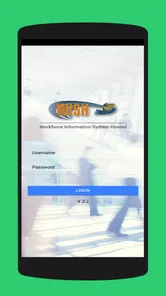
To use WISH ESS, you normally need login credentials provided by your employer, such as an employee ID, username, password, or organization-specific account details. In some implementations, the app may require a company code, server address, or additional verification before allowing access. If you cannot sign in, your employer’s HR or IT department is usually the correct contact because account permissions are managed by the organization.
What features can I use in WISH ESS?
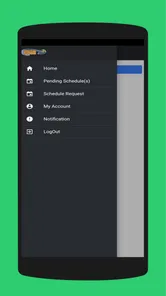
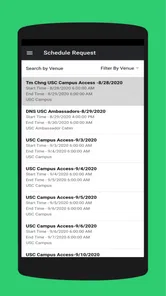
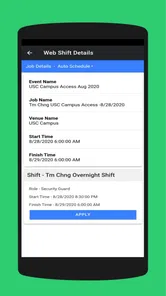
The available features depend on the version of WISH ESS and the configuration chosen by your employer. Common functions may include viewing attendance records, checking work schedules, requesting leave, reviewing salary or payroll information, updating selected personal details, and receiving internal notifications. Some companies may enable only a few of these options, so the application may look different from one workplace to another.
Is WISH ESS safe for viewing personal and payroll information?
WISH ESS may handle sensitive employee data, including attendance, contact details, leave records, and payroll information, so users should treat it like any other business application. Download it only from an official store or company-provided source, use a strong password, and avoid signing in on shared or unsecured devices. Security also depends on your employer’s systems, account policies, and the permissions enabled for your organization.
Pros
- Simple interface makes browsing and ordering products straightforward.
- Frequent discounts and promotions can make some items very affordable.
- Large product selection across fashion
- home
- beauty
- and accessories.
- Personalized recommendations help discover products based on browsing activity.
- Order tracking keeps delivery progress visible after purchase.
Cons
- Product quality and sizing can vary significantly between different sellers.
- Delivery times may be long
- especially for international shipments.
- Returns can be inconvenient and may involve shipping costs.
- Product photos and descriptions are not always fully accurate.
- Customer support response times may vary when resolving order issues.











