Widgets Art - Wallpaper, Theme
- 2.74K
- 4.7
- Installs
- 5.00M
- Price
- Free
Screenshots
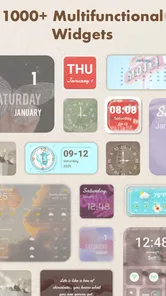
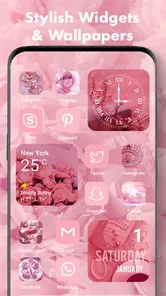
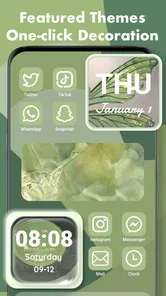
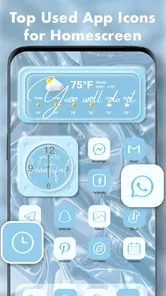
Analysis by Reviewed
I tend to notice my home screen most when I’m reaching for my phone in a hurry: the same icons, the same background, day after day. Widgets Art - Wallpaper, Theme is aimed at people who want to change that look without turning customization into a technical project. It’s a free personalization app from Animoji Phone X & Emoji Maker Develop Team, and its focus is on themes, app icons, wallpapers, and widgets rather than changing how the phone works.
Trust starts with clear expectations
I’d treat this as a visual customization tool, not as something I need to hand over personal details to use. The app is rated Teen, and it has a 4.7 average from around 159,000 ratings, with over 5 million installs. Those figures suggest it has found an audience, but popularity alone is not a privacy guarantee. Before installing, I’d still read the permission prompts on my own device and consider whether each one makes sense for the task I’m doing.
That distinction matters with any app that invites you to change a home screen. A wallpaper choice is one thing; allowing access to something unrelated would be another. I wouldn’t approve a permission just because a setup flow asks for it. If a prompt is unclear, I’d pause and check the phone’s settings rather than assume it is essential to make the design look right.
First Impressions: A Visual Feast
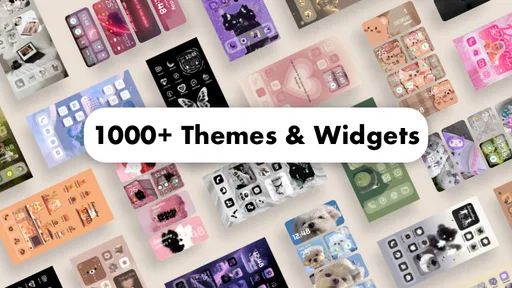
Right off the bat, Widgets Art - Wallpaper, Theme greets you with a super intuitive interface. It's like walking into a well-organized candy store, with a plethora of options to choose from. Each wallpaper and theme is carefully curated, offering a mix of vibrant colors and soothing tones, catering to all sorts of preferences.
Customization Galore
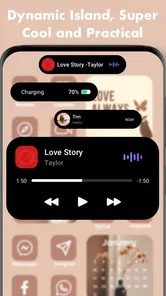
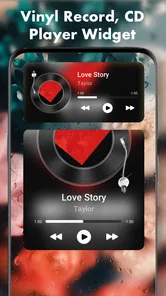
Now, let’s talk customization. This app isn’t just about swapping out your wallpaper. Oh no, it goes beyond! Whether you’re looking to tweak your home screen layout or give your widgets a fresh new look, this app's got your back. The variety of themes is quite impressive, ranging from minimalist designs to more elaborate artistic styles. It feels like the app knows exactly what you need, even before you do.
And the best part? You don’t need to be tech-savvy to make these changes. The user-friendly design ensures that anyone can navigate through the options without breaking a sweat. Adding widgets or changing themes is as easy as pie, and honestly, it’s a whole lot of fun experimenting with different looks.
A Little Something for Everyone
What truly sets this app apart is its versatility. There’s something magical about how it caters to a variety of tastes. Whether you’re a fan of bold, eye-popping visuals or prefer something more subtle and calming, you’ll find a theme that resonates with your style. Plus, the app regularly updates its library, so you’ll always have fresh options to keep your phone looking snazzy.
More From Our News Desk

 Gmail
Gmail in a Busy Inbox: Who Benefits Most?
From first account to crowded workday, Gmail earns its place through dependable search and flexible sorting—but its best fit depends on how much inbox maintenance you can tolerate.

 Prime Video
Switching to Prime Video: What Changes in Your Viewing Routine
Prime Video can make a compelling second home for streaming, but switching means learning a different catalog, rental layer, and route from browsing to playback.

 Universal TV Remote Control
 Works Best as a Reliable Backup
A phone remote earns its place through quick setup and reliable habits. Here is how to get more from Universal TV Remote Control—and where its limits show.

 Weather - By Xiaomi
Weather by Xiaomi Review: Clear at a Glance, Less Clear Up Close
Xiaomi’s weather app makes everyday forecasts quick to scan, but its calm surface can leave useful details and recovery paths harder to find than they should be.

 X
X Under Pressure: Can It Recover When Posting Goes Wrong?
A resilience-focused review of X, examining setup, mistaken posts, interruptions, weak connections, and the gaps that matter when recovery needs to be dependable.

 Clash of Clans
 Is Won Between the Battles
Its raids are quick; its community is a long-term project of coordination, teaching, rivalry, and shared responsibility—with all the friction that entails.
Latest News



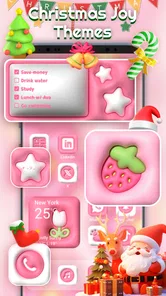
And let’s not forget about the seasonal themes! With holidays around the corner, you can easily dress up your phone to match the festive spirit. Imagine having a spooky Halloween theme or a cozy winter wonderland scene—it's like dressing up your phone for the occasion!
Make the makeover work in daily use
For me, the most practical way to try a theme is to change one part of the screen first, then live with it for a day. A dramatic wallpaper can look great in a preview but make icons harder to spot when I’m checking a message outdoors. I’d pick a background with enough contrast, keep the most-used apps in familiar positions, and only then decide whether a matching icon style is worth applying. This small-step approach makes it easier to undo a choice that looks attractive but slows me down.
A realistic use case is preparing a calmer screen before a busy work or study week. I might choose a quieter background and a widget arrangement that puts the information I check most within easy reach, then save a bolder theme for the weekend. That is where a themed customization app can feel more useful than simply downloading a single wallpaper: it gives you a way to make several visual choices feel coordinated. The trade-off is that a complete makeover may take more tapping than changing one image, and it can make familiar icons less recognizable if the new style is too decorative.
Where it fits among other options
Compared with the built-in wallpaper picker, this app is for people who want a more styled, coordinated result rather than a quick background swap. Compared with changing icons manually or piecing together designs from separate apps, having themes, wallpapers, and widgets in one place may make experimenting feel less scattered. But if you already enjoy building a precise layout with your phone’s native tools, or only want one plain wallpaper, the built-in options may be simpler and easier to maintain.
I’d also keep an eye on the practical cost of trying lots of designs. The app is free to install, while optional in-app purchases range from $0.49 to $39.99 per item. I’d browse first and decide what I actually want before buying anything; a preview is not the same as knowing a design will suit my everyday screen. The current version is 1.0.0.2625 and it requires Android 7.0 or later, so it is worth checking compatibility before planning a full setup.
Choices, purchases, and sensible limits
Personalization is most satisfying when the user stays in control of the final screen. I’d treat each theme as a starting point, not a commitment: test it, check whether the icons remain easy to identify, and switch back if it adds clutter. If you share your device with someone else, it is also sensible to consider whether a playful or highly customized home screen will be comfortable for both of you.
One question people often have is whether they need to pay to try the app. It is free to download, but optional purchases are available, so I’d check the price attached to any item before confirming it. Another practical question is age suitability: its Teen content rating makes it a better fit for teenagers and adults than for young children without a parent’s guidance. Those checks help keep the decision grounded in how you actually use your phone, rather than in the excitement of a preview.
Making a theme easier to live with
A useful way to judge a design is to test it during the moments when your screen has to work, not just when you are browsing themes. I’d check readability in both a bright room and a dim one, and look at the screen with notifications visible. A wallpaper that feels peaceful on its own can compete with notification text or make an icon label harder to read. This is a small check, but it can save the annoyance of having to redo a setup after a day.
I’d also make a note of the original arrangement before changing several elements. Keeping a mental or written record of which apps sit in the spots you use most makes it easier to restore familiar navigation if a theme rearranges the visual balance. For someone who relies on muscle memory, preserving the position of everyday apps matters more than matching every icon. The best makeover is not necessarily the most complete one; it is the one that makes the phone feel different without making basic tasks slower.
Who will enjoy it—and who may not
I can see this being a good fit for someone who gets bored with a stock-looking screen, likes coordinated visuals, and enjoys occasional small changes. It also suits a person who wants to make a device feel more personal for a new season or a change in routine, without learning a complicated design workflow. If you like browsing styles before settling on one, the combination of themes, wallpapers, icons, and widgets gives you several ways to approach the same makeover.
I’d be more cautious if you depend on a tightly organized screen, prefer the phone’s original icons, or simply want a background you can set and forget. A themed look can introduce extra visual decisions, and decorative icons may take longer to recognize than familiar ones. If your priority is the fewest steps and the least change, the built-in wallpaper controls are likely the more straightforward choice. If you enjoy fine-tuning every detail, separate tools or native settings may also give you more direct control.
What to check before committing
Before applying a full design, I’d look at how it affects the particular screen I use most. A work phone, for example, may benefit from a subdued background and easily identifiable icons, while a personal device used mainly for browsing photos and messages can handle a more expressive look. That distinction keeps the choice practical rather than treating every attractive preview as a good fit for every device.
There are a few sensible questions to settle as you explore. Does the style leave your important apps easy to find? Are you comfortable with any purchase prompt that appears? Do the permission requests make sense for the change you are making? I’d answer those one at a time and stop if the experience feels unclear. For privacy-minded users, checking the device’s permission controls remains the most useful way to stay in charge; I wouldn’t infer anything about data handling from a theme’s appearance or popularity.
Final Thoughts: Worth the Download?
In a word, absolutely! Widgets Art - Wallpaper, Theme is more than just a tool; it’s like a personal stylist for your phone. It elevates your device from merely functional to a true reflection of your personal style. The ease of use combined with the sheer variety of options makes it a must-have app for anyone looking to add a touch of personality to their phone.
So, if you're ready to transform your screen from drab to fab, give this app a whirl. Trust me, your phone will thank you for it, and so will your eyes!
My cautious recommendation
I’d recommend giving it a look if you enjoy refreshing your screen and are happy to check purchases and permission prompts as you go. It is less compelling for someone who values a completely stock interface, wants only a single background, or dislikes spending time checking whether a theme remains practical after the first impression. The app was released on February 24, 2023, and its visual focus is clear; the best reason to keep it is that its designs make your own device feel more inviting without making everyday navigation harder.
Widgets Art - Wallpaper, Theme Frequently Asked Questions
Does Widgets Art - Wallpaper, Theme offer enough variety to match different personal styles?
Widgets Art - Wallpaper, Theme is intended for people who want to give their home screen a more personal look. Its summary highlights multiple themes, app icons, and wallpapers, giving you several kinds of visual elements to explore and combine. If you enjoy changing your device’s appearance to suit your taste, these options make the app worth considering.
Is Widgets Art - Wallpaper, Theme suitable for personalizing a home screen without changing how my device works?
Widgets Art - Wallpaper, Theme is a personalization app for customizing the look of a device’s home screen. Its store summary highlights themes, app icons, and wallpapers, so its focus is visual rather than changing the device’s underlying functions. It is listed for free, with optional in-app purchases ranging from $0.49 to $39.99 per item.
What is Widgets Art - Wallpaper, Theme and how does it enhance my device's appearance?
Widgets Art - Wallpaper, Theme is a creative application designed to transform your device's home screen with personalized themes and stunning wallpapers. It provides an extensive library of high-quality images and customizable widgets. Users can enhance their device's appearance by selecting from various themes and wallpapers, allowing a unique and personalized aesthetic that reflects individual style preferences.
Is Widgets Art - Wallpaper, Theme free to use or does it require a subscription?
Widgets Art - Wallpaper, Theme offers a basic version for free, allowing access to a limited selection of wallpapers and themes. For full access to the premium library and additional features such as exclusive widgets and ad-free experience, users can opt for a subscription model. This premium option provides ongoing access to the latest updates and content enhancements.
How user-friendly is Widgets Art - Wallpaper, Theme for customizing my home screen?
The application is designed with user-friendliness in mind, offering an intuitive interface that makes it easy to navigate and apply themes and wallpapers. Users can effortlessly browse through categories, preview themes, and apply them with just a few taps. The app also provides customization options for widgets, allowing users to tweak their home screen to fit their personal style seamlessly.
Pros
- Highly customizable widget options.
- Regular updates with new themes.
- Easy-to-use interface.
- Low battery consumption.
- High-quality graphics and design.
Cons
- Limited free themes available.
- Ads can be intrusive.
- Requires in-app purchases for full features.
- Occasional crashes reported.
- Limited support for older devices.