Widgeet-Color Widgets(Widget)
- 916.00
- 4.4
- Installs
- 5.00M
- Price
- Free

Screenshots
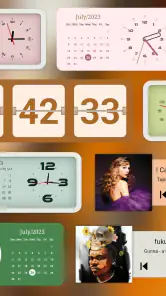
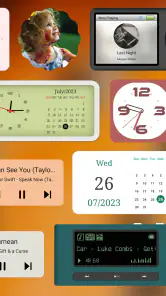
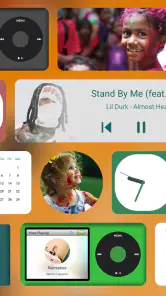
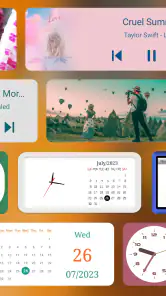
Analysis by Reviewed
When a widget refuses to appear where I expect it, I don’t immediately assume the design app is broken. With a home-screen tool such as Widgeet-Color Widgets, the fiddly part is often the handoff between choosing a design in the app and placing it through Android’s own home-screen controls. I find it helps to treat those as two separate steps: first prepare the look, then add the widget using the launcher’s widget menu.
Where setup can snag
The app is aimed at visual personalization, so it makes most sense when you want a home screen that feels coordinated rather than merely functional. A useful first project is a single clock or calendar widget, not a full-screen makeover. That gives you a chance to check whether its size and appearance suit your layout before spending time styling several elements around it.
If the result looks crowded, try planning around the space your icons already occupy. A photo-based design may look striking on its own but compete with app labels or a busy wallpaper. I’d choose a simpler color treatment for the most-used screen and reserve more decorative choices for a less crowded page. That small decision can make a personalized layout easier to read day to day.
Checks before rebuilding your screen
Widgeet is a free personalization app from Hello Widget, with optional in-app purchases listed from $2.99 to $9.99 per item. It is rated for Everyone, and its Android version requires 8.0 or later. The current version is 1.1.2.4. I’d check the device’s Android version before planning a setup, especially if you’re helping someone with an older phone.
It has a 4.4 average from around 115,000 ratings and more than 5 million installs, which suggests plenty of people use it, though popularity can’t tell you whether its style will suit your particular launcher or taste. The app was released on January 10, 2023, and its 916 written reviews are a reminder that star averages compress a lot of different devices and expectations into one number.
Recovering a layout without starting over
If a widget disappears after you rearrange the home screen, I’d first look for it in the launcher’s widget picker and add it again rather than immediately recreating the design. If its appearance seems stale, reopen the app and check the selected design before changing several settings at once. Making one adjustment at a time is a practical way to see whether the issue is the chosen look, placement, or simply a screen refresh.
It also pays to keep a mental note of the choices that make a layout work: approximate placement, the colors that remain legible, and which widgets you actually use. That is more useful than chasing a perfect screenshot. If you switch launchers or rearrange icons, expect to review the layout; home-screen behavior is partly controlled by Android and the launcher, not only by the widget app.
More From Our News Desk

Weather by Xiaomi Review: Clear at a Glance, Less Clear Up Close

X Under Pressure: Can It Recover When Posting Goes Wrong?

Clash of Clans Is Won Between the Battles

Android Auto Makes the Case for Quieter Car Software

MobiOffice: Transforming Mobile Productivity with Seamless Integration

EA SPORTS FC™ Mobile Soccer: Redefining Mobile Sports Gaming
Unleashing Your Creativity
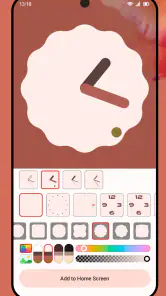
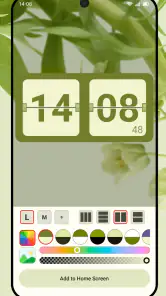
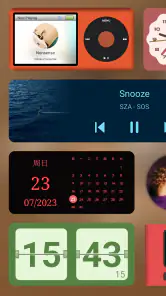
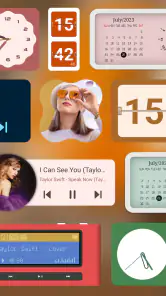
The first thing that struck me about Widgeet-Color Widgets is the sheer variety of options it offers. You can create widgets in all shapes and sizes, from calendar widgets to clocks, and even to-do lists. It's like having a whole playground for your creativity right on your home screen. I found myself spending way more time than I'd like to admit tweaking and adjusting until everything looked just right.
Customization Galore
What I love about this app is the level of detail you can get into when customizing your widgets. You can change colors, fonts, and even add personal photos. It's a fantastic way to make your phone truly yours. For someone who enjoys personalizing their tech, this was a dream come true. I mean, who doesn’t want a home screen that reflects their personality?
Moreover, the app interface is pretty intuitive. Even if you're not the most tech-savvy person out there, you won't have a hard time navigating through the options and settings. It's all laid out in a way that just makes sense, which is always a relief.
A practical way to make the options less overwhelming is to decide what each screen should do before you customize it. On a weekday morning, for instance, I’d keep the most glanceable information—such as the time or calendar—where I can see it quickly, and use color or a personal photo to give the screen character without making the text harder to read. This is a better test than judging a widget only inside the editor: check it against your wallpaper and icons in its actual home-screen position.
Compared with relying only on Android’s built-in widgets, this app is more appealing when matching colors, fonts, and photos matters as much as seeing information. Built-in options are often the simpler choice if you want the least setup or already like their appearance. I’d also avoid building a whole layout around decorative widgets if you mainly need quick access to apps; visual consistency is satisfying, but it should not make your everyday taps harder.
Making a layout work for different routines
The useful question is not simply which widget looks best, but what you need to notice without opening another app. If you check the date while getting ready, a calendar design can earn its space; if you mostly unlock your phone to launch a handful of apps, that same area may serve you better as clear, familiar icon space. I’d treat each widget as a trade: it should provide a glanceable cue or a look you genuinely enjoy, not occupy the screen just because it can be customized.
For a shared family photo or a favorite image, I’d test the crop and contrast before settling on it. A picture that looks balanced in the customization view can become visually busy once it sits behind other home-screen elements. Choosing an image with a calmer area where text needs to remain readable is a small design decision that can make the finished screen feel more intentional without requiring a complicated arrangement.
Another practical tip is to change one visual variable at a time. If you alter the photo, font, and color together, it becomes harder to tell which choice improved readability and which made it worse. I’d settle the background first, then adjust text contrast, and only then decide whether the widget belongs on the primary screen. That sequence is especially helpful if you are making a layout for someone else who values legibility over experimentation.
Performance and Usability
Now, let's talk about how it actually performs. I was pleasantly surprised to find that it runs smoothly on my device without any noticeable lag. The widgets update in real-time and don't seem to drain the battery excessively, which is a big win in my book. No one wants a battery-hogging app, right?
In terms of usability, it's pretty straightforward. Once you've set up your widgets, they blend seamlessly with your other apps and functions. It’s like they were always meant to be there. Plus, if you ever get bored of your current setup, switching things up is a breeze.
My main caution is to make changes in small passes. Start with one widget, place it, and live with it through a normal day before committing to several matching designs. That reveals practical issues a preview can miss, such as whether a photo makes text difficult to distinguish or whether the chosen space is more useful for an app shortcut. If your phone’s layout looks different from the editor, check the launcher placement and available screen space before rebuilding the design.
When another approach makes more sense
Widgeet is best suited to people who enjoy adjusting the look of their Android home screen and don’t mind spending a little time getting the balance right. It is less compelling if you prefer a plain layout, rarely use widgets, or want every element to stay exactly as the manufacturer arranged it. In those cases, leaving the existing home screen alone—or using the phone’s built-in widgets—may be more satisfying than adding another customization step.
If you are deciding whether to pay, I’d begin with the free app and see whether its available choices already fit your routine. The listed purchases are optional, so there is no reason to buy anything before you know what you want to change. I’d also keep expectations grounded: a design app can personalize a screen, but the launcher still affects how widgets are placed and displayed.
Who will get the most from it
I’d recommend trying it if you enjoy making a phone feel personal and are willing to spend a little time checking how a design behaves outside the editor. It is particularly suited to someone who wants a coordinated home screen but still wants to choose the balance of color, type, and personal imagery. The most satisfying outcome is likely to come from a few purposeful widgets rather than treating every open patch of screen as space that needs decoration.
I would steer away if you want a setup that needs no visual decisions, or if you rely on a launcher arrangement that you do not want to disturb. A simple built-in widget can be the better fit when speed and familiarity matter more than matching a theme. Likewise, if you rarely look at widgets, the time spent styling one may not repay itself. That is not a flaw so much as a mismatch between a customization tool and a person who prefers the default screen.
Why You Might Love It
If you're someone who enjoys giving your phone a personal touch, Widgeet-Color Widgets is definitely worth checking out. It's fun, it's functional, and it lets you express yourself in a way that few other apps do. Plus, the satisfaction of seeing your perfect home screen every time you unlock your phone is truly unmatched.
So, if you're ready to unleash your inner designer and give your phone a fresh, personalized look, I'd say go ahead and give this app a try. Who knows, you might just find yourself getting hooked on the endless possibilities!
A sensible way to decide
My advice is to begin with one useful widget and give it a real job: help you check the time, orient yourself around the day, or bring a personal touch to a screen you see often. Judge the result in ordinary use, with your usual icons and wallpaper in place, rather than by how polished it looks in isolation. If the design makes information harder to scan, simplify it; if it adds character without slowing down your routine, keep building from there.
Overall, I see Widgeet as a hands-on option for Android users who care about the appearance of their home screen as well as its basic usefulness. Its appeal is the freedom to shape a widget’s look, while the trade-off is that placement and day-to-day fit still take a little thought. I’d give it a try if personalizing your screen sounds enjoyable, and stick with the standard widgets if you would rather keep things quick and uncomplicated.
Widgeet-Color Widgets(Widget) Frequently Asked Questions
Is Widgeet-Color Widgets free to download?
Widgeet-Color Widgets is free to download, so you can try its home-screen personalization features without paying upfront. The app also offers in-app purchases priced from $2.99 to $9.99 per item. Consider whether the free options meet your needs before deciding to buy anything; you can use the app to explore widget-based personalization and choose whether additional paid options are worthwhile for you.
Who is Widgeet-Color Widgets intended for, and what is its age rating?
Widgeet-Color Widgets is a personalization app for people who want to change the appearance of their Android home screen using widgets. It has an Everyone content rating, so its stated age classification is suitable for a general audience. If you enjoy tailoring the look of your device, its focus on colorful widget designs may make it a useful app to explore.
Is Widgeet-Color Widgets available for Android, and what does it help me personalize?
Widgeet-Color Widgets is an Android personalization app for dressing up your home screen with widgets. Its focus is making the screen feel more individual through colorful designs and customizable layouts. If you enjoy adjusting the look of your device rather than leaving the home screen unchanged, the app offers a way to explore widget-based personalization.
Will Widgeet-Color Widgets work on my Android device?
Widgeet-Color Widgets requires Android 8.0 or later, so check your device’s Android version before downloading. The app is available for Android, and its purpose is to help personalize the home screen with widgets. If your device meets the minimum system requirement, you can try installing it and see how its widget options fit your screen and setup.
What is Widgeet-Color Widgets and how does it work?
Widgeet-Color Widgets is a versatile app that allows users to personalize their home screens with colorful and customizable widgets on both Android and iOS devices. The app offers a wide range of widget styles, including clocks, calendars, and weather updates, all of which can be tailored to fit your personal aesthetic. Users can easily add widgets by choosing from pre-designed templates or by creating their own unique designs using the app's intuitive interface.
Pros
- Highly customizable widgets
- Intuitive user interface
- Regular updates
- Seamless integration
- Wide range of widget types
Cons
- Some features require payment
- Occasional bugs
- Limited free widget options
- Consumes battery quickly
- Ads can be intrusive
- Category
- Personalization
- Version
- 1.1.2.4











