Whova - Event & Conference App
- 4.04K
- 4.9
- Installs
- 1.00M
- Price
- Free

Screenshots
Analysis by Reviewed
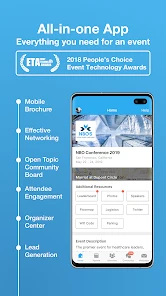
When I attend a busy conference, I want to spend my attention on people and ideas, not on hunting through printed schedules or trying to remember which session starts next. Whova - Event & Conference App is built around that practical problem: it brings event information and attendee activity together on a phone. It is a free business app from Whova, and its 4.9 average from around 30,000 ratings suggests many users find it useful. I see it as an event companion rather than a general-purpose planner: its value depends heavily on whether the event you are attending uses it well.
Free to install, with value tied to your event
The app is free, so trying it for an event does not require a purchase. That makes the decision fairly simple: the more of the event’s schedule, materials and attendee activity you can use in one place, the more worthwhile it is to have on your phone. It has over a million installs and around 4,000 reviews, and it is rated Teen. Whova’s long-running presence in the event-app space is also reflected in its release date of October 7, 2013; version 11.8.0 is the current version, with Android 7.0 as the minimum OS.
Free access should not be confused with a guarantee that every event offers the same experience. Whova is useful when the organizers have populated the event area with relevant information and encourage attendees to use it. If you install it expecting a complete directory of every conference or a social network that stays busy year-round, you may not get much out of it. I would install it once I know an event is using Whova, then judge its value by the information and activity available for that specific gathering.
Diving into the Features
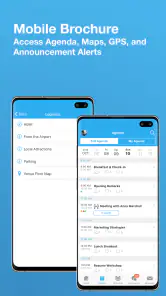
First off, let's talk about the agenda feature. With Whova, you can easily browse the event's agenda, customize your own schedule, and set reminders for sessions you don't want to miss. It’s like having a digital agenda book that keeps everything neatly organized. I love how you can even get notifications about any changes in the schedule, which is a lifesaver if you’re anything like me and tend to lose track of time.
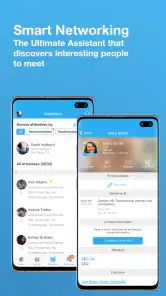
Networking can often feel a bit daunting at large events, but Whova makes it a breeze. The app provides a platform where you can see who else is attending, check out their profiles, and even schedule meetups. It’s like LinkedIn but specifically for your event. I found the icebreaker feature particularly fun, letting you interact with other attendees even before the event kicks off. It's a great way to turn those awkward introductions into meaningful connections.
Making the agenda work in a real conference day
I find the personal schedule most useful when sessions overlap or the venue is busy. Before the day begins, I would scan the agenda and pick the talks I genuinely want to attend rather than trying to keep every option in my head. Reminders can help me leave one conversation in time for the next session, while schedule-change notifications give me a reason to check the app again before walking across a venue. A good habit is to review the next block of the day during a break; that is more reliable than opening the agenda only after a session has already started.
There is a trade-off, though: a personal schedule only helps if I keep it current. If I change plans after talking with someone or decide to stay for a discussion, the app cannot make that choice for me. I would treat the schedule as a flexible shortlist, not a rigid itinerary. That approach preserves room for the unexpected while still reducing the chance that I miss a talk I planned around.
More From Our News Desk

Clash of Clans Is Won Between the Battles

Android Auto Makes the Case for Quieter Car Software

MobiOffice: Transforming Mobile Productivity with Seamless Integration

EA SPORTS FC™ Mobile Soccer: Redefining Mobile Sports Gaming

How Microsoft OneDrive Became a Mobile Productivity Giant

How Google Translate Breaks Language Barriers Effortlessly
Networking without turning every break into work
The attendee profiles and meetup option can make a large gathering feel more approachable, especially if I arrive without colleagues. I would use the attendee list with a clear purpose: look for people whose work connects to a question I already have, then send a short, specific invitation rather than trying to contact everyone. The icebreaker is most useful as a low-pressure opening, not a substitute for an actual conversation. A quick exchange before the event can give me a natural topic when we meet in person.
This is also where restraint matters. Networking tools can feel awkward if I treat every profile as a lead or assume that a listed attendee is available to meet. I would use the app to make a few intentional connections and leave open time for people I encounter naturally. If I prefer not to share a profile or interact through an event platform, the schedule and documents can still be the practical reason to use it, while ordinary in-person introductions remain an option.
What Makes Whova Stand Out?
One of the standout features of Whova is its ability to handle multiple events simultaneously. If you're a conference junkie hopping from one event to another, this feature is a godsend. You can switch between different event agendas without any hassle, ensuring you’re always in the loop no matter where you are.
That is particularly handy for someone attending a work conference and a separate professional gathering around the same period: keeping both event spaces available can be simpler than juggling separate printed programs or notes. I would still check which event is selected before relying on a reminder, especially when moving between gatherings. The app’s multi-event convenience does not remove the need to pay attention to the context of each agenda.
Another gem is the document-sharing capability. Gone are the days of lugging around hefty conference booklets. With Whova, all the necessary documents are just a tap away. Whether it’s speaker slides, event maps, or exhibitor brochures, everything is stored digitally for easy access. Plus, you can jot down notes directly in the app, making it super handy for those information-packed sessions.
Useful materials, with a sensible backup plan
For a practical workflow, I would save the most relevant event materials for the parts of the day when I need them: check a map before changing rooms, open a brochure when deciding which exhibitor to visit, and use notes to capture one follow-up task after a talk. That keeps the app from becoming a pile of files I never revisit. Notes are most valuable when they are specific enough to act on later, such as a name to contact or a point to research, rather than a full transcript of a session.
I would not make a phone the only place I keep an important work note or the only way I know where to go. A paper backup or a separate calendar entry can be sensible if a session is essential, particularly when a full day leaves little time to troubleshoot. Whova brings event resources together, but my own preparation still matters: I would check the day’s key details before arriving and keep a note of the sessions I cannot afford to miss.
Where a dedicated event app beats general tools
Compared with a standard calendar, Whova is more event-centered: the agenda, attendee connections and shared materials sit in the same event context rather than being scattered across appointments, messages and files. A calendar may be better for long-term planning across work and personal commitments, while a notes app can be a better home for information I need after the conference ends. I would use those tools alongside Whova when needed, not expect one event app to replace them all.
It is also different from simply relying on the organizer’s emails or a printed program. Those can be enough for a small event with a stable schedule and little need to connect with other attendees. Whova makes more sense when I expect changes, several sessions to compare, or useful attendee and document information in the app. If an event’s Whova space is sparse, the familiar alternatives may be quicker and less distracting.
My Personal Take
Using Whova felt like having a secret weapon during conferences. The app's intuitive design and user-friendly interface make it accessible for everyone, whether you're tech-savvy or not. I appreciated the little touches, like the ability to provide feedback on sessions and speakers directly within the app. It makes you feel like your opinion truly matters and contributes to improving future events.
For a first-time attendee, I would install it before the event rather than while walking between sessions. That gives me time to find the agenda, look at the materials and decide whether I want to use the networking options. If the event has invited attendees to participate through the app, checking it before arriving can make the first few conversations less of a cold start. If I only need a program, I can keep my use narrow and ignore the social side.
If I had to pick one thing that truly sets Whova apart, it would be its community engagement. The app fosters a sense of belonging among attendees, turning a large, overwhelming event into a series of smaller, intimate gatherings. It’s a game-changer for anyone looking to get the most out of their conference experience.
Making a short event worthwhile
Not every useful situation involves a large conference. At a professional meetup with a handful of sessions, I would use the agenda to decide which talk fits my goals, then check the attendee area for someone I have a concrete reason to meet. If the event materials are available, I can keep a map or exhibitor information close instead of searching through email while people are waiting. The same routine works for a one-day gathering, but I would skip the networking steps if the attendee list is quiet or I already know who I need to speak with.
A small but useful habit is to turn each session note into a next action before moving on: a person to follow up with, a resource to revisit, or a question to raise later. That makes the conference experience easier to carry back into normal work. I would not use event notes as a permanent archive, though; copying only the points I need into my usual notes system after the event keeps the temporary program from becoming a second, poorly organized notebook.
Who will get the most from it?
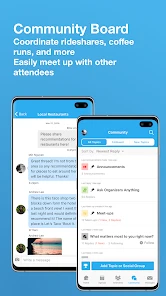
I think Whova is a strong fit for people attending multi-session conferences, professional meetups or other events where organizers have supplied a useful agenda and attendee information. It can also help speakers and busy participants keep event materials close while moving between sessions. The best everyday scenario is a packed workday: I check my chosen talks over breakfast, use a reminder to leave a conversation on time, consult a map during a break, and make one planned introduction before heading home.
I would skip it, or use it only as a basic program, if I dislike event-based social tools, do not need networking, or am attending a small gathering whose schedule is already easy to manage. It is not a replacement for a broad professional network, a full calendar, or a durable personal knowledge system. The practical question is whether this particular event has enough content and participation to justify another app on my phone.
It is also a sensible choice for someone who wants a single event workspace but does not want every part of the day to become a networking exercise. I can rely on the agenda and materials without using attendee profiles, and I can decide how much to participate rather than treating every feature as mandatory. On the other hand, if an organizer communicates everything clearly by email and the program is simple, adding another app may create more checking than convenience. In that case, a calendar reminder and the organizer’s messages may be the better fit.
Questions worth settling before the event
Before installing, I would check whether the event organizer is using Whova and whether the event has been set up with the information I actually need. That answers the most important practical question: will this be a working event hub or just another icon on my phone? I would also confirm that my device meets the Android minimum of 7.0 if I plan to use the Android version. The app is rated Teen, a detail families and younger attendees may want to consider when deciding whether it is appropriate for them.
People who are concerned about staying connected during a busy day should make a simple backup plan for essential details. I would note the room and the sessions I care most about somewhere dependable, rather than assuming that every last-minute change will be noticed while I am occupied. For questions about event access or the information available inside a particular gathering, the organizer is the useful point of contact; the app itself cannot make a poorly maintained event space more informative.
My verdict on the free download
Because Whova is free, I see little reason not to try it when an organizer uses it, especially if I have several sessions to plan around. Its strongest value comes from combining the event agenda with attendee connections and shared resources; its main limitation is that usefulness depends on the event experience, not just the app itself. I would download it for a busy conference, explore the features I actually need, and keep a calendar or simple notes app for anything that must outlast the event.
In conclusion, if you're attending an event anytime soon, do yourself a favor and give Whova - Event & Conference App a try. It's more than just an app; it's your conference companion. Trust me, once you've experienced a conference with Whova, you'll wonder how you ever managed without it.
Whova - Event & Conference App Frequently Asked Questions
Does Whova work without an event invitation or access code?
Whova is most useful when you are taking part in an event that uses the app. Event information and attendee tools are tied to the particular gathering, so having the relevant event details or access instructions can help you find the right event and use its available features. You can download the app beforehand, but the experience depends on the event you plan to attend.
Can I check an event schedule and plan sessions in Whova?
Yes. Whova can help attendees review event information and plan which sessions to attend. Its agenda tools make it easier to keep track of a conference schedule from a mobile device, while the information available can vary by event. If you are deciding whether to install it, consider whether your event uses Whova and whether you want to keep its schedule and participation tools together in one app.
Is Whova free to download, and what devices can run it?
Whova is free to download and is available for Android and iOS devices, including smartphones and tablets. Before installing, check that your device runs a compatible operating system; the Android version requires Android 7.0 or later. The app is designed to give attendees access to event information and features from their mobile device.
Who develops Whova, and what should I know about its age rating?
Whova is developed by Whova and is listed as a business app with a Teen age rating. That rating is worth considering if a younger person will use the app, especially because Whova includes attendee profiles and messaging for event-related networking. Its focus is conferences and other professional gatherings, where participants use the app to follow event activities and connect with others.
Can I use Whova if I am attending an event rather than organizing it?
Yes. Whova is useful for attendees as well as event organizers. As a participant, you can use it to review event information, plan which sessions to attend, and connect with other people taking part. The available details and tools may depend on the particular event, but the app is intended to make participation and event coordination easier from a mobile device.
Pros
- User-friendly interface with intuitive navigation.
- Comprehensive event information and updates.
- Networking features enhance attendee interaction.
- Customizable agendas for personal scheduling.
- Offline access to event materials.
Cons
- Requires internet for full functionality.
- Limited customization for event organizers.
- Occasional bugs with notifications.
- Some features require event organizer setup.
- Data privacy concerns for users.

- Category
- Business
- Version
- 11.8.0











