

Whoop Triggerz Plus
- 385.00
- 4.7
- Installs
- 100.00K
- Price
- Free

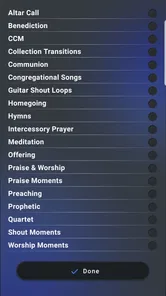
Screenshots
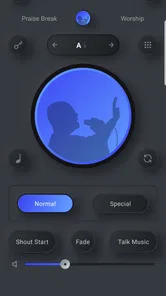
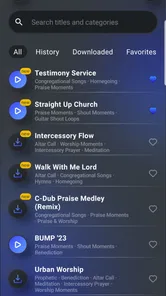
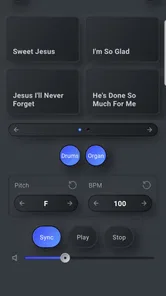
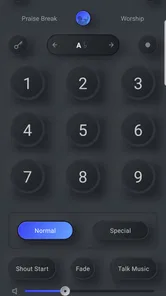
Analysis by Reviewed
I came to Whoop Triggerz Plus expecting a focused music tool rather than a general streaming service, and that distinction matters. This free Music & Audio app from The C-Dub Brand is aimed at a very particular need: giving a church musician a practical way to support a service when a live player is unavailable. In my experience, its value depends less on browsing through a huge catalog and more on whether it fits the way your congregation rehearses, prepares, and performs.
The app has earned a 4.7 average from around a thousand ratings, with more than a thousand written reviews and over a hundred thousand installs. Those figures suggest that the concept has found a real audience, but they should not be read as a guarantee that it will suit every worship team. I would recommend approaching it as a specialized accompaniment and performance aid, not as a replacement for a full band, a recording studio, or a conventional music player.
Where the first experience can become confusing
The most common difficulty with a focused app like this is understanding its role before trying to use it in a live setting. Someone may install it expecting a normal playlist app, then feel lost when the useful workflow is tied to church music and performance preparation. I found that the best starting point is to decide exactly what you want it to do: fill a missing musical role, help a solo worship leader, support rehearsal, or provide a dependable option for a small service.
That decision changes how you judge the app. If you need background listening during a commute, a mainstream music service will usually be more flexible. If you need a tool for a worship setting where timing, confidence, and repeatable preparation matter, this app makes more sense. The store summary presents it as a solution for churches without a musician, but the practical question is whether its material and workflow match your particular service.
I would not wait until the congregation is seated to learn the controls. A church environment adds pressure that a casual listening session does not: a phone may be connected to a speaker, the person operating it may also be singing, and a small delay or wrong selection can interrupt the flow. Spend time with the app when nobody is waiting for you. That simple habit is more valuable than assuming the interface will be self-explanatory.
Another point of friction is expectation management around the free download. The app itself is free, while in-app purchases are listed from twenty-five dollars to two hundred forty dollars per item. That is a significant range, so I would treat the initial installation as an opportunity to evaluate the basic experience before committing money. A church should decide in advance who is authorized to buy anything and whether the purchase is genuinely needed for its regular use.
The Everyone content rating makes the app approachable for a broad church audience, including situations where younger volunteers may help operate it. That does not remove the need for adult supervision of account and purchase decisions. I would separate those two responsibilities: let a volunteer learn the playback routine, but keep payment approval with the person responsible for the church budget.
More From Our News Desk

 Gmail
GmailGmail in a Busy Inbox: Who Benefits Most?
From first account to crowded workday, Gmail earns its place through dependable search and flexible sorting—but its best fit depends on how much inbox maintenance you can tolerate.

 Prime Video
Switching to Prime Video: What Changes in Your Viewing Routine
Prime Video can make a compelling second home for streaming, but switching means learning a different catalog, rental layer, and route from browsing to playback.

 Universal TV Remote Control
Universal TV Remote Control Works Best as a Reliable Backup
A phone remote earns its place through quick setup and reliable habits. Here is how to get more from Universal TV Remote Control—and where its limits show.

 Weather - By Xiaomi
Weather by Xiaomi Review: Clear at a Glance, Less Clear Up Close
Xiaomi’s weather app makes everyday forecasts quick to scan, but its calm surface can leave useful details and recovery paths harder to find than they should be.

 X
XX Under Pressure: Can It Recover When Posting Goes Wrong?
A resilience-focused review of X, examining setup, mistaken posts, interruptions, weak connections, and the gaps that matter when recovery needs to be dependable.

 Clash of Clans
Clash of Clans Is Won Between the Battles
Its raids are quick; its community is a long-term project of coordination, teaching, rivalry, and shared responsibility—with all the friction that entails.
Latest News



What to check before relying on it
Before a rehearsal, I would confirm that the phone or tablet meets the minimum operating-system requirement of version 8.0. I would also update the app if an update is offered; the current version is 2.1.46. These are small checks, but they eliminate avoidable problems before you start investigating more complicated causes.
Next, I would test the complete audio path rather than opening the app and assuming everything is ready. Play something through the device speaker first, then test the exact cable, adapter, wireless connection, mixer input, or powered speaker that will be used at church. If sound is missing only after connecting external equipment, the app may be working normally while the problem sits in the output route, input selection, volume control, or adapter.
Keep the first test deliberately simple. Open the app, select one item you already understand, start playback, pause it, resume it, and adjust the volume from the same device you will use during the service. This gives you a baseline. If that basic sequence works, you can then explore more of the app without confusing a setup issue with a content or control issue.
I also recommend preparing a short written run sheet. Note the order in which you expect to use the material, who will operate the device, and what should happen if the planned selection cannot be started. This is not glamorous, but it prevents a common failure: several people reaching for the phone at once and nobody knowing which action was intended.
Use a stable physical position for the device. A phone placed on a music stand can be bumped, muted, or locked accidentally. A tablet may be easier to read, but only if it is positioned where the operator can reach it without crossing in front of the congregation or leaving the microphone. The app cannot solve an awkward stage layout, so treat placement as part of the setup.
Recovering when a rehearsal or service goes off track
When playback does not behave as expected, I use a calm recovery sequence instead of repeatedly tapping the screen. First, check whether the device itself is producing sound through its own speaker. Then inspect the selected output and the physical connection. After that, stop and restart the specific playback action. If the issue remains, close and reopen the app, then repeat the simplest test.
This order matters because it keeps the diagnosis narrow. Restarting everything at once may appear to fix the problem, but it teaches you nothing about what went wrong. A quick baseline test tells you whether the trouble is inside the app or somewhere between the device and the church audio system.
If the app opens but a particular item does not behave as expected, avoid changing several settings simultaneously. Try another available item, then return to the original one. If the second item works, the problem may be limited to the first selection or the way it was prepared. If nothing works, look again at the device, connection, and volume path before assuming the entire app has failed.
A useful recovery plan is to keep one simple alternative ready. That could be a different prepared selection, a familiar instrument, or an unaccompanied transition led by the worship leader. I would not build a service around a single untested sequence. The app can reduce the need for a musician, but it should not become the only point of failure in the room.
During rehearsal, practice the recovery itself. Have the operator pause, return to the intended place, and continue without rushing. The goal is not merely to make the app work under ideal conditions; it is to make the person using it comfortable enough to respond when a cable is loose or the wrong item is chosen.
Separating app problems from equipment and room problems
Church audio systems can make a working app seem unreliable. A mixer channel may be muted, the amplifier may be on the wrong input, or the speaker may be receiving a signal that is too quiet to notice in a noisy room. Test with the device speaker before involving the entire sound system. If the device plays correctly on its own, move outward through the chain one connection at a time.
Volume is another source of misleading results. A device volume control, a mixer gain, a channel fader, and a powered speaker level may all affect what you hear. Raise levels gradually and avoid compensating for one quiet control by pushing another to its limit. Sudden loudness is unpleasant for the congregation and can make troubleshooting harder.
Wireless audio can introduce its own uncertainty through pairing, distance, or another nearby device trying to connect. When the service depends on predictable timing, a tested wired route may be preferable if your equipment supports it. I am not saying one connection method is always best; I am saying that the most convenient option during setup is not necessarily the most dependable option during worship.
Room acoustics also matter. A selection that sounds clear through headphones may feel muddy through a church speaker, especially when the room is full. Listen from the seats rather than standing directly beside the equipment. If the balance is poor, the answer may be an audio-system adjustment rather than a change inside Whoop Triggerz Plus.
Finally, check simple device conditions. Make sure the device is not muted, do not leave it in a mode that blocks expected audio, and keep enough battery for the whole service. These are ordinary checks, but they are exactly the issues that create unnecessary blame when an app is being used in an unfamiliar environment.
How I would fit it into a real church routine
Imagine a small Sunday service where the usual keyboard player is away. A worship leader has prepared the order in advance, and one volunteer is responsible for the phone. I would have that volunteer arrive early, verify the device output through the actual speaker, run through the opening selection, and rehearse the transition into the next part of the service. The leader should know the recovery plan before the first person arrives.
That workflow shows the app's strongest practical quality: it can help a church create a repeatable musical structure without requiring a musician to be physically present every time. It may also help a solo singer feel less exposed, or give a small group a consistent foundation while it develops its own instrumental resources.
There is a trade-off, though. A live musician can respond to the room, extend a moment, soften an ending, or follow an unexpected change from the leader. A prepared app-based accompaniment is more consistent but less flexible. If your worship style depends heavily on spontaneous changes, the app may support only part of the service rather than replace the musician's role.
I would also use it selectively during rehearsal instead of leaving it running for every practice. First work through the vocal parts or service transitions, then bring in the app to check timing and confidence. This keeps the group from becoming dependent on the accompaniment before it understands the underlying arrangement.
For a church with several volunteers, document the operating routine in plain language. Write down how the device is connected, where it is placed, who starts playback, and what the backup action is. This is one of the less obvious benefits of treating the app seriously: the church becomes less dependent on one technically confident person.
The app is less convincing for someone who wants broad music discovery, advanced recording, detailed editing, or a full band-replacement system with extensive control over every musical element. In those cases, a conventional streaming service, a dedicated accompaniment platform, or live musicians may be a better match. Choosing it simply because it is free to install would be the wrong reason.
What the developer and version details mean in practice
The developer is The C-Dub Brand, and the app has been available since June 3, 2019. Its current version, 2.1.46, indicates that this is not a brand-new experiment, which may reassure users who prefer a tool with an established presence. Still, I would judge it by the exact workflow your church needs today, not by age alone.
The Android requirement of version 8.0 or newer keeps the technical entry point fairly accessible for many existing devices. Even so, an older phone may be less comfortable for live operation if its battery is tired, its screen is difficult to read, or it struggles with other tasks running at the same time. A supported operating system means the app can install; it does not automatically make that device ideal for a service.
Because the app is free, a church can evaluate it without paying at the door. The possible in-app purchase range changes the budgeting conversation once the basic experience has been tested. I would let the person who will actually operate the app participate in that decision, because a purchase that looks useful in theory may not solve the real bottleneck, which could instead be the audio connection or the rehearsal process.
The audience rating of Everyone is helpful for shared church equipment, but it should not be confused with a statement about musical suitability. A family-friendly rating tells you about audience access; it does not tell you whether the available material matches your denomination, service style, vocal range, or preferred arrangement.
My practical verdict after weighing the trade-offs
I see Whoop Triggerz Plus as a useful specialist tool for churches that need dependable musical support and are willing to prepare properly. Its best use is not casual experimentation during a live service; it is a planned routine in which the operator knows the device, the leader knows the transitions, and the sound path has been tested beforehand.
The real strength is the gap it can fill when a musician is unavailable. That can make a meaningful difference for a small congregation, a solo worship leader, or a group that needs support while building its volunteer team. The app's high average rating and broad install base reinforce that it has practical appeal, but my recommendation still depends on your expectations.
I would skip it if your main goal is unrestricted music listening, detailed production work, or highly spontaneous accompaniment. I would also avoid making it the sole backup for an important service until the team has practiced both normal operation and recovery. A different option will be better when flexibility, live response, or advanced audio control matters more than simplicity.
For the right church, however, the download is worth testing. Start with the free experience, confirm compatibility, check the complete audio route, and run a rehearsal under realistic conditions. If it helps your team lead confidently without adding more confusion than it removes, then it has earned a place in your service routine. If the trouble remains after those checks, look at the device, connection, room, and workflow before deciding that the app itself is at fault.
My final view is positive but practical: this is not magic in a phone, and it is not a substitute for every kind of musician. It is a focused Music & Audio app that can make a specific church situation easier when someone takes responsibility for preparation. Used that way, it feels less like a last-minute workaround and more like a dependable part of the worship team's plan.
Whoop Triggerz Plus Frequently Asked Questions
Who develops Whoop Triggerz Plus?
Whoop Triggerz Plus is developed by The C-Dub Brand. Knowing the developer can help you find the correct app in the store and distinguish it from similarly named apps. It is a Music & Audio app, and its short store description is simply “Whoop Triggerz Plus.” Check the developer name on the download page before installing.
What is Whoop Triggerz Plus?
Whoop Triggerz Plus is an entertainment-focused mobile app centered on trigger-style sound effects and interactive audio content. It is designed for users who enjoy creating funny reactions, adding sound effects to conversations, or experimenting with short audio clips. Its store summary says, “Don't have a church musician? Problem solved.” Before downloading, check the current store description carefully, because available features, supported devices, regional availability, and the exact content library may change between updates.
Is Whoop Triggerz Plus free to download and use?
The app is free to download, but some features may involve in-app purchases. Prices range from $24.99 to $239.99 per item, so review the purchase screen carefully before confirming anything. Some versions of entertainment apps include advertising, optional purchases, subscriptions, or premium sound collections. The store page normally explains the pricing model, while the in-app purchase screen should be checked carefully so you understand whether any feature requires payment.
What permissions does Whoop Triggerz Plus require?
The permissions requested by Whoop Triggerz Plus can depend on the operating system and the features you use. An audio-based app may request access related to sound, media, notifications, or storage, although not every permission is necessary on every device. Review the permission prompts during installation and deny anything that seems unrelated. You can also change permissions later through your phone’s settings.
Can Whoop Triggerz Plus be used offline?
Some sound effects may work without an internet connection after they have been loaded, but offline availability can vary by version and device. Internet access may still be required for the initial download, advertisements, updates, account functions, or additional audio content. If offline use is important to you, test the app with mobile data and Wi-Fi disabled rather than assuming every feature will remain available.
Pros
- Fast access to curated trigger sound effects
- Simple interface makes browsing and playing sounds easy
- Useful for pranks
- videos
- and casual entertainment
- Sound effects can add variety to social content
- Lightweight app with a straightforward purpose
Cons
- Contains repetitive content if used frequently
- Some sounds may feel dated or low quality
- Ads can interrupt browsing or playback
- Limited customization compared with full soundboard apps
- Not suitable for users seeking music or advanced audio tools












