

Loops By CDUB
- 196.00
- 3.5
- Installs
- 100.00K
- Price
- Free
Screenshots
Analysis by Reviewed
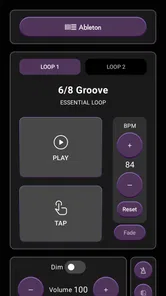
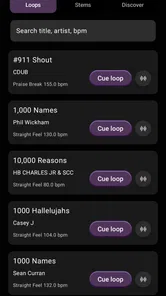
I approached Loops By CDUB as a working musician would: not as a general music player, but as a focused toolbox for building gospel arrangements with ready-made musical material. The app sits in the Music & Audio category and comes from The C-Dub Brand. Its central idea is simple—put gospel loops, stems, and learning material in one place—yet the value depends heavily on how you plan to use those ingredients.
My first impression is that this is aimed at people who already understand the basics of arranging. If you know what a loop is, why isolated stems matter, and how a tutorial can help you improve a part, the app makes more sense immediately. If you are looking for a full recording studio, a streaming service, or an automatic song generator, you may find its focus too narrow. That narrowness is also its strongest quality: it is built around gospel production rather than trying to cover every style.
How the app feels in its current form
The current release is version 5.0, and the app remains free to install. That makes it easy to test without committing money at the start, although optional in-app purchases range from $9.99 to $199.99 per item. I would treat the free entry point as an opportunity to inspect the material and workflow before deciding whether the paid content fits my needs, rather than assuming the entire catalog is available without cost.
The app has reached over 100 thousand installs, with an average rating of 3.5 from around 500 ratings and 196 written reviews. Those figures suggest a product with a real audience but also a mixed reception. I would not read the rating as a verdict on the musical quality alone. Apps like this can be judged on several things at once: the usefulness of the loops, the clarity of navigation, the amount of material accessible without buying, and whether the experience matches a user’s preferred production setup.
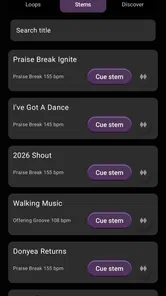
In practical terms, I see three main uses. A keyboard player can study a gospel phrase and use a loop as an arrangement reference. A producer can audition stems as building blocks for a track. A worship musician or songwriter can use the material to move from a rough idea toward a fuller arrangement. These are different jobs, and the app is more convincing when approached as a source of focused musical components rather than a complete project environment.
The most important distinction is between inspiration and production. Loops can help me find a groove quickly, but they do not replace decisions about tempo, key, structure, transitions, mixing, or the final recording. The app can shorten the distance between an empty session and a musical starting point; it is not the whole journey.
What the loop-based approach gets right
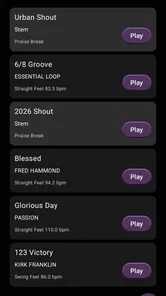
Gospel music often depends on feel, repetition, layered parts, and changes in intensity. A loop can communicate those relationships faster than a written explanation. When I hear a phrase repeated in context, I can judge whether it supports a verse, lifts a chorus, or leaves enough space for vocals. That is more useful than collecting isolated sounds that have no obvious role in an arrangement.
More From Our News Desk

 Gmail
GmailGmail in a Busy Inbox: Who Benefits Most?
From first account to crowded workday, Gmail earns its place through dependable search and flexible sorting—but its best fit depends on how much inbox maintenance you can tolerate.

 Prime Video
Switching to Prime Video: What Changes in Your Viewing Routine
Prime Video can make a compelling second home for streaming, but switching means learning a different catalog, rental layer, and route from browsing to playback.

 Universal TV Remote Control
Universal TV Remote Control Works Best as a Reliable Backup
A phone remote earns its place through quick setup and reliable habits. Here is how to get more from Universal TV Remote Control—and where its limits show.

 Weather - By Xiaomi
Weather by Xiaomi Review: Clear at a Glance, Less Clear Up Close
Xiaomi’s weather app makes everyday forecasts quick to scan, but its calm surface can leave useful details and recovery paths harder to find than they should be.

 X
XX Under Pressure: Can It Recover When Posting Goes Wrong?
A resilience-focused review of X, examining setup, mistaken posts, interruptions, weak connections, and the gaps that matter when recovery needs to be dependable.

 Clash of Clans
Clash of Clans Is Won Between the Battles
Its raids are quick; its community is a long-term project of coordination, teaching, rivalry, and shared responsibility—with all the friction that entails.
Latest News



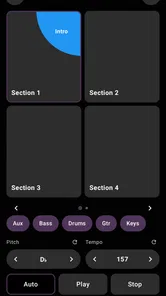
Stems add another layer of usefulness. Instead of treating a finished loop as one fixed block, I can think about its individual musical roles. That matters when the full texture is too busy or when I want one part to answer a vocalist rather than compete with one. The practical trade-off is that stems demand more organization and more decisions. They are powerful for someone who wants control, but less convenient for someone who only wants to press play and perform over a finished backing track.
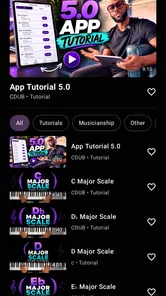
The tutorial side also changes the app’s purpose. A loop library gives me material; a tutorial can help me understand how that material works. For a developing player, that combination is more valuable than either part alone. I can listen for a pattern, study the explanation, and then return to the musical idea with a better sense of timing and placement.
A realistic workflow for a busy musician
Imagine I have a rehearsal later in the evening and a chorus that feels too plain. I could open the app during a short break, listen through relevant gospel material, and identify a rhythmic or harmonic idea that gives the section more movement. Rather than trying to build an entire arrangement inside the app, I would use it to choose a direction, make a note of the useful part, and recreate or develop that idea in my usual music software or instrument setup.
That workflow avoids a common mistake: buying material before knowing where it belongs. I would first decide whether I need a groove, a supporting layer, a transition, or a learning example. Then I would listen for something that fills that specific role. This makes the app more efficient and reduces the temptation to collect loops simply because they sound impressive in isolation.
For a home producer, a better approach is to audition a loop against the song’s existing mood before building around it. A strong gospel phrase can pull a track in a different direction from the original idea. That is not necessarily bad, but it means the loop should serve the song rather than dictate it. I would test the musical idea quietly, at the intended tempo, and with the main vocal or lead instrument in mind.
For a teacher or student, I would use the material in short exercises. Focus on one rhythmic figure, identify where it repeats, and then try to play it without the reference. After that, change the dynamics or leave deliberate spaces. This turns a loop from a passive backing element into a lesson about pocket, restraint, and arrangement. The app becomes more valuable when I actively study what I hear instead of treating it as background sound.
How version 5.0 matters to existing users
Version 5.0 is the clearest sign that the product has continued to evolve beyond its earlier form. I would be cautious about treating the version number as proof of a particular redesign or a specific feature set, because a number alone does not explain every internal change. What it does tell me is that the app is not presented as an untouched first release. Existing users should approach the current version as the one that matters for present-day decisions, especially if they are returning after time away.
That distinction is important for anyone who remembers an older experience. A familiar app can feel different after updates even when its main purpose remains the same. Navigation, content organization, purchase presentation, or compatibility may affect how quickly a returning user gets to the material. I would spend a few minutes exploring the current layout before judging it against memory, particularly if I previously used it only for a single loop or tutorial.
The app was released on August 2, 2017, so it has had time to establish an identity rather than appearing as a brand-new experiment. For long-term users, that history may be reassuring because the concept has had room to mature. At the same time, older foundations can create expectations about how modern the workflow should feel. Someone accustomed to a full digital audio workstation may still find the experience more limited than the date of the latest version suggests.
For people already invested in the app’s material, the main benefit of moving to the current release is continuity with the present product rather than relying on an old installation. I would check that the app behaves properly on my device, revisit any previously purchased material, and make sure the current browsing process suits the way I work. Those are sensible steps whenever a music app has changed over time, especially when the content itself is part of the investment.
Where it fits beside familiar alternatives
The usual alternative for a producer is a general-purpose digital audio workstation. That kind of software offers deeper editing, recording, mixing, automation, and arrangement control. It is the better choice when I need to finish a complete song in one environment. Loops By CDUB is more specialized: its advantage is the gospel-focused starting material and the connection between loops, stems, and tutorials. I would use the two together rather than treating them as direct replacements.
A sample marketplace is another comparison. Marketplaces usually offer broad genre coverage and many independent sources, which is useful when I need unusual sounds or a large range of styles. The trade-off is that searching can become slow and inconsistent. A focused gospel app can save time when the musical target is already clear. If I need electronic textures, cinematic effects, or a huge cross-genre catalog, a broader marketplace will probably serve me better.
Streaming platforms solve a different problem. They are good for discovering songs, studying performances, and building listening habits, but they do not necessarily give me separated musical parts or material designed for hands-on arrangement work. This app is more practical when I want to interact with musical components rather than simply hear finished recordings.
There is also a difference between this app and a traditional lesson platform. A lesson platform may offer a wider curriculum, structured progression, and more general theory. Here, the tutorials are most useful when connected to the gospel loops and stems. I would choose this app for style-specific practice and production inspiration, but choose a broader educational service if I need a complete beginner-to-advanced course.
Small techniques that make the material more useful
One useful habit is to separate “sounds good” from “solves a problem.” When auditioning a loop, I would ask what it contributes: momentum, response, atmosphere, rhythmic definition, or a transition. This prevents a polished phrase from taking over a track simply because it is attractive. It also helps me decide whether I need the full loop or only the musical idea behind it.
A second technique is to compare the full texture with the individual stems before making an arrangement decision. The complete version may feel exciting, but one layer might be the real reason it works. Removing the rest can reveal whether that part supports the song on its own or only sounds effective because of the surrounding layers. This is particularly useful when leaving room for a singer, choir, or live keyboard player.
A third is to treat tutorials as listening instructions, not just demonstrations. Before replaying a lesson, I would identify one detail to follow—perhaps the placement of a hit, the length of a phrase, or the way a part leaves space. Then I would imitate that single detail at a slower pace and place it into a different musical context. This creates a transferable skill instead of producing a copy that works only with the original loop.
I would also keep an external naming system for ideas I plan to use later. A short note describing the mood, likely song section, and required instrument is more useful than remembering that something was merely “good.” Since loop-based work can quickly become a collection of disconnected possibilities, simple organization protects the creative momentum the app is meant to provide.
Limitations I would consider before installing
The first limitation is scope. This is not the right choice if I want a complete recording studio with detailed editing and final mastering tools. I would still need another environment for recording vocals, arranging a full song, balancing a mix, or preparing a finished release. The app can support those tasks indirectly, but it should not be mistaken for a replacement for production software.
The second is the cost structure. Free installation lowers the barrier to trying it, but the optional purchases can become significant, with individual items reaching $199.99. I would not buy on impulse. I would first establish whether the material matches my style, whether I will actually use stems rather than just listen, and whether one purchase solves a current project need. For a casual listener, the paid side may be difficult to justify.
The third is that a focused catalog can feel restrictive outside its intended lane. Gospel musicians may appreciate the direction, while someone producing several unrelated genres may prefer a broader source. The app’s specialization is an advantage only when it overlaps with the music I am making. If my work changes constantly between styles, I would compare its usefulness against a more flexible library before spending money.
The rating of 3.5 also encourages realistic expectations. I would install it with an open mind, but I would pay attention to the specific parts of the experience that matter to me: finding relevant material, understanding what I am hearing, and fitting it into my workflow. A middling average can reflect different frustrations for different users, so my own trial should focus on practical fit rather than on the number alone.
Who should use it and who should skip it
I would recommend giving it a serious look if you are a gospel keyboard player, producer, songwriter, worship musician, or student who wants style-specific material instead of a random collection of sounds. It is particularly appealing when you learn by listening and experimenting. The combination of musical building blocks and tutorials can make practice feel connected to a real arrangement rather than detached from the music you want to play.
I would be more hesitant to recommend it to someone who only wants free, unlimited content, a conventional streaming experience, or a one-stop recording application. It is also not my first choice for a musician who needs a broad library covering many unrelated genres. In those cases, a general-purpose workstation, educational platform, or larger sample service may offer better value and fewer compromises.
Device compatibility is another practical checkpoint. The app requires at least iOS 9, and its content rating is Everyone, so it is accessible to a broad audience from an age-rating perspective. I would still test the current experience on the device I intend to use, especially if my workflow depends on quick playback during rehearsal or on moving ideas into another music setup.
What I would watch as the app continues
For future use, I would watch how clearly new and existing material is organized, how easy it is to distinguish learning content from production content, and whether the app continues to serve both without making either side feel secondary. A loop library benefits from fast discovery, while tutorials benefit from context. The best evolution would make those paths feel connected without turning the interface into a crowded catalog.
I would also pay attention to how the product handles the gap between listening and exporting ideas into a finished workflow. The more naturally I can move from inspiration to an organized project, the more often I will return. If that bridge remains limited, the app can still be useful, but mainly as a source of references and building blocks rather than as a central production hub.
My overall view is positive but specific. Loops By CDUB is most convincing when I need gospel-focused inspiration, separated musical layers, and tutorials that relate to the same creative world. It gives me a faster way to explore an arrangement than starting with silence, and it encourages listening with more intention. I would use it alongside my main recording tools, budget carefully around the optional purchases, and judge every loop by whether it helps a real song or practice goal.
In the end, I would recommend it to the right musician rather than to everyone. If gospel is central to your playing or production, the app’s focused approach can save time and spark ideas that a generic audio library may not provide. If you need a complete studio, a broad multi-genre catalog, or a purely free experience, I would look elsewhere. For me, that clear boundary is what makes the app useful: it knows what kind of musical problem it is trying to help solve.
Loops By CDUB Frequently Asked Questions
What kind of music does Loops By CDUB focus on?
Loops By CDUB focuses on gospel music, with professional loops, stems, and tutorials brought together in one app. That makes it relevant for users exploring gospel sounds, building arrangements, or learning through music-focused guidance. Its focus is more specific than a general-purpose audio workstation, so it may appeal most to people who want gospel-oriented material rather than a broad library covering many unrelated genres.
Who develops Loops By CDUB, and what devices can run it?
Loops By CDUB is developed by The C-Dub Brand and is available for Android and iOS users to consider through their respective app stores. On Android, the listed minimum operating-system requirement is version 9, so it is sensible to check your device’s software version before downloading. The app is free to install, though some optional purchases may be offered inside it.
What is Loops By CDUB and what can you do with it?
Loops By CDUB is a music-focused app built around loop-based creation and performance. It is designed for users who want to experiment with rhythmic patterns, melodic phrases, and layered sounds in a more accessible way than a full digital audio workstation. After trying the app, its main appeal is the quick workflow: you can explore available loops, combine compatible parts, adjust the arrangement, and develop ideas without needing advanced production experience.
Is Loops By CDUB suitable for beginners or only experienced music producers?
The app is approachable for beginners because its loop-based structure reduces the need to understand complex recording, mixing, and sequencing tools immediately. New users can start by selecting sounds and building combinations by ear, while more experienced producers may appreciate it as a fast sketching or performance tool. However, users expecting the detailed editing, automation, and mastering controls of professional desktop software may find its creative options more limited.
Does Loops By CDUB require an internet connection to work?
Some features may depend on an internet connection, particularly downloading the app’s content, accessing online material, signing in, or receiving updates. Once the necessary sounds and resources are available on the device, basic loop creation may be possible offline, although this can vary according to the app version and the specific feature being used. It is worth opening the app before traveling or working without reliable mobile data to confirm which content remains accessible.
Pros
- Simple loop-based workflow is easy for beginners to understand.
- Useful for sketching song ideas quickly on a mobile device.
- Loop categories make it easier to find complementary sounds.
- Compact interface keeps the main recording tools accessible.
- Can encourage experimentation without requiring music theory knowledge.
Cons
- The available sound selection may feel limited for experienced producers.
- Loop-based creation offers less control than a full digital audio workstation.
- Mixing and fine-tuning individual elements can be restrictive.
- Some features or content may require in-app purchases or subscriptions.
- Performance may depend on device hardware when layering many loops.












