Whitetail Deer Calls Pro
- 11.00
- 4.3
- Installs
- 5.00K
- Price
- $1.49

Screenshots
Analysis by Reviewed
I’d judge a deer-calling app less by how many sounds it claims to offer and more by whether it fits the way I actually prepare and hunt. Whitetail Deer Calls Pro is a paid sports app from Nielsen Family Creations, listed at $1.49, so the decision is a small one-time purchase rather than a free download followed by an unknown cost. It’s intended for everyone, and the app has an average rating of 4.3 from 34 ratings, with 5K+ installs. Those figures suggest a modest, focused tool, not a broad hunting platform.
Start with the kind of calling you need
Before spending anything, I’d be clear about what I want from phone-based calls. If my aim is to have a compact backup or listen to whitetail sounds while preparing, a dedicated app may fit. If I want detailed hunting guidance, location tools, or a substitute for learning to use a mouth call, this is a narrower purchase. The key question is not whether a phone can make a sound, but whether having that sound available solves a real problem in my routine.
I’d also separate practice from active use. At home, I can listen without pressure and think about which calls I recognize. Outdoors, even a simple playback choice competes with paying attention to the surroundings. A little preparation beforehand can make the app more useful: decide what you may use, check that you can operate it comfortably, and avoid turning a quiet moment into a search through menus.
What the price needs to earn
At that price, I’d expect a straightforward utility rather than a complete substitute for field experience or dedicated calling gear. The app’s basic promise is convenient deer calls from a phone. Whether that is worth paying for depends on when you would use it: as a backup or practice aid, it may be handy; as your only calling method, I’d be more cautious. The current version is 3.0.0, and it requires Android 6.0 or later.
Where phone calls can be useful
The practical value is portability. I can see using the phone to review a call sequence before leaving home, or to have a sound option available when carrying extra equipment is inconvenient. A useful habit is to decide on a small set of calls before heading out, rather than browsing through options when attention should be on the surroundings. That preparation matters more than simply having a sound library within reach.
There is also a meaningful difference between listening to calls for familiarity and relying on phone playback in the field. A phone speaker may not deliver the same presence as a purpose-built caller, and playback can draw attention to the device instead of the hunt. I’d treat this as a convenient supplement, not assume it will outperform physical calls or dedicated equipment in every setting.
A realistic way to fit it into a hunting day
Imagine I’m packing the evening before an outing and want to keep my kit simple. I’d open the app indoors, listen through the calls I’m considering, and settle on a small number rather than improvising once I’m outside. I’d then make sure the phone is charged, keep it somewhere I can reach without rummaging, and decide in advance whether playback makes sense for the conditions. That workflow turns a phone app into a prepared option instead of a distraction that demands attention at the wrong moment.
More From Our News Desk

 Gmail
Gmail in a Busy Inbox: Who Benefits Most?
From first account to crowded workday, Gmail earns its place through dependable search and flexible sorting—but its best fit depends on how much inbox maintenance you can tolerate.

 Prime Video
Switching to Prime Video: What Changes in Your Viewing Routine
Prime Video can make a compelling second home for streaming, but switching means learning a different catalog, rental layer, and route from browsing to playback.

 Universal TV Remote Control
 Works Best as a Reliable Backup
A phone remote earns its place through quick setup and reliable habits. Here is how to get more from Universal TV Remote Control—and where its limits show.

 Weather - By Xiaomi
Weather by Xiaomi Review: Clear at a Glance, Less Clear Up Close
Xiaomi’s weather app makes everyday forecasts quick to scan, but its calm surface can leave useful details and recovery paths harder to find than they should be.

 X
X Under Pressure: Can It Recover When Posting Goes Wrong?
A resilience-focused review of X, examining setup, mistaken posts, interruptions, weak connections, and the gaps that matter when recovery needs to be dependable.

 Clash of Clans
 Is Won Between the Battles
Its raids are quick; its community is a long-term project of coordination, teaching, rivalry, and shared responsibility—with all the friction that entails.
Latest News



There’s a useful distinction here between availability and effectiveness. Having a call ready does not mean it is the right call for a particular animal or situation. I would use what I hear as a reference and make my choice conservatively, rather than assuming a collection of sounds can make that judgment for me. This is especially important for a new hunter, because convenient playback can feel like progress while the harder skills—patience, observation, and timing—still need practice.
Trade-offs before buying
A paid app can be appealing when the price is clear and modest, but I would still check that it suits my device and intended use before purchasing. This is a focused whitetail tool, so it is not the right choice if I want a general hunting planner, maps, weather information, or a broad wildlife sound collection. For those needs, another kind of app would be a better match.
I’d also think about the setting in which I plan to use it. In a quiet practice session, phone playback can help me become familiar with calls without extra gear. In the field, battery management, handling the phone safely, and keeping the screen from becoming a distraction all matter. Those are ordinary phone-use trade-offs, but they can be especially relevant when I’m trying to stay patient and observant.
How it compares with other ways to learn and call
Compared with a physical caller, a phone app is convenient to carry and does not require me to practice producing the sound with a separate instrument. But convenience is not the same as control: a physical caller gives me a hands-on way to shape the sound, while phone playback depends on the device and how I use it. I’d choose based on the role I need filled, not on the assumption that one method is universally better.
Compared with general hunting apps, this one is more specialized. A map or planning tool can help with preparation in ways a call app cannot, while a sound-focused resource may be more relevant when I specifically want whitetail calls at hand. Someone who wants one app to handle several parts of a trip should look for a broader option; someone who already has those basics covered may prefer a focused companion.
For learning, I’d also compare it with listening to experienced callers or using a physical call under guidance. The app’s appeal is immediate access, but a recording cannot give personal feedback on technique or tell me when to use a sound. I’d treat it as one aid among several, particularly if I’m new, rather than expecting an app to replace instruction and time outdoors.
Who is likely to get value
This makes the most sense for a whitetail hunter who wants a compact call option and is comfortable using a phone as part of preparation. A newcomer might appreciate having calls available while learning the vocabulary of deer sounds, though I would pair that with careful observation and guidance rather than treating playback as a shortcut to hunting skill. An experienced hunter with established calls and equipment may find it more useful as a spare than as a replacement.
If I were deciding on an ordinary evening before a weekend outing, I’d install it at home, check how it behaves on my device, and choose any sounds I might want before packing. That gives me a chance to avoid fumbling with the phone outdoors. If I only wanted a free way to learn calls, or needed a tool that does much more than play whitetail sounds, I’d compare alternatives before paying.
I’d be less likely to buy it if I rarely hunt whitetails, already carry a caller that covers my needs, or dislike handling a phone in the field. It also may not suit someone whose main goal is to study deer behavior in depth; access to sounds is not the same as a lesson in context. For those readers, money and practice time may be better directed toward equipment or learning resources that address the gap they actually have.
Hey there fellow hunting enthusiasts! I recently got my hands on the Whitetail Deer Calls Pro app, and let me tell you, this app could be a game-changer for all you hunters out there. If you’re anything like me, you know that calling a deer requires skill and the right tools. Well, this app might just be your new best friend in the woods.
Getting the Hang of Deer Calls
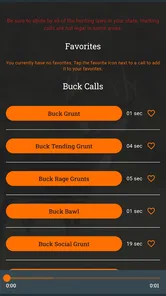
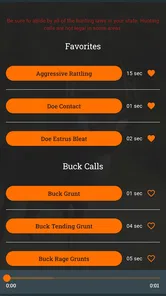
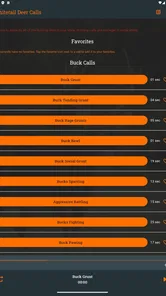
So, what makes Whitetail Deer Calls Pro stand out? First off, this app is packed with a variety of calls that are designed to lure in those elusive whitetails. From doe bleats to buck grunts, the app offers a comprehensive selection that you can play right from your phone. I found the interface pretty intuitive, which is a win for those who want to focus on the hunt rather than fiddling with technology.
Features That Matter
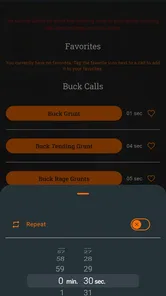
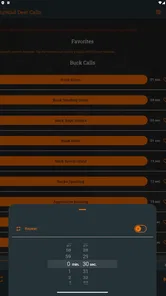
Let’s dive into some of the features that I found most impressive. The app provides a library of high-quality sound clips that are as close to the real thing as you can get. Whether you're trying to mimic a fawn in distress or a dominant buck, the sounds are clear and convincing. Plus, the app allows you to mix and match these sounds to create a more dynamic calling sequence, which might just be the edge you need during hunting season.
Another feature that I appreciate is the app’s ability to work offline. Let’s be real, sometimes you’re out in the woods with no signal, and the last thing you want is for your call to cut out unexpectedly. With Whitetail Deer Calls Pro, you can download the sounds directly onto your device and play them whenever you need, no Wi-Fi required.
User Experience
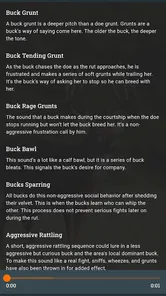
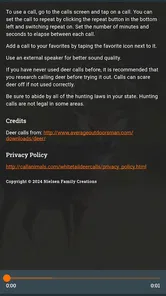
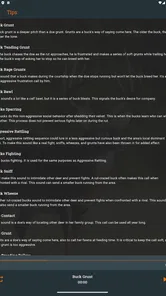
Using the app is a breeze. The layout is straightforward and not cluttered, which means you can easily navigate between different calls and features. I also love that there’s a section with tips and tricks, offering advice on how to use the calls effectively. It’s like having a mini-guide right in your pocket!
Now, let’s talk about the aesthetics. The app has a rustic, nature-inspired design that feels quite authentic. It doesn’t try to be flashy, which I think is a good thing for an app of this nature. The focus is clearly on functionality and practicality, which is exactly what you need when you’re out there trying to snag that trophy buck.
Small habits that prevent field frustration
Because a phone is also a camera, map, and communication device for many people, I would avoid opening the app for the first time when I’m already settled in a spot. Familiarizing myself with the controls beforehand is a simple way to reduce screen time. I’d also consider how I can keep the device secure and easy to reach without leaving it exposed or repeatedly checking it. The useful trick is not technical; it is deciding in advance how the phone fits into the outing.
Sound choice deserves the same restraint. If I’m learning, I’d listen to one call at a time and give myself room to notice its character rather than rapidly switching between clips. If I’m already experienced, I’d still avoid assuming that more options automatically improve the result. A narrow, intentional use can be more practical than treating the app as a menu to explore whenever there is a pause.
Using it with good judgment
The main question I’d ask before relying on phone playback is whether it fits the conditions and rules of the place I plan to hunt. Calling practices and permitted equipment can vary, so I’d check local regulations rather than assume an app-based call is acceptable everywhere. Even where it is allowed, I’d keep the phone secured and the sound choice deliberate; repeatedly switching clips can make a simple tool more distracting than helpful.
For someone learning, I’d use the calls as listening references first: notice how different sounds vary, then practice choosing one that makes sense for the situation instead of playing everything in succession. That is a more useful workflow than treating a larger selection as automatically better. The app can make calls accessible, but it cannot judge animal behavior, wind, distance, or timing for me.
My buy-or-skip call
The app is a reasonable fit if I specifically want whitetail calls on my phone, value having a compact option, and are comfortable with a paid app serving a narrow purpose. I’d skip it if I expect a complete hunting companion, prefer hands-on calling equipment, or mainly want free educational material. The developer, Nielsen Family Creations, keeps the product focused on calls rather than presenting it as an all-purpose field toolkit.
Overall, I’d consider it a convenient extra for preparation and occasional use, not a guaranteed advantage in the woods. The 4.3 average is encouraging, though it comes from a relatively small group of ratings, so I wouldn’t treat it as proof that every hunter will find it useful. If the modest purchase price feels fair for a dedicated phone-based call option, it’s worth considering; if you need broader tools or depend on a physical caller, your money is better spent elsewhere.
One last check before deciding
For me, the clearest buy-or-skip test is whether I can name a specific moment when I’d reach for it. If I want a portable way to review whitetail calls before heading out, or an extra option alongside equipment I already trust, the purchase has a sensible purpose. If I’m hoping it will teach me when to call, replace field judgment, or cover planning needs beyond calls, I’d hold off and choose a resource built for that job instead.
That is why I see this as a specialized convenience rather than an essential piece of hunting gear. Its value rests on how often a phone-based call option fits into my own routine, and whether I’m comfortable with the compromises of using a phone outdoors. If that description sounds like you, it is worth considering; if not, skipping it is a perfectly reasonable choice.
Whitetail Deer Calls Pro Frequently Asked Questions
How much does Whitetail Deer Calls Pro cost, and what should I know before buying it?
Whitetail Deer Calls Pro is a paid app priced at $1.49, so it is worth considering whether phone-based deer calls fit your hunting routine before downloading. It is listed in the Sports category and has an Everyone content rating. The app’s straightforward purpose is to let you call whitetail deer from your phone, making it a focused purchase rather than a general hunting guide.
Who makes Whitetail Deer Calls Pro, and is it actively used by other hunters?
The app is developed by Nielsen Family Creations. It has passed 5,000 installs and holds an average rating of 4.3 from 34 ratings, with 11 written reviews. Those figures offer a small snapshot of its audience and reception, rather than a guarantee that it will suit every hunter. Its central appeal is simple: whitetail deer calls are available directly on a phone.
What is Whitetail Deer Calls Pro and how does it work?
Whitetail Deer Calls Pro is an app designed for hunters to mimic the sounds of whitetail deer, helping to attract them during hunting sessions. The app provides a range of authentic deer call sounds, including grunt, bleat, and rattling sequences, which can be played directly from your smartphone. The ease of use and realistic audio quality make it a valuable tool for both novice and experienced hunters aiming to improve their success rates in the field.
Is Whitetail Deer Calls Pro suitable for beginners in hunting?
Yes, Whitetail Deer Calls Pro is suitable for beginners due to its user-friendly interface and comprehensive sound library, which includes detailed instructions on when and how to use each call. The app is designed to help novices learn about different deer calls and their appropriate usage in various hunting scenarios, enhancing their overall hunting experience and skill level.
Can I use Whitetail Deer Calls Pro without an internet connection?
Yes, Whitetail Deer Calls Pro can be used offline. Once the app is downloaded and installed on your device, all the deer call sounds are stored locally, allowing you to access them without needing an internet connection. This feature is particularly useful for hunters who frequently venture into remote areas where cellular service may not be available.
Pros
- User-friendly interface for easy navigation.
- High-quality deer call sounds for hunting.
- Offline access to all features and calls.
- Customizable call sequences for personalized use.
- Regular updates with new features.
Cons
- Limited to whitetail deer calls only.
- No integration with other hunting apps.
- Requires in-app purchases for full access.
- Ads in the free version can be intrusive.
- Limited customer support options.