WhenToWork Employee Scheduling
- 575.00
- 2.9
- Installs
- 1.00M
- Price
- Free

Screenshots


Analysis by Reviewed
Before choosing a shift-scheduling app, I’d pin down the problem I want it to solve. Do people mainly need to see their rota, ask about time off, arrange trades, and communicate about those matters? Or does the workplace need scheduling tied closely to broader workforce administration? WhenToWork Employee Scheduling is a free business app from TCP Software, rated for Everyone, and it has been around since 2014. Its average rating is 2.9 from around 2,900 ratings, so I’d treat the mixed response as a reason to try its everyday workflow with the team before making it the only channel for important updates.
Decide what your team actually needs
The app is most relevant when staff regularly need to view schedules, check a trade board, keep track of time off, and send or receive messages. That combination can cut down on the familiar scramble of searching through old texts to confirm who is working. It is less compelling if the main problem is payroll, hiring, or detailed labor-cost analysis; those are different jobs, and a scheduling app should not be mistaken for a complete replacement for them.
For a small team, I’d first ask whether everyone can reliably check the same schedule and whether managers are willing to keep it current. For a larger or frequently changing rota, a dedicated shared schedule is more useful than a spreadsheet passed around by email, but only if staff understand where the latest information lives. The app has over a million installs, though that alone does not tell me whether it will suit a particular workplace.
Think through a shift change before it happens
Picture a worker who learns they cannot make an upcoming shift. Rather than sending separate messages to coworkers and hoping a manager sees them, they can use the tradeboard and messaging tools to bring the request into the team’s scheduling workflow. The practical tip is to agree on a clear rule: a proposed trade is not a confirmed change until the manager or the workplace’s designated decision-maker has approved it. That prevents an informal request from being mistaken for a finalized rota.
Time-off requests benefit from the same discipline. I would encourage employees to submit requests through the agreed process and managers to check them before publishing or changing coverage. A shared tool can make a request easier to track, but it cannot settle staffing priorities by itself. For day-to-day clarity, teams should also decide which messages require a reply and which schedule changes need direct confirmation.
Where a shared scheduling hub is useful
The key advantage here is having several routine schedule conversations close to the rota. Staff can check when they are working, look at the tradeboard, and deal with time-off matters and messages without treating a group chat as the official record. I find that distinction more valuable than simply moving a paper schedule onto a phone: it gives the team a place to point to when people need to establish what was requested and what still needs a manager’s decision.
That setup can help in a café, shop, or other shift-based workplace where availability changes and coverage needs regular attention. Imagine a worker checking the schedule before arranging a ride, then noticing a conflict and raising a trade request through the usual channel. The manager can keep the request connected to the scheduling conversation instead of trying to reconstruct it from private texts later. The app does not decide whether the trade works; the useful part is keeping the request visible within the team’s process.
More From Our News Desk

Clash of Clans Is Won Between the Battles

Android Auto Makes the Case for Quieter Car Software

MobiOffice: Transforming Mobile Productivity with Seamless Integration

EA SPORTS FC™ Mobile Soccer: Redefining Mobile Sports Gaming

How Microsoft OneDrive Became a Mobile Productivity Giant

How Google Translate Breaks Language Barriers Effortlessly
One practical tip is to make the app the place for requests, while keeping the manager’s approval as the point at which a change becomes official. Another is to tell staff how to handle urgent issues that cannot wait for someone to check messages. That boundary prevents a mobile tool from being mistaken for guaranteed real-time contact and makes the team’s expectations more reliable.
Easy Scheduling, Happy Staff
The first thing that struck me about WhenToWork Employee Scheduling is its user-friendly interface. The app is designed to make life easier for both managers and employees. Setting up schedules is as simple as dragging and dropping shifts to the right spots. You don’t need to be a tech expert to figure this out, which is great news for those of us who aren’t exactly tech-savvy.
Features That Stand Out
One of the standout features of this app is its ability to handle complex scheduling scenarios. Whether you’re managing a small team or a large workforce, WhenToWork adapts to your needs. It allows employees to input their availability, making it easier for managers to assign shifts without the back-and-forth emails or texts.
Another gem is the notification feature. Employees get instant alerts about their schedules, changes, or upcoming shifts. No more excuses about not knowing your shift timings! Plus, it offers a two-way communication channel where staff can request shift swaps or time off directly through the app. It’s like having a digital HR assistant in your pocket.
Choose the kind of tool that fits
Compared with a paper rota or a shared spreadsheet, a dedicated app can give workers a more direct route to check the schedule and raise a trade or time-off request. The trade-off is that it asks the whole team to adopt another routine: checking the app, keeping contact details current, and not relying on a message as proof that a shift has changed. If your workplace already has a scheduling platform that employees use consistently, switching may create more confusion than benefit.
Some alternatives in the broader category focus on broader workforce administration, while others are simply calendars or messaging tools. I’d favor a broader system when scheduling needs to be closely connected to other management tasks; I’d favor a basic calendar when the rota rarely changes and only a few people need access. WhenToWork makes most sense in between: schedules and related staff communication are the central concern, rather than an add-on to a general calendar.
For a team that already plans shifts in a spreadsheet, the important comparison is not whether an app looks more modern; it is whether staff will actually consult one shared source instead of continuing to message the manager for confirmation. A calendar can be enough when shifts are fixed and communication is minimal. A broader workforce platform may make more sense when the rota is only one part of a tightly connected administrative process. I’d choose this app when the schedule itself and its related conversations are the recurring pain point.
How to switch without creating two rosters
If you are considering a move from a spreadsheet or another app, start by deciding which schedule is authoritative and when the team should begin using it. A short overlap can help staff learn where to look, but managers should avoid leaving two competing versions active for long. Before relying on the app for a busy period, walk through a normal schedule change, a trade request, and a time-off request with a few employees. This simple rehearsal can expose unclear approval habits before they affect coverage.
Employees may also wonder whether they can use it just to view shifts rather than manage the schedule. Its role includes viewing schedules and handling related communication, so it can serve staff who mainly need to keep up with their rota. The manager still needs to maintain the schedule and make decisions about requests; the app does not remove that responsibility.
Check the workflow with a small group first
I would begin with a few people who represent different parts of the routine: a manager who builds the rota, someone who often requests time off, and a worker who mainly checks assigned shifts. Ask each person to complete a real task and explain what they think the next step is. If one person assumes a trade is final as soon as it is proposed while the manager expects to approve it, the team has found a process gap worth fixing before a full changeover.
That kind of trial also answers a practical question: will employees remember to check the app, or will they keep relying on the old group chat? Agreeing where schedule notices belong is as important as choosing the tool. I’d keep any genuinely urgent contact method clear and separate, and avoid treating a notification as proof that every person has seen a change.
What it can and cannot replace
It can give a shift-based team a shared route for checking schedules and handling related requests and messages. It should not be treated as a substitute for a manager’s judgment, a complete payroll process, or every workplace communication channel. Those distinctions matter most when a trade affects coverage, a time-off request overlaps with a busy day, or someone needs an immediate answer.
The app is a weaker fit when only one person needs to see a stable rota, because a simple calendar or posted schedule may involve less upkeep. It is also not the obvious choice if the workplace is seeking an all-in-one system for many administrative tasks. In those cases, the better tool is the one that matches the wider workflow, not the one with the most convenient shift screen.
Why It’s Worth Your Time
Now, I know what you’re thinking: “Do I really need another app?” Trust me, this one’s a game changer. Not only does it save time – which, let’s be honest, we all need – but it also boosts productivity. Happy employees mean a more efficient workplace, and WhenToWork helps achieve just that.
Moreover, the app offers a seamless integration with various payroll systems, which is a huge plus. It means less manual entry and fewer errors. The analytics feature also provides insights into work patterns, helping managers make informed decisions.
Who should give it a try
I’d consider it for a workplace where shifts change often enough that a paper notice or scattered group messages become hard to manage, and where staff are comfortable checking a shared mobile schedule. It is also a plausible fit for managers who want schedule-related messages, time-off matters, and shift trades to sit closer to the rota rather than being spread across separate conversations.
I’d be more cautious if employees have limited access to smartphones, if schedule changes are rare, or if the team depends on a system that already handles its rota reliably. In those cases, another app can add friction without solving much. The average rating of 2.9 is also a reminder to test the actual workflow with the people who will use it, rather than assuming an easy interface will work equally well for every team.
There are around 575 written reviews, alongside the broader rating count, so I would not turn the average into a verdict about every workplace. Instead, I’d use it as a reason to pay attention during a real trial: can employees find the information they need, and can managers keep requests from being confused with approved changes? Since the app is free, trying the routine with a small group can be a sensible first step, provided the team does not move important communication over until everyone understands the process.
For employees, the practical question is whether the app is useful even when they are not making schedule changes. If checking the rota and seeing relevant messages is a regular need, it may earn a place on the phone. If a worker only needs a reminder for an occasional fixed shift, a calendar they already use could be simpler. Managers should also consider whether staff can reliably access the shared schedule; a tool only reduces confusion when people can reach and understand the same current information.
My recommendation
In wrapping up, if you’re in charge of schedules and want to streamline the process, give WhenToWork Employee Scheduling a shot. It’s intuitive, efficient, and, most importantly, it makes both managers and employees happy. Whether you’re a newbie or a seasoned pro in scheduling, this app is designed to make your life easier. And who wouldn’t want that?
My recommendation is to treat it as a practical scheduling hub, not a cure-all: its value depends on managers keeping the rota accurate and the team agreeing how requests become approved changes. Try it when the current process is genuinely creating missed updates or unnecessary back-and-forth; look elsewhere when you need a different kind of workforce tool. That is the distinction that makes the decision worthwhile.
WhenToWork Employee Scheduling Frequently Asked Questions
Is WhenToWork Employee Scheduling free to download?
WhenToWork Employee Scheduling is free to download. It is a business app from TCP Software for employees and employers who use WhenToWork to keep up with workplace scheduling. Before installing, make sure the app suits the way your team handles shifts and workplace communication; its core purpose is to let users view schedules and use tools such as Tradeboard, Time Off, and Messages.
What can employees do in WhenToWork Employee Scheduling?
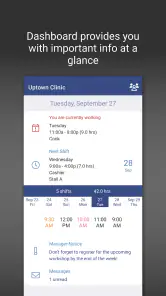
Employees can use WhenToWork Employee Scheduling to view their W2W schedules, check the Tradeboard, manage Time Off, and send or receive Messages. These tools bring common scheduling tasks together in a mobile app, so staff can keep track of work information and communicate with their team. The app is intended for people whose workplace uses WhenToWork.
What is WhenToWork Employee Scheduling?
WhenToWork Employee Scheduling is a comprehensive app designed to help employers and employees manage work schedules more efficiently. It allows for easy shift planning, swapping, and tracking, making it an ideal tool for businesses of all sizes. The app is particularly useful for organizations that require flexible scheduling options. Its store summary also highlights viewing W2W schedules, Tradeboard, Time Off, and sending or receiving Messages.
How does WhenToWork Employee Scheduling improve shift management?
WhenToWork Employee Scheduling enhances shift management by providing tools for creating, modifying, and sharing work schedules seamlessly. It allows employees to swap shifts with colleagues or pick up available shifts. Managers can easily oversee and approve changes, reducing scheduling conflicts and improving overall workforce efficiency.
Is WhenToWork Employee Scheduling user-friendly for both managers and staff?
Yes, the app is designed with a user-friendly interface that caters to both managers and employees. Managers can effortlessly create and manage schedules, while employees can view their schedules, request changes, and communicate with their team. Its intuitive design ensures that users of all tech levels can navigate it without difficulty.
Pros
- User-friendly interface
- Flexible scheduling options
- Automated reminders
- Mobile access available
- Customizable notifications
Cons
- Limited offline functionality
- Requires internet for updates
- Initial setup can be complex
- Limited free features
- Occasional syncing issues

- Category
- Business
- Version
- Varies with device











