When I Work Team Scheduling
- 16.63K
- 4.8
- Installs
- 1.00M
- Price
- Free

Screenshots
Analysis by Reviewed
When a team’s schedule lives in a spreadsheet, a group chat and someone’s memory at the same time, small changes can turn into a lot of chasing. I look at When I Work Team Scheduling as a way to bring the shift plan and everyday team communication into one place. It is a business app from When I Work, Inc., and its strongest appeal is practical: helping managers make schedules visible and giving employees a direct way to keep up with them.
A better starting point than scattered messages
The first useful question is whether your workplace actually needs dedicated scheduling software. If shifts repeat, several people need to see changes, or managers spend time confirming who is working, a shared schedule can replace a patchwork of messages. If you only coordinate occasional one-off duties among a small group, a calendar or shared document may be simpler and easier to maintain.
When I Work is free to download, rated for Everyone, and has a 4.8 average from around 74,000 ratings. Those figures suggest it has found an audience, but I would still judge it by how well its workflow fits your team rather than treating popularity as proof that it suits every workplace.
From building a rota to getting a shift covered
First things first, installing When I Work Team Scheduling is a breeze. Available on both Android and iOS, it’s just a quick download away. Once you’ve got it running, the interface is as intuitive as it gets. You’re greeted with a clean and straightforward dashboard that doesn’t overwhelm you with options but rather guides you gently into the scheduling process. It’s like the app knows that nobody likes a complicated start!
Features That Stand Out
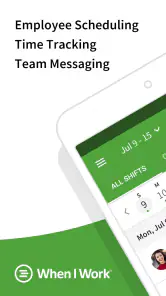
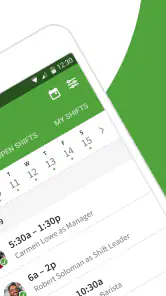
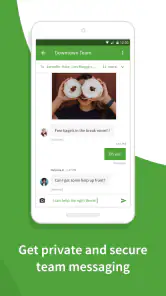
What really gets me excited about this app are its nifty features. You can easily create and manage employee schedules, and the drag-and-drop interface makes it feel like playing a game. Need to swap shifts last minute? No problem! The app allows you to do just that without breaking a sweat. Plus, the built-in messaging feature means you can communicate with your team without hopping between apps.
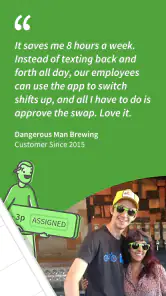
In a realistic shift-change scenario, a team member who can no longer work a scheduled shift needs the rest of the team to know quickly. Keeping the schedule and conversation together helps avoid the familiar problem of one person replying in a chat while another still refers to an old roster. I’d still make the manager’s approval and the final schedule update explicit in the team’s routine; a message saying “I can cover” should not be mistaken for a confirmed change unless the schedule itself reflects it.
A useful habit is to treat the published schedule as the source of truth and use messages to explain exceptions, not as a second unofficial rota. That small distinction matters when someone checks their next shift later or a manager hands scheduling duties to a colleague. It also reduces the chance that a quick chat exchange gets lost among unrelated messages.
More From Our News Desk

Clash of Clans Is Won Between the Battles

Android Auto Makes the Case for Quieter Car Software

MobiOffice: Transforming Mobile Productivity with Seamless Integration

EA SPORTS FC™ Mobile Soccer: Redefining Mobile Sports Gaming

How Microsoft OneDrive Became a Mobile Productivity Giant

How Google Translate Breaks Language Barriers Effortlessly
Making shift changes less fragile
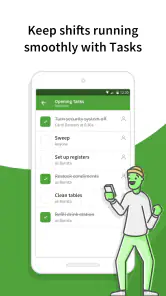
For a busy service team, I’d build a repeatable handoff around the app rather than relying on individual memory. The employee flags the conflict, coworkers can discuss whether they are available, and the manager confirms the arrangement by making sure the rota reflects the agreed change. The important part is not simply that people can communicate; it is that everyone knows which action turns a proposed swap into the actual plan.
That distinction becomes especially useful when a shift is close to starting. A manager can scan the schedule to identify who is expected, while messages provide context about a late change or a request for cover. If someone takes over scheduling from a colleague, the visible rota gives them a clearer starting point than a long conversation thread. I would still make a quick check of the affected shift after a handoff, because a message and a schedule are useful only when they tell the same story.
One practical tip is to establish a simple message convention for changes: say which shift is affected, who is involved, and whether the manager has confirmed it. That makes short updates easier to interpret later and helps prevent a vague “sorted” from being treated as a final decision. This is a team habit, not a magic feature, but it makes the app’s combination of scheduling and messaging more dependable.
Attendance is a separate handoff
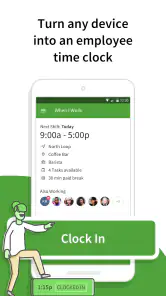
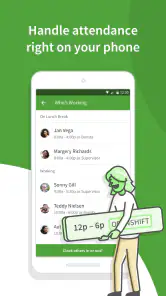
One feature that deserves a special mention is the time clock integration. Employees can clock in and out directly from their phones, and let’s be honest, who doesn’t love that kind of convenience? It’s all about making life easier, and this app nails it.
The time clock is most useful when the manager and employee agree on how it fits into the workday: staff need to know when to record attendance, while the person reviewing the schedule needs to check that the shift plan and actual attendance make sense together. Mobile clocking can make the routine more convenient, but it does not remove the need for a clear process when someone forgets to clock in or a shift changes at short notice.
I would keep attendance corrections from becoming an informal chat-only process. If a person misses a clock-in, the manager should know who is responsible for checking the discrepancy and how the team records the correction in its normal workflow. Otherwise, the time clock may capture the easy days while leaving the awkward exceptions to be reconstructed from memory. That is not a reason to avoid mobile clocking; it is a reason to decide how exceptions are handled before the first one happens.
What a normal workday can look like
For a small shop, café or service team, I can see the practical flow: a manager prepares the rota, employees check their upcoming work, and messages handle the day-to-day questions that would otherwise bounce between separate apps. The app has more than a million installs, but the real benefit for an individual team is less about scale and more about whether everyone consistently checks the same schedule.
Imagine a manager preparing the week while balancing opening and closing shifts. Once the rota is ready, staff can look up when they are expected rather than asking the manager to resend a screenshot. Later, an employee realizes they cannot make one shift and contacts coworkers. The manager then checks the proposed cover, confirms the decision, and leaves the schedule as the place to verify who is actually working. On the day itself, the time clock supports the attendance routine. The outcome is not that every complication disappears; it is that the handoffs have a clearer home.
For a team lead, this can also make a shift change of responsibility less stressful. Instead of passing along a spreadsheet file and a separate collection of messages, the next person can start from the current schedule and review the relevant conversation. I would still make a short verbal handover for unusual staffing issues, but the app can reduce the amount of basic information that has to be repeated.
How it compares with familiar alternatives
Another feather in its cap is the ability to integrate with other platforms. Whether you’re using payroll services or other management tools, When I Work Team Scheduling plays nice with them all. And for those of us who are always on the go, the app’s mobile-friendliness ensures you can manage schedules anytime, anywhere. It’s like having a personal assistant in your pocket!
I would compare it with a spreadsheet plus a group chat, the common low-cost alternative. That combination gives a manager freedom to format things any way they like, but it leaves the team to work out which file is current and where shift changes belong. This app is more purpose-built for recurring schedules and attendance, while a simple shared calendar may be better when a team only needs occasional availability planning.
The trade-off is control versus structure. A spreadsheet can be shaped around unusual roles, exceptions and local conventions, and a manager who already maintains one may find it familiar. But when several people need to consult or change a rota, the team must manage versions and communication itself. A dedicated scheduling tool gives the process a more focused place, yet the team has to learn to use that place consistently.
There is a trade-off to that structure. A scheduling app only helps if the team adopts it; employees who rarely open it may still rely on texts or ask a manager to repeat information. Before moving everyone over, I’d agree on where final shift decisions appear and ask staff to check the schedule after a change. Teams with complicated approval rules or unusual payroll processes should also test their actual workflow rather than assume an integration will cover every handoff they need.
Who benefits, and who may not
When I Work is a stronger fit for businesses where people work defined shifts and attendance needs to be coordinated. It is particularly appealing when managers repeatedly answer the same questions about who is working, or when staff need a convenient way to check changes without depending on a printed rota. A small retail, hospitality or service team with recurring coverage needs is the kind of workplace where I can see the daily routine becoming more orderly.
I would be more cautious if the team’s work is mostly project-based, if schedules change too rarely to justify a dedicated process, or if employees cannot reliably use a mobile app during their working routine. Freelancers arranging tasks independently may get more from a calendar, while a manager who only makes a rota now and then may prefer a lightweight document. The point is not to move every workplace into scheduling software; it is to avoid choosing a tool that creates more upkeep than it removes.
Where the routine can snag
Mobile access is convenient, but it can encourage managers to make changes on the fly without giving the whole team enough context. I’d pair any schedule adjustment with a clear message about what changed and who is affected. Likewise, employees should not treat the ability to request or discuss a swap as evidence that the rota has been updated. The app can organize communication; the team still needs consistent habits.
Another source of friction is onboarding. A schedule is only useful if each employee knows how to find their shifts and understands which channel to use when something is wrong. I would introduce the app with one real scheduling cycle rather than a long explanation of every possible situation. Show staff where to check their work, how the team communicates about changes, and whom to contact when the schedule and a message appear to conflict. That limited, practical introduction is easier to remember.
Managers should also consider what happens when a person is unavailable to check the app at the moment a change is made. A digital update can be clear in the system and still fail as communication if the affected employee does not see it in time. For a last-minute adjustment, I would use the team’s agreed direct contact method as well as keeping the rota current. That is a sensible backup, not a reason to maintain two competing schedules.
The app’s broad audience is reflected in its 17,000 reviews and more than a million installs, but those numbers cannot settle the operational questions that matter to a particular team. Before relying on it, I would ask whether the manager can build the rota comfortably, whether employees will check it without repeated prompting, and whether the attendance routine fits the way the workplace handles exceptions. Those are better tests than simply counting features.
Before you roll it out
It is free, which makes a small trial easier to consider, but I would still treat setup and adoption as real costs in time. First agree who owns the schedule, who can confirm a change, and where employees should look for the final version. Then run through an ordinary week and one plausible exception, such as a requested shift swap or a missed clock-in. If the team can resolve both without creating a parallel record in a chat or spreadsheet, the workflow is starting on solid ground.
People often want to know whether the app can replace their whole scheduling setup or whether it works better alongside existing tools. I would view it first as a place for the rota, team messages and attendance routine, then assess any other management or payroll connection against the specific steps your business needs. An integration may help, but it should not be assumed to eliminate every manual check or approval.
Another useful question is whether employees need to do anything beyond checking the rota. In everyday use, the answer depends on the workplace’s process: staff may need to communicate availability or a conflict, follow the team’s rules for a swap, and record attendance when required. I would explain those expectations before launch so that a worker is not left guessing whether a message alone has changed a shift or whether a manager must confirm it.
Wrapping Up
In a world where time is money, When I Work Team Scheduling is a tool that not only saves you time but also keeps your team happy and productive. It’s user-friendly, packed with useful features, and best of all, it takes the stress out of team management. If you’re tired of juggling spreadsheets and endless emails, give this app a whirl. You might just find it’s the missing piece in your organizational puzzle.
The app was released on July 13, 2010, and its current version is 13.11.1-1663, with Android 11 as the minimum operating system. Those details are worth checking against the devices your team actually uses before rollout, especially if staff rely on older phones. I’d begin with one scheduling cycle, explain where confirmed changes will appear, and see whether employees can follow the process without extra reminders.
So, if you’re ready to transform the way you manage your team’s schedules, head over to your app store and let When I Work Team Scheduling take the wheel. Trust me, your future self will thank you!
When I Work Team Scheduling Frequently Asked Questions
Who is When I Work Team Scheduling designed for?
When I Work Team Scheduling is aimed at employees and managers who coordinate shift-based work. Its scheduling templates, messaging, time clock, and shift attendance features bring several work-related tasks together in one app. It may be useful for a business whose team needs to keep track of shifts and communicate about work, while teams with different needs may not use all of its tools.
What can employees and managers do with the app during a typical workday?
The app brings scheduling and team communication features into the same place. Employees can use it to check schedule information and keep up with work-related messages, while managers can use its scheduling templates to organize shifts. The time clock and shift attendance features also support attendance-related tasks. How useful this combination is will depend on your team’s workflow and how it handles scheduling.
Is When I Work Team Scheduling free to download, and what should I expect from the app?
When I Work Team Scheduling is free to download and is a business app for coordinating work schedules and related team tasks. Its core features include scheduling templates, messaging, a time clock, and shift attendance. It is designed for employees and managers working with shifts, so its usefulness depends on whether your team wants these scheduling and communication tools in one place.
What is When I Work Team Scheduling and how can it benefit my business?
When I Work Team Scheduling is a comprehensive workforce management app designed to streamline employee scheduling, time tracking, and communication. It benefits businesses by reducing scheduling conflicts, improving staff accountability, and enhancing communication through centralized messaging. This app is particularly useful for businesses with shift-based workforces, as it helps optimize labor costs and increase operational efficiency.
Is When I Work Team Scheduling easy to set up and use for new users?
Yes, When I Work Team Scheduling is designed with user-friendliness in mind, making it easy for new users to set up and navigate. The app offers a clean and intuitive interface, along with tutorials and customer support to assist users during the initial setup process. This ensures that users can quickly start managing their workforce effectively without any steep learning curve.
Pros
- Intuitive user interface for easy scheduling.
- Seamless integration with payroll systems.
- Mobile access for on-the-go management.
- Real-time updates and notifications.
- Customizable reports and analytics.
Cons
- Limited offline functionality.
- Occasional sync issues with calendars.
- Some features require premium upgrade.
- Initial setup can be time-consuming.
- Limited support for international languages.
- Category
- Business
- Version
- 13.11.1-1663











