WGN-TV
- 816.00
- 3.3
- Installs
- 100.00K
- Price
- Free

Screenshots
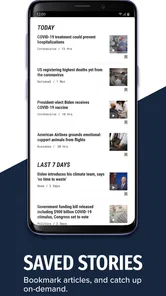
Analysis by Reviewed
When I want local news from Chicago without constantly checking a browser, WGN-TV is the app I would try first. It brings the station’s reporting, live coverage, and urgent alerts into one place, which makes it especially useful during a developing story, severe weather, a major traffic problem, or a local event that is changing quickly. I found its strongest quality to be focus: this is not a broad national news reader trying to cover everything. It is built around Chicago’s Very Own WGN-TV and the people who want that local perspective close at hand.
That focus also explains its limits. WGN-TV is a free News & Magazines app from Nexstar Inc., and its average rating sits at 3.3 from around 2.3 thousand ratings. That tells me the experience is useful for many people but not consistently smooth for everyone. I would recommend approaching it as a practical companion to the station, rather than as a complete replacement for every news source on a phone.
How WGN-TV feels in current everyday use
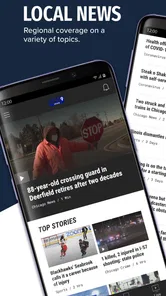
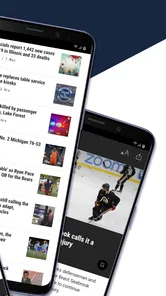
The app’s main purpose is straightforward: keep up with WGN-TV news, watch livestreaming coverage when it is available, and receive breaking news alerts. I like that combination because each part serves a different moment. The live side matters when a story is unfolding right now, the articles are better when I need a quick explanation, and alerts help when I am not actively looking at the app.
In a normal morning routine, I could open it while having coffee, scan local headlines, and then leave it alone until something important arrives. That is more useful than endlessly scrolling through a national feed when my real concern is what is happening around Chicago. The app’s value comes from reducing that distance between a local station and the phone I already carry.
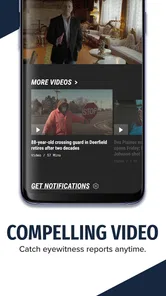
The livestreaming option is particularly helpful during coverage that feels more immediate than a written article. If a press conference, weather situation, or major local event is developing, video can provide context that a short headline cannot. I would still keep expectations realistic: live news depends on the station’s current programming and the quality of the connection, so it is not the same as having an uninterrupted, on-demand video library.
Breaking alerts are another reason to install it, but I would treat notification settings as part of the setup rather than accepting every alert automatically. A person who wants only major local developments may find frequent notifications distracting, while someone who needs rapid updates could consider them essential. The right balance depends on how closely I need to follow Chicago news during the day.
A useful local-news workflow
One practical way to use WGN-TV is to separate quick checking from deeper reading. I would use alerts to learn that something has happened, open the app to understand the basic situation, and then watch the live coverage if the story is still developing. That three-step workflow is more efficient than treating every notification as a complete report.
More From Our News Desk

Weather by Xiaomi Review: Clear at a Glance, Less Clear Up Close

X Under Pressure: Can It Recover When Posting Goes Wrong?

Clash of Clans Is Won Between the Battles

Android Auto Makes the Case for Quieter Car Software

MobiOffice: Transforming Mobile Productivity with Seamless Integration

EA SPORTS FC™ Mobile Soccer: Redefining Mobile Sports Gaming
Another helpful habit is to open the app before leaving home when weather or transportation conditions may affect the day. Local reporting can be more relevant to that decision than a general national feed. If I am planning a commute, a school run, or an outdoor appointment, a quick look at Chicago-focused coverage gives me a more useful starting point than broad headlines from elsewhere.
The trade-off is that the app is most valuable when my interests are local. If I mainly follow international news, technology, business, or national politics, I would probably prefer a broader news reader. WGN-TV can complement those services, but it is not designed to replace them.
What the version history suggests about the product
The app was released on March 11, 2013, so it has had a long life on mobile. Its current version is 510.0.1, which shows that the product has continued through many rounds of maintenance and change rather than remaining a one-time station experiment. I see that as a positive sign for continuity, especially for an app tied to a newsroom that needs to keep publishing and delivering alerts over time.
At the same time, a high version number does not automatically mean every part of the experience feels modern. News apps evolve in visible and invisible ways: layouts change, video delivery is adjusted, alert handling is refined, and compatibility work keeps the app usable across devices. The important point for an existing user is that updates can alter familiar navigation or notification behavior, so someone returning after a long break may need a moment to re-learn where things are.
The current release supports devices running Android 7.0 or later. That is useful for people with older Android phones, although compatibility is not the same as identical performance on every device. A newer phone may handle video and switching between articles more comfortably, while an older device could make live coverage feel less fluid. I would check the app on the phone I actually plan to use rather than assuming the minimum operating system tells the whole story.
What I appreciate about the product’s evolution is that it remains centered on the station instead of trying to become an oversized social platform. Its identity is clear: local reporting, live coverage, and alerts. That clarity is more valuable to me than a long list of unrelated tools.
How existing users may notice the changes
If I had used an earlier edition, the biggest practical difference would likely be the way current news is organized and delivered rather than a completely different purpose. The core expectation remains familiar: open the app for WGN-TV coverage, follow a developing story, and receive important updates. That continuity makes it easier to return to the app without starting from scratch.
Still, long-term users should avoid assuming that old notification habits will remain perfect. I would review alert preferences after an update and confirm that the categories I care about are still enabled. This is a small step, but it prevents two common frustrations: missing a story because alerts became too quiet or receiving more interruptions than intended.
I would also revisit the app’s video behavior after an update, especially if live viewing is the main reason I installed it. A change in how a stream opens, pauses, or resumes can affect the experience more than a redesigned headline screen. Watching a short segment at home before relying on it during a time-sensitive event is a sensible test.
For people who already follow WGN-TV through television or another channel, the app does not need to replace that habit. Its advantage is mobility. It puts the station in reach when I am away from the television, and it gives alerts a direct path to my phone. That makes it an addition for existing viewers, not necessarily a reason to abandon every other way of watching.
Where the app still leaves room for improvement
The average rating of 3.3 suggests that the experience has friction for a meaningful portion of its audience. I would not interpret that number as proof that the app is poor, but I would take it as a warning to expect occasional inconsistency. News apps are judged at stressful moments, and a delay, awkward video transition, or unwanted interruption feels especially frustrating when I am trying to understand a breaking story.
Live video is an obvious area where patience may be required. Streaming depends on the connection, the phone, and the current broadcast situation. If the stream is not behaving well, a written article or another local source may be the better way to get the essential facts quickly. I would not rely on any single app as my only source during an emergency.
Alerts can also become a weakness when they are not managed carefully. The feature is valuable precisely because it interrupts my routine, but that benefit disappears if every notification feels equally urgent. I would rather receive a smaller number of meaningful updates than turn alerts off completely because they become overwhelming.
Another limitation is editorial scope. WGN-TV gives me a Chicago-centered view, which is its reason to exist, but that means it may not satisfy someone looking for a balanced national or international briefing. A general news app is better for comparing several regions and publishers in one feed. I would use WGN-TV when local relevance matters most and another service when breadth matters more.
The age rating is Teen, so families should still make their own judgment about whether the combination of breaking coverage, live reporting, and news imagery suits a younger viewer. News can change quickly and may include upsetting subjects even when the app itself is simple to navigate.
Who should install it, and who should skip it
I think WGN-TV is a good fit for Chicago residents, commuters, former residents who still follow local events, and anyone who wants a station-specific source rather than a crowded national feed. It is also useful for people who prefer receiving a local alert and then deciding whether to read or watch more. The free price removes the usual barrier to trying it, so I would install it if local WGN-TV coverage is already part of my routine.
I would be more cautious if I wanted a highly customizable news dashboard, extensive international coverage, or a single place to compare many outlets. This app’s narrow identity is a strength for local focus but a weakness for variety. Someone who rarely follows Chicago news may open it only occasionally, making a broader service more practical.
I would also skip relying on it alone if I need guaranteed access to live information in places with unreliable mobile service. A downloaded article, television broadcast, radio source, or another dependable channel may be more appropriate in that situation. The app is convenient, but convenience should not be confused with redundancy during serious events.
What I would watch in future updates
For future versions, I would pay attention to how consistently the app handles the three things that define it: alerts, live video, and fast access to local articles. Those areas matter more than decorative changes. A cleaner route from a notification to the relevant report would make the app feel more useful, especially when I am reading under pressure.
I would also look for improvements that help users control the intensity of breaking coverage. Clearer notification choices, sensible grouping of related updates, and a simple way to return to an ongoing story would all make a noticeable difference without changing the station’s identity. These are the details that determine whether I keep an app installed after the first week.
Existing users should watch for changes after each update, particularly if they depend on alerts or live broadcasts. Rather than assuming everything works exactly as before, I would open the app, check the main news screen, test a video, and review notifications. That quick check can reveal a changed workflow before an important story arrives.
My final take on WGN-TV
WGN-TV succeeds because it understands its job. It gives Chicago-focused news a direct place on the phone, combines written coverage with livestreaming, and can notify me when something important is developing. With over 100 thousand installs, it has clearly found an audience, and the free model makes it easy to judge for myself.
My recommendation is positive but specific: install it if you want WGN-TV’s local reporting close by, especially for breaking news and live coverage. Keep your alert settings under control, do not depend on the stream as your only source during an urgent situation, and pair it with a broader news option if your interests extend far beyond Chicago. The best way to use this app is as a focused local-news tool, not as an all-purpose news universe.
For me, that is a worthwhile role. It is simple to understand, relevant when local events matter, and more convenient than waiting until I am near a television. Its weaknesses keep it from being an automatic recommendation for everyone, but for the right reader, WGN-TV is a practical way to stay connected to Chicago’s Very Own WGN-TV wherever the day takes me.
WGN-TV Frequently Asked Questions
Who publishes the WGN-TV app, and is it free to download?
WGN-TV is published by Nexstar Inc. as a News & Magazines app, and it is free to download. It is intended for people who want news connected with Chicago’s WGN-TV, including breaking updates and livestreaming. As with other news apps, using video over a mobile connection can consume data, so Wi-Fi may be preferable when you want to limit cellular usage.
What age group is the WGN-TV app intended for?
The app is rated Teen, which is useful to consider when deciding whether it is appropriate for younger users. Its focus is news coverage, where stories may involve serious or sensitive real-world events. Parents and guardians should use their judgment about whether that material suits a particular teenager and may want to explore the app together before enabling notifications or regular use.
What is WGN-TV, and what can I use the app for?
WGN-TV is the official mobile app for keeping up with news, weather, traffic, and local coverage associated with Chicago’s WGN-TV. After installing it, users can browse breaking stories, watch available video reports, check forecasts, and follow regional updates. The app also promotes livestreaming and breaking news alerts, making it useful for following developing stories as they happen.
Does the WGN-TV app provide live news or television streaming?
The app offers livestreaming alongside video coverage and news from Chicago’s Very Own WGN-TV. This makes it possible to follow live news through the app rather than relying only on written stories or recorded clips. Streaming video uses an internet connection and can consume mobile data, so consider using Wi-Fi if you plan to watch for an extended period.
Can I use WGN-TV for local weather forecasts and alerts?
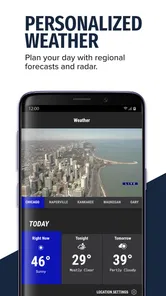
Yes, weather is one of the app’s useful features for users who want Chicago-area forecasts and changing conditions in one place. You can typically view current temperatures, hourly or extended forecasts, radar imagery, and severe-weather coverage. Notifications may be available for important updates, but you should enable location access and push alerts only if you are comfortable granting those permissions.
Pros
- Live local news
- weather
- and traffic updates in one app.
- Video reports make it easy to catch up on missed broadcasts.
- Breaking-news alerts help users stay informed throughout the day.
- Coverage focuses on Chicago-area stories and community events.
- Free to download with a straightforward
- easy-to-navigate layout.
Cons
- Some content may be limited to viewers in the Chicago region.
- Frequent notifications can feel excessive unless carefully customized.
- Advertising may interrupt browsing and video viewing.
- Video playback can depend heavily on connection quality.
- Certain live or on-demand features may require location access.













