

wePix arena
- 0.00
- 0.0
- Installs
- 100.00K
- Price
- Free

Screenshots
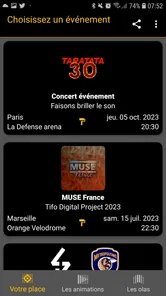
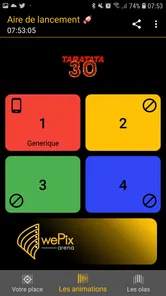
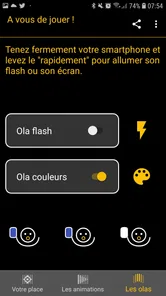
Analysis by Reviewed
Some apps are built for one person staring at a screen, while others make the phone part of a shared moment. wePix arena belongs to the second group. Developed by GIRY, this free Events app is designed around the idea of turning smartphones into a large collective display. I found that concept more interesting than the short store wording suggests, because the value is not really in using the app alone; it appears when several people coordinate around it.
That immediately makes it different from the usual event tools. A calendar app helps me remember where to go, a ticketing app helps me get inside, and a social network helps me talk about what is happening. This app is aimed at the atmosphere itself. It is for moments where a group wants to look unified, visible, or playful rather than simply exchange messages.
It is available for free, carries an Everyone age rating, and runs on Android devices starting with version 5.0. The current release is 3.9.2, and the app has passed the 100K-install mark. Those details make it approachable for mixed groups, especially when an organizer cannot assume that every participant owns a recent phone.
How the shared-screen idea feels in real use
The first thing I would clarify to a friend is that wePix arena makes most sense as a coordinated event companion. It is not the kind of app I would open every morning for personal productivity, and it is not a replacement for a conventional event-management platform. Its purpose is more visual and collective: people use their phones as pieces of one larger display.
That distinction matters when judging speed. A normal utility can feel fast if its menus open quickly and its main task finishes immediately. A group-display app has another challenge: everyone needs to join the same experience without confusion, and the visual result needs to feel synchronized enough to be convincing. Even when the app itself responds quickly, the overall impression depends on the people using it at the same time.
In a practical setting, I would prepare participants before the main moment rather than handing them the app seconds beforehand. Asking a crowd to install an app, find the right event, understand the controls, and hold phones in position all at once creates avoidable friction. The strongest use case is an organized gathering where someone can explain the basic flow before the display is needed.
The important performance insight is that coordination is part of performance. A fast interface cannot compensate for unclear instructions, poor visibility, or a group that starts at different times. I would treat the app as one component of an event plan, not as a magic button that automatically creates a polished spectacle.
More From Our News Desk

 Gmail
GmailGmail in a Busy Inbox: Who Benefits Most?
From first account to crowded workday, Gmail earns its place through dependable search and flexible sorting—but its best fit depends on how much inbox maintenance you can tolerate.

 Prime Video
Switching to Prime Video: What Changes in Your Viewing Routine
Prime Video can make a compelling second home for streaming, but switching means learning a different catalog, rental layer, and route from browsing to playback.

 Universal TV Remote Control
Universal TV Remote Control Works Best as a Reliable Backup
A phone remote earns its place through quick setup and reliable habits. Here is how to get more from Universal TV Remote Control—and where its limits show.

 Weather - By Xiaomi
Weather by Xiaomi Review: Clear at a Glance, Less Clear Up Close
Xiaomi’s weather app makes everyday forecasts quick to scan, but its calm surface can leave useful details and recovery paths harder to find than they should be.

 X
XX Under Pressure: Can It Recover When Posting Goes Wrong?
A resilience-focused review of X, examining setup, mistaken posts, interruptions, weak connections, and the gaps that matter when recovery needs to be dependable.

 Clash of Clans
Clash of Clans Is Won Between the Battles
Its raids are quick; its community is a long-term project of coordination, teaching, rivalry, and shared responsibility—with all the friction that entails.
Latest News



Speed expectations on older and newer phones
Because the minimum operating-system requirement is Android 5.0, the potential audience includes phones that are much older than current models. That is useful for public events, schools, community gatherings, and family occasions, where participants may bring a wide range of devices. It also means I would avoid promising identical smoothness across the whole group.
A newer phone will generally give the app more breathing room for display updates and background activity, while an older device may take longer to launch or react when several things are happening at once. I cannot sensibly reduce the experience to a single speed expectation, because the result depends on the phone, its available memory, its battery condition, and what else is running.
My practical advice is to test the oldest likely participant device before the event. That is more valuable than testing only the organizer’s phone. If the shared effect still feels clear on the least capable handset in the group, the event is much less likely to be interrupted by last-minute surprises.
I would also open the app before the audience arrives. This is a small step, but it separates startup delays from the public moment. It gives the organizer time to check whether the intended event experience is ready and whether participants can understand what to do without repeated explanations.
What happens during heavy-use moments
The most demanding situation is not a quiet individual test. It is a crowded event where many people are looking at their phones, changing position, reacting to instructions, and possibly launching the experience within a narrow window. That is where a shared display can feel either impressive or disjointed.
For a smoother result, I would divide the setup into stages. First, have a small group try it. Next, explain where phones should be held and when the action begins. Only then bring in everyone else. This staged approach reduces the chance that the organizer is troubleshooting while the whole audience waits.
A second useful habit is to keep the visual goal simple. If people need to understand several controls while also watching a performance, the shared effect can lose its impact. The app works best when the audience knows the basic action in advance and can focus on the collective result rather than learning the interface during the event.
Battery level is another everyday consideration. Turning a phone into part of a live display can be more demanding than briefly checking a message, particularly if the session lasts longer than expected. I would ask participants to arrive with reasonably charged phones and avoid unnecessary background activity. That is not a special trick inside the app; it is sensible preparation for any group experience that keeps screens active.
There is also a trade-off between scale and control. A small gathering may be easier to synchronize and correct if someone is out of position. A large audience can create a much stronger visual impression, but it also magnifies every inconsistency. If the event depends on perfect timing, a rehearsal with a representative group is worth the effort.
Reliability depends on the event setup
I would judge reliability here in two layers. The first is whether the application launches and behaves consistently on an individual phone. The second is whether a whole group can produce the intended shared result at the same time. The second layer is naturally harder, because it includes human timing and the surrounding event conditions.
That is why I would not use wePix arena as the only critical system for an event where failure would have serious consequences. If the ceremony, announcement, or performance must continue regardless of the app, keep a non-app fallback ready. The app can add a memorable visual element, but a responsible organizer should not make the entire schedule depend on every participant completing the same digital step perfectly.
For casual gatherings, the risk is easier to accept. A family celebration, fan activity, school event, or community occasion can still be enjoyable if a few people need help. In those settings, the shared-screen effect is an enhancement rather than the only reason the event works.
I also appreciate that the Everyone rating makes the app easier to consider for mixed-age groups. That does not remove the need for adult guidance at organized events, especially when younger participants are being asked to follow timing instructions or keep their phones positioned. It simply makes the app feel less restricted as a general event companion.
One realistic scenario would be a small indoor celebration where the host wants guests to participate in a coordinated visual moment before a speech. I would install the app ahead of time, ask a few guests to join early, explain the starting cue, and keep the speech itself independent of the result. If the display works, it creates a strong opening; if one or two phones lag, the event can continue without awkward recovery.
Recovery when something goes wrong
Good recovery planning is especially important for a group app. If one person cannot join, the quickest solution is usually not to stop the entire audience. I would let that participant watch first, then help them afterward. If the app is being used for a visual pattern, one missing phone is less damaging than a long pause while everyone waits for a single device.
If the group starts at different times, I would reset the moment rather than repeatedly issuing complicated instructions. A short, clear restart cue is easier for people to follow than a detailed explanation shouted across a noisy room. This is one of the less obvious lessons of using a shared display: the organizer’s communication style affects the perceived stability almost as much as the software.
For an event with a stage, I would position the app activity before the main performance rather than during the most important part. That leaves room to recover from a slow launch, a participant who needs assistance, or a phone that runs out of power. The app is better treated as a planned visual beat than as an invisible technical layer.
I would also avoid assuming that reinstalling is always the best first response. In a crowd, it can take longer and create more confusion than simply moving forward with the participants who are ready. A calm fallback is more useful than aggressive troubleshooting when the audience is already waiting.
Device limits and practical preparation
The Android 5.0 minimum is a clear advantage for reach, but it should not be mistaken for a guarantee that every compatible phone will feel equally capable. Operating-system compatibility tells me that older devices can install the app; it does not tell me how much free storage, battery, memory, or screen quality each participant has available.
Screen brightness can matter in the final result. In a bright outdoor location, a dim display may be difficult to see, while indoors the same phone could be perfectly adequate. I would choose the venue with the visual effect in mind and ask participants to adjust brightness before the coordinated moment, while still being mindful of battery use.
Physical handling matters too. People may be standing, walking, cheering, or holding other items. A phone that works well on a table may be awkward in a moving crowd. For that reason, I see the app as a better fit for moments where participants can comfortably keep their devices visible and stable.
Older phones may also have worn batteries or slower startup behavior. A short pre-event check can reveal more than a long description ever could: launch the app, join the intended activity, try the basic interaction, and leave enough battery for the actual event. If the device struggles during this simple test, it is better to assign that person a spectator role than to discover the problem at the key moment.
People who want a private, low-effort experience should probably skip it. The app’s appeal comes from participation with others, so someone looking for a solo event calendar, a ticket wallet, or a simple messaging tool would be better served by a dedicated alternative. Likewise, organizers who need registrations, schedules, attendee management, or detailed reporting will likely prefer conventional event software.
On the other hand, people planning a visual group moment should consider it precisely because ordinary alternatives do not offer the same kind of shared phone-based presentation. A slideshow remains controlled by one screen. A group chat spreads information but does not turn the audience into a coordinated display. A social feed can document an event afterward, but it does not create the same collective action in the room.
Who will get the most from it
I think wePix arena is best for organizers who already have a defined audience and a clear reason for everyone to participate together. It could suit a community gathering, a school activity, a fan-led moment, or a personal celebration where the phones themselves become part of the presentation.
It is also a reasonable choice when the budget is limited. Since the app is free, the main cost is preparation rather than purchase. That makes experimentation easier: an organizer can test the concept with a small group before deciding whether it fits the event. The free model is particularly helpful when attendees are contributing their own devices instead of receiving dedicated equipment.
Still, free does not mean effortless. The organizer invests time in communication, testing, and contingency planning. If nobody is available to guide participants, the app may feel less successful than its simple premise suggests. I would recommend assigning one person to coordinate the setup rather than expecting the host, performer, or speaker to manage everything at once.
For younger audiences, the Everyone rating is reassuring, but the experience should still be explained in plain language. A short demonstration is more effective than a long set of written instructions. Children and casual participants are likely to understand the idea quickly when they can see the desired result, while technical explanations may only slow the group down.
My performance verdict after weighing the trade-offs
My overall view is positive but specific. I would recommend wePix arena when the goal is a shared visual moment and the organizer is willing to treat preparation as part of the experience. Its strongest quality is not a long feature list; it is the way it gives ordinary smartphones a collective role during an event.
Perceived speed should be good enough when participants prepare in advance and the devices are in reasonable condition, but I would not promise identical timing on every compatible phone. Heavy use is manageable with a staged start, clear instructions, sensible brightness, and charged batteries. Reliability is strongest when the app adds atmosphere rather than carrying the full responsibility for the event.
The current version, 3.9.2, and the broad Android compatibility make it easy to consider for a mixed-device audience. GIRY has positioned the app in a useful space between event utility and live visual participation. I would not choose it for ticketing, detailed planning, or solo organization, but those are not the problems it is trying to solve.
My final recommendation is to test it with the actual phones and people who will attend, not just on the organizer’s device. If the group can understand the action quickly and the visual effect supports the occasion, the app can turn a simple gathering into something that feels coordinated and memorable. If the event needs guaranteed precision, extensive management tools, or zero setup, a more traditional event platform will be the safer choice.
For the right situation, though, wePix arena is a refreshingly focused idea: free, accessible to a wide range of Android users, and built around participation rather than passive viewing. I would recommend it to a friend planning a communal moment, with one condition: rehearse the shared display, keep a fallback ready, and let the event itself remain more important than the technology.
wePix arena Frequently Asked Questions
What kind of experience should I expect from wePix arena?
wePix arena is a mobile app in the Events category, built around the idea of making smartphones work together as a giant screen. Its short description is simply “wePix arena,” while its central invitation is to be brilliant together. Before downloading, consider whether you are looking for an event-oriented app that brings people and their phones into a shared experience rather than a conventional single-player game.
What is wePix arena and how does it work?
wePix arena is a mobile gaming experience centered on competitive play, challenges, and progression. After installing it, players can enter the available arena modes, complete objectives, and improve their results through practice. The exact content may vary depending on updates, but the main appeal is its quick sessions and competitive structure. New users should explore the menus first to understand the controls, scoring system, and available game modes.
Is wePix arena free to download and play?
wePix arena can generally be downloaded without an upfront purchase, allowing users to try the core experience before spending money. However, availability of optional in-app purchases, premium items, advertisements, or other paid features may depend on the current version and platform. Before confirming any transaction, review the store listing and payment details carefully. Parents should also check purchase restrictions if children use the device.
Does wePix arena require an internet connection?
An internet connection may be necessary for important parts of wePix arena, especially when accessing online competitions, synchronizing progress, viewing rankings, receiving updates, or connecting with other players. Some functions might work temporarily offline, but this should not be assumed for the complete experience. A stable Wi-Fi or mobile-data connection is recommended, particularly during competitive matches, where interruptions could affect progress or results.
Is wePix arena suitable for children and younger players?
Whether wePix arena is appropriate for children depends on its current age rating, gameplay content, advertising, chat features, and purchase options. Parents should read the official Google Play or App Store rating before installation and review the privacy policy as well. If the game includes online interaction or purchases, enabling parental controls is advisable. Younger players may also need supervision while learning the competitive systems.
Pros
- Fast-paced arena battles are easy to start and difficult to master.
- Short matches fit well into quick gaming sessions.
- Character abilities add variety to each team composition.
- Bright visuals make the action easy to follow on mobile screens.
- Regular competition can keep experienced players engaged.
Cons
- Matchmaking may feel uneven when experienced players face newcomers.
- The small player base could lead to longer waiting times.
- Progression may feel repetitive after unlocking the main content.
- Frequent battles can drain the battery on older devices.
- A stable internet connection is required for smooth online play.











