Wells Fargo Mobile®
- 335.81K
- 4.8
- Installs
- 10.00M
- Price
- Free

Screenshots
Analysis by Reviewed
I find banking apps most useful when they make routine tasks straightforward and help me work out what to do when something interrupts the routine. Wells Fargo Mobile is a finance app from Wells Fargo Mobile for people who already use Wells Fargo for banking or investment accounts. It is free, rated for Everyone, and has been available since May 26, 2010. Its current version is 25.11.00.81, and it requires Android 10 or later. The app has a 4.8 average from around 2.8 million ratings, with more than 10 million installs. Those figures suggest a well-established service, but whether it suits you depends more on where you keep your accounts and which tasks you need to handle.
Where a banking task can get stuck
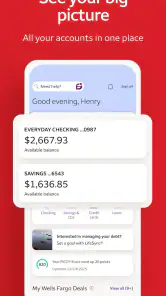
In my view, the key trade-off is that this is a companion to a Wells Fargo relationship, not a general-purpose finance dashboard for accounts at any bank. If your daily money is spread across institutions, you may still need other apps to see the full picture. If Wells Fargo is where you bank, having account access and common tasks together can save a trip to a website or branch.
Mobile banking can also feel less convenient when a task needs a careful review. A small screen is fine for checking an amount or handling a familiar payment, but I prefer to slow down before confirming a transfer or changing a recurring arrangement. For anything consequential, read the destination and amount again rather than treating quick access as a reason to rush.
The Ease of Banking Anytime, Anywhere
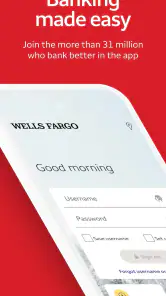
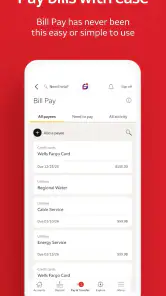
One of the standout features of the Wells Fargo Mobile app is its convenience. Imagine needing to check your balance, transfer funds, or even pay bills while sipping coffee at your favorite cafe. With this app, it's all possible! The app's intuitive design makes navigation a breeze. You can find everything you need right from the home screen, which is a huge plus for those of us who aren't keen on digging through menus.
Checks before relying on it day to day
If you are setting it up for the first time, I would start with the basics: install the current app on a supported device, make sure you can sign in to your Wells Fargo account, and check that the account you expect to use appears once you are in. Keep your sign-in details private, and use the device’s normal security protections. If you are changing phones or have trouble getting in, avoid repeated guesses; use the bank’s sign-in recovery or support route instead.
It is also worth checking your account details before arranging a bill payment or transfer. A quick review of the selected account, recipient, and timing can prevent the kind of mistake that is harder to fix later. I would treat alerts as a useful way to notice activity, not as a substitute for checking statements and account history yourself.
Choosing the right routine for your accounts
I would decide what role this app should play before making it the center of a money routine. If Wells Fargo is your main bank, it can serve as the place to check balances, review account activity, and take care of familiar tasks. If you also use another bank for bills or savings, keep a separate check-in habit for that provider instead of assuming one app presents every account you own.
More From Our News Desk

Weather by Xiaomi Review: Clear at a Glance, Less Clear Up Close

X Under Pressure: Can It Recover When Posting Goes Wrong?

Clash of Clans Is Won Between the Battles

Android Auto Makes the Case for Quieter Car Software

MobiOffice: Transforming Mobile Productivity with Seamless Integration

EA SPORTS FC™ Mobile Soccer: Redefining Mobile Sports Gaming
A practical approach is to use the app for quick, focused jobs and reserve a quieter moment for decisions that affect several accounts. For example, checking whether a deposit has appeared is a small task; deciding how much to move between accounts may require looking at upcoming bills elsewhere too. This distinction helps prevent convenience from turning into an incomplete view of your cash flow.
Secure and Reliable
Security is a big deal, especially when it comes to managing your money. The app uses advanced security features to ensure that your financial information is safe. From biometric login options like fingerprint and facial recognition to customizable alerts for every transaction, you can be sure that your data is protected. I felt a sense of relief knowing that I could monitor my account activity and get instant notifications for any unusual transactions.
Recovering a routine when something goes wrong
For an everyday example, imagine checking your balance before paying for groceries, then noticing an unfamiliar transaction. I would pause before making another payment, open the account activity to review the entry, and contact the bank through a trusted channel if it still looks wrong. That is a more useful role for a banking app than simply showing a number: it gives you a place to check what happened and decide on a sensible next step.
If a screen will not load or a task does not complete, first check that the device has a working connection and that you are using the current app version. Close and reopen the app, then try again once; if the issue remains, switch to the bank’s other support or account-access options rather than repeating a payment or transfer and risking a duplicate. For a pending transaction, check its status before starting it again.
When a delay is not necessarily an app problem
It is easy to blame the app when an account entry or deposit does not look the way you expected, but the app is only the interface for your account. A displayed balance and a payment’s final status are not always the same thing as money being ready for every purpose. I would check the transaction details and account history, then give a pending item time to update before acting on it twice.
If the app opens but a particular task remains unavailable, consider whether the issue is tied to the account or the transaction rather than the screen itself. Keep a note of what you were trying to do and any status shown, and use a trusted Wells Fargo support route for account-specific guidance. That is safer than trying alternate steps repeatedly when you are unsure whether the first request went through.
Features That Make Life Easier
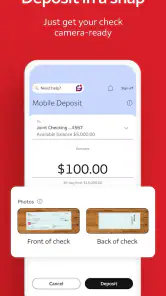
Let's talk about some of the features that really impressed me. First off, the mobile check deposit feature is a lifesaver. I could just snap a picture of my check and deposit it without having to visit a branch. Also, the app lets you set up and manage your account preferences, like automatic payments, which makes life so much easier. It's all about saving time and reducing hassle, which I'm all for!
Mobile deposit is especially handy when a branch visit would be inconvenient, but I would still check that the deposit appears in the account before treating the money as available for a planned expense. For recurring payments, review the schedule and funding account after setting them up. That small check is worthwhile because automation saves effort only when the instructions still match your current bills and cash flow.
Making mobile deposit and recurring payments work for you
For a check deposit, I would choose a moment when I can take a clear look at the information rather than trying to rush through it between errands. After submitting it, I would confirm that the app shows the deposit in the account activity and keep the check until I am comfortable that the deposit has been handled. The useful lesson is to treat the camera step as submission, not as proof that the money is immediately ready to spend.
Automatic payments need a different kind of follow-up. When a bill changes, an account is replaced, or your monthly budget shifts, revisit the arrangement instead of assuming an old instruction still fits. I find automation most valuable for predictable obligations, while irregular bills deserve a deliberate review. That balance keeps the convenience without letting a forgotten schedule quietly become a problem.
When another route makes more sense
Compared with using a bank website in a mobile browser, an app can make repeat checks and everyday account tasks feel more direct. Compared with a budgeting app that brings several institutions together, though, Wells Fargo Mobile is a better fit for handling Wells Fargo accounts than for building a household-wide view across providers. If you mainly want broad spending analysis, or your accounts are elsewhere, your bank’s own app or a multi-bank budgeting tool may be a better starting point.
I would also choose a larger screen or another support channel for complicated account questions, detailed research, or a problem that remains unresolved after basic troubleshooting. A banking app is convenient, but it cannot make every account issue self-service, and a phone interface is not ideal for reviewing a lot of information at once.
Who benefits most—and who may prefer something else
I think this app makes the most sense for someone who already banks with Wells Fargo and wants a practical way to handle routine account checks away from a computer. It can also suit someone who occasionally needs to deposit a check or keep an eye on payment activity while out. The strongest reason to use it is that it connects everyday mobile access to an existing Wells Fargo relationship, rather than asking you to build a separate financial system.
I would not choose it as my only money-management tool if I needed a single view of accounts across several banks, detailed budgeting across providers, or a comfortable way to study a lot of information at once. In those situations, a dedicated budgeting tool, the other banks’ own apps, or a desktop session may fit better. The right choice depends on whether your priority is acting on Wells Fargo accounts or organizing your whole financial picture.
Customer Support at Your Fingertips
In case you run into any issues, the app provides easy access to customer support. You can chat with a representative right from the app or get assistance through their comprehensive help section. This level of support is truly invaluable, especially when you need quick answers to pressing questions.
When I need help with a sensitive or time-critical matter, I would use a support path I can trust and explain the specific screen or transaction involved. For a simple navigation question, in-app help can be a convenient first stop; for an account access issue or a payment whose status is unclear, I would avoid sharing sign-in details in an informal conversation and follow the bank’s secure process. Keeping the issue focused makes it easier to get useful guidance without exposing more information than needed.
A practical verdict for everyday banking
Wells Fargo Mobile is most compelling when its purpose is clear: give Wells Fargo customers a convenient place to check and manage their own banking or investment accounts. Its long-standing presence, free price, Everyone rating, and strong user response make it a familiar option for people already tied to the bank, while the 25.11.00.81 version and Android 10 minimum are useful compatibility details to check before installing. I would approach the app as a handy day-to-day companion, not as a replacement for careful review or for tools designed to cover multiple financial providers.
My practical recommendation is to start with one low-stakes task, confirm that the account information you expect is visible, and learn where to check activity before relying on it for a more important payment. Keep a separate method for accounts outside Wells Fargo, and use a larger screen or support when a question needs more than a quick mobile check. If those boundaries match the way you handle money, this is a sensible app to keep close; if you want broad budgeting or an all-bank dashboard, another tool will likely serve you better.
In conclusion, the Wells Fargo Mobile app is a game-changer for anyone looking to manage their finances efficiently. It's packed with features that cater to modern banking needs, all wrapped up in a user-friendly package. Whether you're paying bills, transferring money, or just checking your balance, this app has got you covered. Give it a try, and you might find, like I did, that it's an indispensable tool in your financial arsenal.
Wells Fargo Mobile® Frequently Asked Questions
What does Wells Fargo Mobile do, and is it the right app for me?
Wells Fargo Mobile is a finance app for accessing bank and investment accounts from a mobile device. It may suit Wells Fargo customers who want to check their accounts or manage banking while away from a computer. If you are looking for a general budgeting app or a way to access accounts at another institution, this app’s stated purpose may not match what you need.
Who develops Wells Fargo Mobile?
Wells Fargo Mobile is developed by Wells Fargo Mobile. Knowing who publishes an app can help you choose the official mobile service rather than an unrelated app with a similar name. Before installing, check the app name and developer in your device’s app store, and make sure you are comfortable using a mobile app to access your Wells Fargo accounts.
What devices and operating systems can run Wells Fargo Mobile?
Wells Fargo Mobile is a finance app for managing access to bank and investment accounts on a mobile device. Before downloading, check that your device meets the app’s minimum operating-system requirement; the current version requires iOS or Android 10 or later. Keeping your device’s operating system and the app up to date can also help you use the latest available version.
Is Wells Fargo Mobile free to download?
Yes, Wells Fargo Mobile is free to download. It is intended for Wells Fargo customers who want mobile access to their bank and investment accounts. Your mobile carrier may charge for data or messaging, and account services or transactions may have their own terms and fees, so review the applicable account details before using a particular feature.
What features does the Wells Fargo Mobile app offer?
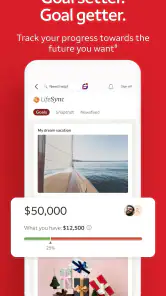
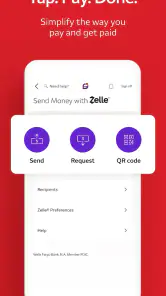
The Wells Fargo Mobile app provides a comprehensive suite of banking features, allowing users to manage their accounts conveniently from their mobile devices. Users can check account balances, view transaction history, transfer funds, pay bills, deposit checks using mobile deposit, and even locate nearby ATMs or branches. The app also offers personalized alerts to help manage account activities.
Pros
- User-friendly interface
- Secure login options
- Comprehensive financial tools
- Quick account access
- 24/7 customer service
Cons
- Occasional login issues
- Limited international support
- Frequent app updates
- Slow customer service response
- Requires strong internet connection
- Category
- Finance
- Version
- 25.11.00.81