Wellcare+
- 622.00
- 2.4
- Installs
- 100.00K
- Price
- Free

Screenshots
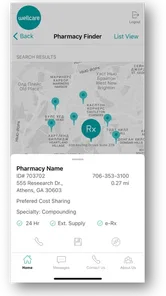
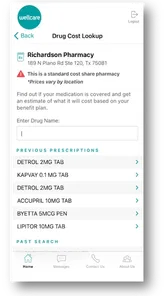
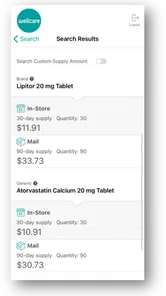
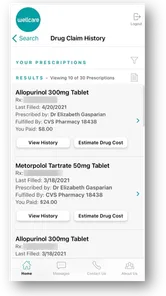
Analysis by Reviewed
In a household where one person manages health coverage while another handles errands or appointment calls, a member app can be useful without becoming a shared family health record. That distinction matters with Wellcare+: I see it as a practical place for a WellCare member to check benefit-related information, not as a general fitness dashboard or a way to manage someone else’s account. Before relying on it for a household task, I would make sure the person whose coverage is involved can sign in and confirm details themselves.
Using Wellcare+ around a household routine
For a realistic example, imagine a member is out of the house and a relative is helping organize a health-related errand. The relative can remind them to check the app, but I would not assume that sharing a phone or login is the right way to handle private account details. Keeping the member in control avoids confusion about whose benefits are being viewed and leaves the final check with the person the coverage belongs to.
Keep the account boundary clear
Wellcare+ is a medical app from Centene Corporation, and its purpose is tied to keeping WellCare members up to date about health benefits. That makes it different from the usual health and fitness apps, which tend to center on workouts, food logs, sleep, or social challenges. I would use it alongside those tools only if I had a specific reason: a fitness tracker can help with personal routines, while a member-focused app is the more relevant place to look for coverage information.
If more than one person in a household has a reason to use it, I would treat each person’s account as their own rather than expecting one shared profile to cover everyone. That is a small but useful habit: check the member identity before acting on any information, especially when helping a parent, partner, or adult child. It also makes the app a poorer fit for someone who wants a single family organizer with shared calendars or household health records.
Coordination without turning it into a family hub
In practice, the most helpful household workflow is simple: the member checks their own benefits, then shares the relevant detail with whoever is helping coordinate the next step. I would avoid relying on another person’s memory of what appeared on screen; if a detail affects a decision, the member should reopen the app and verify it. This approach is less convenient than a shared dashboard, but it reduces the chance of mixing up one person’s information with another’s.
That trade-off also helps set expectations. Wellcare+ is not a substitute for a conversation with a care professional, and a benefit view is not the same thing as medical advice. If someone needs to discuss symptoms or decide what care is appropriate, I would turn to a qualified clinician rather than treating a member app as a health coach. For routine benefit checks, though, keeping the information close at hand can be more convenient than searching through old papers or relying on a family member to find them.
Age, trust, and who should use it
The app is free, is rated for Everyone, and requires Android 8.0 or later. Those details make access straightforward for many households, but they do not mean every age group should use an account without a responsible adult’s involvement. I would help a younger family member understand whose coverage is being checked and make sure an adult handles any decisions that require it. The app has a 2.4 average from around a thousand ratings, so I would keep expectations measured and verify important details rather than assuming every interaction will feel effortless.
More From Our News Desk

 Gmail
Gmail in a Busy Inbox: Who Benefits Most?
From first account to crowded workday, Gmail earns its place through dependable search and flexible sorting—but its best fit depends on how much inbox maintenance you can tolerate.

 Prime Video
Switching to Prime Video: What Changes in Your Viewing Routine
Prime Video can make a compelling second home for streaming, but switching means learning a different catalog, rental layer, and route from browsing to playback.

 Universal TV Remote Control
 Works Best as a Reliable Backup
A phone remote earns its place through quick setup and reliable habits. Here is how to get more from Universal TV Remote Control—and where its limits show.

 Weather - By Xiaomi
Weather by Xiaomi Review: Clear at a Glance, Less Clear Up Close
Xiaomi’s weather app makes everyday forecasts quick to scan, but its calm surface can leave useful details and recovery paths harder to find than they should be.

 X
X Under Pressure: Can It Recover When Posting Goes Wrong?
A resilience-focused review of X, examining setup, mistaken posts, interruptions, weak connections, and the gaps that matter when recovery needs to be dependable.

 Clash of Clans
 Is Won Between the Battles
Its raids are quick; its community is a long-term project of coordination, teaching, rivalry, and shared responsibility—with all the friction that entails.
Latest News



It has been available since October 29, 2021, and version 2.11 is the current version. WellCare members who want a convenient mobile way to keep up with benefits are the clearest audience. Someone looking for workout tracking, a shared household planner, or a broad wellness program should look elsewhere; those needs are not the same as checking member benefits. With over 100,000 installs and hundreds of reviews, there is evidence of use, but I would still judge it by whether it handles the specific member task I need.
Getting Started with Wellcare+
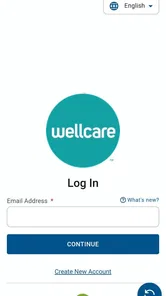
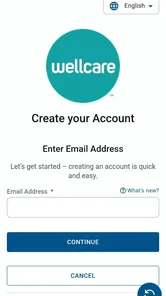
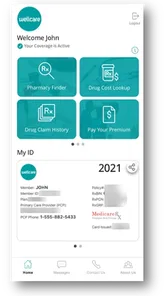
First impressions? The app is surprisingly user-friendly! When you download it from your app store, you’ll notice its sleek design and intuitive navigation. Signing up is a breeze—just a few taps, and you’re in. You’ll be greeted with a dashboard that gives you a snapshot of your daily activities, nutrition, and mental health status. It’s like having a personal health assistant in your pocket!
Features That Stand Out
One of the best things about Wellcare+ is its comprehensive tracking system. Whether you’re counting steps, monitoring your calorie intake, or logging your sleep patterns, this app has got you covered. I particularly love the way it integrates with other fitness devices, ensuring that all your data is synced seamlessly.
Another highlight is the app’s mental health resources. In today’s fast-paced world, taking care of your mental well-being is just as crucial as physical health. The app offers guided meditations, stress-relief exercises, and even a mood tracker to help you stay mindful and centered. Honestly, it’s like having a therapist on speed dial!
Community and Support
Feeling a bit isolated in your wellness journey? No worries! Wellcare+ has a vibrant community feature where you can connect with like-minded individuals. Share tips, join challenges, and cheer each other on. It’s a fantastic way to stay motivated and inspired. Plus, the customer support team is super responsive, ready to help with any app-related hiccups you might encounter.
Final Thoughts
So, is Wellcare+ worth downloading? Absolutely! It’s an all-in-one app that caters to both your physical and mental health needs. Whether you’re a fitness newbie or a seasoned pro, this app provides the tools and support necessary to enhance your wellness journey. Don’t just take my word for it—give it a try and see how it transforms your daily routine. Here’s to a healthier, happier you!
Wellcare+ Frequently Asked Questions
Who can use Wellcare+?
Wellcare+ is intended for WellCare members who want to keep up with their health benefits through a mobile app. It is a medical app from Centene Corporation, so its main purpose is tied to managing WellCare membership rather than serving as a general wellness tracker. If you are considering downloading it, first make sure you are a WellCare member and that the app matches the benefits information you want to access.
What is Wellcare+ and how does it benefit users?
Wellcare+ is a comprehensive health and wellness app designed to help users manage their health routines effectively. It offers features like personalized health assessments, daily wellness tips, and tracking tools for exercise, nutrition, and mental well-being. The app aims to enhance users' overall health by creating tailored wellness plans and providing easy access to health resources, making it an essential tool for those looking to improve their lifestyle. Its stated focus is helping WellCare members keep up with their health benefits using a mobile app.
Is Wellcare+ compatible with both Android and iOS devices?
Yes, Wellcare+ is compatible with both Android and iOS devices. Users can download the app from the Google Play Store for Android devices or the Apple App Store for iOS devices. The app is designed to work seamlessly across different platforms, ensuring a consistent user experience regardless of the device being used. This compatibility makes Wellcare+ accessible to a wide range of users. Android users should check that their device runs version 8.0 or later before downloading.
Are there any subscription fees for using Wellcare+?
Wellcare+ is free to download. The app is designed for WellCare members to keep up with their health benefits, rather than being presented as a general paid wellness service. Before installing it, users can consider whether that membership-focused purpose fits what they need from a medical app. The download price is free, so there is no purchase cost to obtain the app itself.
How does Wellcare+ ensure the privacy and security of user data?
Wellcare+ takes user privacy and data security very seriously. The app employs robust encryption protocols to protect personal information and health data. Additionally, Wellcare+ adheres to stringent privacy policies and complies with international regulations, such as GDPR, to ensure users' data is handled responsibly. Users can confidently use the app, knowing that their sensitive information is safeguarded against unauthorized access.
Pros
- User-friendly interface design.
- Comprehensive health tracking features.
- Syncs with popular fitness devices.
- Secure data privacy measures.
- Regular updates and improvements.
Cons
- Limited free features available.
- Requires internet for full functionality.
- Occasional syncing issues.
- In-app ads in free version.
- Can be overwhelming for new users.