Web Video Cast | Browser to TV
- 26.29K
- 4.6
- Installs
- 50.00M
- Price
- Free

Screenshots
Analysis by Reviewed
For a shared living room, casting can be less about technical wizardry and more about getting everyone to the same screen without passing a phone around. I find Web Video Cast | Browser to TV useful when someone finds a clip or stream in a mobile browser and the group would rather watch together. It is a free video player and editor app from InstantBits Inc, with a 4.6 average from around 2.3 million ratings and over 50 million installs. Those figures suggest it has found a broad audience, though they do not guarantee every device or video source will behave perfectly.
A practical fit for shared viewing
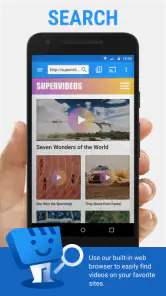
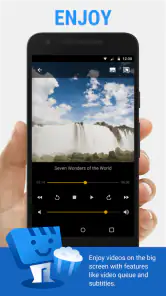
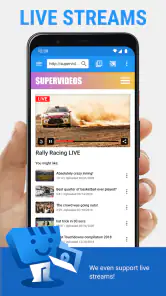
Picture a relaxed evening: one person finds a video, another wants it on the television, and nobody wants to interrupt the room to search for the same content on a separate TV app. The built-in browser gives this app a different role from a conventional remote-control app: you can browse on the phone, then send compatible video to a larger screen. That is handy for short clips, web-hosted programs, and live streams, especially when the content is easier to locate on a phone than through a TV’s menus.
The key distinction is that casting a video is not always the same as mirroring a whole phone screen. Web Video Cast is aimed at sending media to a receiver, rather than making every phone activity appear on the television. For a shared session, that can be a benefit: the phone can remain a browsing tool while the TV handles viewing. If your goal is to show an app that has no castable video, or to mirror a presentation exactly as it appears on your phone, a screen-mirroring option may be a better fit.
Using it with a household TV
Ever been stuck trying to cast your favorite show from your phone to your TV, only to be met with endless buffering or compatibility issues? Say goodbye to those woes because Web Video Cast | Browser to TV is here to save the day!
What is Web Video Cast?
Imagine this: you’re browsing on your phone, stumble upon a hilarious video, and think, "this would look amazing on the big screen." That's where Web Video Cast | Browser to TV steps in. It's an app that lets you cast videos from your smartphone browser directly onto your TV. No more squinting at tiny screens or struggling with tangled HDMI cables.
Getting Started
First things first, the setup is a breeze. Install the app on your Android or iOS device, and you’re halfway there. It supports a wide range of TVs and streaming devices, so chances are, you’re covered. Just ensure your TV and phone are on the same Wi-Fi network, and you’re good to go. Trust me, if I can do it, anyone can!
Setting boundaries on a shared device
When several people use one TV, I recommend treating the phone as the person’s own browsing space and agreeing who is choosing what before starting a stream. That simple habit avoids the awkward moment when someone else’s browsing takes over the shared screen. The app’s job is to connect a phone’s browser video to a receiver; it should not be mistaken for a household account manager or a way to coordinate separate viewing histories.
More From Our News Desk

Weather by Xiaomi Review: Clear at a Glance, Less Clear Up Close

X Under Pressure: Can It Recover When Posting Goes Wrong?

Clash of Clans Is Won Between the Battles

Android Auto Makes the Case for Quieter Car Software

MobiOffice: Transforming Mobile Productivity with Seamless Integration

EA SPORTS FC™ Mobile Soccer: Redefining Mobile Sports Gaming
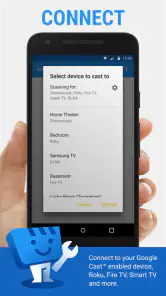
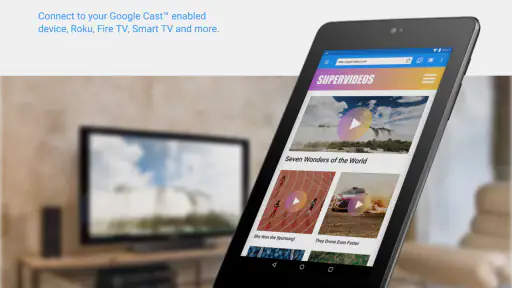
Compatibility is broad, but it is still worth checking the receiver and network before planning a group watch. The app works with Chromecast, Roku, DLNA devices, Fire TV, and more, yet the exact path can vary with the device and the source. If a page does not offer a playable video stream, changing TVs may not solve the problem. I’d first try another source or confirm that the phone and receiver are on the same Wi-Fi network instead of repeatedly restarting everything.
Features You’ll Love
One of the standout features is its compatibility with various media formats. Whether it’s a video, audio, or even live streams, Web Video Cast handles it all like a champ. Plus, the built-in browser means you can surf the web as you normally would, find your content, and cast it with just a tap. It’s like having a portable cinema in your pocket!
And let's not forget about the user interface. It’s sleek, intuitive, and doesn’t bombard you with ads every two seconds. Honestly, it’s a breath of fresh air compared to some other clunky casting apps I’ve tried.
Who should choose another approach?
If your household mostly watches services through their dedicated TV apps, those apps are often the simpler choice: open the service on the television and avoid using a phone as the middle step. This app makes more sense when the video starts on the web, or when a live stream is available in the browser but inconvenient to find elsewhere. Compared with a basic casting button built into a media app, its browser-based workflow can reach more web content, but it also asks you to locate the right page and confirm that its video can be handed off.
A useful troubleshooting habit is to test a short clip before settling in for a long stream. If it plays on the phone but will not cast, that points to a source or receiver compatibility issue rather than proving the whole app is unusable. For longer viewing, keep the phone nearby for choosing content and leave the TV’s controls available to whoever is managing volume or input. This division of roles makes shared use feel less fiddly.
Why It Stands Out
What truly sets this app apart is its reliability. We’ve all been there—midway through a video, and bam! It stops. With Web Video Cast, I’ve experienced fewer interruptions, and the streaming quality is top-notch. It’s like the app knew I needed a break from buffering hell.
Age, trust, and everyday coordination
The app is rated Everyone, which makes its age classification suitable for a general audience, but that is not a guarantee that every website opened in its browser is appropriate for every viewer. I would still keep ordinary household expectations in place, particularly if children share the device or television. The app does not replace a parent’s judgment about which sites and streams are suitable.
For a group, coordination matters more than having everyone install the app. One person can find a video and start the cast, while others can suggest what to watch without taking over the phone. If you use a shared phone, be mindful that the browser may reflect the person using it; switching viewers is a good cue to hand the device back or start a fresh browsing session according to your own habits. This is a practical boundary, not a special family-control feature.
Web Video Cast is free to install, with in-app purchases ranging from $1.49 to $7.49 per item. It is available for devices running Android 5.0 or later, and its current version is 5.12.7. I would start with the free experience and decide whether it fits your routine before spending anything. Its age rating is Everyone, and the app has been available since March 7, 2014; what matters day to day is whether your particular receiver and chosen web source work smoothly together.
Making a cast session less frustrating
One small routine can save time when people are waiting to watch: find the page and check that the video starts on the phone before connecting the group’s attention to the TV. Then try casting a brief segment. That separates two questions—whether the source plays at all and whether the receiver can accept it—without turning troubleshooting into a household event. If the stream is live, I’d also avoid switching between several pages once everyone has settled in; each change means rechecking whether the new source is castable.
It helps to think of the phone as a selector rather than the television’s permanent remote. The person browsing can locate the next item, while another person handles the TV’s ordinary volume or input controls. This is especially useful when guests are unfamiliar with the app: they can take part in choosing without needing to learn a new setup. If the cast fails, agree on a backup quickly—such as opening a native TV app—rather than making everyone wait while one person repeatedly retries the same page.
Choosing the right route for each source
The main alternative is often not another casting utility but the service’s own app on the TV. That route usually makes more sense for regular subscriptions and familiar shows because it avoids the browser-to-receiver handoff. A built-in cast button is similarly convenient when the source already provides one. I’d reach for this app when the thing I want to watch is easier to find on the web, or when I want one browser-based starting point for different compatible sources.
There is a trade-off in that flexibility. A web page can contain a video that plays in the phone browser but does not offer a stream the receiver can use, so a successful phone playback is not a promise of successful casting. In that situation, trying another browser page or using the provider’s TV app may be more productive than changing settings at random. For a presentation, a game, or any task where the entire phone display must be visible, choose screen mirroring instead; casting a video is a narrower job.
Who will get the most from it?
I’d consider it a good fit for people who often discover clips, web programs, or live streams on a phone and want to see whether they can move them to a living-room screen. It is also useful as a flexible option to keep available for an occasional source that is awkward to locate in a TV interface. The app is less compelling if nearly all your viewing already happens inside TV apps, or if you need consistent whole-screen sharing rather than video playback.
For a household with children, the Everyone age classification may be reassuring as a description of the app itself, but it should not be treated as a content filter for the wider web. I’d keep the usual adult oversight around what is searched for and played, and be clear about whose browsing session is open on a shared phone. Those expectations matter more than the casting workflow and help prevent accidental exposure of another person’s browsing choices on a communal screen.
Final Thoughts
In a world where connectivity is king, having a tool like Web Video Cast | Browser to TV is a game-changer. Whether you’re a tech-savvy streamer or just someone who loves a good binge-watch session, this app is a must-have. So, next time you find yourself yearning to watch something on the big screen, give it a whirl. You might just find it’s exactly what you needed!
My household verdict is more measured: I’d recommend it to people who often discover watchable videos in a phone browser and want a straightforward way to try them on a shared screen. I would skip it if you mainly use native TV apps, need full-screen phone mirroring, or expect every website to cast without exceptions. The strongest reason to keep it around is flexibility; the main trade-off is that results depend on both the receiver and the video source. Used with those expectations, it is a handy bridge between web browsing and communal viewing rather than a replacement for every streaming app.
Web Video Cast | Browser to TV Frequently Asked Questions
Does Web Video Cast play videos on my phone, or only send them to a TV?
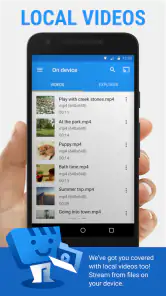
Web Video Cast is built around browsing for videos and casting them to a compatible TV or streaming device, rather than serving as a general-purpose player for every video on your phone. Its main appeal is watching supported online videos on a larger screen. The exact playback experience depends on the video source and the receiving device.
Do I need a particular Wi-Fi setup to cast videos?
For casting to work reliably, connect your phone or tablet and the TV or streaming device to the same Wi-Fi network. A stable connection can make browsing and playback smoother, while a weak or interrupted network may cause connection or buffering problems. If the devices cannot find one another, check their network connection before trying again.
Can I use Web Video Cast with Chromecast, Roku, or Fire TV?
Yes. Web Video Cast is designed to send supported videos to devices including Chromecast, Roku, Fire TV, and DLNA-compatible receivers, as well as compatible smart TVs. Available casting options can depend on the device and video source, so check that your TV or receiver is connected and discoverable on the same Wi-Fi network as your phone.
What phones and tablets can I use Web Video Cast on?
Web Video Cast is available for Android and iOS phones and tablets. On Android, the app requires version 5.0 or later, so it is worth checking your device’s software before downloading. Once installed, you can use the mobile device to browse for a video and send it to a compatible TV or streaming device.
What is Web Video Cast and how does it work?
Web Video Cast is an app designed to stream videos from your mobile device to your TV. It works by allowing users to browse the web for videos, including movies, TV shows, and live streams, and then cast them to a smart TV or a streaming device like Chromecast, Roku, or Amazon Fire TV. The app supports various video formats, ensuring a seamless viewing experience on the big screen.
Pros
- Easy integration with multiple TV brands.
- Supports various video formats.
- User-friendly interface.
- Fast streaming capabilities.
- No need for additional hardware.
Cons
- Contains in-app ads.
- Requires stable internet connection.
- Limited free features.
- Occasional streaming interruptions.
- No offline viewing option.
- Category
- Video Players & Editors
- Version
- 5.12.7












