WeatherWise.app
- 666.00
- 4.3
- Installs
- 500.00K
- Price
- Free

Screenshots
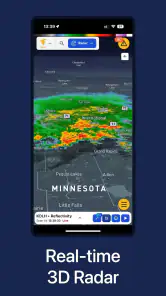
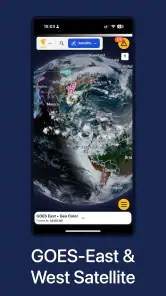
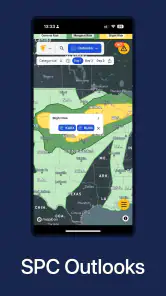
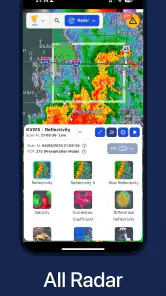
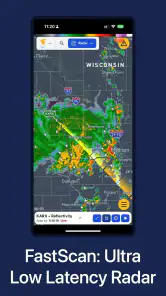
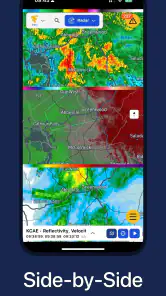
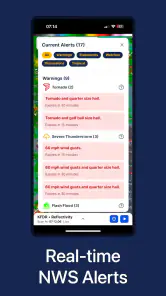
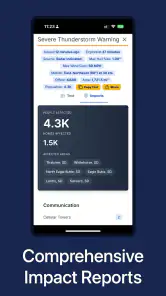
Analysis by Reviewed
I installed WeatherWise.app because I wanted a weather tool that could help me make decisions, not just show a temperature and a small sun icon. My usual problem is familiar: I check the forecast before leaving home, look again when clouds gather, and then wonder whether the rain is actually moving toward me or simply passing nearby. This app takes a radar-first approach, which makes it more useful when the question is “what is happening around me right now?” rather than “what will the week look like?”
It is a free weather app from Interactive Weather, aimed at everyone and available for devices running Android 7.0 or later. The current release is version 1.8.2, and the app has reached over 500 thousand installs with an average rating of 4.3 from around 1.5 thousand ratings. Those figures suggest a healthy level of interest, but my recommendation comes more from the way it fits into a practical weather-checking routine.
The central idea is straightforward: use high-resolution, real-time radar to understand nearby conditions and prepare for rough weather. That sounds simple, but radar changes how I use a weather app. Instead of treating a forecast as a fixed promise, I can look for movement, direction, and timing before deciding whether to walk, drive, cycle, postpone an errand, or take extra protection for equipment.
From a quick forecast check to a usable weather decision
The starting condition: uncertainty before leaving
A realistic use case is a late afternoon trip across town. The sky is bright when I leave work, but a dark band is visible in the distance. A normal forecast may still show a general chance of rain for the hour, which does not answer the question I actually have: should I leave now, wait a little, or bring waterproof clothing?
This is where WeatherWise.app feels different from a standard forecast screen. Its emphasis is the live radar picture, so I begin by checking the current pattern instead of relying only on a daily icon. I can see whether the weather near me is isolated, expanding, or moving away. That visual context is often more useful than a single percentage because it helps me judge the immediate situation.
I would not use it as a replacement for every kind of weather information. For planning a holiday several days ahead, a conventional forecast service may be easier to scan. For the next short stretch of time, especially when conditions are changing quickly, the radar view gives me a more practical starting point.
Step one: open the map with a specific question
The best habit I found is to open the app with a decision in mind. “Will I get wet on the walk home?” is more useful than casually staring at the map. I first identify my location, then look outward rather than focusing only on the pin. A nearby patch of precipitation matters differently depending on its direction and how much of the route it covers.
More From Our News Desk

Clash of Clans Is Won Between the Battles

Android Auto Makes the Case for Quieter Car Software

MobiOffice: Transforming Mobile Productivity with Seamless Integration

EA SPORTS FC™ Mobile Soccer: Redefining Mobile Sports Gaming

How Microsoft OneDrive Became a Mobile Productivity Giant

How Google Translate Breaks Language Barriers Effortlessly
This approach also prevents a common mistake with radar apps: assuming that a colorful area means bad weather will definitely arrive at your door. Radar shows observed or detected activity, not a personal guarantee about what will happen at one exact address. I use it as evidence, then combine it with what I can see outside and the time needed for my journey.
For a short walk, I may accept a passing shower. For a bike ride with no shelter, I need a much larger margin. The app is most helpful when I use the map to adjust that margin rather than expecting it to make the decision for me.
Step two: read movement instead of a single frame
A single radar image can be misleading. The useful part of a live radar tool is watching the sequence and asking how the pattern changes. I look for the leading edge of precipitation, gaps between bands, and whether the area affecting my route appears to be growing or breaking apart.
This is one of the more valuable workflows for WeatherWise.app: check once, wait briefly, and check again when the situation is borderline. If the band has shifted consistently, I have a better basis for estimating whether leaving now is sensible. If the pattern is scattered or changes shape quickly, I become more cautious and avoid treating the display as an exact countdown.
That extra interpretation is important. The app can make weather movement easier to see, but it does not remove uncertainty. A user who wants one large “safe to go” button may find this style less convenient. I prefer it because it shows why the answer may be uncertain.
Step three: turn the map into an action
The radar only becomes useful when it changes what I do. If rain is approaching from the direction of my destination, I might leave immediately and take the shorter route. If the strongest-looking area is moving toward the route, I may delay the trip. If the activity is passing beside me, I can continue without overreacting to a dramatic-looking patch on the map.
For commuting, I use the app before stepping outside and again before the return journey. For outdoor work, I would check before loading tools or setting up equipment, because a radar view can reveal that the risk is not evenly spread across the whole area. A nearby storm cell may affect one side of town while another route remains relatively clear.
There is also a useful handoff between the app and ordinary observation. I do not leave the decision entirely to the screen. I compare the radar pattern with cloud movement, wind, visibility, and the condition of the road. When those signals agree, I feel more confident. When they disagree, I treat the disagreement as a reason to add time or shelter to the plan.
Step four: pass the information to someone else
Weather decisions often involve another person. A parent may be deciding whether a child should walk home, a group may be arranging an outdoor meeting, or a driver may need to choose when to start. In those situations, I would not simply say “the app says rain.” I would describe the practical result: the rain is approaching from the west, the route may be affected soon, and waiting could make the trip easier.
This is a small but important distinction. A radar image is useful to the person looking at it, but a handoff needs a clear conclusion. WeatherWise.app supports that kind of conversation indirectly by giving me a visual basis for the explanation. It does not replace judgment or communication, and I still need to translate the map into plain language for someone who has not opened it.
For shared plans, I would take a screenshot only when necessary and avoid presenting it as a precise promise. The better message is conditional: “This line is moving toward us, so let’s leave earlier,” or “The activity is staying north of the route, so we can probably continue but should keep an eye on it.” That keeps the information useful without creating false confidence.
The result: fewer surprises, not perfect certainty
After using the app this way, the main benefit is not that every forecast becomes correct. The benefit is that I make better short-term choices with the information in front of me. I am less likely to leave without a jacket when a rain band is clearly approaching, and less likely to cancel a plan simply because a broad forecast mentions a chance of showers.
The high-resolution radar presentation is especially helpful around uneven weather. A general forecast can describe a whole city or region with one label, while the radar view encourages me to consider the smaller area that actually affects my route. That makes it a good companion for walking, cycling, commuting, photography, gardening, and outdoor maintenance.
It can also reduce unnecessary checking. Instead of opening several weather screens and comparing icons, I can focus on the immediate pattern and decide whether I need to act. The result is a more focused routine: open the map, inspect movement, compare it with the journey, and choose a sensible margin.
What it does better than ordinary weather alternatives
Many weather apps are designed around current temperature, hourly forecasts, and multi-day outlooks. Those are still valuable, particularly when I need clothing guidance or broad planning. WeatherWise.app stands out when the question is spatial and immediate: where is the weather now, and how might it affect the next part of my day?
A basic forecast screen may tell me that rain is possible during an hour. A radar-centered screen helps me see whether the rain is already nearby, whether it appears organized into a moving band, and whether my location sits inside or outside the active area. That difference is practical for short journeys.
On the other hand, I would choose a more traditional weather service when I need a quick glance at several days, a broad overview for travel planning, or a compact summary with minimal interpretation. WeatherWise.app asks me to read the situation. That is its strength for alert users and its weakness for anyone who wants the simplest possible answer.
Three habits that make the radar more useful
Check the route, not just the location. If I am traveling across town, I inspect the full path and the area beyond my destination. A clear starting point does not mean the entire journey will be clear.
Look for direction and continuity. One bright area on the map is less informative than a pattern that repeatedly moves toward the route. I pay attention to the sequence rather than reacting to one image.
Build a buffer for slow or exposed activities. A runner, cyclist, outdoor worker, or photographer needs more caution than someone walking between covered entrances. I use the same radar information differently depending on how easy it is to find shelter.
These habits are not flashy features, but they are where the app creates real value. A radar map can be impressive while still being poorly used. The benefit comes from connecting what is shown to the time, route, and consequences of the decision.
Where the workflow becomes less comfortable
The biggest limitation is that radar requires interpretation. New users may see a complex weather pattern and still wonder whether they should leave. The app can improve awareness, but it cannot know how important the journey is, how quickly I walk, whether I have shelter, or how much rain I personally consider acceptable.
It is also not the ideal single tool for every planning horizon. If I am organizing an outdoor event far in advance, a radar view is only one part of the decision. I would want a broader forecast and would still revisit the app closer to the event. Treating current radar as a long-range guarantee would be a mistake.
There is another practical consideration: the app is free to download, but it includes in-app purchases ranging from $1.99 to $159.99 per item. I would review any purchase screen carefully before confirming anything, especially if I only want the basic weather-checking experience. The free entry point makes it easy to try, but the presence of optional spending means users should understand what they are selecting.
The age classification is Everyone, which fits the straightforward weather purpose. Still, younger users may need help interpreting radar colors and movement. The display can support a family weather routine, but an adult should explain that a map is an estimate of changing conditions, not a promise that a particular street will remain dry.
Who should install it, and who should look elsewhere
I would recommend WeatherWise.app to anyone who regularly makes short-notice outdoor decisions. It is a strong fit for commuters, cyclists, walkers, gardeners, photographers, delivery workers, and families who want to understand approaching rain or severe weather rather than rely on a single forecast symbol.
It is also a good choice for people who enjoy seeing the reasoning behind a weather decision. The radar view encourages active checking and makes local changes easier to notice. If I am already comfortable reading weather maps, the app feels naturally aligned with the way I think.
I would be more cautious about recommending it to someone who wants only a minimal glance at temperature and the next day’s forecast. That user may prefer a simpler weather app with less visual interpretation. I would also avoid depending on it alone for high-consequence decisions. When travel, work, health, or safety is seriously affected by extreme conditions, I would compare the radar with official warnings and local guidance rather than treating any one app as the final authority.
My final take after fitting it into daily life
WeatherWise.app works best when it is treated as a decision tool for changing conditions. I open it with a question, inspect the nearby pattern, watch how that pattern moves, and then pass a clear plan to whoever is affected. That workflow is more useful than repeatedly checking a generic forecast without knowing what to do with it.
Its free availability, Everyone rating, broad device support from Android 7.0 onward, and established presence make it easy to try. Interactive Weather has built the experience around a specific strength rather than trying to make the app feel like every weather service at once. The trade-off is that I have to pay attention and accept that radar does not eliminate uncertainty.
My recommendation is simple: install it if your weather questions are about the next journey, the next shower, or the storm moving toward your plans. If your priority is a fast multi-day summary with no map reading, another type of weather app may suit you better. For immediate, visual awareness, though, WeatherWise.app earns a place in my daily weather routine.
WeatherWise.app Frequently Asked Questions
Is WeatherWise.app suitable for people who mainly want to track severe weather?
WeatherWise.app is presented as a weather app with real-time radar and a focus on helping users prepare for extreme weather. That may make it useful when you want to keep an eye on changing conditions, but radar information should not replace official warnings or local emergency guidance. If hazardous weather is possible, check trusted public alerts as well and follow instructions from local authorities.
What devices and operating systems can run WeatherWise.app?
WeatherWise.app is available for Android devices that run Android 7.0 or later. Check your device’s operating-system version before downloading, and make sure you install the app from a source that provides the Android version. The app is rated for Everyone, so its content rating is suitable for a broad audience, though parents can still review the app and its permissions with younger users.
What is WeatherWise.app and what can I use it for?
WeatherWise.app is a weather application designed to help you check current conditions and prepare for the hours or days ahead. Its store description highlights super-resolution, real-time weather radar and preparation for extreme weather. It may be useful for planning commutes, outdoor activities, travel, or daily routines, although forecasts should always be treated as estimates rather than guarantees.
Does WeatherWise.app require my location, and is it safe to use without it?
WeatherWise.app may request location access so it can automatically display forecasts for your current area. You can usually deny this permission and search for a city manually, which is a better option if you prefer to limit location sharing. Before installing, review the app’s privacy policy and your device settings to understand how location data is collected, stored, and used.
How accurate are the forecasts in WeatherWise.app?
Weather forecasts can vary depending on the region, forecast period, and data providers used by the application. WeatherWise.app can be helpful for general planning, especially with short-term conditions, but no weather app can guarantee perfect accuracy. For severe storms, hurricanes, flooding, or other dangerous conditions, compare its information with official government alerts and local emergency services.
Pros
- Clear forecasts with useful hourly and daily breakdowns.
- Weather alerts help users prepare for changing conditions.
- Clean interface makes key information easy to find.
- Supports planning with temperature
- wind
- and precipitation details.
- Location-based updates reduce the need for manual searches.
Cons
- Some advanced features may require a subscription.
- Forecast accuracy can vary by location and weather conditions.
- Frequent alerts may feel excessive for some users.
- The app may use noticeable battery for background updates.
- Ad-supported areas can make the interface feel less streamlined.
- Category
- Weather
- Version
- 1.8.2











