Weather Radar Home
- 439.00
- 4.4
- Installs
- 500.00K
- Price
- Free
Screenshots
Analysis by Reviewed
I like weather apps that help me make a decision quickly rather than burying a simple forecast under decorative screens. Weather Radar Home takes a more focused approach: it puts storm radar, alerts, and live weather information close to the place where I start many phone sessions, the home screen. After using it as a daily weather tool, I found that its real value is not just checking whether rain is coming. It is building a repeatable habit for deciding when to leave, whether an outdoor plan needs a backup, and how seriously to take changing conditions.
This is a free weather app from OmniHome Apps, rated 4.4 on average from around 1.7 thousand ratings and supported by more than 500 thousand installs. It is suitable for Everyone, so it is easy to recommend to households where several people need a straightforward way to keep an eye on conditions. The app was released on August 17, 2024, and version 4.0.36 works on Android 8.1 and later. Those details matter mainly because this is a relatively modern home-screen weather experience that remains accessible to people using older compatible phones.
How I use the radar as a daily weather routine
My basic workflow starts with the home screen instead of opening a full forecast page every time. I glance at the weather information available there, then decide whether I need a closer look at radar or alerts. That small change makes the app useful during busy moments. Before walking to a station, taking a child to school, or starting a commute, I can check the immediate situation without turning the process into a long research session.
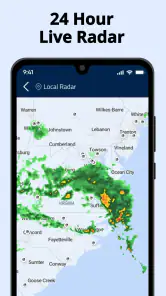
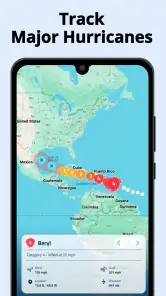
The radar is most useful when the sky looks uncertain. A standard forecast might tell me that rain is possible, but radar helps answer a more practical question: is precipitation already moving toward me, or is the risk still distant? I do not treat the display as a promise about the exact minute rain will begin. Instead, I use it to spot movement and direction, then combine that view with the broader forecast and what I can see outside.
A realistic example is a late afternoon walk. If the forecast says showers are possible, I first check the home-screen view. If a band of rain is approaching, I open the radar and look for whether it appears to be moving across my route. I may leave immediately with a jacket, delay the walk, or choose a shorter path. The important benefit is that the app supports a decision based on changing conditions rather than making me rely only on a morning forecast.
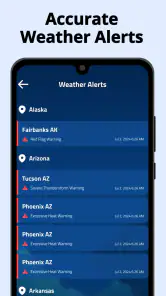
Storm alerts add another layer for situations where a quick glance is not enough. I find them more valuable when I have already developed a habit of checking the app at predictable times. For example, I can look before leaving work, before driving to an outdoor appointment, and again before going to bed if severe weather seems possible. Alerts are not a substitute for official emergency instructions, but they can make me less likely to miss a meaningful change while concentrating on something else.
The best use of Weather Radar Home is as a first check, not as the only source for high-stakes decisions. If I were preparing for a long drive, a flight, a hike in exposed terrain, or a response to dangerous weather, I would also consult official local warnings and other reliable sources. Radar is excellent for visual context, but it does not remove the uncertainty that comes with rapidly developing storms, local terrain, or gaps between observations.
More From Our News Desk

Clash of Clans Is Won Between the Battles

Android Auto Makes the Case for Quieter Car Software

MobiOffice: Transforming Mobile Productivity with Seamless Integration

EA SPORTS FC™ Mobile Soccer: Redefining Mobile Sports Gaming

How Microsoft OneDrive Became a Mobile Productivity Giant

How Google Translate Breaks Language Barriers Effortlessly
What I would check before making the app part of my routine
The first setting worth reviewing is the home-screen arrangement. The app’s identity is built around bringing weather information onto the home screen, so the placement should match the way I actually use my phone. A compact view is convenient for a quick glance, while a larger view may be more useful if I want radar or changing conditions to be visible without opening the app. I would try the available arrangement options and keep the one that remains readable without making the home screen feel crowded.
Location handling deserves attention as well. Weather is highly local, and a radar view centered on the wrong place can create false confidence. I would confirm that the displayed location matches home, work, or the place I care about most. When traveling, I would check whether the app has shifted to the new area before relying on its alerts. This is a simple habit, but it prevents one of the most common weather-app mistakes: looking at accurate information for the wrong location.
Alert preferences should be approached with balance. I prefer notifications that help me act, not a constant stream of minor changes. If the app offers choices about alert behavior, I would begin conservatively and adjust after a few days. Too many notifications can train me to dismiss everything, which defeats the purpose of having storm information available. On the other hand, disabling every alert removes one of the main reasons to use a radar-focused tool.
It is also worth checking how the app behaves alongside the phone’s own notification and battery controls. A weather alert cannot help if the operating system suppresses the app’s notifications or limits its background activity too aggressively. I would review the phone-level settings rather than assuming the app is malfunctioning. This is especially useful on devices that apply strong battery-saving rules to less frequently opened apps.
The version number is another practical detail when troubleshooting. The current release is 4.0.36, so if the interface looks different after an update, I would avoid judging the app from an old setup guide or remembered layout. Weather tools can change their controls as the developer improves the experience. My advice is to spend a minute after an update checking the home-screen view, location, and alert behavior instead of discovering a changed setting during a storm.
Small habits that make the information faster to use
Experienced use is less about staring at radar continuously and more about checking it at the right moments. I like a three-step pattern: glance at the home screen, open the radar only when conditions look uncertain, and then compare the picture with the timing of my actual plan. This keeps the app from becoming a distraction while still giving me more detail when it matters.
Another useful pattern is to check the movement of weather rather than only its color or intensity. A bright, dramatic radar image can look alarming, but the direction and speed of the system are more relevant to my next hour. I look for whether the area around me is changing, whether the precipitation is moving toward my route, and whether the strongest part is likely to miss me. I still treat those observations as guidance, not exact scheduling.
For commuting, I use the app at departure time rather than trusting a single check made hours earlier. Conditions can change between breakfast and the trip home. A morning glance helps me dress appropriately, but an afternoon radar check can tell me whether I should carry rain gear or allow extra time. This is a better workflow than repeatedly opening the app without a specific question.
For outdoor plans, I find it useful to define a personal decision rule before checking the radar. For instance, I might decide that an approaching storm means moving a walk indoors, while scattered light rain only changes what I wear. Having that rule prevents me from overreacting to every patch on the map. The app supplies visual information; I supply the judgment about what level of weather matters for my activity.
Home-screen access is particularly helpful for people who check weather several times a day but do not want a full weather dashboard. It can also work well for families sharing a phone or for anyone who wants conditions visible while planning errands. The trade-off is that a home-screen view is necessarily less detailed than a dedicated meteorological service. I see it as a fast layer in a broader routine, not a replacement for every forecast source.
Where this app is stronger than ordinary weather shortcuts
The usual alternative is a built-in weather panel or a general forecast app. Those options are often perfectly adequate for temperature, daily conditions, and a basic chance of rain. Weather Radar Home has a different emphasis. Its strongest case is for someone who wants storm awareness and radar access to be part of the phone’s everyday surface rather than hidden behind several taps.
That emphasis changes how I use it. A general forecast app encourages me to read a summary. This app encourages me to notice what is happening nearby and whether the pattern is changing. When a storm is developing, that visual context can be more useful than a single percentage. When the weather is stable, however, the difference is smaller, and a simpler built-in tool may be enough.
I would choose this app over a basic weather shortcut if I regularly make short-term decisions around rain or storms. I would choose a more comprehensive weather service instead if I need extensive long-range planning, specialist information, or highly detailed tools for aviation, sailing, agriculture, or mountain travel. The right choice depends on whether the priority is convenient local awareness or deep forecasting detail.
There is also a privacy and attention trade-off that I consider with any location-based weather tool. The more convenient the local display and alerts, the more carefully I want to review location and notification behavior on my phone. I do not want to grant more access than the app needs for the way I use it, and I do not want alerts so frequent that they become background noise. The practical solution is to start with the least intrusive setup that still gives useful local information, then adjust only when a real need appears.
Limits I noticed when relying on radar
Radar is not equally informative in every situation. It shows precipitation patterns, but it does not tell me everything about wind damage, lightning risk, flooding, road conditions, or the safety of a specific outdoor location. A storm can also change quickly, and a clear-looking gap on the screen does not guarantee a comfortable or safe trip. For serious weather, I would treat the app as an additional awareness tool and follow official warnings first.
Short-term timing is another area where I keep my expectations realistic. I can use the radar to understand whether rain appears to be approaching, but I would not plan a precise five-minute window around a moving storm. Local showers can form or weaken, and the experience of weather can differ across nearby neighborhoods. The app is most helpful when I use it to choose between sensible options, not when I demand certainty it cannot provide.
The home-screen design can also be a limitation for users who prefer a clean, minimal phone layout. Weather information takes space, and not everyone wants a widget or prominent weather element visible all day. Someone who checks weather only once in the morning may find a regular forecast app less intrusive. In my view, the home-screen approach earns its place when I genuinely benefit from repeated quick checks.
New users may also need a little patience while deciding which information deserves attention. Radar colors, movement, alerts, and forecast summaries can feel like too much if viewed all at once. I recommend starting with one question, such as whether rain is likely during a commute, and learning the controls through that use case. Once the basic pattern feels natural, the extra detail becomes easier to interpret.
Who should install it and who should look elsewhere
I think Weather Radar Home is a good fit for people who want local weather visible without opening a full app, especially those who often deal with changing rain or storm conditions. It suits commuters, parents organizing outdoor activities, dog walkers, runners, and anyone whose plans are affected by the next hour rather than only tomorrow’s high and low.
It is also a reasonable choice for someone moving from a simple built-in weather display to a more radar-centered routine. The free price removes a financial barrier for trying that workflow, and the Everyone age rating makes it approachable for general household use. Its adoption is already substantial, with over 500 thousand installs, while the 4.4 average suggests that many users find the overall experience useful.
I would skip it if I want only a clean weekly forecast, if I dislike home-screen weather elements, or if I need professional-grade information for high-risk activities. I would also avoid making it my sole emergency reference. A radar-focused app can improve awareness, but it should sit alongside official alerts and common sense, particularly when conditions are severe.
For a new installation, my recommended setup is simple. Place the weather view where it is easy to see, confirm the location, choose alert behavior that you will not ignore, and use the radar for decisions rather than entertainment. After a few days, notice whether the home-screen information actually changes what you do. If it does not, the app may be more detail than you need. If it helps you leave earlier, carry the right gear, or cancel plans before conditions worsen, then it is doing its job.
My verdict after building a repeatable habit
Weather Radar Home works best when I treat it as a quick, practical layer between a basic forecast and a full emergency-information search. Its home-screen focus makes storm awareness easier to revisit, while radar gives more useful short-term context than a simple temperature card. I especially like the way it supports small decisions: whether to walk now, wait a little, take a different route, or bring protection from rain.
It is not a universal replacement for established forecast services, and the radar should not be read as a guarantee. The app asks me to interpret what I see, manage alerts sensibly, and remember that local weather can change faster than any screen suggests. Those are fair limitations for a tool designed around fast awareness rather than specialist forecasting.
My final recommendation is positive for anyone who wants weather information to be visible and actionable throughout the day. I would install it for a commute, a busy family schedule, or regular outdoor plans, then spend a few minutes tailoring the home-screen view and notifications. For me, its strongest feature is the repeatable habit it creates: glance first, investigate when needed, and make the decision before the weather makes it for you.
Weather Radar Home Frequently Asked Questions
Who develops Weather Radar Home, and which devices can run it?
Weather Radar Home is developed by OmniHome Apps and is available for Android devices running version 8.1 or later. Before downloading, check your device’s operating-system version to make sure it meets that requirement. The app is listed as suitable for everyone, so its weather-focused content is intended for a general audience.
What is Weather Radar Home, and what does it do?
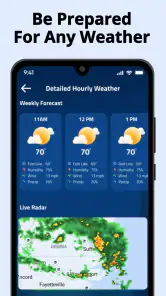
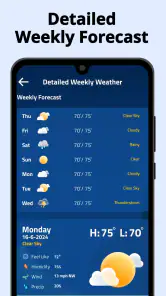
Weather Radar Home is a weather-monitoring app designed to provide radar-based forecasts and current conditions in an easy-to-read format. After exploring the app, users can typically view precipitation movement, temperature, wind information, alerts, and short-term forecasts for selected locations. It is especially useful for checking whether rain or storms are approaching before commuting, traveling, exercising, or planning outdoor activities. Its central appeal is having storm radar, alerts, and live weather forecasts right on your home screen.
Does Weather Radar Home provide accurate and real-time weather information?
Weather Radar Home relies on weather data supplied by external meteorological services, so its accuracy depends on the quality, coverage, and update frequency of those sources. Radar imagery can be very helpful for tracking nearby rain and storms, but it should not be treated as a guarantee, particularly during rapidly changing conditions. For severe weather, users should also consult official local warnings and emergency services.
Does the app require location access or an internet connection?
The app can usually provide the most relevant forecast when location access is enabled, because it can automatically identify the user’s current area. Users who prefer greater privacy may be able to search for and save locations manually instead. An internet connection is generally required to download updated radar images, forecasts, and alerts. Previously loaded information may remain visible temporarily, but offline functionality is likely limited.
Is Weather Radar Home free to download and use?
Weather Radar Home is free to download. Some functions, such as removing advertisements, accessing extended forecasts, unlocking advanced radar layers, or receiving additional customization options, may require an in-app purchase or subscription. Before downloading, users should review the app’s current purchase details and any applicable renewal terms so they understand what is included at no cost and what may involve payment.
Pros
- Clear radar maps make approaching rain and storms easy to track.
- Useful forecasts help with short-term outdoor planning.
- Location-based weather updates reduce the need for manual searches.
- Radar animation shows how precipitation is moving over time.
- Simple layout makes key weather information quick to find.
Cons
- Some advanced radar features may require a paid subscription.
- Forecast accuracy can vary by region and local weather conditions.
- Radar data may take time to refresh in areas with weak connectivity.
- Frequent alerts could become distracting without careful customization.
- The app may use extra battery when location and radar updates stay active.
- Category
- Weather
- Version
- 4.0.36











