Weather Neon
- 490.00
- 4.5
- Installs
- 500.00K
- Price
- Free
Screenshots
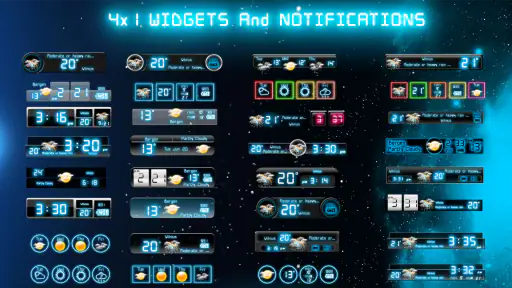
Analysis by Reviewed
I usually want a weather app to answer one practical question quickly: what will the next few hours feel like, and should I change my plans? Weather Neon takes a focused approach to that question. Developed by MobileRise, this free weather app combines a simple visual presentation with small details that reward a closer look. Its store summary calls it stylish and full of hidden details, and that is a fair way to describe the experience without making it sound more complicated than it is.
After spending time with it, I found the strongest part of Weather Neon is its ability to make routine weather checking feel more immediate. Instead of treating the forecast as a wall of numbers, it presents the information in a way that is easy to scan. That matters when I am standing by the door, deciding whether to take a jacket, or checking conditions before a walk. It is not trying to replace every specialist weather tool. Its appeal is the balance between a clean interface and enough detail to make everyday decisions with confidence.
The app belongs to the weather category, carries an Everyone content rating, and is free to install. Optional in-app purchases range from $1.99 to $8.99 per item, so the basic experience is accessible while some extras may require payment. It has reached over 500 thousand installs and holds a 4.5 average from around 15 thousand ratings, which suggests that its straightforward style has connected with a sizeable audience.
Why the visual forecast is the real strength
A forecast designed for quick decisions
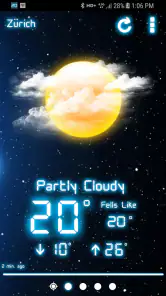
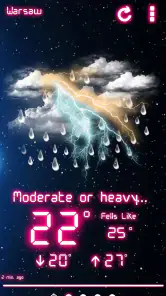
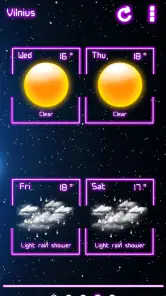
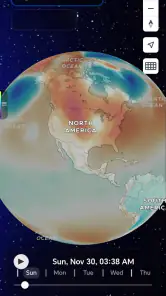
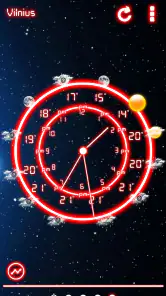
The central capability is not simply showing weather information; it is making that information readable at a glance. That distinction is important. Many weather apps give me plenty of data but make me work to understand it. Weather Neon feels more deliberate about visual hierarchy. The main conditions stand out first, while additional details are available when I want to look more closely.
That approach works especially well for short checks. I do not need to study a chart to decide whether outdoor errands are sensible. A glance tells me the general situation, and a longer look helps me judge the day more carefully. The result is an app that feels useful in small moments rather than demanding a dedicated forecasting session.
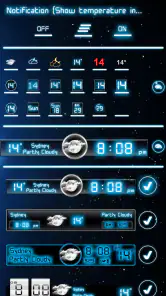
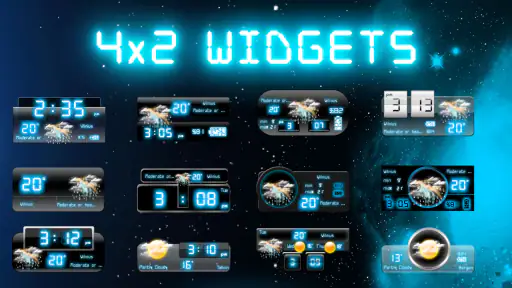
The neon-inspired presentation also gives the app an identity. It is more expressive than the plain, utility-first screens found in many built-in weather services, but it does not bury the practical information under decoration. I still see the forecast as a tool first. The visual style simply makes returning to it more pleasant.
Hidden detail without an overwhelming dashboard
The phrase “hidden details” is most useful when understood as a design choice. Weather Neon does not need to show every piece of information immediately. Instead, it keeps the first view approachable and lets the user explore further. For me, this creates a better rhythm: quick glance when I am busy, deeper check when the weather actually affects my plans.
More From Our News Desk

Clash of Clans Is Won Between the Battles

Android Auto Makes the Case for Quieter Car Software

MobiOffice: Transforming Mobile Productivity with Seamless Integration

EA SPORTS FC™ Mobile Soccer: Redefining Mobile Sports Gaming

How Microsoft OneDrive Became a Mobile Productivity Giant

How Google Translate Breaks Language Barriers Effortlessly
This is also where the app may suit people who dislike dense weather dashboards. A conventional alternative may expose multiple panels, maps, alerts, charts, and layers at once. Those tools can be excellent for serious planning, but they can also make a simple question feel unnecessarily technical. Weather Neon’s restrained presentation is a genuine advantage when I want clarity more than analysis.
There is a trade-off, though. A visually polished interface can make the experience feel simpler than the underlying forecast really is. Weather changes quickly, and no attractive screen removes the need for judgment. I would still treat the app as a planning aid rather than a guarantee, particularly when conditions are changing or a trip depends on precise timing.
What the design changes in daily use
The practical effect of the visual approach is reduced friction. I am less likely to open the app, see a crowded screen, and close it without finding what I need. That sounds minor, but weather checking is repetitive. A tool that makes the repeated action comfortable can become more useful than a technically richer alternative that I avoid because it feels busy.
I also noticed that the style makes the app easier to recommend to someone who wants weather information without learning a complicated interface. A family member who only checks temperature, general conditions, and the outlook can begin using it naturally. Someone who wants meteorological depth may prefer another service, but the learning curve here is appealing for ordinary use.
How I use it in practice
The morning routine
My most common workflow is a short morning check. I open the app before leaving home, look at the current presentation, and then inspect the upcoming conditions rather than relying only on the moment outside the window. This helps separate a temporary cool spell from the broader direction of the day. If the forecast looks changeable, I check again before heading out instead of assuming the morning reflects the afternoon.
The useful habit is to avoid reading only the most prominent condition. The first screen is ideal for orientation, but the additional information is where the app earns its place. I use the quick view to form an initial impression, then spend a few seconds checking the details that relate to my plan. That two-step workflow is faster than opening a highly technical app and sorting through every available layer.
Planning around a short outdoor window
Weather Neon is particularly handy when I have a flexible activity, such as walking, shopping, or taking a child to a park. I do not need a long-range weather investigation. I need to know whether the next part of the day is likely to be comfortable enough and whether I should prepare for a change. The app’s visual clarity lets me compare the immediate situation with the rest of the day without making the decision feel like research.
A useful tip is to check the app immediately before leaving and once more if the activity is several hours away. The first check helps with clothing and transport; the second helps me decide whether to carry an extra layer or adjust the timing. This is a better use of the app than opening it once in the morning and treating that forecast as fixed.
Keeping the interface useful instead of decorative
The neon look is part of the attraction, but I would not use the app only as a visual display. Its value comes from connecting the appearance to a repeatable routine. I keep my checks focused on a decision: what should I wear, when should I leave, or whether an outdoor plan needs flexibility. That prevents the stylish presentation from becoming a distraction.
Users who enjoy exploring interfaces may appreciate the less obvious details more than people who want a bare minimum temperature readout. I found that the best experience comes from spending a little time learning where the secondary information appears, then returning to the quick view for everyday checks. The initial exploration pays off because later visits become fast and familiar.
The best everyday scenario
A changeable commute
The clearest use case for me is a commute that includes walking. Imagine leaving home under bright conditions, walking to public transport, and returning later when the weather may be different. A basic glance at the current conditions is not enough. I want a sense of how the day develops so I can decide whether to carry rain protection, wear a warmer layer, or choose a different route.
Weather Neon fits that situation because it supports two levels of attention. Before leaving, I can make a quick decision from the main presentation. If the commute is important or the forecast looks uncertain, I can inspect the extra details before committing. The app does not turn the decision into a complicated process, which is exactly what I want when I am already trying to get out the door.
It is also useful for people who plan short activities around comfort rather than strict schedules. A walk may be possible in several parts of the day, and the app helps me choose the most suitable window. I would not claim that it replaces specialized forecasting for severe conditions or complex travel, but for ordinary planning it provides a sensible middle ground between a phone’s basic weather panel and an advanced meteorological service.
When the simple view is enough
The app works best when the question is practical and local: should I go now, what should I wear, and will the next part of the day remain manageable? Those questions benefit from a clean overview. The interface helps me avoid overthinking a routine decision while still giving me more context than a single current-temperature reading.
This makes it a strong choice for students, commuters, casual walkers, and households that want a shared, approachable weather tool. It is also a good fit for someone who has tried more crowded apps and found them tiring. The experience feels intentionally shaped around repeated checking rather than occasional deep analysis.
Where the trade-offs become noticeable
Style cannot replace forecasting depth
The same simplicity that makes Weather Neon pleasant can limit its appeal to demanding users. If I need detailed radar interpretation, highly specialized storm tracking, or extensive environmental measurements, I would look toward a more technical weather service. Those alternatives may be less attractive visually, but they are better suited to users who need layers of evidence before making a decision.
This is not a flaw in the app’s basic idea. It is a question of fit. Weather Neon is strongest as an everyday forecast companion, not as a professional analysis workstation. Someone choosing it should be comfortable with a concise presentation and willing to use another source when a situation calls for deeper verification.
Extra purchases deserve attention
The app is free, but optional purchases are part of the experience, with individual items priced from $1.99 to $8.99. I would begin with the free version and use it through several ordinary routines before deciding whether any paid extras genuinely improve the way I check weather. A purchase makes sense only if it removes a recurring annoyance or adds information I will use regularly.
This matters because weather apps are easy to replace. If I only open one occasionally, paying for additional elements may not offer much value. On the other hand, someone who enjoys the visual design and checks conditions several times each day may find the optional additions worthwhile. The sensible approach is to judge them by frequency of use, not by curiosity during the first session.
Compatibility and expectations
The current version is 5.1.2.GMS, and the app requires Android 9 or later. That makes checking device compatibility important before installation, especially on an older phone. On a supported device, the experience is aimed at being accessible rather than demanding specialist knowledge. Still, users should keep realistic expectations: the app’s attractive presentation does not mean every forecast decision will be certain.
I would also skip it if my priority is a broad ecosystem of advanced weather tools. A standard phone weather service may be more convenient for someone who wants the smallest possible interaction, while a specialist app may be preferable for maps and detailed warnings. Weather Neon occupies the middle: more character and discoverability than a plain built-in widget, but less technical depth than a dedicated forecasting platform.
Who gets the most from Weather Neon
People who check weather repeatedly
The biggest beneficiaries are people who make several small decisions throughout the day. Commuters, outdoor exercisers, parents, and anyone whose plans depend on comfort will appreciate a screen that communicates quickly. The app’s value grows through repetition. Each check takes little effort, and the visual structure makes it easier to return without feeling as though I am opening a data-heavy tool.
It is also well suited to users who want a little personality in a practical app. The neon styling gives the routine a distinct feel, while the hidden details provide something to explore beyond the first glance. That combination is more memorable than a generic weather panel and may encourage people to check conditions before leaving rather than after the weather has already disrupted their plans.
People who should choose another tool
I would point serious travelers, outdoor professionals, and weather enthusiasts toward a more specialized alternative if they need extensive mapping, technical layers, or detailed event monitoring. Weather Neon can support preparation, but it should not be the only tool for high-consequence decisions. Its strength is communication and convenience, not exhaustive analysis.
I would also hesitate to recommend it to someone who wants absolutely no visual styling or optional purchase prompts. A minimalist system widget may feel more direct, and a paid specialist service may offer a more focused feature set. The right choice depends on whether the app’s presentation makes weather easier for you to understand or simply adds another layer between you and the information.
My final assessment
After using it as an everyday weather companion, I see Weather Neon as a polished choice for people who value a quick, readable forecast with more character than the usual default app. MobileRise has kept the central experience approachable while leaving room for users to discover additional detail. That balance is the reason I would recommend it to a friend who finds conventional weather apps cluttered or dull.
My recommendation comes with a clear boundary: use it for ordinary planning, flexible outdoor activities, and fast daily checks, but switch to a more specialized source when precision, maps, or serious weather analysis matters. The app is free to try, rated for Everyone, and supported on Android 9 and newer, so the barrier to testing it is low. If its visual forecast helps you make decisions faster, it can become a genuinely useful part of your routine. Its real advantage is not showing more weather, but making the weather you need easier to act on.
Weather Neon Frequently Asked Questions
Is Weather Neon suitable for someone who wants a simple weather app?
Weather Neon is aimed at people who want a stylish way to check the weather, with a visual presentation that stands out from a plain forecast screen. Its appeal is the balance of weather information and neon-inspired design. If you mainly need a quick look at conditions, it may suit you; people seeking extensive travel-planning or outdoor tools may prefer to compare other options.
Is Weather Neon appropriate for all ages?
Weather Neon has an Everyone content rating, so it is presented as suitable for a broad audience. Its purpose is to show weather information, and the visual style may be especially appealing to people who enjoy bright, distinctive interfaces. As with any app, parents can review its permissions and available settings before a child uses it, and can decide whether its features fit their family’s preferences.
What devices can run Weather Neon?
Weather Neon is available for Android devices running Android 9 or later. Before downloading, check your device’s operating system version and make sure you have enough storage for the app. The app is designed for weather checking, so it may suit people looking for a straightforward way to view conditions rather than a broader travel or outdoor-planning tool.
Who makes Weather Neon, and what do users think of it?
Weather Neon is developed by MobileRise and is intended for anyone who wants a weather app with a distinctive visual style. It has an average rating of 4.5 from around 15,000 ratings, with roughly 490 written reviews. Those figures offer a useful snapshot of user reception, though individual preferences can differ, especially when interface design and local forecast usefulness are involved.
What is Weather Neon, and what does the app offer?
Weather Neon is a visually focused weather application designed to present current conditions and forecasts with bright neon-style graphics. After exploring the app, its main appeal is the combination of readable weather information and an attractive interface. Depending on the version and device, users may find details such as temperature, feels-like conditions, precipitation, wind, humidity, and forecast information for selected locations.
Pros
- Eye-catching neon visuals make forecasts easy to scan.
- Provides essential weather details in a compact interface.
- Animated effects add personality without overwhelming the screen.
- Useful for quickly checking current conditions and temperatures.
- Simple layout is approachable for casual weather users.
Cons
- Neon styling may reduce readability for some users.
- Advanced radar and map tools may be limited or unavailable.
- Weather accuracy depends on the selected data provider.
- Animations could consume extra battery on some devices.
- Limited customization may disappoint users wanting detailed widgets.
- Category
- Weather
- Version
- 5.1.2.GMS











