Weather Live Wallpapers
- 593.00
- 4.6
- Installs
- 1.00M
- Price
- Free

Screenshots
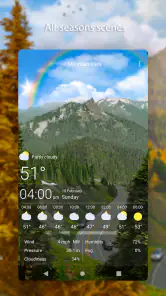
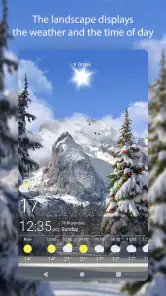
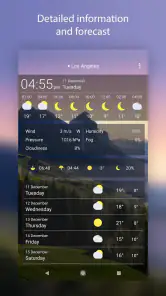
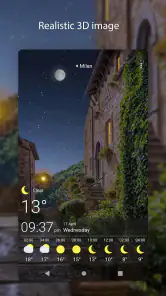
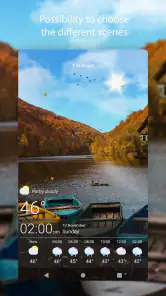
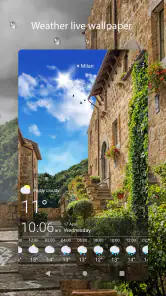
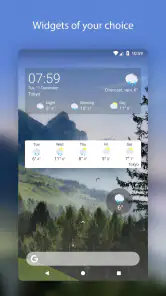
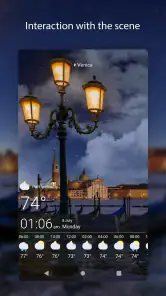
Analysis by Reviewed
I tend to judge a weather wallpaper by two questions: does it make my home screen feel more personal, and does it tell me something useful at a glance? Weather Live Wallpapers aims to do both, pairing changing weather scenes with a phone background. I’d treat it as a visual companion to checking the forecast, not as a replacement for a dedicated forecast app. That distinction matters: its appeal is strongest when you enjoy seeing the weather reflected on your screen, rather than needing a detailed report every time you unlock your phone.
A sensible first setup
My preferred way to start is to choose a look I can live with for several days, preview it, and then see how it feels during ordinary use. A wallpaper is visible often, so a dramatic scene that looks impressive for a minute can become distracting if it competes with app icons or makes the screen feel busy. I’d check the preview with my usual home-screen layout in mind, then settle on a style that leaves the display comfortable to read.
The basic routine is simple: open the app, explore the available themes, preview a choice, and apply the one that suits your taste. Weather-responsive visuals make the result feel less static than a photograph, while the ability to choose a preferred theme gives you some say in how that change appears. If I wanted a calm screen for work, I’d favor a restrained look; if I wanted something more expressive, I’d choose a theme whose animation and atmosphere are part of the attraction.
Check the fit before making it a habit
Before committing, I’d pay attention to the difference between enjoying a scene inside the app and liking it as a background throughout the day. A preview helps answer that, but the real test is whether the wallpaper remains pleasant behind icons, widgets, and notifications. I’d also revisit my choice after using it in different lighting and at different points in my routine; a scene that feels soothing in the morning may feel too vivid when I’m trying to focus later.
It’s worth thinking about what you want “weather live” to mean in practice. The changing visual mood can make the screen feel connected to conditions outside, but I wouldn’t rely on a wallpaper alone to decide whether to carry an umbrella or change plans. For those decisions, I’d open a weather service that presents the forecast in detail. The wallpaper is better as a glanceable atmosphere cue than as the final word on the day’s conditions.
Weather Meets Art
The first thing that struck me about Weather Live Wallpapers is how it seamlessly integrates weather data with stunning visuals. Imagine waking up, grabbing your phone, and being greeted by a wallpaper that not only looks fantastic but also reflects the current weather conditions right outside your window. It's like your phone is wearing a little window to the world.
Dynamic and Customizable
One of the coolest features of this app is its dynamic nature. The wallpapers change based on real-time weather updates. If it's sunny outside, expect to see bright and vibrant images. If it's raining, a soothing drizzle might grace your screen. This app takes personalization to another level, allowing you to customize the wallpapers according to your preferences. Want a wintery theme even when it’s sweltering hot outside? No problem, you can set it up just the way you like it.
More From Our News Desk

Clash of Clans Is Won Between the Battles

Android Auto Makes the Case for Quieter Car Software

MobiOffice: Transforming Mobile Productivity with Seamless Integration

EA SPORTS FC™ Mobile Soccer: Redefining Mobile Sports Gaming

How Microsoft OneDrive Became a Mobile Productivity Giant

How Google Translate Breaks Language Barriers Effortlessly
Moreover, the app doesn’t skimp on variety. With a plethora of themes to choose from, you can switch things up whenever you feel like it. Each theme is crafted with attention to detail, ensuring that your phone looks nothing short of a work of art.
Make the weather cue useful
A small habit makes this kind of wallpaper more worthwhile: when I first pick up my phone in the morning, I can use the scene as a prompt to check the actual forecast before deciding what to wear or pack. If the screen suggests unsettled weather, I can take the extra moment to look at a proper forecast rather than assuming the image tells me the timing or severity. That keeps the wallpaper in its strongest role—an ambient reminder—without asking it to answer questions it was not designed to settle.
It can also be a pleasant way to make a familiar phone feel less static without changing the way I use it. I don’t need to open a separate screen just to enjoy the visual change, and I can keep my normal icons and routine. The trade-off is that visual variety is the point: anyone who prefers an absolutely still background may find the changing scene unnecessary, even if they like the idea of seeing weather at a glance.
User-Friendly Experience
Another aspect worth mentioning is the app's user-friendly interface. Navigating through the app is a breeze, even for those who aren't exactly tech-savvy. Everything is laid out in a straightforward manner, making it easy to find what you're looking for and set up your wallpaper in no time.
The app also offers a neat preview feature. Before committing to a wallpaper, you can see how it looks on your home screen, ensuring that it matches your style perfectly. This little addition saves you from the hassle of switching back and forth between different wallpapers.
Faster patterns for everyday use
Once I’ve found a theme I like, I wouldn’t keep browsing just for the sake of browsing. A repeatable setup is more useful: pick a scene, preview it against the home screen, apply it, and leave it alone long enough to decide whether it actually works. That avoids turning a quick personalization task into a constant cycle of changing backgrounds. If I do want a different mood, I can return to the themes deliberately instead of treating every unlock as a reason to tinker.
A practical day-to-day example is getting ready to leave home. I might notice the wallpaper’s weather mood while checking messages, then open my usual forecast source if the day looks uncertain. This takes advantage of the screen’s visibility without confusing decoration with precision. It is a modest workflow, but that is exactly why it can stick: the wallpaper adds context to a habit I already have rather than demanding a new one.
When comparing it with the usual options, I see three distinct choices. A still image gives the cleanest, most predictable home screen and asks nothing of the user. A standard weather app is the better tool for checking forecast details and making plans. This app sits between those approaches: it makes the background itself responsive and expressive, but it is not the one I’d choose when accuracy details, alerts, or a quick written forecast are the priority. I’d use it alongside, not instead of, a weather app I already trust.
Settings and sensible expectations
The choice of theme is the main decision I’d make carefully. The app lets you customize the wallpaper, including choosing a wintery look regardless of hot conditions, so the visual preference and the weather-driven effect need not be the same thing. I’d decide whether I want the scene to follow the day’s conditions or whether I’m primarily choosing an aesthetic I enjoy. Being clear about that prevents disappointment if my favorite look is not the one that most closely mirrors the weather outside.
I’d also treat live visuals as a possible trade-off rather than assuming they are free of cost on every device. The original experience may feel smooth, but phones differ in age, settings, and workload, and any animated background can be less suitable for someone who is especially protective of battery life or prefers a minimal screen. If that describes you, try it with your normal routine and switch back if the movement or energy use is not worth the visual benefit. I wouldn’t promise that every phone will behave identically.
One question people often have is whether the app is only for someone who wants a weather tool. I don’t think so: its appeal is also for anyone who likes atmospheric backgrounds and wants their display to feel more alive. But if you need a compact, information-dense forecast, or you dislike animation behind your icons, a conventional weather app and a static wallpaper are likely a better pairing.
Another reasonable concern is whether setup takes much effort. The interface and preview make trying a theme approachable, and the basic process is to browse, inspect, and apply. I’d still spend a little time checking the result on my actual home screen rather than choosing solely from a theme’s standalone appearance. The icons and widgets are part of the composition, and the preview is useful precisely because a wallpaper has to work with them, not just look good by itself.
Who will enjoy it—and who may not
I think this is a good fit for people who look at their home screen often, enjoy changing the phone’s appearance, and like a visual connection to the weather. It can suit someone who wants a more expressive background but does not want to manually replace a static image every time the mood changes. The app is also approachable for a casual user: browsing themes and previewing a selection are easier than building a complex custom setup.
I’d be less likely to recommend it to someone who keeps a very plain home screen for focus, uses a static background to maximize visual clarity, or expects the wallpaper to provide a complete forecast. It may also be the wrong choice if animated scenes feel distracting rather than enjoyable. In those cases, there is no need to force a live wallpaper into the routine; a still image plus a separate forecast app is a more straightforward arrangement.
The app is free to start, with in-app purchases ranging from $1.99 to $16.99 per item. I’d explore the experience before paying for anything and decide whether the available look and customization matter enough to justify an extra purchase. The age rating is Everyone, and the developer is SkySkyAm. It has a 4.6 average from around 24,000 ratings, with roughly 593 written reviews and over one million installs. Those figures suggest it has found an audience, but I’d still judge it by whether the moving background fits my own phone habits.
Performance and Battery Life
Now, you might be wondering how these live wallpapers affect your phone's performance. I had the same concern, but I’m happy to report that Weather Live Wallpapers is optimized to run smoothly without draining your battery. It’s designed to be lightweight, so you get all the beauty without compromising on performance.
Even so, I’d make battery and smoothness a personal check rather than a universal guarantee. If I notice the phone feels less responsive or its battery routine changes after applying an animated background, I’d compare a normal day with the wallpaper enabled and disabled. That is more useful than guessing from a single session, especially if I also use demanding apps or keep the phone active for long stretches. If there is no noticeable downside, the visual change may be an easy addition; if there is, a static background is a sensible fallback.
Where it fits in the weather-app lineup
Weather Live Wallpapers is not trying to replace every kind of weather app, and I think that is a useful way to assess it. A forecast-first app puts conditions and planning information at the center. A live wallpaper puts the screen’s appearance first and makes the weather part of that experience. If you already have a preferred forecast source, you can keep using it for decisions and let this app handle the visual side. If you want only one app and expect detailed planning tools, I would choose a dedicated forecast option instead.
The version available is 2.17.0, and it runs on Android 7.0 or later. For someone with a compatible device, the sensible approach is to try a theme, use it through normal routines, and decide whether the animation feels like a real improvement. I wouldn’t install it just because a live wallpaper sounds novel; I’d install it because I enjoy the changing atmosphere enough to keep it on my screen.
A considered recommendation
In conclusion, if you're on the hunt for an app that adds a touch of magic to your phone while keeping you updated on the weather, Weather Live Wallpapers is definitely worth a try. It's not just an app; it's a delightful experience that transforms your screen into a canvas of ever-changing art. So go ahead, give it a whirl and let your phone reflect the beauty of the weather, one wallpaper at a time.
My recommendation comes with a clear boundary: think of it as a decorative, weather-aware layer for your phone, not as your only source for deciding what the day will bring. Its strengths are the changing scenery, theme choice, and approachable preview-and-apply routine. Its limitations are just as important: a live background is not for everyone, and people who want a quiet display or detailed forecast information will be happier with different tools. If the idea of a screen that shifts with the weather sounds genuinely enjoyable, this is an easy app to test; if you mainly want practical forecast details, put those first instead.
Weather Live Wallpapers Frequently Asked Questions
Is Weather Live Wallpapers free to download, and what does the free version include?
Weather Live Wallpapers is free to download, so you can try its weather-themed background experience without paying upfront. The app centers on animated and interactive weather visuals for your screen, while optional in-app purchases provide additional paid choices. Before installing, consider whether you are looking for a live wallpaper rather than a conventional weather app, since its main appeal is bringing weather-inspired scenes to your device background.
Is Weather Live Wallpapers appropriate for children and general audiences?
Weather Live Wallpapers has an Everyone content rating, making it suitable for a broad audience. Its focus is on weather-themed animated and interactive visuals, which can make a device’s background more engaging without changing the app’s basic role as a weather experience. Parents can still review the app and its purchase options with younger users, especially if they plan to explore optional paid content.
What devices and operating systems can run Weather Live Wallpapers?
Weather Live Wallpapers is an Android weather app, and it requires Android 7.0 or later. Before downloading, check your device’s Android version and available storage so you can install and set up the app without surprises. Its Everyone content rating makes it suitable for a broad audience, though the live wallpaper experience may look different depending on your device and display settings.
Does Weather Live Wallpapers need access to my location?
Weather Live Wallpapers uses your location to fetch weather information and show scenes that correspond to local conditions. If you prefer not to share location access, review the permission request when setting up the app and consider whether its location-based wallpaper updates suit you. Keeping location access available helps the display reflect the weather around you, while your device’s permission controls let you manage that access.
What is Weather Live Wallpapers and how does it work?
Weather Live Wallpapers is a mobile application that transforms your device's background into a dynamic display based on real-time weather conditions. It uses your location to fetch weather data and then displays corresponding live wallpapers, such as sunny, rainy, or snowy scenes, keeping your home screen fresh and engaging. Its focus is on bringing animated, interactive weather visuals to the screen, so it combines a practical weather theme with a changing background.
Pros
- Stunning high-resolution graphics
- Real-time weather updates
- User-friendly interface
- Customizable settings
- Battery-efficient
Cons
- Limited free features
- Ads in the free version
- Occasional lag on older devices
- Requires internet for updates
- Some themes are paid
- Category
- Weather
- Version
- 2.17.0











