Wave: Small Business Software
- 4.18K
- 3.3
- Installs
- 500.00K
- Price
- Free

Screenshots



Analysis by Reviewed
When a workday is already full, business admin tends to spill into the cracks: an invoice waits until evening, a receipt gets lost in a bag, and a transaction needs explaining weeks later. I look for a tool that helps me finish those small tasks while the details are fresh. Wave: Small Business Software brings invoicing, receipt capture and bookkeeping into a mobile business app, so its value is less about replacing every financial tool and more about reducing the number of loose ends I carry around.
The small-business chores Wave is meant to simplify
For a solo business owner, money admin often arrives in fragments: an invoice to send between appointments, a receipt to remember after buying supplies, and figures to review when the working day is already over. I judge a finance app by whether it makes those small tasks easier to finish, not by how many buttons it can display. Wave brings invoicing, receipt scanning and other business-finance tools into one place, which can make it a practical home base for routine bookkeeping.
That convenience has a clear boundary. An app can help organize transactions and paperwork, but it does not replace your judgement about how a purchase should be recorded or whether your books are ready for tax work. I would treat Wave as a way to keep everyday records closer to the moment they happen, rather than as a substitute for a bookkeeper when your business has complicated accounts.
Getting Started with Wave
First things first, setting up Wave is a breeze. As someone who’s not exactly a tech wizard, I was pleasantly surprised by how straightforward it was to get started. You just hop onto the app, create your account, and you’re good to go. The interface is super user-friendly, which is a huge plus for those of us who don’t want to spend hours figuring things out.
Build a habit, not just an account
The useful first step is deciding what you want the app to help you keep up with. If invoices are the main headache, start by setting up the details you want customers to see and make a simple routine for creating each bill as soon as the work is agreed. If receipts tend to disappear, scan them soon after a purchase and make sure the image is clear enough to identify later. Small habits like these matter more than trying to configure everything on the first day.
A good test is to put one real task through the whole workflow: record a business expense, create an invoice, then check whether the resulting information is easy for you to find again. That gives you a better sense of the app’s fit than browsing screens without a purpose. If you are moving from another bookkeeping tool, I would also plan a careful review of your opening records rather than assume a new app will automatically recreate your old system exactly.
Features That Stand Out
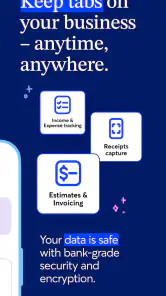
Now, let’s talk features. What makes Wave stand out in the crowded world of business apps? Well, for starters, it offers a range of tools that are incredibly handy for small business owners. You can manage your accounting, invoicing, and even payroll all in one place. It’s like having your own virtual assistant right in your pocket.
More From Our News Desk

Clash of Clans Is Won Between the Battles

Android Auto Makes the Case for Quieter Car Software

MobiOffice: Transforming Mobile Productivity with Seamless Integration

EA SPORTS FC™ Mobile Soccer: Redefining Mobile Sports Gaming

How Microsoft OneDrive Became a Mobile Productivity Giant

How Google Translate Breaks Language Barriers Effortlessly
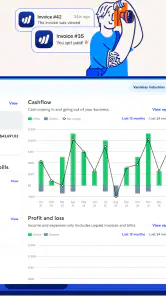
One feature I found particularly cool is the invoicing tool. You can create and send professional invoices in minutes. Plus, you can customize them to match your brand, which is a nice touch. Trust me, sending out invoices has never been this easy or looked this good.
Invoicing that fits the workday
For a freelancer or a small service business, the most valuable invoice is often the one sent promptly, while the job details are still fresh. I can see Wave working well after a repair visit, design delivery or tutoring session: prepare the bill before moving on to the next task, then keep the payment record with the rest of the business activity. That is a more useful rhythm than saving a pile of notes and trying to reconstruct the week later.
Customization is helpful, but I would keep the invoice layout readable rather than spend too long polishing it. Customers need to understand what they are being charged for and how to pay; a consistent, clear template is usually more useful than a different design for every job. If you bill by varied projects, take a moment to make descriptions specific enough that you can recognize the work when you review your records months later.
Accounting Made Simple
Let’s face it, accounting can be a headache. But with Wave, it’s as simple as it gets. The app automatically tracks your income and expenses, so you don’t have to worry about manually entering every little thing. You can even connect your bank accounts and credit cards to keep everything synchronized. It’s like having a personal accountant without the hefty price tag.
Receipts and records that hold up later
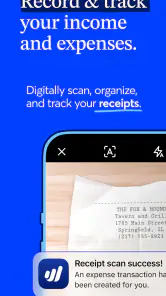
Receipt scanning is most useful when it prevents a small purchase from becoming a mystery at month-end. I would scan a receipt while it is still in my hand, then check that the merchant, date and purpose are recognizable in the record. A photo alone is not the whole bookkeeping decision: adding enough context to distinguish a business purchase from a personal one can save time when you later review expenses.
Connected accounts can reduce repetitive entry, but I would still review imported activity instead of assuming every transaction has been categorized correctly. A recurring subscription, a refund or a mixed personal-and-business purchase can need a human check. The trade-off is straightforward: automation can make capture faster, while a regular review is what keeps the records trustworthy. For a business with lots of unusual transactions, that review may matter more than the convenience of automatic syncing.
Payroll and the point where needs diverge
If you have employees, you’re going to love the payroll feature. It’s integrated directly into the app, making it seamless to run payroll. What I found impressive is how it handles tax calculations and payments automatically, so you can stay compliant without breaking a sweat. It’s perfect for those of us who aren’t exactly tax experts.
Payroll is also the part I would check most carefully before relying on it. A business owner should confirm that the available payroll setup fits their location and circumstances, and review pay details before anything is finalized. If you have unusual compensation, complex staffing arrangements or strict internal approval needs, a dedicated payroll service or professional guidance may be a better fit than expecting a general small-business app to handle every edge case.
The Mobile Experience
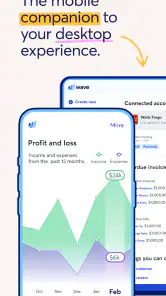
Let’s talk about how Wave performs on mobile. If you’re always on the move, like me, this is crucial. The mobile app is smooth and responsive, allowing you to manage your finances from anywhere. Whether you’re at a coffee shop or halfway around the world, you can keep your business running smoothly.
A realistic day with the app
Imagine finishing a client visit, buying a small supply on the way back, and having another customer ask when their invoice will arrive. The practical advantage is being able to handle the receipt and invoice while those details are still easy to remember, rather than leaving both for a late-night admin session. Later, when you sit down to review the week, the records are more likely to have useful context attached.
I would not use a quick phone check as a replacement for a careful bookkeeping session. A small screen is convenient for capturing information and handling straightforward tasks, while reviewing a run of transactions or checking a period’s figures is easier when you can give it focused attention. That split—capture on the go, review deliberately—is a sensible way to get value from mobile finance tools without rushing decisions.
Customer Support
We all know that sometimes things don’t go as planned, and that’s where customer support comes in. I tested out Wave’s support team and was impressed by their quick and helpful responses. It’s comforting to know that help is just a message away when you need it.
Who will get the most from it
Wave is best suited to a freelancer, independent contractor or small operation that wants invoicing and everyday financial records together without starting with a costly accounting setup. Its free price makes it easy to try as a basic business tool, while in-app purchases range from around eight to one hundred ninety dollars per item. I would check the cost and scope of any paid option against the particular job I need it to do, rather than assume every feature is included at no charge.
Compared with a spreadsheet, Wave can give routine recordkeeping a more organized structure and keep invoices close to expense tracking. A spreadsheet may still be preferable for someone who wants complete control over a custom process and is comfortable maintaining it manually. Compared with a full accounting platform aimed at larger companies, Wave is a more approachable starting point, but businesses with advanced reporting, layered approvals or complex operations may need a more specialized system.
The app is from Wave HQ, and its business focus is clear. It has an average rating of 3.3 from around twenty-four thousand ratings, so I would not take its broad popularity as proof that every workflow suits every owner. Its age rating is Everyone, and it has been available since October 19, 2016. The current version is 4.13.0, and it has more than five hundred thousand installs. Those details offer context, but my own decision would still come down to whether its core routine matches how I bill and track expenses.
Small workflow choices that save cleanup
One practical distinction I would make from the start is between capturing a document and deciding how it belongs in the books. A receipt image is useful evidence, but a brief note about why the purchase relates to work can make the record far easier to interpret later. This matters especially for supplies bought during a mixed errand or a charge that looks similar to a personal expense. I would use a consistent naming habit for unusual purchases rather than rely on memory.
For invoicing, I would also settle on a repeatable description style. Include enough detail to identify the job without turning each bill into a long explanation. When a customer asks about an old charge, clear descriptions make the answer quicker; when every invoice uses vague wording, the app cannot supply the context that was never entered. The trade-off is a small amount of care during setup in exchange for less detective work at review time.
Choosing it over a separate tool
People often ask whether they should keep receipts, invoices and bookkeeping in separate apps. I would choose Wave when the main goal is to keep ordinary small-business paperwork connected and reduce the handoffs between tools. A dedicated invoicing app may suit someone whose priority is a highly specialized billing flow, while a spreadsheet can be better for a simple operation with a custom method and very few transactions. The advantage here is having related routines in one place; the cost is accepting a more defined workflow instead of designing every detail yourself.
Before moving an established business over, I would compare the way I currently name clients, track outstanding bills and review expenses with the structure I expect to use in Wave. Switching is not automatically a time-saver if it leaves old records split across systems or makes a familiar process harder. A low-risk approach is to try a normal invoice-and-expense cycle first, then decide whether the reduction in daily friction is worth changing the wider bookkeeping routine.
Where I would draw the line
I would look elsewhere if I needed a highly tailored accounting workflow, extensive controls for a larger team, or specialized reporting that goes beyond straightforward small-business needs. I would also avoid treating automatic transaction tracking as set-and-forget bookkeeping: checking categories and keeping supporting details is still part of doing the job properly. And while having several tools together is convenient, it may not be the best choice if you already rely on another system that handles your books well and switching would create more cleanup than benefit.
I would also be cautious if my business depended on payroll arrangements or financial processes that require close professional oversight. A streamlined routine is useful only when it fits the real rules and responsibilities of the business. In that situation, I would compare the exact workflow with a specialist option before moving important records or making it the sole place I manage the process.
Final Thoughts
All in all, Wave: Small Business Software is a fantastic tool for small business owners who want to keep their finances in check without the hassle. It’s packed with features that make managing your business a breeze, and the best part? It’s free! That’s right, you get all these amazing tools without spending a dime.
If you’re looking for an app to help take your small business to the next level, give Wave a try. I’ve personally found it to be an invaluable addition to my business toolkit, and I’m confident you will too. Happy business managing!
Wave: Small Business Software Frequently Asked Questions
Is Wave intended for business use or personal budgeting?
Wave: Small Business Software is a business app built around tasks such as invoicing, receipt scanning, and managing financial records. It may help freelancers and small business owners keep work-related finances organized, but it is not presented as a general personal budgeting app. Before downloading, consider whether you need business tools for handling invoices and expenses rather than a household spending tracker.
Can I create and send invoices from the Wave app?
Yes. Invoicing is one of Wave’s central features, and the app is described as a way to invoice, scan receipts, and handle more small-business tasks. It can be useful when you want to prepare invoices while away from a desk and keep routine financial work close at hand. The fit depends on whether its invoicing workflow matches how you bill customers.
Does Wave let me scan and organize business receipts?
Receipt scanning is among the app’s highlighted features, making Wave relevant for business owners who want to capture expense documentation on a mobile device. Keeping receipts connected to your financial routine can make it easier to stay organized when managing business spending. If receipt capture is a priority, consider whether you will use it regularly alongside Wave’s invoicing and other financial tools.
Is Wave a good option for freelancers and independent workers?
Wave may suit freelancers and independent workers who need practical tools for invoicing and routine financial organization. Its focus on small-business tasks can be helpful when you handle client billing and business expenses yourself. As with any business app, it is worth comparing its capabilities with your particular workflow, especially if your work involves more specialized needs than invoicing and receipt management.
Does Wave work on my phone’s operating system?
Wave: Small Business Software is a business app for mobile devices, and its current version is 4.13.0. It requires operating system version 9 or later, so check your device’s software version before downloading. The app is free to install, and its Everyone age rating makes it suitable for a broad audience, including business owners who want to handle basic financial tasks on the go.
Pros
- User-friendly interface
- easy to navigate.
- Free accounting tools available.
- Integrates with major banks seamlessly.
- Customizable invoicing options.
- Detailed financial reports accessible.
Cons
- Limited customer support options.
- Mobile app lacks full features.
- No inventory management available.
- Only supports English language.
- Limited payroll features outside US/Canada.
- Category
- Business
- Version
- 4.13.0











