WatchMaker Watch Faces
- 9.23K
- 3.7
- Installs
- 5.00M
- Price
- Free

Screenshots

Analysis by Reviewed
I like the idea of choosing a watch face to suit the day rather than settling for whatever came preloaded. That is the appeal of WatchMaker Watch Faces: it is a personalization app from androidslide focused on changing the look of a smartwatch. It is free to install, rated for Everyone, and has a 3.7 average from around 97,000 ratings. If you enjoy making small, visible changes to the tech you use every day, it is worth a closer look—but the experience depends on how much choice and tinkering you actually want.
Start with the watch you already have
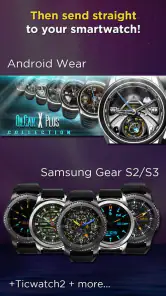
Before browsing, I would first check whether the app suits the smartwatch and phone setup I use. Watch-face apps are not interchangeable: a design that looks appealing in a gallery is only useful if it can make the trip from phone to watch. Compatibility and transfer are therefore the first practical questions, not details to leave until after spending time choosing a face.
The app has been available since July 25, 2014, and its current version is 9.0.6. Its scale is part of the appeal: it has more than 5 million installs and around 9,200 written reviews. Those figures suggest a well-established option, but they do not guarantee that every face will suit every watch or that the handoff will feel effortless on every setup.
From browsing to a face on your wrist
My recommended workflow is to begin with a clear purpose. Do I want an easy-to-read display for a busy day, a more expressive design for the weekend, or a face that makes the watch feel less like a default device? Starting with that choice makes a large collection easier to approach than scrolling without a target.
Find a design without getting lost
Once I know the mood or practical need, I would browse the collection and narrow the options by the kinds of themes and styles I want. A quick scan is useful for inspiration, but I would pause on the details that matter when the watch is actually in use: whether the time stands out, whether the layout feels crowded, and whether the design suits the size of my screen.
That last check is easy to overlook. A face can look polished in a preview yet feel busy on a small display, especially when decorative elements compete with the time. I would favor legibility first if I rely on quick glances, and save the more elaborate look for occasions when appearance matters more than seeing information at a glance.
Make a choice, then personalize it
After finding a face that is close to what I want, I would treat customization as a finishing step rather than a reason to change everything. Adjusting colors or other available elements can help a design fit a watch band or personal style. If I am starting from scratch, I would keep the first attempt simple: a clear time display and a restrained visual theme are easier to judge than a screen filled with competing effects.
More From Our News Desk

Weather by Xiaomi Review: Clear at a Glance, Less Clear Up Close

X Under Pressure: Can It Recover When Posting Goes Wrong?

Clash of Clans Is Won Between the Battles

Android Auto Makes the Case for Quieter Car Software

MobiOffice: Transforming Mobile Productivity with Seamless Integration

EA SPORTS FC™ Mobile Soccer: Redefining Mobile Sports Gaming
There is a trade-off between creative freedom and setup time. People who enjoy experimenting can get more out of the design tools; anyone who only wants a quick replacement may find choosing and adjusting a face more involved than selecting a built-in option. In-app purchases range from $0.99 to $49.99 per item, so I would check what is included before committing to a paid choice rather than assuming every design or option is part of the free experience.
The phone-to-watch handoff
Choosing a design in an app is only half the job. The next step is getting it onto the watch and checking the result on the actual screen. I would do that before spending time fine-tuning small details: if the face does not transfer as expected or its layout feels wrong at wrist size, it is better to choose another starting point than keep polishing a poor fit.
For a realistic routine, I might pick a clean, high-contrast face before a workday, check that the time is readable outdoors and in a quick glance, then switch to a more decorative design later. That gives the app a practical role beyond collecting screenshots. It also makes the choice easier to evaluate: a face should look good in the gallery, but it should earn its place by working in the moments when I actually check my watch.
What happens after the first choice
A collection this broad is most useful when I treat it as a set of options for different situations, not as a challenge to find one perfect face forever. I would keep a reliable, uncluttered design for everyday use and experiment with a more playful one when I have time to judge whether it remains comfortable to read. This approach also limits the temptation to keep changing settings without knowing what I like.
Compared with the usual alternative—sticking to the watch’s built-in faces—WatchMaker is appealing when those defaults feel too limited or too familiar. Built-in choices are usually the simpler route if I want minimal setup and predictable behavior. This app makes more sense when I value a larger selection and want to shape the look myself, accepting that browsing, customization, and transferring a design add steps.
Where the experience can break down
Not every design is a good everyday choice. Detailed graphics can make the display harder to read, and animated or otherwise elaborate faces may put more pressure on battery life than a simpler layout. I would start with a restrained face, use it through a normal day, and only add visual effects if the watch remains practical for my routine. That is a more useful test than choosing based on appearance alone.
I would also be cautious about expecting a single workflow to suit every device. The app is available in the personalization category, but a phone app and a watch face still have to work together. If the handoff proves awkward on my particular setup, or if I mainly need a dependable, readable time display, the watch’s built-in options may be the better fit. If I enjoy browsing and adjusting designs, the extra steps are easier to justify.
Who I would recommend it to
I would recommend it to smartwatch owners who see the watch face as part of their personal style and are happy to spend a little time choosing and refining a design. It is especially appealing if the standard faces no longer feel fresh and you want a broader canvas for changing the look of your wrist. The free entry point makes it approachable, while the item-by-item purchase range is worth keeping in mind if browsing leads you toward paid options.
I would skip it if I rarely change my watch face, dislike customizing small details, or value the shortest possible route from opening an app to having a working display. It is also not the first choice I would make for someone whose main priority is an uncomplicated, highly legible face; a built-in option can be more direct. The app’s 3.7 average reflects a mixed overall reception, so I would treat it as a substantial catalog to explore rather than a guarantee that every part of the experience will suit me.
Choosing a face for the way I use my watch
The best test is not how many designs catch my eye, but whether one solves a small, recurring problem. For commuting, I would favor a clear face that lets me check the time without lingering over the screen. On a relaxed weekend, I might accept a busier design because I am choosing it for appearance rather than speed. Keeping those jobs separate makes it easier to decide when customization adds value and when it just adds another thing to manage.
I would also take a moment to compare a candidate with the watch band and the watch’s physical screen, rather than judging it only on the phone. A color that looks subtle in a preview can dominate at wrist size; a decorative detail can become visual clutter when viewed briefly. Choosing a simple starting point and changing one element at a time is a practical way to learn what improves the face without losing track of what made it readable.
When the catalog is an advantage—and when it is not
WatchMaker’s appeal is strongest for people who treat the watch as a small personal display, not just a clock. A wide range of styles can help when the stock selection feels repetitive, and the option to alter a design gives an interested user more room than a fixed set of presets. In that sense, it sits between built-in faces and a purely hands-on design tool: there is room to explore, but the extra choice asks for patience.
That same breadth can slow down someone who only wants to install one dependable face and get on with the day. If I find myself browsing without a clear idea of what I need, I would stop and decide whether readability, appearance, or a particular mood matters most. If none of the available options feels right after that, a standard face may be a better answer than turning setup into a project.
A sensible way to try it
Because the app is free to install, I would begin by exploring before buying anything. I would test a design on the watch, use it in ordinary conditions, and see whether I still like the layout after the novelty wears off. If a paid item looks tempting, I would make that decision only after checking the face’s fit for my own routine and confirming what the purchase covers. That avoids paying for an attractive preview that does not work for me in practice.
This trial also answers the questions that matter most: does the chosen face transfer to my watch, can I read it quickly, and is changing it worth the extra step? The answers are personal because screen size, habits, and tolerance for customization differ. I would not judge the app by the gallery alone; the useful outcome is a face I can comfortably keep on my wrist.
My take after weighing the workflow
Hey there! If you're like me and love to personalize every aspect of your tech gadgets, then you're probably always on the lookout for cool ways to customize your smartwatch. I recently stumbled upon an app called WatchMaker Watch Faces, and it's a game-changer for anyone who wants to add a bit of flair to their wrist.
A Universe of Customization
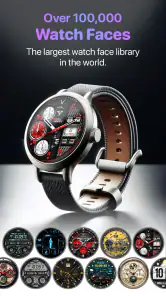
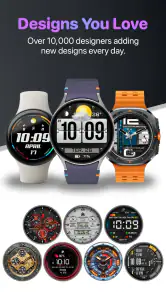
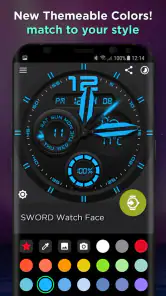
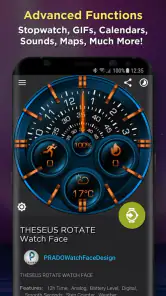
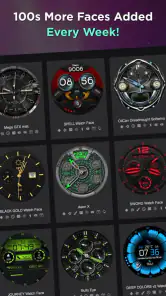
So, what’s the deal with WatchMaker Watch Faces? Well, imagine having thousands of watch faces, all in one app. Seriously, it's like having a whole universe of customization at your fingertips. The app comes loaded with a massive collection of watch faces, and if you can’t find one that suits your style, you can easily create your own. Whether you’re into classic designs, modern digital aesthetics, or something more quirky, there’s something here for everyone.
User-Friendly Interface
One of the first things I noticed is how user-friendly the app is. Even if you're not super tech-savvy, you'll find navigating through the app a breeze. The layout is intuitive, with everything neatly categorized. You can search for watch faces by theme, style, or popularity, making it easy to find exactly what you’re looking for without getting overwhelmed.
Customization at Its Best
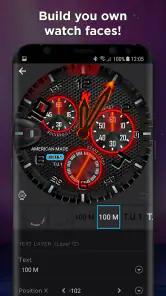
If you’re a DIY enthusiast, you’re going to love the customization features. The app allows you to tweak existing watch faces or create completely new ones. You can change colors, add widgets, and even include animated effects. It’s like having a mini design studio right on your smartphone. Plus, the design tools are robust yet easy to use, giving you professional-quality results without the hassle.
Performance and Compatibility
The range of possible watch-and-phone setups is one reason I would test the transfer before getting attached to a particular design. I would not assume that an experience on one device settles how it will behave on another. The app has a 3.7 average, and that makes me more inclined to judge it by the face I can actually use than by the size of the collection alone.
Community and Sharing
Another fantastic feature is the community aspect. You can share your own creations with other users and explore designs made by others. It's a great way to get inspired and see what’s trending in the world of smartwatch fashion. Plus, there are frequent updates and new watch faces being added all the time, so you’ll never run out of options.
Battery Life Considerations
Now, let’s talk about battery life, because I know that’s a concern for many smartwatch users. Some of the more elaborate watch faces with animations might drain your battery quicker than simpler designs. However, the app provides tools to help you optimize battery usage, like adjusting brightness or disabling certain animations. It’s all about finding the right balance for your needs.
Final Thoughts
All in all, WatchMaker Watch Faces is a must-try for anyone looking to spice up their smartwatch experience. The sheer variety of watch faces combined with the ability to create your own unique designs makes it a standout app in the customization space. Whether you’re a seasoned smartwatch user or a newbie just getting started, this app has something special to offer. So, go ahead and give it a try – your wrist will thank you!
Ready to dive into the world of custom watch faces? You can download the app from the Google Play Store or the Apple App Store. Happy customizing!
WatchMaker Watch Faces Frequently Asked Questions
Can I browse and choose watch faces before pairing or setting up a smartwatch?
WatchMaker Watch Faces is centered on browsing and personalizing watch-face designs, so you can explore its collection and consider the styles you like before choosing one. To use a face on a wearable, you will need to make sure your particular watch and its software work with the app. Compatibility is worth checking before you download, especially if you already have a specific design in mind.
What kinds of designs can I expect to find in WatchMaker Watch Faces?
The app’s main appeal is its collection of watch faces, with options intended to help make a smartwatch feel more personal. The store summary highlights a large collection and smart live Christmas faces gallery widgets, so seasonal designs are part of its identity as well. You can browse for a look that suits your taste, then explore customization options where available.
Does WatchMaker Watch Faces work without an internet connection?
WatchMaker Watch Faces is designed around browsing, downloading, and sharing watch faces, so some actions may rely on an internet connection. Whether a particular face remains available for use after it has been downloaded can depend on how the app and your watch handle that design. If offline use matters to you, check the behavior of a chosen face on your own setup before relying on it.
Will WatchMaker Watch Faces affect my smartwatch’s battery life?
The app lets users choose and customize watch faces, and the effect on battery life can vary with the design and the watch. A face with live or changing elements may behave differently from a simpler design, depending on how it is implemented and supported by your wearable. If battery life is a priority, try a face and monitor your watch’s usual performance.
Can I share or use watch faces made by other people?
WatchMaker Watch Faces includes community-oriented features: users can download watch faces and share their own creations. That makes it possible to explore designs beyond the ones you create yourself, though the available options and their compatibility can vary. If you find a face you like, check that it works with your smartwatch before applying it.
Pros
- Extensive library of watch faces.
- Highly customizable options available.
- Compatible with most smartwatches.
- User-friendly interface and design.
- Regular updates with new features.
Cons
- Some features require premium.
- Occasional syncing issues reported.
- Battery usage can be high.
- Limited free content available.
- May have a learning curve initially.
- Category
- Personalization
- Version
- 9.0.6











