

Wanderboat: Local Guide
- 16.00
- 4.1
- Installs
- 100.00K
- Price
- Free

Screenshots
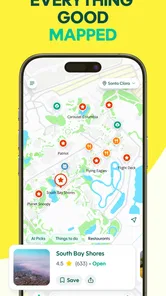
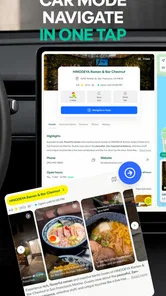
Analysis by Reviewed
I approached Wanderboat: Local Guide as someone who wants useful ideas for going out, not another app that turns a simple plan into a research project. Its promise, “Live your best life,” is broad, while the short store description is simply “Wanderboat,” so the real question is how helpful it feels when I am deciding what to do in an unfamiliar place or trying to make better use of my own neighborhood.
This is a free Travel & Local app from UTA AI Inc., aimed at people who want a more guided way to explore. It is available to an Everyone audience, and its current version is 1.5.5. The app has passed the stage of being a tiny experiment, with over a hundred thousand installs, although its average rating of 4.1 from roughly two hundred ratings suggests a generally positive but not flawless experience.
Getting from installation to a useful local idea
I’d use this section to focus on the first practical decision: how to turn a broad wish to explore into a manageable outing. I find it helps to choose a time window and one area before browsing, then judge suggestions by whether they fit the day I actually have—not an idealized itinerary.
What to expect when you open it
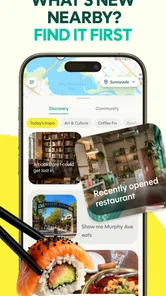
My first impression is that Wanderboat: Local Guide is best understood as a discovery companion rather than a complete replacement for every travel tool on a phone. I would not open it expecting the same role as a dedicated map, a booking service, or a transport planner. Its value is in helping me move from “I want to go somewhere” to a more concrete idea that I can actually consider.
That distinction matters for first-time users. A local guide can be useful even before a trip has a fixed itinerary. Perhaps I have an afternoon free, guests visiting from another city, or a vague wish to find something different nearby. In those moments, a conventional map often gives me a long list of places, while a guide-style app can make the starting point feel less empty.
I found the broad positioning appealing because it leaves room for both travel and ordinary local plans. I can imagine using it while preparing for a destination, but also when I want to break a familiar weekend routine. The app makes the most sense when I am open to suggestions rather than searching for one exact business by name.
At the same time, I would keep my expectations realistic. A guide can help with inspiration and selection, but it should not be treated as the sole authority for opening hours, availability, access requirements, or last-minute changes. Before leaving, I would still verify important practical details through the relevant official source. That is not a criticism unique to this app; it is simply sensible whenever recommendations affect a real journey.
More From Our News Desk

 Weather - By Xiaomi
Weather by Xiaomi Review: Clear at a Glance, Less Clear Up Close
Xiaomi’s weather app makes everyday forecasts quick to scan, but its calm surface can leave useful details and recovery paths harder to find than they should be.

 X
XX Under Pressure: Can It Recover When Posting Goes Wrong?
A resilience-focused review of X, examining setup, mistaken posts, interruptions, weak connections, and the gaps that matter when recovery needs to be dependable.

 Clash of Clans
Clash of Clans Is Won Between the Battles
Its raids are quick; its community is a long-term project of coordination, teaching, rivalry, and shared responsibility—with all the friction that entails.

 Android Auto
Android Auto Makes the Case for Quieter Car Software
The car interface is no longer judged by how much it can do, but by how quietly it helps. Android Auto shows what drivers now expect—and what still gets in the way.

 MobiOffice: Word, Sheets, PDF
MobiOffice: Transforming Mobile Productivity with Seamless Integration
MobiOffice: Word, Sheets, PDF is redefining mobile productivity with a surprising blend of functionality and innovation.

 EA SPORTS FC Soccer Mobile 26
EA SPORTS FC™ Mobile Soccer: Redefining Mobile Sports Gaming
Dive into EA SPORTS FC™ Mobile Soccer, where immersive gameplay and strategic depth transform mobile sports gaming.
Latest News



The first setup: keep it simple and purposeful
When I install a travel discovery app, I prefer to begin with the smallest amount of setup needed to see value. My advice here is to avoid trying to build a perfect travel profile immediately. Start with the place you actually care about now, whether that is your current area or an upcoming destination, and use a specific intention such as a short outing, a food-focused search, or a relaxed day plan.
This approach makes the first session easier to judge. If I begin with an overly broad request like “show me everything,” I may end up with too many possibilities and no clear way to choose. A narrower starting point gives the app a fairer test and gives me a result I can act on. Once I understand how its suggestions feel, I can broaden the search and explore more freely.
For a visitor, I would prepare the app before the busiest part of the trip. Sitting down with a stable connection and a few minutes to think is better than attempting to make every decision while standing outside a station. I would note the general area, the amount of time available, and the kind of experience I want. Even a simple distinction between “quiet afternoon” and “packed sightseeing day” can improve the usefulness of the results I choose to follow.
For a local user, the setup can be even more practical. I might choose a district I rarely visit and look for an idea that fits a particular time window. The important habit is to treat the app as a filter for possibilities, not as a command to accept the first suggestion. I still decide whether the distance, atmosphere, and timing fit my day.
The first successful action should be small
The quickest way to understand Wanderboat is to use it for one realistic decision instead of attempting to plan an entire holiday. I would begin with a free afternoon and a clear limit: one neighborhood, one general interest, and a manageable amount of travel. The goal is not to create a flawless itinerary. The goal is to find one suggestion that makes me say, “Yes, I could do that today.”
That small win is important because travel apps can feel impressive while producing nothing actionable. I judge a guide by whether it helps me choose, not by how many ideas it displays. If Wanderboat narrows my options into a plan that suits my time and mood, it has already earned a place in my planning routine.
A useful workflow is to save or note the most promising idea, then immediately check the practical details that matter to me. I would look at the route separately, confirm that the destination fits the available time, and identify a backup nearby. This creates a simple two-option plan: a first choice and an alternative if weather, crowds, or timing changes.
That backup habit is one of the better ways to use a discovery app. Recommendations are most valuable when they reduce decision fatigue, but they should not make the day fragile. A second nearby option means I do not have to restart the entire search if the first stop does not work out.
How I would use it in an everyday situation
Imagine that a friend is visiting on a Saturday and neither of us wants a rigid tourist schedule. I would open Wanderboat and define the outing around the kind of day we want rather than listing ten separate attractions. Maybe the aim is a relaxed walk with something interesting to see and a place to pause afterward. I would use the app to generate possibilities, select one area, and keep the rest of the day flexible.
Before leaving, I would compare the suggested route with the actual starting point and check how much walking is realistic. Then I would choose one main stop and one optional addition. This is where the app can be more useful than aimless map browsing: it gives me a starting shape for the day, while I retain control over the pace.
Another realistic use is a short break during a business trip. I may only have a few hours and no interest in crossing the entire city. In that situation, a local guide is valuable when it helps me stay near a practical area and find something that fits the gap. I would not ask it to design a full vacation; I would ask it to make a limited window feel worthwhile.
For residents, the strongest use case may be breaking repetition. I can use a familiar starting point but search for a different kind of outing, then judge the suggestions by convenience and novelty. The app becomes less about famous landmarks and more about giving me a reason to explore beyond my usual route.
Common confusion and where judgment is still needed
The first possible confusion is the difference between inspiration and confirmation. A recommendation can be a good lead without being a guarantee that a place is open, quiet, accessible, or suitable for a particular group. I would always verify details that could ruin the outing, especially when traveling with children, older relatives, or anyone with mobility needs.
The second is expecting the app to understand an extremely vague request perfectly. “Something fun” can mean a museum, a long walk, a lively venue, or a quiet view depending on the person. I get better results when I add constraints in ordinary language: how much time I have, whether I want indoor or outdoor activities, and whether I prefer a calm or busy atmosphere.
A third point is that local relevance depends on context. A suggestion that looks attractive on a screen may be inconvenient from my actual starting point. I therefore separate two decisions: first, is the idea appealing; second, can I reach it comfortably today? Keeping those questions separate prevents me from rejecting a good discovery simply because the route needs adjustment.
I also would not use Wanderboat as my only navigation tool. A dedicated maps app is usually the better choice for turn-by-turn directions, live traffic, transit changes, and precise arrival planning. Wanderboat has a different job: helping me decide what deserves a visit. Using both tools together is more sensible than demanding that one app handle every part of a trip.
Three less obvious ways to get more from the app
First, I would use it before I know the exact destination, but after deciding the shape of the day. This middle ground is more productive than either a completely open search or a rigid itinerary. “A half-day near the center” gives me enough structure to choose without closing off discovery.
Second, I would use the app to build a geographic cluster rather than a long checklist. Once I find one appealing area, I would look for a nearby secondary idea and stop there. This reduces unnecessary travel and gives the day a natural rhythm. It also makes the plan more resilient if one stop takes longer than expected.
Third, I would treat the app as a conversation starter when traveling with someone else. Instead of arguing over a blank map, I can show a small selection of possibilities and ask which mood fits. The final choice becomes a shared decision, not an algorithmic instruction. This is particularly useful for groups where everyone wants something different.
A fourth useful trade-off is to search broadly once, then become selective. Constantly requesting more and more options can create the same overload that the app was meant to solve. I prefer to stop when I have one strong candidate, one backup, and enough practical information to decide. More recommendations are not automatically better recommendations.
Who will appreciate it most
Wanderboat is a good fit for first-time visitors who want help getting started without committing to a detailed schedule. It also suits curious locals, spontaneous weekend planners, and people who find ordinary map searches too mechanical. If I enjoy choosing from a few appealing possibilities and shaping the final plan myself, the app’s approach feels natural.
It can also help travelers who are short on planning time. Someone arriving in a city with only a loose idea of what to do may benefit from a guided starting point. The app is especially useful when the problem is not finding a place, but deciding what kind of experience would fit the available time.
I would be more cautious about recommending it to users who need a highly technical travel tool. If my priority is exact public transport timing, detailed offline navigation, reservations, price comparison, or a locked schedule, I would choose a specialist service first. Wanderboat may support that process, but it should not replace tools built specifically for those jobs.
It is also not the ideal choice for someone who dislikes exploratory suggestions and already knows exactly where they are going. If I have a named destination and only need directions or opening information, a conventional maps service is likely faster. The app earns its place when there is a discovery problem to solve.
How it compares with familiar alternatives
Compared with a standard maps app, Wanderboat feels more oriented toward the question “What should I consider?” rather than “How do I get to this exact address?” Maps are stronger for navigation and immediate logistics. Wanderboat is more appealing at the earlier stage, when I am choosing an area or activity.
Compared with a traditional travel guide, the app feels easier to use for a flexible day because I do not have to work through a fixed chapter structure. A printed or editorial guide can still be better for deep cultural background, carefully researched historical context, and a sense of a destination’s wider character. I would use those resources when I want understanding, not just a practical idea.
Compared with social media recommendations, a dedicated local guide is less dependent on me sorting through unrelated posts and trying to separate useful suggestions from personal taste. Social platforms can reveal hidden places and current atmosphere, but they can also encourage chasing whatever is popular. Wanderboat is more useful when I want a focused planning step rather than an endless stream of content.
Compared with booking platforms, the roles are different. Booking services are the better destination for reservations and transaction details. Wanderboat is more relevant before that point, when I am still deciding what belongs in the day. The best workflow is often to discover an idea here, then confirm and book through the appropriate service if necessary.
Practical expectations for device and access
The app is listed for a minimum operating system of 10, so I would check compatibility before asking someone with an older device to install it. That requirement is straightforward, but it is worth remembering when planning a group trip where not everyone has a recent phone.
Because this is a travel-focused app, I would prepare important information before entering an area with unreliable connectivity. I would not assume that every useful detail will remain available in every situation. Saving the key destination, noting the meeting point, and keeping a backup route in a separate maps tool are simple precautions that make the app more useful rather than less.
The free price makes experimenting easy. I can try it for a local outing without making the decision feel expensive or permanent. That is a real advantage for casual users, although free access alone does not remove the need to check whether a recommendation fits my actual needs.
My next step after the first successful outing
After using Wanderboat for one small plan, I would review what worked instead of immediately building a much larger itinerary. Did the suggestions match my preferred pace? Were they close enough together? Did the app help me choose, or did I still spend most of the time researching elsewhere? Those answers tell me whether it belongs in my regular travel routine.
If the first experience is useful, I would use it earlier in future trips. I would begin with broad discovery, narrow the results into one or two areas, and then hand the practical work to maps and official sources. This division of labor keeps the app in its strongest role and avoids expecting it to solve problems it was not designed to solve.
I would also keep the planning human. The best recommendation is not always the most famous or visually impressive option. It may be the place that is easy to reach, suits the weather, and leaves enough time for an unplanned coffee or conversation. Wanderboat is most valuable when it helps me notice those possibilities without taking the decision away from me.
Final opinion
My overall view is that Wanderboat: Local Guide is a promising choice for discovery-led travel and local exploration. Its free access, approachable purpose, and focus on moving from vague intention to a concrete idea make it easy for a first-time user to try. The developer, UTA AI Inc., has positioned it in a useful space between a broad travel guide and a practical map.
I would recommend starting with one modest outing, a clear time limit, and a backup option. That method shows the app’s strengths quickly while protecting against the normal uncertainty of recommendations. I would also keep a maps app and official information nearby for navigation and final checks.
For me, the deciding question is simple: do I need directions to a place I already chose, or do I need help choosing what is worth doing? If it is the second question, Wanderboat deserves a trial. If the first is all I need, a specialist maps or booking app will probably be quicker. Used for the right job, this local guide can turn an empty afternoon or an unfamiliar city into a plan that feels personal rather than prepackaged.
Wanderboat: Local Guide Frequently Asked Questions
Is Wanderboat: Local Guide suitable for first-time travelers?
Wanderboat: Local Guide can be useful if you are visiting a destination for the first time and want help finding places and shaping a day of activities. Its recommendations and itinerary inspiration can give you ideas to explore, while you remain in control of what to include. For a smoother visit, compare suggestions with your own priorities and check essential logistics before setting out.
What devices can I install Wanderboat: Local Guide on?
Wanderboat: Local Guide is available for devices running Android 10 or later. Before downloading, check your device’s operating-system version and make sure you have enough space for the installation. The app is a travel and local discovery tool, so having a compatible device ready can help you use it to explore destinations and organize plans while you are on the go.
What is Wanderboat: Local Guide, and what can I use it for?
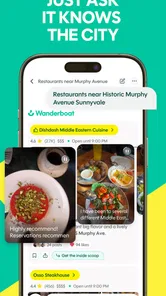
Wanderboat: Local Guide is a travel-planning and discovery app designed to help you find interesting places, activities, restaurants, attractions, and travel ideas. It is useful when you are planning a trip, exploring a new city, or looking for something nearby. The app brings recommendations and itinerary inspiration together, making it easier to compare options and organize your day without relying on several separate travel apps.
Can Wanderboat create personalized travel plans or itineraries?
Yes, Wanderboat is designed to help users build more personalized travel plans based on destinations, interests, available time, and preferred activities. You can use it to discover places and assemble a practical itinerary rather than simply browsing isolated recommendations. However, suggested plans should be treated as a starting point: opening hours, travel times, reservations, weather, and attraction availability can change, so verify important details before following the itinerary.
Does Wanderboat provide reliable information about restaurants, attractions, and local places?
Wanderboat can be helpful for discovering restaurants, landmarks, experiences, and other points of interest, but the accuracy of listings may vary depending on the information source and how recently a place has updated its details. Before visiting, check the venue’s official website or a current map listing for opening hours, prices, booking requirements, closures, and customer policies. This is especially important for popular attractions and seasonal activities.
Pros
- Personalized suggestions make discovering nearby places quick and convenient.
- Useful for finding restaurants
- attractions
- and activities in unfamiliar cities.
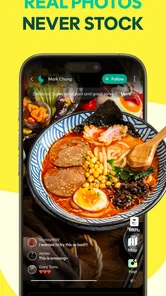
- Visual content helps compare destinations before deciding where to go.
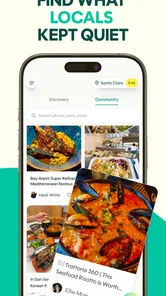
- Can inspire spontaneous plans beyond typical tourist recommendations.
- Simple interface makes browsing local ideas easy for casual travelers.
Cons
- Recommendation quality may vary depending on the city and available local data.
- Some features or listings may require an internet connection while traveling.
- Popular places can become crowded despite appearing as convenient suggestions.
- Information such as prices
- hours
- or availability may change without warning.
- Privacy-conscious users may dislike sharing location or travel preferences.











