

Voxa: Voice Translator & Chat
- 0.00
- 0.0
- Installs
- 50.00K
- Price
- Free

Screenshots
Analysis by Reviewed
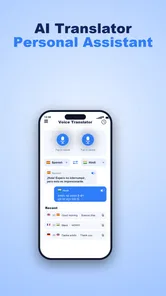
I judge a translator less by how impressive its feature list sounds than by whether I can use it when I’m tired, in a hurry, or trying to communicate across a noisy counter. Voxa is built around several ways to exchange language—voice, typed text, camera-based translation, and calls or chat—so its appeal is flexibility rather than one single clever trick. That range could help in everyday travel, but it also makes clear instructions and a calm interface especially important.
Good preparation makes each exchange easier
Before relying on a translator in an unfamiliar place, I would decide how to handle the information that matters most. For a hotel check-in, that might mean having the address and booking name written down; for a food order, it could mean keeping a short, clearly worded note about a dietary requirement. These preparations do not replace translation. They give both people a stable reference if a spoken exchange becomes confusing or the phone is inconvenient to use.
I would also consider how much of a conversation needs translating. A quick question about directions is a good fit for an app-mediated exchange, while a long discussion about changing travel plans may be easier if I first write the key points in short sentences. Breaking one complicated request into separate questions gives the other person more chances to correct a misunderstanding before it snowballs.
For someone deciding whether to install it, Voxa makes most sense when travel involves a mixture of spoken questions and unfamiliar printed information. It is less compelling if the need is only an occasional word lookup, or if using a phone during conversation is uncomfortable. That distinction is useful: a flexible tool is not automatically the easiest tool for every traveler.
Making translation easier to follow
As a travel and local communication app, Voxa is aimed at situations where a language gap can turn a simple errand into a slow exchange of guesses. I like the basic idea of having spoken and written translation in the same tool: if a conversation is hard to hear, text can be easier to check; if typing is awkward, voice may be quicker. Camera translation offers another route when the words are on a sign or menu rather than in someone’s speech.
The app is called Voxa, and its focus on multiple communication modes gives it a practical advantage over a basic phrasebook. A phrasebook is dependable for familiar requests but limited when a reply changes the conversation. A general text translator is better for composing a careful message, yet less convenient when the other person is standing in front of you. Voxa’s promise is to bring those kinds of exchanges together, which is useful when switching between them matters more than having a long list of travel content.
For readability, I would treat translated text as something to review, not as an unquestionable answer. Short sentences are easier to scan and less likely to become muddled by idioms or several ideas packed together. If I needed to explain a food allergy, a medical concern, or a complicated booking problem, I would keep the wording plain and check that the translated version still says what I mean before showing it to someone.
More From Our News Desk

 Weather - By Xiaomi
Weather by Xiaomi Review: Clear at a Glance, Less Clear Up Close
Xiaomi’s weather app makes everyday forecasts quick to scan, but its calm surface can leave useful details and recovery paths harder to find than they should be.

 X
XX Under Pressure: Can It Recover When Posting Goes Wrong?
A resilience-focused review of X, examining setup, mistaken posts, interruptions, weak connections, and the gaps that matter when recovery needs to be dependable.

 Clash of Clans
Clash of Clans Is Won Between the Battles
Its raids are quick; its community is a long-term project of coordination, teaching, rivalry, and shared responsibility—with all the friction that entails.

 Android Auto
Android Auto Makes the Case for Quieter Car Software
The car interface is no longer judged by how much it can do, but by how quietly it helps. Android Auto shows what drivers now expect—and what still gets in the way.

 MobiOffice: Word, Sheets, PDF
MobiOffice: Transforming Mobile Productivity with Seamless Integration
MobiOffice: Word, Sheets, PDF is redefining mobile productivity with a surprising blend of functionality and innovation.

 EA SPORTS FC Soccer Mobile 26
EA SPORTS FC™ Mobile Soccer: Redefining Mobile Sports Gaming
Dive into EA SPORTS FC™ Mobile Soccer, where immersive gameplay and strategic depth transform mobile sports gaming.
Latest News



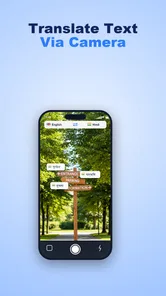
That small habit is particularly useful with camera translation. A sign may contain a heading, fine print, symbols, and decorative lettering; a quick translation can help identify the general message, but it is wise to inspect the original too. For a menu, I would use the translated view to shortlist options, then confirm important ingredients directly with staff. This is not a weakness unique to Voxa so much as a sensible boundary for machine translation.
Choosing the right way to communicate
The strongest workflow is not necessarily to use every mode in one conversation. I would begin with speech for a quick question, move to typed text if a name or address needs to be exact, and use the camera when the obstacle is printed information. That choice can reduce confusion: speaking a street name may produce a poor transcription, while showing the written address avoids the problem altogether.
There is also a useful trade-off between speed and control. Voice is natural when both people are ready to talk, but it depends on clear speech and a setting where audio is appropriate. Text takes longer to compose, yet gives me a chance to remove ambiguity before sending or showing a message. Camera translation can save effort when reading unfamiliar print, though it is less helpful if the text is obscured, tiny, or presented in a difficult layout.
Access across different bodies and settings
I find that access is not just about which translation modes an app offers; it is also about choosing a method that fits the person and the moment. A useful next step is to think through what would make each mode workable before relying on it away from home, especially when the setting is noisy, public, or physically awkward.
Motor and sensory considerations
Offering more than one input method can make a translator easier to approach for people with different needs. Someone who finds speaking difficult may prefer text; someone who has trouble reading a long message may find a short spoken exchange more comfortable. A traveler carrying bags might benefit from a quick voice question rather than typing, while a person who cannot comfortably use audio in public can choose a written route. These are meaningful possibilities, but they depend on how well each mode works in the moment.
I would not assume that a camera workflow is effortless for everyone. It asks the user to aim a phone, hold it steady, and frame the words, which can be tiring or difficult with limited hand control. In that situation, asking a companion to position the camera or switching to typed text may be more practical. Likewise, voice translation is not an ideal fallback for someone who cannot speak comfortably or who needs a private exchange.
Sensory context matters as much as individual ability. In a quiet café, spoken translation may be straightforward; beside traffic or a busy station, sound can become hard to distinguish. Text can help both people verify the exchange, but only if the screen is easy to read and there is enough time to look at it. I would avoid relying on a single mode in a loud or rushed setting and keep the message brief enough to confirm together.
For people who depend on screen readers, captions, enlarged text, or other device-level support, the key question is how Voxa behaves alongside those settings on their particular phone. I can’t responsibly promise a specific compatibility experience without testing the exact device and configuration. If access tools are essential, I would try a low-stakes exchange first rather than discovering a mismatch during a time-sensitive conversation.
Where it fits into a real day
Imagine arriving at a guesthouse and needing to ask whether luggage can be left before a room is ready. I would use a short spoken question if the reception area is calm, then switch to typed text if the answer includes a time or condition that needs checking. If the reply points to a notice on the wall, the camera route can help make sense of it. This is where Voxa’s variety feels useful: the user can adapt to the information in front of them rather than forcing every exchange through speech.
On a trip, a sensible preparation step is to decide what information should not be left to improvisation. I would save or write down critical details such as an accommodation address and keep a human-checked version of important medical or dietary wording. A translator can bridge routine communication, but it should not be the only safeguard for emergencies, legal decisions, or anything where a small translation error could have serious consequences.
Voxa is free, and TRUNG NAM CORPORATION is the developer. It is a travel and local app for Everyone, with over fifty thousand installs. Its release date is July 25, 2026, and the current version is 1.0.4; it requires Android 7.0 or later. Those details make it accessible to a broad range of Android devices in principle, though the actual experience still depends on the phone and the user’s needs.
Remaining barriers and better alternatives
The biggest practical limitation is that multiple modes do not remove the uncertainty inherent in translation. A conversation can go off track if speech is unclear, a phrase has a local meaning, or the other person responds with detail that is difficult to interpret. I would use Voxa for everyday questions and simple coordination, but choose a professional interpreter or a trusted human translator when accuracy has serious consequences.
There is also a social trade-off. Holding up a phone and waiting for a translation can interrupt eye contact and make a conversation feel less natural. For a brief exchange, that pause is usually acceptable; for a long, sensitive discussion, repeated turns through an app can become tiring for both people. A bilingual companion or interpreter may be a better fit when nuance, reassurance, or back-and-forth discussion matters more than convenience.
Compared with a dedicated text translator, Voxa’s broader mix of speech, camera, and communication modes is attractive when the setting changes from one moment to the next. Compared with a phrasebook, it is more adaptable to unfamiliar questions, while a phrasebook can be easier when the user wants a known sentence without composing it. I would keep a phrasebook or written essentials as a backup for a trip where phone access may be inconvenient, and use Voxa as a flexible helper rather than the sole plan.
People who dislike switching between modes may also prefer a simpler tool focused on one task. If all I needed were occasional dictionary lookups, a full communication app could feel unnecessary. And if a user cannot comfortably operate a phone while speaking with someone, the most inclusive option may be another person’s assistance, a prepared card, or a different communication method altogether. The right choice depends on the context, not on the number of functions an app offers.
A practical inclusive verdict
I see Voxa as a potentially useful companion for travelers who want several ways to get through ordinary language barriers without carrying separate tools for speech, text, and printed words. Its most inclusive quality is the choice of communication route: users can respond to the situation instead of being locked into one method. That flexibility is valuable, especially when a conversation moves from a spoken question to a written detail or a sign.
My recommendation comes with a straightforward condition: test the mode you expect to rely on before a demanding trip or important appointment. Try a short voice exchange, inspect how you handle a typed message, and see whether camera translation is manageable on your device. Keep essential information available in a form you can access without the app, and do not rely on machine output alone for high-stakes decisions.
For casual travel questions, directions, and simple chat, Voxa is worth considering, particularly if switching between speech, text, and camera input would make communication easier for you. For prolonged sensitive conversations, users with specific access requirements that have not been tested on their device, or situations where exact wording is critical, a human interpreter or a simpler prepared alternative may serve better. I like the flexibility, but I would use it as a bridge between people—not as a substitute for checking that they have understood each other.
Calls and chat need a little extra care
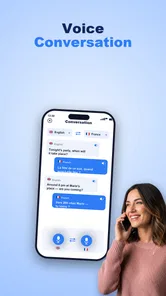
Calls and chat broaden the situations where this translator may be useful, but they also change the practical trade-offs. A call can suit someone who is coordinating while apart from a travel companion, whereas chat gives each person more time to read a message before responding. I would still keep call exchanges focused on one point at a time, and use text for details such as names or meeting places that are easy to mishear.
For chat, a useful habit is to send one request per message rather than combining directions, timing, and a follow-up question into a single block. That makes it easier to spot which part needs clarification. If the conversation turns into a long discussion, I would pause to confirm the main decision in plain wording instead of assuming that several translated turns have all landed correctly.
Who is likely to get the most from it
The strongest fit is a traveler who is comfortable using a phone and expects to move between conversations, signs, and typed details during the same outing. Someone visiting a market, checking a notice at a station, then asking a simple question at a counter can benefit from having those different routes in one place. Voxa may also suit people who want to try speaking first but appreciate a text-based fallback when the setting makes speech awkward.
I would be more cautious if a person needs a highly predictable interface, relies on specific assistive settings, or must communicate complex information precisely. In those cases, test it before travel and compare the experience with a familiar translator or a prepared communication aid. The useful question is not whether Voxa offers several modes, but whether its actual interaction feels manageable for the person who will depend on it.
TRUNG NAM CORPORATION’s app has a free entry point and is rated for Everyone, so it is straightforward to consider for ordinary travel use. I would treat the current release, version 1.0.4, as a reason to check the experience on my own device before making it part of a critical routine—not as a guarantee that every phone or access setup will behave the same way.
My overall view remains positive but practical: the ability to shift between voice, text, camera, calls, and chat addresses real changes in how people communicate while away from home. The best results are likely when I keep messages short, verify names and important details, and choose a mode that fits the surroundings and the user’s abilities. For everyday exchanges, that is a helpful combination; when the stakes rise, I would bring in a human or a more dependable backup.
Voxa: Voice Translator & Chat Frequently Asked Questions
What is Voxa: Voice Translator & Chat used for?
Voxa is designed to help people communicate across language barriers using voice translation and chat features. Depending on the languages and functions available in your version, you can speak or enter a message and use the app to translate it for another person. It may be useful for travel, everyday conversations, or language practice, but it should not be treated as a substitute for a professional interpreter in important situations.
How do I translate a conversation with Voxa?
Choose the languages for the people communicating, then use the app’s available voice or text controls to provide a phrase and view or hear its translation. For voice features, Voxa may need microphone permission, and clear speech with little background noise can improve recognition. The exact steps and supported conversation modes can vary by app version, so check the interface and app listing before relying on a particular feature.
Which languages does Voxa support, and does it work offline?
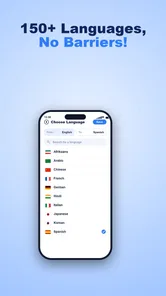
Language availability and offline support can change between releases, so check the current Google Play or App Store listing and Voxa’s in-app language selector for the options available on your device. Do not assume that every language works with every feature, or that translation works without an internet connection. If you plan to use Voxa while traveling, test the languages and connectivity requirements before you leave.
Is Voxa free, and are there subscriptions or in-app purchases?
The cost depends on the current version and the terms shown in your app store. Voxa may offer free access alongside paid features, a subscription, or in-app purchases; availability and pricing can vary by region and may change over time. Review the store listing and any purchase screen carefully before confirming payment, including the subscription duration, renewal terms, and cancellation instructions.
What permissions and privacy considerations should I know about before using Voxa?
Voice translation may require microphone access, while other permissions can depend on the features you choose. Before speaking sensitive information, review Voxa’s privacy policy and the relevant app-store privacy disclosures to understand how audio, text, and other data may be processed, stored, or shared. You can manage permissions in your device settings, but restricting microphone access may prevent voice input from working.
Pros
- Translates spoken conversations without requiring users to type every message.
- Chat-style layout makes translated exchanges easy to follow.
- Useful for quick
- face-to-face conversations while traveling.
- Voice input can be more convenient than typing on a phone.
- Combines voice translation and chat in one app.
Cons
- Translation quality may vary with accents
- background noise
- and phrasing.
- A stable internet connection may be needed for some features.
- Voice recognition can struggle in crowded or noisy places.
- Sensitive conversations may raise privacy concerns when using voice input.
- It may not suit users who need precise translations for important matters.











