Volume Styles - Custom control
- 2.28K
- 4.5
- Installs
- 10.00M
- Price
- Free

Screenshots

Analysis by Reviewed
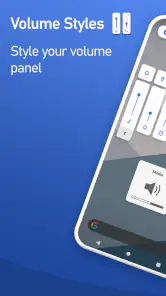
I notice a phone’s volume panel most when I’m trying to make a quick adjustment, so changing its appearance can be more than a cosmetic decision. Volume Styles - Custom control gives Android users a way to make that panel feel more personal, but I think its lasting value depends on whether the new design stays clear and useful after the first burst of experimentation.
A change you notice in the first week
My first impression was that this is a small, focused way to make an everyday phone control feel more personal. Volume controls appear often enough to make a visual change noticeable, but the appeal depends on whether you enjoy adjusting your Android interface rather than simply setting it up once and forgetting it. I’d treat the first session as a chance to pick a style that remains easy to read, not just the one that looks most dramatic in a preview.
The choice between familiar-looking panels and more distinctive themes is useful for different reasons. An iOS-like appearance can make the controls feel fresh, while a restrained style may blend better with the rest of your screen. I’d avoid changing several visual details at once: choosing a theme, using it for a few days, and then deciding whether its colors and layout work in bright light and at night is a more reliable test than switching constantly.
First Impressions
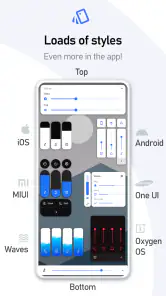
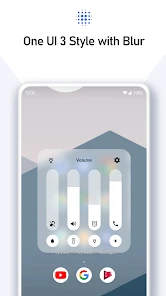
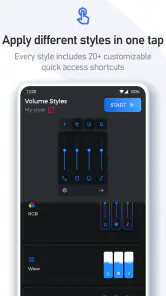
Upon installing Volume Styles - Custom control, I was greeted with a sleek and intuitive interface. The app doesn’t waste your time with unnecessary tutorials. Instead, it gets you right into the action. You can choose from a plethora of themes ranging from iOS styles to those reminiscent of the classic Android look. It’s like having a wardrobe of volume sliders at your disposal!
Customization Galore
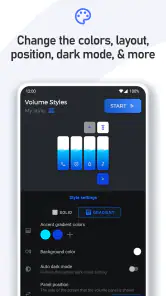
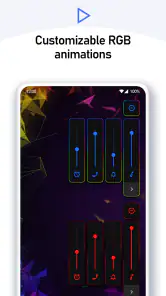
One of the coolest features is the ability to customize each slider to your liking. Want a neon look with vibrant colors? Done. Prefer a minimalist black and white theme? Easy peasy. The app lets you tweak everything from the color, shape, and even the functionality of the volume panel. It’s like having a mini graphic design studio right in your pocket. And for the tech-savvy, there’s even an option to create your own custom styles if the pre-existing ones don’t suffice.
Usability and Performance
Now, customization is great, but what about usability? I tried the app on both my Android and iOS devices and experienced no lag or crashes. The transitions between different volume styles were smooth and snappy. Moreover, the app consumes minimal battery power, so you don’t have to worry about it draining your phone’s battery life. It integrates seamlessly with your device’s existing volume controls, making it feel like a native feature rather than an add-on.
There is one practical distinction worth keeping in mind: Volume Styles is an Android personalization app, not an iOS option. It is made by Tom Bayley, and the current version is 4.5.1 for Android 6.0 and later. That makes it a reasonable fit for someone who wants to alter the look of Android’s volume panel, but not for someone trying to customize an iPhone’s system controls. If your phone’s manufacturer already provides a volume panel you like, the built-in option may also be the simpler choice.
You May Like

Clash of Clans Is Won Between the Battles

Android Auto Makes the Case for Quieter Car Software

MobiOffice: Transforming Mobile Productivity with Seamless Integration

EA SPORTS FC™ Mobile Soccer: Redefining Mobile Sports Gaming

How Microsoft OneDrive Became a Mobile Productivity Giant

How Google Translate Breaks Language Barriers Effortlessly
A more useful panel for everyday adjustments
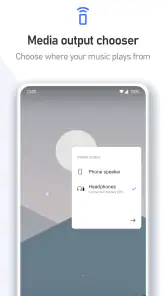
Besides the fantastic customization options, Volume Styles - Custom control offers some neat additional features. For instance, you can adjust the volume for individual apps right from the volume panel. Imagine watching YouTube and wanting to lower the music volume without affecting the notification volume – this app makes it possible. It’s these little touches that make it stand out from other similar apps in the market.
That kind of control is most useful when you have a repeatable reason to separate sound levels, rather than simply wanting a new look. For example, if I’m watching a clip while keeping notification sounds quieter, being able to reach the relevant controls from the panel can save me from searching through settings. A helpful habit is to decide which sound adjustments you actually use during a normal day, then shape the panel around those. A highly customized layout is less valuable if it makes the controls you need harder to find.
A realistic test is a commute or a busy afternoon: I might lower media volume for a video, then quickly adjust another sound before putting the phone away. In that sort of stop-and-start use, the benefit is not having the most elaborate slider; it’s being able to recognize the right control quickly. I’d set up the panel at home, then try it without lingering over the screen. If the design makes that quick adjustment less obvious, I’d simplify it rather than keep adding visual flourishes.
People who enjoy matching small interface details to their wallpaper or preferred phone theme are likely to get the most immediate pleasure from the app. It can also suit someone who regularly uses different sound channels and wants the panel to feel more approachable. On the other hand, anyone who rarely touches volume controls, prefers an unchanged manufacturer interface, or expects a complete phone makeover may find the app’s narrow focus underwhelming. It changes one familiar part of Android, not the whole device.
Sharing styles without turning setup into a hobby
And for those who love sharing their creativity, the app allows you to export and share your custom styles with friends. You can even import styles from others, building a community of volume style enthusiasts. It’s like social media but for volume sliders – how cool is that?
Sharing can also be a shortcut when you want a starting point rather than building a look from scratch. I’d still check an imported style for legibility and practical fit on my own phone before settling on it; a design that looks good on someone else’s screen may not suit my display or preferences. That small check helps keep customization useful instead of turning it into a recurring project.
One trade-off with shared designs is that convenience and personal fit are not the same thing. I’d use an imported look as a draft, then check whether its colors provide enough contrast and whether the controls I actually use stand out. If I find myself repeatedly changing a shared style to make it work, starting with a simpler preset may be less effort. The point is to reduce friction at the volume panel, not to create another design task to maintain.
Month-to-month value and upkeep
The longer-term question is whether the app earns a place after the novelty wears off. For me, its recurring value comes from a combination of familiar access and a panel that feels more suited to my taste. If I settle on one clear style and use the sound controls regularly, the change can remain quietly useful. If I rarely adjust volume or already like the default panel, the visual difference may stop mattering after the first few days.
Maintenance should be light if you keep your setup simple: choose a style, make only the adjustments that solve a real annoyance, and revisit it if your needs change. The temptation is to keep trying colors and themes because the options make experimentation easy. That can be fun, but frequent redesigns don’t necessarily make volume control more convenient. I’d prioritize contrast and quick recognition over novelty, especially if I often adjust sound without looking closely at the screen.
Volume Styles is free to install, with optional in-app purchases priced from $0.99 to $7.49 per item. Its Everyone age rating makes it suitable for a broad audience, while its 4.5 average from around 151,000 ratings and more than 10 million installs indicate that many Android users have tried it. Those figures don’t decide whether it fits your routine, though: the best test is whether you prefer its panel after using it in ordinary situations, not only while browsing themes.
For a low-maintenance setup, I’d make one deliberate choice and leave it alone for a while. There is little practical reason to revisit the app every day if the panel is easy to use and looks right. If I do change styles, I’d do so because a real habit has changed—perhaps I’m adjusting media more often than alerts—not simply because another color combination caught my eye. This approach makes it easier to tell whether the app is earning its space through regular use.
Where the trade-offs show up
Compared with leaving the manufacturer’s default controls alone, this app offers more visual choice and a more personal feel, but it also gives you another layer to configure. Compared with other personalization tools that focus on wallpapers or icons, it has a narrower purpose: it changes a control you use during sound adjustments rather than the whole appearance of the phone. That focus is a strength if the volume panel is what bothers you, and a reason to skip it if you are looking for a broad makeover.
It also occupies a different niche from simply changing a wallpaper or icon set. Those changes are visible across the phone, while a volume-panel change matters mainly when sound is being adjusted. I’d choose the built-in controls if reliability and familiarity matter more to me than appearance, and a broader personalization option if I want the whole interface to feel different. This app makes most sense when the volume panel itself is the small detail I keep noticing.
My practical test would be simple: try the panel while changing media volume, then try it in a quieter setting where notification sounds matter. Check that the labels and colors are easy to distinguish, and see whether the controls you reach for most are still straightforward. This helps answer the question of whether a style is merely attractive or actually comfortable to use. If the new panel feels distracting or less clear than the default, returning to the standard controls is a sensible choice rather than a failure to customize.
If you are unsure whether to pay for anything, I’d first spend time with the free version and decide whether the basic experience already solves the problem. The optional purchases are a reason to check what is included before spending, rather than assuming every style or customization choice is free. For someone who only wants to try a different look, there is no need to buy anything immediately; first see whether the panel becomes part of your normal routine.
For someone deciding whether it is worth keeping, I’d ask: do I adjust sound often enough to notice the change, does the panel remain readable, and do I still enjoy the chosen look after the first week? If the answer is yes, the app has a modest but repeatable role. If not, there is little reason to keep tweaking it just because customization is available.
Those questions also help separate a useful setup from a temporary novelty. I’d keep it when the new panel feels natural during quick adjustments and does not need regular attention. I’d remove it when I find myself thinking about the design more than the sound controls, or when the phone’s built-in panel already does the job with less fuss. That is a fair standard for an app devoted to one small, frequently encountered part of Android.
Who should keep it installed
My strongest recommendation is for Android users who like personalizing their interface and have a specific reason to change the volume panel: perhaps the default look feels out of place, or they want a more accessible way to reach the sound controls they use. If you mainly want your phone to look different everywhere, this is probably too narrow to be your first personalization download. If you value a familiar, untouched system and rarely adjust sound, leaving the default alone is the more sensible option.
Before settling on a design, I’d check it in the situations where I actually use the phone: outdoors, in a dim room, and while making a quick adjustment rather than studying the screen. I’d also keep the original panel in mind as a useful fallback. Customization should make an ordinary action feel clearer or more enjoyable; if it instead makes that action harder to recognize, the familiar option has a real advantage.
Final Thoughts
In a world where personalization is key, Volume Styles - Custom control is a must-have app for anyone looking to break away from the mundane default settings. It’s perfect for tech enthusiasts and casual users alike. With its user-friendly interface, robust customization options, and seamless integration, it’s hard not to fall in love with it. So go ahead, give it a try, and transform your device’s volume control into something truly unique!
My recommendation is a little more specific: I’d keep it on an Android phone when the default volume panel feels dull or inconvenient and a carefully chosen alternative makes everyday adjustments nicer. I’d skip it if I’m already happy with the built-in controls, want to customize an iPhone, or tend to tire quickly of visual changes. Used with a clear purpose, it can remain a pleasant part of the phone rather than a novelty that demands constant attention.
Volume Styles - Custom control Frequently Asked Questions
Who develops Volume Styles - Custom control, and what kind of app is it?
Volume Styles - Custom control is a personalization app developed by Tom Bayley. Its purpose is to let you change the appearance of your device’s volume panel, rather than replace your phone’s audio hardware or provide a separate music player. If you enjoy adjusting the look of Android’s controls, it offers a way to give the familiar volume slider a style that better suits your preferences.
Is Volume Styles - Custom control free to download, and are purchases required to use it?
Volume Styles - Custom control is free to download, so you can try the app without paying upfront. It also includes in-app purchases priced from $0.99 to $7.49 per item, which may be relevant if you want to access paid options. The app’s main appeal is customizing the volume panel, and you can decide whether its available options meet your needs before choosing to make any purchase.
What Android version does Volume Styles - Custom control require, and is my device compatible?
Volume Styles - Custom control is an Android app, so it is not designed for iOS. It supports devices running Android 6.0 or later. If your phone or tablet meets that requirement, you can explore its options for changing the appearance of the volume panel. The app is in the Personalization category and is developed by Tom Bayley.
What is Volume Styles - Custom control and how does it enhance my device's audio experience?
Volume Styles - Custom control is an app designed to transform and personalize your device’s volume panel. It offers a wide range of customization options for the volume slider, allowing users to change its style, color, and position. The app enhances your device's audio experience by providing you with a unique and aesthetically pleasing way to adjust volume settings, making it not only functional but also visually appealing.
Can Volume Styles - Custom control be used on both Android and iOS devices?
Volume Styles - Custom control is primarily designed for Android devices. It leverages the flexibility of Android’s operating system to allow users to customize the volume panel extensively. As of now, the app is not available for iOS devices due to the platform's restrictions on customizing system UI elements. Android users can download it from the Google Play Store to enjoy its features.
Pros
- Highly customizable UI
- Easy to use interface
- Supports multiple volume panels
- Compatible with most devices
- Minimal battery usage
Cons
- Limited free features
- Occasional bugs
- Ads in free version
- Requires system permissions
- Not available on iOS

- Category
- Personalization
- Version
- 4.5.1











