Volleyball Rotations
- 15.00
- 4.9
- Installs
- 1.00K
- Price
- $14.99

Screenshots
Analysis by Reviewed
When a volleyball team gets confused about who should be where, the problem is often less about effort than about making a moving arrangement easy to picture. I find that a rotation board can turn a verbal explanation into something players can examine together. Volleyball Rotations is a sports app from REFACTOR MEDIA INC. built around that practical learning need. It costs $14.99, so I’d treat it as a focused coaching and learning tool rather than a casual download. For players who regularly get tangled up in serving order or court positions, that focus can make it worth considering.
Why a rotation board helps
Rotation rules can feel abstract when they’re explained only aloud. A board gives a coach a way to point to positions and walk through movement one step at a time, while players can connect the explanation to the court they’ll actually use. The useful part is not simply memorizing a numbered order; it’s noticing how each rotation changes responsibilities and where confusion is likely to arise.
That makes a visual simulator especially handy for teaching a new lineup. I’d use it to pause at each transition, ask players where they should begin, then check whether everyone understands their starting spot before moving on. It also gives a parent or newer player a lower-pressure way to learn the structure away from practice, rather than trying to catch every detail while a fast drill is underway.
Getting to Know Volleyball Rotations
Right off the bat, what struck me about Volleyball Rotations is its intuitive interface. Navigating through the app feels as smooth as a well-executed serve. The app is designed to help users understand and master volleyball rotations, which can be a bit tricky if you're new to the sport. But fear not, because this app breaks it down in a way that's easy to grasp.
Key Features
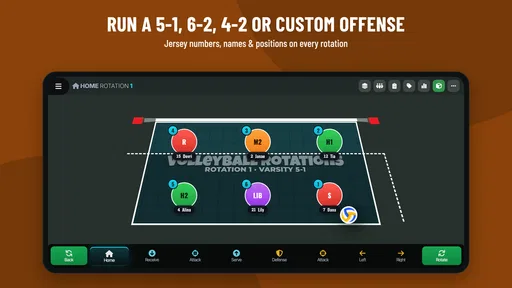
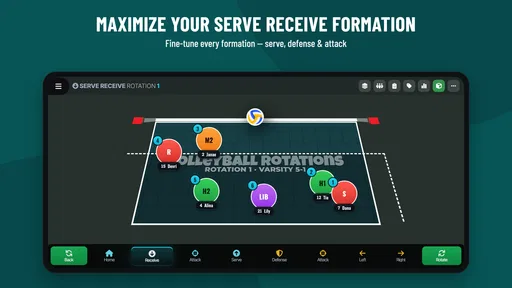
The app offers a variety of features that cater to both beginners and seasoned players. First up, it provides detailed diagrams of different rotations. These visual aids are a blessing, especially if you're a visual learner like me. You can see exactly where each player should be at any given time, which is fantastic for understanding positional play.
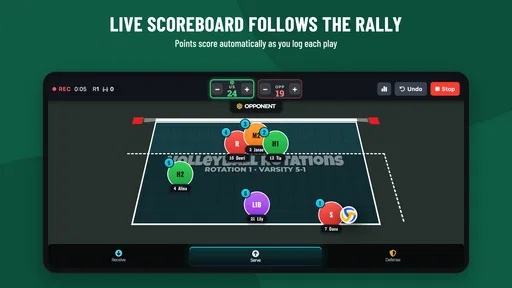
Another cool feature is the interactive practice mode. Here, you can simulate matches and practice rotations in real-time. It's almost like having a virtual coach by your side, guiding you through each play. Plus, the app allows you to customize setups according to your team's specific strengths and weaknesses. It's all about optimizing performance on the court!
How I’d use the board to teach a sequence
The most useful way to approach the simulator, in my view, is as a teaching aid for one question at a time. Start with the rotation your team is trying to understand, ask each player to identify their starting position, and then move through the change together. Once the positions are clear, ask what each person needs to remember as play develops. This keeps the discussion tied to the lineup rather than letting it drift into unrelated tactical debate.
More From Our News Desk

 Gmail
Gmail in a Busy Inbox: Who Benefits Most?
From first account to crowded workday, Gmail earns its place through dependable search and flexible sorting—but its best fit depends on how much inbox maintenance you can tolerate.

 Prime Video
Switching to Prime Video: What Changes in Your Viewing Routine
Prime Video can make a compelling second home for streaming, but switching means learning a different catalog, rental layer, and route from browsing to playback.

 Universal TV Remote Control
 Works Best as a Reliable Backup
A phone remote earns its place through quick setup and reliable habits. Here is how to get more from Universal TV Remote Control—and where its limits show.

 Weather - By Xiaomi
Weather by Xiaomi Review: Clear at a Glance, Less Clear Up Close
Xiaomi’s weather app makes everyday forecasts quick to scan, but its calm surface can leave useful details and recovery paths harder to find than they should be.

 X
X Under Pressure: Can It Recover When Posting Goes Wrong?
A resilience-focused review of X, examining setup, mistaken posts, interruptions, weak connections, and the gaps that matter when recovery needs to be dependable.

 Clash of Clans
 Is Won Between the Battles
Its raids are quick; its community is a long-term project of coordination, teaching, rivalry, and shared responsibility—with all the friction that entails.
Latest News



For a coach, one practical trick is to let players explain the diagram back instead of doing all the talking. A player who can point out where they begin and describe the next movement has probably understood more than someone who simply nods through a demonstration. I’d also invite a player who is unsure to ask about one position at a time; a visible board makes that less awkward than stopping a live drill to request the whole explanation again.
The board is also useful for comparing a familiar setup with a proposed change. I’d make only one adjustment, then talk through what that changes for the players affected. If several positions shift at once, it becomes harder to tell whether the new arrangement solves the original confusion. This restrained approach makes customization a way to clarify a decision, not a reason to keep tinkering without a coaching purpose.
Putting it to work at practice
A realistic use is a short pre-practice walkthrough: I’d bring up the team’s intended setup, take one rotation at a time, and have players call out their positions and next movement. That turns the board into a shared reference instead of a coach’s private planning space. It can also help when a player misses a session; reviewing the sequence later is more concrete than relying on a teammate’s hurried explanation.
One useful habit is to keep the discussion narrowly focused. Rather than trying to solve every tactical question on the board, use it first to establish who starts where and what changes after the rotation. Then take the group onto the court to test whether the explanation holds up at match speed. A simulator can clarify the arrangement, but it cannot replace movement, communication, or live decisions under pressure.
For example, imagine a team has a match coming up and one player is uncertain about the starting order. Before warm-ups, the coach can use the diagram to review the relevant arrangement with the group, then ask that player to point out the position they should occupy. The team can move to the court and rehearse the transition physically. That short loop—look, explain, move—gives the visual lesson a real-world check without turning the app into a substitute for practice.
Where it fits among other options
Compared with a coach drawing positions on a whiteboard, a dedicated rotation app is easier to revisit and can make a sequence clearer to people who learn visually. A paper diagram is still perfectly adequate for a quick explanation, and it doesn’t require someone to open a device. For a team that already has a dependable coaching routine and rarely struggles with rotations, the app may add little. Its strongest case is when the same arrangement needs to be explained repeatedly or shared among people with different levels of experience.
It also has a different job from video analysis or general training resources. Video can help a team review what happened in play, while drills build timing and movement; a rotation board is better suited to explaining where players begin and how the formation changes. I wouldn’t choose one of those tools expecting it to replace the others. If your main concern is technique, fitness, or reviewing match footage, a resource built for that task is likely to serve you better.
The customization is also most valuable when used to clarify a real team setup, not as an invitation to endlessly adjust hypothetical formations. I’d settle on the lineup being taught, use the board to resolve specific questions, and avoid changing several things at once. That keeps the session easy to follow and makes it more likely players remember the reason behind each position.
Who benefits most—and who may not
Whether you're a coach, player, or even a parent trying to help your kid improve their game, this app is a valuable resource. Coaches can use it to devise strategies and communicate them effectively to their team. Players can hone their skills, ensuring they're always in the right spot at the right time. It's also incredibly useful for parents who want to get a better understanding of the game their children are so passionate about.
Its clearest fit is someone who needs to explain or revisit volleyball positioning more than once: a coach teaching a lineup, a player who wants to check their understanding away from practice, or a parent trying to follow what a coach is teaching. Beginners may appreciate having a visual reference while they learn the vocabulary and order of the game. More experienced players can still get value when they are working through a particular lineup, though they may have less need for a basic explanation.
On the other hand, a casual viewer who only wants to understand one match may find a dedicated simulator more than they need. The same is true for a team whose players already know their positions and rarely need reminders. The purchase makes more sense when the board will be used for repeated teaching or planning; if the goal is just to settle a single question, a quick coach explanation or a hand-drawn court may be enough.
We've all been there – trying to understand why the rotation rules are the way they are. The app not only explains the "how" but also delves into the "why," making it a comprehensive learning tool. This deeper understanding can make all the difference on the court.
Practical limits to keep in mind
This is a specialized volleyball aid, not a substitute for a full coaching resource or a live practice. If what you need is conditioning, technique feedback, or real-time communication with a team, a board simulator is the wrong tool for that job. I’d also consider the one-time decision carefully: at $14.99, it makes most sense for someone who expects to return to rotation planning, rather than a curious beginner who only wants a quick explanation once.
The app is rated for Everyone, has a 4.9 average from around 45 ratings, and has passed 1K+ installs. It was released on October 26, 2018, and its current version is 2.18.0, with Android 5.1 as the minimum requirement. Those details make it easier to judge whether it suits your device and how established its audience is, but the best test is still whether your team actually needs a visual rotation tool.
For a coach deciding whether it will earn a place in a practice routine, I’d ask a simple question: do players repeatedly need the same positions explained, or is the difficulty actually about executing them under pressure? In the first case, a visual simulator can make instruction more consistent. In the second, more board time may not help; the group needs court repetitions and feedback. Keeping that distinction clear prevents the app from being asked to solve a problem it is not designed for.
One practical consideration is how you plan to use the board with a group. If everyone can see the display, it can support a quick shared walkthrough; if not, a coach may need to guide the explanation verbally or let players take turns looking. Either way, the strongest learning comes from connecting the diagram to movement on court. I’d treat the screen as the starting point for a conversation, not the whole lesson.
My recommendation for a volleyball learner
In a nutshell, Volleyball Rotations is a must-have app for anyone serious about volleyball. It's like having a pocket-sized coach available 24/7. The app's user-friendly interface, coupled with its rich features, makes mastering rotations a breeze. So, if you're looking to elevate your volleyball game, I highly recommend giving this app a try. Your team – and your game – will thank you!
My recommendation is strongest for people who will return to it with a real team arrangement in mind. Use it to make the starting positions understandable, invite players to explain the movement themselves, and then confirm that knowledge in practice. That workflow gives the visual board a clear purpose and makes its cost easier to justify than treating it as a general volleyball reference.
If you are still learning the game, it can be a reassuring way to slow down a confusing idea and look at the positions without the pressure of a live rally. If you already know rotations and mainly want physical training, match review, or detailed coaching on technique, I’d choose a tool or practice method aimed at that need instead. For the right learner, though, the focused approach is its strength: it helps turn rotation rules from something to memorize into something a team can discuss and apply.
Volleyball Rotations Frequently Asked Questions
Who might find Volleyball Rotations useful on a volleyball team?
Volleyball Rotations is a sports app for people who want a clearer way to work through volleyball positioning and tactics. Coaches can use its visual approach to explain court arrangements, while players can review where they fit in a rotation. It may be especially handy when a team is learning a system together and wants a shared reference for practice discussions.
What is Volleyball Rotations app used for?
Volleyball Rotations app is designed to help coaches and players understand and manage rotations during a volleyball match. It provides a visual representation of different rotations, allowing users to strategize effectively and ensure all players are in the correct positions. This app is particularly useful for learning proper rotations and improving team coordination during games.
Is Volleyball Rotations app suitable for beginners?
Yes, Volleyball Rotations app is highly suitable for beginners who are just starting to learn about the game. It offers easy-to-understand diagrams and explanations of each rotation, helping new players grasp the fundamentals of positioning. The app is user-friendly, making it an excellent learning tool for both novice players and new coaches.
Does the app offer customization for different team line-ups?
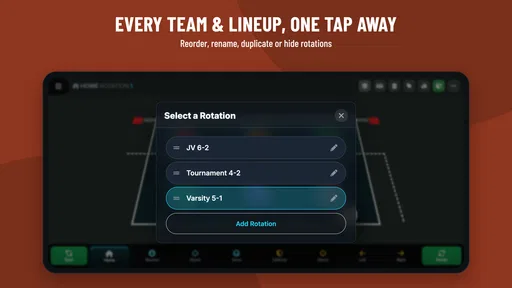
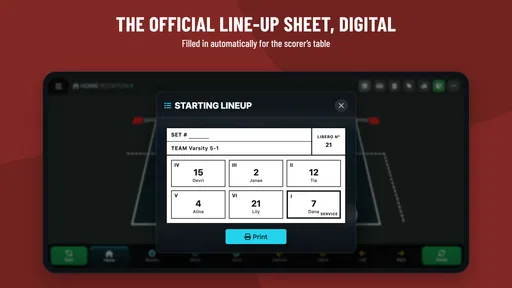
Absolutely, the Volleyball Rotations app allows users to customize team line-ups based on their specific team members. You can input player names and positions, and the app will adjust the rotations accordingly. This feature helps in visualizing how different line-ups will perform, making it easier to strategize for upcoming matches.
Can I use Volleyball Rotations offline?
Yes, the Volleyball Rotations app can be used offline, making it convenient for use in areas without internet access, such as certain sports facilities or outdoor courts. This offline capability ensures that coaches and players can always access rotation strategies and diagrams without relying on a network connection.
Pros
- User-friendly interface
- Comprehensive rotation guides
- Customizable team settings
- Works offline
- Regular updates
Cons
- Limited free features
- Occasional ads
- Requires in-app purchases for full access
- No live match tracking
- Interface can be slow on older devices