

VoiceMap: Audio Tours & Guides
- 285.00
- 4.7
- Installs
- 100.00K
- Price
- Free

Screenshots

Analysis by Reviewed
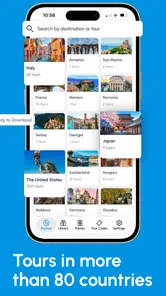
I like travel apps that help me look up from my screen instead of making me manage a timetable every few minutes. VoiceMap: Audio Tours & Guides takes that idea seriously. It is a travel and local app from AudioGuide that turns sightseeing into a guided walk or drive, with tours available across hundreds of cities, including London, New York City, Paris, Rome, Amsterdam, and Prague.
After spending time with it, my impression is that it sits between a traditional guided tour and a self-planned route. You get spoken commentary while moving through a place, but you still decide your pace, stops, and overall day. That balance is the main reason I would recommend it to independent travelers. It is also the source of its biggest weakness: the experience depends on choosing the right tour, preparing before you leave, and recovering calmly when your route does not go exactly as planned.
The app is free to install, carries a Teen content rating, and has built a strong audience with a 4.7 average from around 1.9 thousand ratings and over 100 thousand installs. Its current version is 15.3.7, and it supports operating systems from version 10 onward. Some tour content can involve in-app purchases, ranging from $0.99 to $149.99 per item, so I would treat the free app as an entry point rather than assuming every available experience is included.
Where the experience can become confusing
The first thing I noticed is that the app is not simply a map with a collection of audio files. Its value depends on matching a tour to the way I actually want to explore. A walking route through a historic center is a different commitment from a drive between landmarks, and the title alone may not tell me whether the route suits a relaxed morning, a short stop, or a full afternoon.
This is where users can get stuck before they even start. A city may offer several choices, and the most attractive-sounding title is not automatically the best fit. I would check the route type, the area covered, and the opening point before making a decision. If I am arriving by train, for example, I would rather choose a tour whose starting point fits naturally into my arrival than select one that requires crossing town first.
The spoken format also changes how I plan. With a written guide, I can skip a paragraph, jump ahead, or glance at a map whenever I want. An audio tour asks me to listen while walking, crossing streets, taking photographs, or dealing with crowds. That makes it more immersive, but it also means I should not expect to absorb every detail in a noisy or rushed environment.
I found the best results came from treating the tour as a flexible companion rather than an invisible guide who must be obeyed perfectly. If a café catches my attention or a museum takes longer than expected, I can let the day breathe. The app is most enjoyable when I use its narration to add context to my route, not when I feel pressured to complete every instruction in sequence.
More From Our News Desk

 Weather - By Xiaomi
Weather by Xiaomi Review: Clear at a Glance, Less Clear Up Close
Xiaomi’s weather app makes everyday forecasts quick to scan, but its calm surface can leave useful details and recovery paths harder to find than they should be.

 X
XX Under Pressure: Can It Recover When Posting Goes Wrong?
A resilience-focused review of X, examining setup, mistaken posts, interruptions, weak connections, and the gaps that matter when recovery needs to be dependable.

 Clash of Clans
Clash of Clans Is Won Between the Battles
Its raids are quick; its community is a long-term project of coordination, teaching, rivalry, and shared responsibility—with all the friction that entails.

 Android Auto
Android Auto Makes the Case for Quieter Car Software
The car interface is no longer judged by how much it can do, but by how quietly it helps. Android Auto shows what drivers now expect—and what still gets in the way.

 MobiOffice: Word, Sheets, PDF
MobiOffice: Transforming Mobile Productivity with Seamless Integration
MobiOffice: Word, Sheets, PDF is redefining mobile productivity with a surprising blend of functionality and innovation.

 EA SPORTS FC Soccer Mobile 26
EA SPORTS FC™ Mobile Soccer: Redefining Mobile Sports Gaming
Dive into EA SPORTS FC™ Mobile Soccer, where immersive gameplay and strategic depth transform mobile sports gaming.
Latest News



Choosing the right tour before leaving
My practical advice is to make the selection at home or at the hotel, while I still have time to think. I would read the description carefully, identify the starting location, and compare the route with my other plans. This small preparation step prevents a common disappointment: buying or beginning a tour that technically covers the right city but does not fit the neighborhood I am visiting that day.
I would also consider the people traveling with me. A solo traveler can pause whenever necessary. A couple may need to agree on whether the commentary or the next coffee stop has priority. Families and groups with different walking speeds may find that a self-guided audio route requires more coordination than a conventional tour with a fixed meeting time.
For a drive, the decision needs even more care. The person operating the vehicle should not be handling the phone while moving. I would set everything up before departure and let a passenger manage any necessary changes. For walking, I would keep the phone accessible without staring at it constantly, especially near traffic, steps, or crowded crossings.
One useful habit is to separate the sightseeing goal from the completion goal. If I am visiting Paris to understand one neighborhood, finishing the entire route matters less than enjoying the places along it. That mindset makes the app more forgiving when I take a detour or stop the narration for a while.
Setup checks that prevent avoidable problems
Before starting, I would check the basics in a quiet place. I would make sure the phone is charged, the selected tour is the intended one, and the device has enough available space if the app asks me to prepare tour material for use during the outing. I would also test the volume with the same headphones or car connection I plan to use outside.
That sound check is easy to overlook. Audio that seems loud enough in a hotel room can disappear beside buses, wind, or a busy market. On the other hand, raising the volume too much can make street awareness harder. I prefer a level that lets me hear the narration clearly while still noticing what is happening around me.
I would begin the route only after reaching or approaching its starting point. Starting early can make the first instructions feel out of order, particularly if I am still navigating from a station or hotel. If the app presents a tour that begins elsewhere, I would use my usual map tool to reach that point first rather than expecting the audio guide to replace every part of the journey.
It is also worth checking the phone’s normal location behavior. If the route appears slow to react, I would wait in an open area for a moment and confirm that the device has a reliable position. Tall buildings, underground passages, and dense streets can make any location-based experience feel delayed. I would not immediately assume the tour itself is broken.
The most important preparation is simple: choose the route, starting point, sound setup, and phone battery before the sightseeing begins. That four-part check removes much of the friction that people often blame on the app later.
How I recover when the route does not behave as expected
When I miss a turn, I do not keep walking quickly and hope the narration catches up. I stop somewhere safe, look at the route, and work out whether I am slightly off course or have deliberately taken a detour. Rushing usually creates a second problem because I am then trying to navigate, listen, and watch traffic at the same time.
If the commentary seems to have paused, I would first check whether I am still near the relevant point and whether the phone is producing sound through the expected speaker or headphones. A disconnected audio device can make a working tour appear silent. I would also check the phone’s volume rather than relying only on controls on the headset or car system.
For a temporary interruption, closing and reopening the app may be a reasonable general recovery step, but I would do it only after noting where I am in the route. I would avoid repeatedly deleting or reinstalling anything while standing outdoors with limited battery and uncertain connectivity. A calm pause is usually more useful than making several changes at once.
If I have wandered far from the route, I would decide whether returning is genuinely worthwhile. Sometimes the better choice is to continue exploring independently and resume the tour later, if the app allows the route to pick up naturally. A self-guided experience should give me freedom; it should not turn a pleasant detour into a stressful backtrack.
Another practical trick is to keep a mental note of the last landmark or instruction I heard. That gives me a reference point if I need to restart the app or explain the problem to a travel companion. It is much easier to recover from “we were near the square after the market” than from “something stopped working.”
When the app is not the cause
Travel conditions can make a good audio route feel unreliable. Mobile reception may vary, a phone may be conserving power, Bluetooth audio may be occupied by another device, or environmental noise may hide the narration. These are not unique flaws in VoiceMap, but they matter because the app is used outdoors, where conditions change constantly.
I would troubleshoot in layers. First, I would check whether the phone itself can play another sound. Then I would check the selected audio output, volume, and connection. After that, I would look at the route position and surroundings. Only once those basics are clear would I treat the tour as the likely source of the issue.
Location accuracy deserves similar patience. A position can jump when I move between narrow streets or emerge from a covered area. If the narration triggers slightly early or late, I would slow down and give the phone a moment to settle. I would not walk into a road, block a pavement, or repeatedly stare at the screen just to force a prompt.
Battery management is another overlooked trade-off. A long walk with audio, location services, photography, and a bright display can consume power faster than a normal sightseeing day. I would start with a well-charged phone, reduce unnecessary screen use, and carry a backup plan for navigation. The guide should enrich the trip, not become the only way I can find my way back.
People who need guaranteed accessibility support, live human assistance, or perfectly timed group coordination should think carefully before relying on this format. A self-guided audio tour can be wonderfully private and flexible, but it does not provide the same immediate adaptation as a person standing beside you. Travelers with hearing limitations may also prefer a guide that offers substantial readable information rather than depending mainly on spoken commentary.
Where VoiceMap fits against ordinary alternatives
Compared with reading a general travel article, this app offers better timing. Information arrives while I am near the place it describes, so the setting can make the story easier to remember. Compared with a standard map, it adds interpretation and a sense of sequence. Compared with a group tour, it gives me control over pace and start time.
The trade-off is that a general map is usually better for spontaneous changes, restaurant searches, and broad navigation. A human guide is better at answering questions, reacting to the group, and changing the route when weather or closures interfere. A written guide is better when I want to skim, revisit a detail, or read quietly in a crowded location.
For me, the strongest use case is a first or second visit to a city when I want structure without surrendering the day to a schedule. I can use a tour to understand a district, then pause it for lunch or shopping. The app is less suitable when I am already an expert on the area, need live local recommendations, or have only a few minutes and cannot commit to a route.
There is also a cost decision. The application itself is free, which makes it easy to explore the catalog and decide whether the format suits me. Individual purchases can add up, particularly on a long trip with several cities, so I would choose only the tours that match my actual plans rather than collecting them impulsively.
A realistic day using the app
Imagine I have a free morning in Rome and want more than a list of landmarks. I would select a route the night before, confirm where it begins, and decide whether it fits before a lunch reservation. In the morning, I would start near that point, test the audio, and keep ordinary navigation available for getting to the meeting area.
During the walk, I would listen in short stretches and pause when taking pictures or entering a shop. If a crowded crossing makes the next instruction unclear, I would wait until I am safely across rather than trying to follow the phone mid-street. If I choose a side street for coffee, I would regard that as part of the day, not as a failure of the tour.
Later, I would resume only if the route still made sense. If returning would cost too much time, I would continue independently and use what I had already heard as context for the rest of the neighborhood. That is the workflow I trust most: preparation gives the tour structure, while personal judgment keeps the trip enjoyable.
My practical verdict after using it
VoiceMap: Audio Tours & Guides is a good choice for travelers who want local context without joining a fixed group. I especially like its middle ground: more guided than wandering with a map, but more personal than following someone else’s timetable. The broad city coverage makes it relevant for major trips, and the free entry point lets me decide whether audio-led sightseeing feels natural before spending money on particular tours.
I would recommend it to independent adults, couples, and curious visitors who enjoy walking or driving through a place at their own speed. It works best when I prepare the route, begin near the correct starting point, keep the phone charged, and accept that real streets are untidy. The app rewards a little planning and a relaxed attitude.
I would skip it if I want a live expert, instant answers, a completely spontaneous route, or a guarantee that every part of the experience will work perfectly in difficult outdoor conditions. I would also avoid making it my sole navigation method on an unfamiliar drive. In those situations, a standard map, a human tour, or a written guide may be the better tool.
AudioGuide has made a format that can turn an ordinary walk into something more memorable, but the result depends on how thoughtfully I use it. Check the route before leaving, troubleshoot the phone before blaming the tour, and allow yourself to pause or deviate. With those habits, this Travel & Local app feels less like another screen demanding attention and more like a quiet layer of explanation over the city I am already exploring.
VoiceMap: Audio Tours & Guides Frequently Asked Questions
Which cities and destinations can I explore with VoiceMap?
VoiceMap offers walks and drives in 600 cities, including London, New York City, Paris, Rome, Amsterdam, and Prague. The range means you can browse for a tour that fits a city break or a longer trip, then choose an experience based on its route and subject. Check the available tours for your destination before you travel.
What is VoiceMap: Audio Tours & Guides?
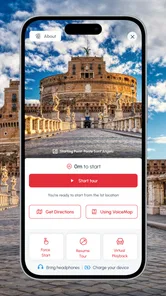
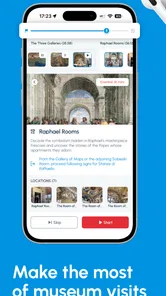
VoiceMap is a location-based travel app that provides self-guided audio tours in cities and destinations around the world. Tours are narrated by local storytellers, journalists, historians, or knowledgeable residents, and typically combine spoken directions with stories about landmarks, neighborhoods, culture, and history. You can explore at your own pace instead of following a fixed group or guide.
How does a VoiceMap audio tour work?
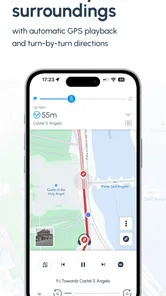
After choosing a tour, you generally download or access its required content, put on your headphones, and follow the suggested route on foot. The app uses GPS to detect your position and automatically plays the appropriate narration as you reach different points. This lets you concentrate on your surroundings while receiving directions and commentary without constantly checking the screen.
Can I use VoiceMap without mobile data or an internet connection?
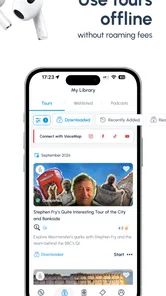
Many VoiceMap tours are designed to be downloaded before you begin, which is particularly useful when traveling abroad or when your connection may be unreliable. Once the relevant tour content is stored on your device, GPS can usually guide you along the route without continuous mobile data. It is still wise to download everything on Wi-Fi and check the tour instructions before leaving.
Are VoiceMap tours free, and how much do they cost?
VoiceMap is free to download, and it includes a mixture of free and paid audio tours, depending on the destination and the creator. In-app purchases range from $0.99 to $149.99 per item, while individual tour prices can vary. Before starting, review the tour page for its price, duration, route details, language, and refund information.
Pros
- Self-guided tours let you explore at your own pace without joining a group.
- GPS-triggered narration keeps the tour hands-free while you walk.
- Tours are available in many cities and cover diverse interests.
- Offline audio access is useful when mobile data or signal is limited.
- Local storytellers add personal details beyond standard sightseeing facts.
Cons
- Tour availability and quality can vary significantly by destination.
- Some routes involve long walks
- hills
- or difficult terrain.
- GPS playback may be unreliable in dense buildings or crowded areas.
- Purchasing tours individually can become expensive for frequent travelers.
- Audio tours may offer limited interaction compared with a live guide.











