

Vocabulary - Learn words daily
- 1.96K
- 4.5
- Installs
- 5.00M
- Price
- Free

Screenshots




Analysis by Reviewed
Choosing a vocabulary app depends on what you want to change: recognize more words, remember them well enough to use, or prepare for a specific exam or conversation. I find Vocabulary - Learn words daily most appealing when the goal is a small, repeatable learning habit rather than a demanding course. It is an education app from Monkey Taps LLC, and its focus is clear: make word practice easy to fit into ordinary gaps in the day.
A quick test for whether it fits
Before settling on any vocabulary tool, I’d ask myself whether I can spare a minute consistently and whether I learn well from short prompts. A brief daily session can be easier to sustain than a long lesson, but it will not replace reading, conversation, or deliberate writing practice. This app makes the most sense as a supplement: a way to meet unfamiliar words and then notice them in real life.
The app is free to start, rated for Everyone, and has a 4.7 average from around 92,000 ratings. That gives a prospective user a useful sense of its broad appeal, but popularity alone does not tell you whether its style will suit you. I’d judge it by whether its explanations and review routine help a word move from “I’ve seen that” to “I can use that.”
Dive into Daily Word Adventures
Vocabulary - Learn words daily is all about infusing your day with a sprinkle of new words. Each day, it serves up a fresh word, complete with its meaning, pronunciation, and usage examples. It’s like having a personal word coach right in your pocket. The best part? These aren’t your run-of-the-mill words. We’re talking about terms that will make you sound like a veritable wordsmith.
The User Interface: Simple and Intuitive
One of the first things I noticed about the app is its straightforward and clean interface. No need to get lost in a maze of menus or settings. Everything is laid out clearly, making navigation a breeze. You can easily access your daily word, review past words, and even take quizzes to test your memory and understanding.
That straightforward layout is particularly handy when you have only a moment to spare. For example, while waiting for a kettle to boil, I’d read the word and example, then try to recall the meaning later without opening the app. That tiny pause turns a passive glance into a retrieval check. If I’m reading an article and encounter the same word, I can connect the app’s example to a real context instead of treating the definition as an isolated fact.
Features That Keep You Hooked
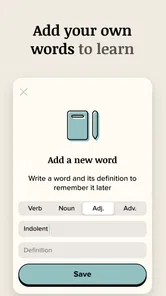
What keeps me coming back to the app are the nifty little features it offers. For instance, the app allows you to create a personalized word list. So, if you come across a word you love and want to remember, just add it to your list. Plus, the app has a spaced repetition system, ensuring you revisit the words you’ve learned so they stick in your memory.
More From Our News Desk

 Instagram
Instagram’s Power Comes From Its Place in Your Phone
A close look at how Instagram turns Meta’s reach, recommendation systems and everyday camera habits into durable platform power—and what that costs users.

 Gmail
GmailGmail in a Busy Inbox: Who Benefits Most?
From first account to crowded workday, Gmail earns its place through dependable search and flexible sorting—but its best fit depends on how much inbox maintenance you can tolerate.

 Prime Video
Switching to Prime Video: What Changes in Your Viewing Routine
Prime Video can make a compelling second home for streaming, but switching means learning a different catalog, rental layer, and route from browsing to playback.

 Universal TV Remote Control
Universal TV Remote Control Works Best as a Reliable Backup
A phone remote earns its place through quick setup and reliable habits. Here is how to get more from Universal TV Remote Control—and where its limits show.

 Weather - By Xiaomi
Weather by Xiaomi Review: Clear at a Glance, Less Clear Up Close
Xiaomi’s weather app makes everyday forecasts quick to scan, but its calm surface can leave useful details and recovery paths harder to find than they should be.

 X
XX Under Pressure: Can It Recover When Posting Goes Wrong?
A resilience-focused review of X, examining setup, mistaken posts, interruptions, weak connections, and the gaps that matter when recovery needs to be dependable.
Latest News



A useful way to make that list work harder is to save only words you can imagine using, not every unfamiliar term you encounter. Later, I’d review a small handful and write an original sentence for each before checking whether the meaning fits. This makes the personal list a practical bridge between recognition and expression. It also exposes a limitation: collecting words can feel productive even when you have not learned to use them, so the review step matters more than the size of the list.
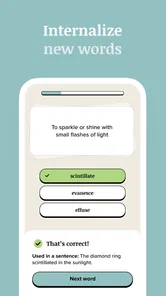
Another cool feature is the quiz section. It’s not just about learning new words; it’s about being able to recall and use them. The quizzes are a great way to test your progress and see how well these new words have settled into your vocabulary.
How it compares with other ways to learn
Compared with a dictionary, which is best when you need a precise answer about a word you have just encountered, this app offers a more guided nudge to keep learning regularly. Compared with flashcards you build yourself, its ready-made daily discovery asks less setup from you, while a custom deck may give you tighter control over a course, textbook, or specialist subject. For grammar, listening, or speaking practice, a broader language-learning course is likely a better fit; this is specifically about building vocabulary.
If you’re studying for an exam, I would not rely on a daily word feed as the whole plan. Keep the app for interesting discoveries and memory practice, but use the exam’s own word list and exercises for coverage. Likewise, if you already have a strong routine with handwritten cards, switching everything over may add friction rather than improve learning. You can try the app alongside that system first and move only the words that benefit from its review and quiz approach.
Why It Stands Out
In a world teeming with educational apps, Vocabulary - Learn words daily stands out due to its engaging approach to learning. It’s not just about rote memorization; it’s about understanding and application. The app encourages you to use the words in sentences and even rewards you for doing so. This kind of interactive learning is not only effective but also highly motivating.
The practical trade-off is that a daily prompt sets the pace, which is helpful if you want a low-effort routine but less suitable if you prefer to choose every topic and move through material at your own speed. I’d use the word list and quizzes to revisit terms that feel relevant, while treating the daily word as a source of curiosity rather than a promise of comprehensive study. That keeps the experience useful without expecting one small tool to do the work of reading widely.
There are over a million installs, and the app is free, with optional in-app purchases ranging from $2.99 to $149.99 per item. I’d begin with the free experience and decide whether the routine fits before paying for anything. The range of purchase prices is broad, so check the specific offer and its terms in the app before committing; the presence of paid options does not mean every learner needs them.
Everyday use and the learning trade-off
A realistic routine might be to open the app during a commute, read the word and example, then revisit it later that evening through a quiz or your saved list. If you meet it in a book or conversation, try using it in a sentence of your own. That extra step is small, but it helps reveal whether you understand the word’s tone and context, not just its rough definition. For a learner who enjoys collecting precise or unusual words, this can make spare minutes feel purposeful.
Who should skip it? Anyone looking for a complete language course, structured lessons for a particular exam, or immediate help with a word in a passage may be better served by a course, a study deck, or a dictionary. And if daily prompts feel like another obligation, a book and a notebook may be more enjoyable. The app is strongest when its light structure supports curiosity rather than competing with a learner’s main study plan.
Making the daily word stick
One sensible way to use a new word is to give it more than one job. After reading its meaning and example, I’d note whether it sounds formal, casual, approving, or critical, then test it in a sentence tied to something I actually do. That quick context check is useful because knowing a definition is not the same as knowing when a word would sound natural. If I cannot make a believable sentence, I’d leave it in the saved list for another review rather than force it into conversation.
For a busy reader, the app can also work as a small companion to books, articles, and podcasts rather than a separate study block. I might encounter an unfamiliar term elsewhere, look it up in a dictionary for the exact sense I need, and use the app’s lists or quizzes to strengthen words that matter to me. The distinction is practical: a dictionary answers a question; this app gives vocabulary practice a recurring place in the day. Keeping those jobs separate helps avoid expecting one tool to do both equally well.
Who benefits most from its light structure
I’d recommend it most to curious readers, people who enjoy language, and learners who want a low-pressure way to encounter and revisit words. It can suit someone who has a few spare moments but finds a full course too demanding, or someone who already reads often and wants a nudge to notice vocabulary more deliberately. The daily rhythm is especially useful when you need a starting point: instead of deciding what to study, you can meet the word, test your memory, and carry on with your day.
It is less compelling for learners who need a carefully sequenced syllabus, vocabulary for a particular profession, or direct preparation for a test. In those cases, a tailored word deck or course built around the relevant material gives better control over what appears and in what order. If your main goal is to speak comfortably in another language, vocabulary alone is also too narrow; listening, pronunciation, grammar, and conversation practice need their own space. The app can complement those efforts, but I would not make it the centre of them.
What to expect when you start
The app is free to download, and the age rating is Everyone, so it is approachable for a broad audience. It has been available since February 23, 2016, and has around 1.5 thousand written reviews alongside its much larger rating total. I see those figures as useful context rather than a promise that every learner will enjoy the same routine. The real test is whether the daily word, saved list, and quizzes make you return to vocabulary practice without turning it into a chore.
Before spending money, I’d use the free experience long enough to see whether I actually revisit words. Optional purchases range from $2.99 to $149.99 per item, a wide span that makes it worth checking the exact offer and terms shown in the app rather than assuming what a purchase includes. A paid option only makes sense if it solves a need you have identified; the basic habit is the first thing to evaluate, not the size of the feature menu.
Switching without losing your existing routine
If you already use a notebook or flashcards, I would not transfer every word at once. Keep your current method as the main system for a week or two and save only a few words in the app that you want to revisit. This small trial makes it easier to tell whether the quizzes and spaced review add something useful or merely duplicate work. If the app helps you recall a term later, keep using it for that purpose; if not, there is little benefit in maintaining two lists just for the sake of trying a new tool.
Likewise, someone coming from a dictionary should not expect the app to replace lookups while reading. A dictionary is still the better choice when the precise meaning, pronunciation, or context of a particular word matters immediately. The app’s advantage is its recurring routine and review, not instant reference for every unfamiliar expression. Treating those as complementary roles keeps the switch low-risk and lets the daily practice build on the words you naturally encounter.
Final Thoughts: Is It Worth It?
If you’re someone who loves words or simply wants to expand your vocabulary in a fun and engaging way, then Vocabulary - Learn words daily is definitely worth a download. It’s user-friendly, packed with features, and most importantly, it makes learning new words something to look forward to every day. So go ahead, give it a try, and watch your vocabulary grow by leaps and bounds!
My recommendation is to treat it as a compact companion, not a shortcut to fluency or a substitute for reading. Give the daily routine a fair try, save only words you genuinely want to use, and check your recall with the quizzes. If those habits feel natural, the app can earn a place in your day; if you need a syllabus, deep explanations, or full control over what comes next, another learning method will fit better.
Vocabulary - Learn words daily Frequently Asked Questions
How much time does Vocabulary - Learn words daily take each day?
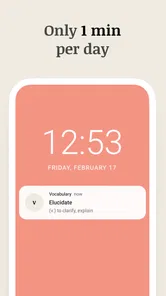
The app is designed for brief, regular vocabulary practice, and its store summary promotes learning in about one minute a day. That makes it a convenient option if you want to fit word study into small gaps in your routine. You can also revisit earlier words, so a short daily session can support continued practice over time.
Who develops Vocabulary - Learn words daily, and what kind of app is it?
Vocabulary - Learn words daily is an education app from Monkey Taps LLC. It focuses on helping users learn words through a daily routine, making it relevant for anyone who wants to build vocabulary in manageable steps. The app has been available since February 23, 2016, and has over one million installs.
Does Vocabulary - Learn words daily offer a manageable way to build a daily learning habit?
The app is built around short, regular vocabulary practice, with its store summary describing a minute of learning a day. That format may suit people who want to fit word study into a busy routine rather than set aside a long session. You can also revisit earlier words, giving a brief daily lesson a way to become ongoing practice.
What is Vocabulary - Learn words daily and how does it work?
Vocabulary - Learn words daily is an app designed to help users expand their vocabulary by introducing a new word each day. The app provides definitions, example sentences, and pronunciation guides to help users better understand and remember each word. Users can also track their learning progress and review past words to reinforce their memory.
Is Vocabulary - Learn words daily suitable for all age groups?
Yes, Vocabulary - Learn words daily is suitable for individuals of all ages who are interested in enhancing their vocabulary. The app offers words ranging from basic to advanced levels, making it a useful tool for students, professionals, or anyone looking to improve their language skills. Its user-friendly interface ensures that even young learners can navigate it easily.
Pros
- User-friendly interface
- Daily word notifications
- Wide range of vocabulary
- Interesting quizzes
- Offline access
Cons
- Limited free content
- Ads in free version
- No pronunciation guide
- Basic level content
- Requires internet for updates











