

Epic Freebie Games Radar
- 519.00
- 4.4
- Installs
- 5.00M
- Price
- Free

Screenshots
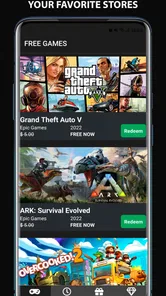
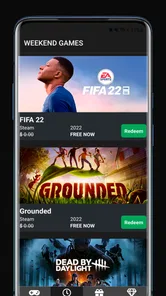
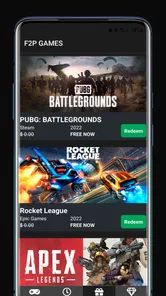
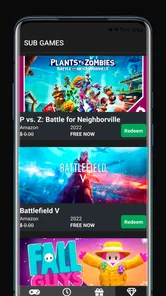
Analysis by Reviewed
If you’re anything like me, a good deal on games is like striking gold. Enter Epic Freebie Games Radar, your new best friend for tracking down those sweet, sweet free games on the Epic Games Store. Let me walk you through why this app is worth your attention.
Checking in without turning it into a chore
I find this app most useful as a quick radar, not as a place to spend a long time browsing. A practical routine is to open it when I have a few minutes, scan what is currently being highlighted, and decide whether anything is worth claiming or investigating. That keeps free-game hunting from becoming another daily task that demands constant attention. If you already follow several gaming news feeds, this focused approach can also help you avoid mixing a time-sensitive giveaway into a stream of unrelated headlines.
It suits players who enjoy discovering games beyond the titles they already follow, especially anyone who is happy to build a library gradually rather than looking for one specific release. I would be less likely to recommend it to someone who only wants a complete catalog of every promotion across every store: its central appeal is tracking giveaways, so it is not a replacement for a broad deal-comparison service or a general gaming news app.
Discovering Freebies Made Easy
Let’s face it, gaming isn’t the cheapest hobby out there. But with Epic Freebie Games Radar, you can snag some fantastic games without spending a dime. The app is designed to notify you of the latest free game offerings available on the Epic Games Store. The interface is clean and user-friendly, so even if you aren’t the most tech-savvy person, you’ll find navigating through the app a breeze.
Stay Updated and Never Miss Out
What’s really cool about this app is how it keeps you in the loop with real-time notifications. Every time there’s a new free game, you’ll get an alert. Say goodbye to the fear of missing out! I’ve managed to grab several top-notch games thanks to these timely notifications. Plus, it’s like having a personal gaming assistant who’s got your back 24/7.
For a useful everyday workflow, I’d treat an alert as a prompt to check the offer, not as a guarantee that the game will suit me or remain available indefinitely. I can look at the title, weigh up whether I’m interested, and then follow through with the relevant store process while I have time. That small pause matters: a free offer still costs attention, and a notification is most valuable when it helps me make a quick choice rather than encouraging me to collect games I will never play.
Easy Navigation and Sleek Design
The developers have nailed it with the design. It’s not just about aesthetics; the app’s layout makes it incredibly easy to find information about each game. You can quickly see the game’s description, platform compatibility, and download size. Trust me, you’ll appreciate the smooth navigation when you’re in a hurry to claim that limited-time freebie.
More From Our News Desk

 Gmail
GmailGmail in a Busy Inbox: Who Benefits Most?
From first account to crowded workday, Gmail earns its place through dependable search and flexible sorting—but its best fit depends on how much inbox maintenance you can tolerate.

 Prime Video
Switching to Prime Video: What Changes in Your Viewing Routine
Prime Video can make a compelling second home for streaming, but switching means learning a different catalog, rental layer, and route from browsing to playback.

 Universal TV Remote Control
Universal TV Remote Control Works Best as a Reliable Backup
A phone remote earns its place through quick setup and reliable habits. Here is how to get more from Universal TV Remote Control—and where its limits show.

 Weather - By Xiaomi
Weather by Xiaomi Review: Clear at a Glance, Less Clear Up Close
Xiaomi’s weather app makes everyday forecasts quick to scan, but its calm surface can leave useful details and recovery paths harder to find than they should be.

 X
XX Under Pressure: Can It Recover When Posting Goes Wrong?
A resilience-focused review of X, examining setup, mistaken posts, interruptions, weak connections, and the gaps that matter when recovery needs to be dependable.

 Clash of Clans
Clash of Clans Is Won Between the Battles
Its raids are quick; its community is a long-term project of coordination, teaching, rivalry, and shared responsibility—with all the friction that entails.
Latest News



Those details are useful for planning, not just browsing. If I’m away from home, knowing a game’s download size can help me decide whether to wait until I’m on a suitable connection instead of starting a large download at the wrong moment. Platform information can likewise prevent a wasted claim if I’m looking for something to play on a particular setup. I’d still make the final decision using the store and device I intend to use; the app is a convenient discovery layer, rather than a substitute for checking the practical details before I install.
Gaming Community’s Secret Weapon
One of the things that sets this app apart is its community links. You can join discussions, share your thoughts, and read reviews from other users. It’s like having a mini gaming forum right in your pocket. I’ve discovered some hidden gems through user recommendations, which I might have otherwise missed.
This social angle gives the app a different feel from simply checking a storefront’s free section. A store is usually the more direct choice when I already know what I want to claim; here, community discussion can help me notice a game I would have overlooked. I use recommendations as a starting point rather than a verdict, since players value different genres and styles. That makes the links most helpful when I’m curious about an unfamiliar title, and less useful when I just want a fast, no-discussion route to a known offer.
What to expect from regular use
Because the app’s purpose is to keep me informed about offers, its busiest moments are likely to be when a new giveaway draws my attention and I want to check the game details promptly. I value a short path from alert to useful information more than elaborate browsing tools. If I’m checking repeatedly during a busy day, I try to make each visit purposeful—review the offer, decide whether it interests me, and leave—rather than refreshing out of habit.
In terms of speed and reliability, I judge it by whether it helps me reach the information I need without unnecessary friction. A notification is handy, but I still prefer to verify an offer in the relevant store before acting, particularly if I have left the alert unopened for a while. If something does not load as expected, returning later or checking the store directly is a sensible fallback. That is a practical way to use any giveaway tracker: it can make discovery easier, while the actual claim depends on the store’s current offer and process.
Who will get the most from it
Arioch Pds - Apps & Games makes this free events app for a broad audience; it is rated for Everyone, and it runs on Android devices with version 7.0 or later. Its current version is 6.0.2. I see the strongest fit for casual PC gamers, budget-conscious players, and people who like sampling games they might not have bought at full price. It is less compelling if you rarely play games, dislike notifications, or only want updates about a narrow set of releases. In those cases, checking a store directly or following a single preferred news source may be simpler.
The app has an average rating of 4.4 from around 21,000 ratings, with roughly 490 written reviews and over a million installs. Those figures suggest it has found a sizable audience, but I would use them as context rather than proof that every feature will match my habits. Free access makes it easy to try, while the best reason to keep it is whether its alerts and discovery flow genuinely help me catch offers I care about.
Device expectations should stay modest: this is a companion for finding game offers, not a game launcher or a way to play demanding titles on a phone. I would not install it expecting it to manage a PC library or replace the store where a game is claimed. On an older compatible device, I’d keep my expectations focused on the basic browsing and notification role, and avoid assuming that every phone will feel equally quick under every network or background-app condition.
Making the alerts work around your routine
A good way to judge whether the notifications are useful is to match them to how you actually play. If you check games during a lunch break or while commuting, an alert can put a new offer on your radar without requiring you to keep a storefront open. I would avoid treating every notification as an instruction to act immediately. Instead, I’d use it to remember the title, then claim it when I have enough time to check the details and use the store comfortably.
That approach also helps if you are selective about what enters your library. Before claiming, I’d ask whether I have a device that can run the game, whether the style appeals to me, and whether I’m willing to make room for a large download later. These small checks are especially useful for people who accumulate free titles faster than they can play them. The app is most valuable when it helps me spot something genuinely interesting, rather than turning “free” into an automatic yes.
How it fits beside stores and gaming news
The usual alternatives each serve a slightly different purpose. Going straight to a store is efficient when I already know which offer I want, while a broad gaming news source is better for release news, reviews, and topics beyond giveaways. A deal-comparison service can be more suitable when I’m hunting for discounts across multiple shops. This app makes more sense between those options: it keeps attention on free-game opportunities and adds a discovery angle, without being a complete shopping guide or a general news feed.
That focus is both its strength and its trade-off. If I mainly want to claim the current Epic offer, opening the store may be enough and avoids an extra stop. If I enjoy seeing what is available and hearing other players’ reactions, the app gives me a reason to check in. I would not rely on it as my only source for every gaming promotion, but I can see the appeal of keeping it alongside a store account and using each for the job it handles best.
When performance matters
For a lightweight check, I would expect the experience to depend more on the phone’s connection and the current state of its apps than on the demands of running a game. The app is a discovery companion, not the game itself, so I would not judge it by the performance needs of the titles it highlights. If a page or offer takes longer than expected to appear, I’d first check my connection and try again rather than assume the phone cannot handle the app.
On a device that is older but still meets the Android requirement, I’d keep the workflow simple: open it when needed, look over the offer, and close it when finished. That avoids leaving another app active in the background just to monitor deals. If notifications are delayed or inconvenient in a particular phone setup, occasional manual checks are a sensible fallback. I would also use the storefront itself to confirm the current claim process, since that is where the actual transaction-free acquisition takes place.
For someone deciding whether to keep it installed, the test is straightforward: does it help you notice and evaluate offers you would otherwise miss? If yes, its role is clear. If you find yourself dismissing alerts or rarely following through, a direct store visit now and then may be a better fit. I like that distinction because it puts the app’s usefulness in the context of my habits, not simply in the number of offers it can bring to my attention.
In conclusion, Epic Freebie Games Radar is a must-have for any gamer looking to expand their library without breaking the bank. It’s efficient, easy to use, and connects you with a community of fellow freebie hunters. So why not give it a whirl? You might just find your next favorite game—for free!
Epic Freebie Games Radar Frequently Asked Questions
Can I use Epic Freebie Games Radar on my Android device?
Epic Freebie Games Radar is available for Android devices running Android 7.0 or later. Before downloading, check your device’s operating system version to make sure it meets that requirement. The app is free, so you can install it without an upfront purchase and use it to follow free-game offers from the platforms it covers.
Does the app claim games for me, or do I still need to visit each gaming platform?
Epic Freebie Games Radar is a freebie-offer discovery app, not a replacement for the gaming platforms themselves. Use it to spot offers that may interest you, then follow the relevant platform’s process to claim a game. Remember that an offer may have its own conditions, so check the game and platform details before expecting it to appear in your library.
Who is Epic Freebie Games Radar intended for, and is it suitable for younger users?
Epic Freebie Games Radar is aimed at players who want to keep an eye on free game offers and discover games they might otherwise miss. Its content rating is Everyone, so it is suitable for a broad audience. It is an app in the Events category, making it a practical option for gamers who prefer reminders and offer information gathered in one place.
What is Epic Freebie Games Radar and what does it offer?
Epic Freebie Games Radar is an application designed for gamers who want to stay informed about free games available on the Epic Games Store. It provides users with timely notifications about new free game offerings, ensuring they never miss out on a chance to expand their game library without spending a dime. The app also includes detailed descriptions and reviews of the games, helping users decide whether a game is worth downloading.
How does Epic Freebie Games Radar notify users about free games?
The app sends push notifications directly to the user's device whenever a new free game becomes available on the Epic Games Store. Users can customize notification settings to receive alerts at specific times or for specific types of games, ensuring they are always aware of the latest freebies without being overwhelmed by notifications. This makes it convenient for users to keep track of free game offers.
Pros
- User-friendly interface for easy navigation.
- Timely notifications for new free games.
- Comprehensive game descriptions provided.
- Supports multiple gaming platforms.
- Regular updates ensure app reliability.
Cons
- Occasional bugs hinder smooth experience.
- Limited customization options available.
- Ad-supported
- which can be distracting.
- Requires stable internet for optimal use.
- Some games may not be available in all regions.











