

vivago.ai - AI Image & Video
- 3.37K
- 4.3
- Installs
- 50.00M
- Price
- Free
Screenshots


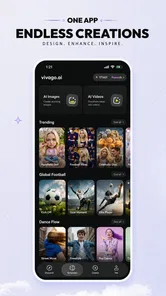
Analysis by Reviewed
Before I decide whether an AI effects app is worth adding to my routine, I ask a practical question: do I want a dependable edit, or do I want to see what a visual transformation might suggest? That difference matters with vivago.ai. I’d approach it as a place to explore creative directions, then choose another tool when a project needs exact timing or a predictable finish.
A low-commitment way to test the idea
Because the app is free to install, I can treat the first session as a test rather than a commitment. I’d choose one photo I know well and one short clip, try the available creative approach, and judge whether the results feel useful enough to revisit. That gives me a better basis for deciding about any purchase than guessing from a price range alone.
A practical tip is to use a copy of a source image when experimenting. Keeping the original separate makes it easy to compare the transformation with the unedited version and avoids confusing a striking effect with an improvement. It also helps when I want to use the same original later in a different editor or for a more faithful version.
When the price is worth considering
The in-app purchase range runs from $0.99 to $899.99 per item, so I would look carefully at the exact offer before confirming anything. That range does not mean I need to spend to explore the app, nor does it tell me which purchase is right for a particular project. I’d base a decision on the item’s displayed terms and whether it solves a recurring need for me.
For an occasional experiment, I’d stay with free access unless a specific paid option clearly changes what I can accomplish. Someone who makes visual content often may place a different value on a purchase, but I would still compare that benefit with how often I expect to use it. If the goal is simply to trim a clip or make a basic adjustment, paying for an AI-oriented workflow may not be the sensible choice.
I’d treat any generated result as a draft until I had checked it in the context where it will appear. A look that feels fun in a preview can become distracting beside captions, other images, or a longer sequence. A quick review on the intended screen helps me decide whether the effect supports the message instead of competing with it.
I’d treat vivago.ai as a creative-effects app rather than a replacement for a full video editor. Its appeal is the chance to turn an image or a video idea into something more stylized, with AI doing much of the visual transformation. That makes it interesting when I want a quick, playful result for a social post, but less compelling when I need precise control over a finished edit.
More From Our News Desk

 Gmail
GmailGmail in a Busy Inbox: Who Benefits Most?
From first account to crowded workday, Gmail earns its place through dependable search and flexible sorting—but its best fit depends on how much inbox maintenance you can tolerate.

 Prime Video
Switching to Prime Video: What Changes in Your Viewing Routine
Prime Video can make a compelling second home for streaming, but switching means learning a different catalog, rental layer, and route from browsing to playback.

 Universal TV Remote Control
Universal TV Remote Control Works Best as a Reliable Backup
A phone remote earns its place through quick setup and reliable habits. Here is how to get more from Universal TV Remote Control—and where its limits show.

 Weather - By Xiaomi
Weather by Xiaomi Review: Clear at a Glance, Less Clear Up Close
Xiaomi’s weather app makes everyday forecasts quick to scan, but its calm surface can leave useful details and recovery paths harder to find than they should be.

 X
XX Under Pressure: Can It Recover When Posting Goes Wrong?
A resilience-focused review of X, examining setup, mistaken posts, interruptions, weak connections, and the gaps that matter when recovery needs to be dependable.

 Clash of Clans
Clash of Clans Is Won Between the Battles
Its raids are quick; its community is a long-term project of coordination, teaching, rivalry, and shared responsibility—with all the friction that entails.
Latest News



vivago.ai - AI Image & Video is a free app from Sparking Innovations Limited in the video-player and editing space. It is rated Mature 17+, so it is not aimed at younger users. The app has an average rating of 4.2 from around 187,000 ratings, and has passed 50 million installs. Those figures suggest a sizable audience, though they don’t tell me whether a particular effect will suit my taste or workflow.
What you get before spending anything
I’d use this section to set expectations: free installation makes it possible to explore the app before deciding whether its AI-driven visual approach suits you. I’d start with a single image or short clip, then compare the result with the original before considering any in-app purchase. That small test helps clarify what the free experience offers you personally and sets up a closer look at where the app’s value comes from.
Free access is the starting point, not the whole price story
The app is free to install, which gives curious users a relatively easy way to try its creative approach. In-app purchases range from $0.99 to $899.99 per item. That is an unusually broad span, so I would not assume that every tool, export, or usage option is included at no cost. The practical move is to check the price shown for any purchase inside the app before confirming it, and to explore the free experience first.
I would also separate “free to download” from “free for every project.” If you only want to experiment with a few effects, the free entry point may be enough to decide whether the results are worth pursuing. If you plan to make content regularly, recurring use could make paid options more relevant. The purchase range alone does not tell me which option fits a given creator, so I’d judge value from the specific item and how often I expect to use it rather than from the largest possible price.
The current version is 4.4.0, and the app requires Android 9 or later. That is useful to check before installing on an older device. The release date is September 12, 2024, but what matters more to me as a prospective user is whether the app currently runs well on my phone and whether its style suits what I want to make.
Where the value comes from
For me, the strongest reason to try an AI effects app is not that it promises to make every image better. It is that it can help me get from a vague idea to a shareable visual without manually building every layer of the effect. That is a different kind of value from a conventional editor, where the main reward is detailed control over trimming, timing, captions, and arrangement.
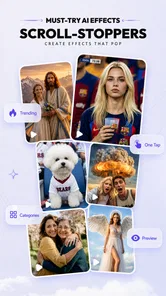
A realistic use case is a quick post for a group chat or social account. I might have an ordinary portrait or a short clip that feels too plain, and want to see whether a more imaginative treatment gives it a clearer mood. Rather than opening a desktop-style editor and assembling a look from scratch, I can test an AI-led transformation and decide whether the result is worth keeping. For this kind of low-stakes experiment, speed and surprise can matter more than fine adjustment.
There is also value in using the app as a sketching tool. If I am unsure whether an image should feel dreamy, dramatic, or simply more playful, trying a visual transformation can help me choose a direction before I spend time on a polished edit elsewhere. I would keep the original file untouched and compare the result against it; AI effects can change the character of an image so much that the most striking version is not always the most useful one.
How I’d fit it into a creator’s workflow
I would use vivago.ai at the idea stage or for a finishing flourish, not automatically as the final stop for every video. A sensible workflow is to pick a clear source image or clip, try one effect that matches the intended mood, and review the result at full size before sharing. If the transformation works but the overall piece still needs captions, careful cuts, or sound timing, I’d take that creative direction into a more conventional editor.
One non-obvious trade-off with AI transformations is that the source material matters. A busy image with several competing subjects can make it harder to judge what the effect has actually improved. I’d start with a simple, well-lit image or a short clip with an obvious main subject, then compare that outcome with a more complicated source. This is not a guarantee of a better result; it is a way to make the experiment easier to evaluate.
Another useful habit is to treat each generated version as an interpretation, not a correction. If the app produces a visually bold result, I’d ask whether it still communicates the person, place, or moment I meant to show. For a private joke or a playful post, exaggeration may be the point. For a product image, work presentation, or personal archive, preserving recognizable detail may matter more than novelty.
Finally, I would avoid making a long chain of edits before checking a first result. When an effect has already changed the image substantially, additional transformations can make it harder to identify which step helped and which one pushed the result too far. Keeping a clean original and testing one direction at a time makes the process easier to reverse and compare.
Where it differs from ordinary editing apps
Traditional mobile editors are usually better when I know exactly what I want: a particular cut, a precise sequence, readable text, or a consistent format across several clips. Their controls can take longer to learn, but they make the final result more predictable. An AI-focused tool is more appealing when I want to explore looks quickly and am willing to accept some unpredictability in exchange for an unexpected visual idea.
That distinction also explains why I would not choose vivago.ai for every job. If I am assembling a tutorial, trimming a long recording, or making a sequence that depends on exact timing, a standard editor is likely to be the more practical starting point. If I am trying to give a single image or short video a distinctive treatment, an AI-effects workflow is a more natural fit. The two approaches can complement each other rather than compete.
Compared with using a filter already built into a social platform, a dedicated creative app can be worthwhile when I want to experiment before posting or keep the visual process separate from publishing. But if I only need a simple color change or a quick crop, opening another app may be needless friction. The choice depends on whether I want a transformation that changes the overall feel, not merely a small touch-up.
Trade-offs I’d keep in mind
The main limitation is control. AI-led effects can be appealing precisely because they do some of the creative work for me, but that also means I may not get the exact result I pictured. I would not rely on a particular transformation for a deadline-sensitive project until I had tried it with similar material and confirmed that the result was usable.
There is a learning trade-off too. A simple interface can make it easy to start, yet it may not offer the predictable, detailed adjustments that experienced editors expect. If I prefer to choose every transition and refine every visual detail, the app’s central creative approach may feel restrictive rather than convenient.
Cost is another reason to be deliberate. The free install makes a trial approachable, but purchases can vary widely in price. Before paying, I’d ask myself what recurring problem the purchase solves and whether I will use it more than once. A one-off experiment and a regular content workflow deserve different spending decisions; the latter may justify a paid option, while the former is a good reason to stay cautious.
I would also consider the audience for the finished work. An eye-catching AI treatment can make casual content feel more distinctive, but it can be the wrong choice when authenticity or exact visual representation matters. For client work, informative footage, or anything where details must remain faithful, I’d prefer a workflow with more direct control and a careful review of the final image.
Who is most likely to get their money’s worth?
I think the best fit is someone who enjoys visual experimentation and wants an accessible way to try AI-driven treatments on images or videos. Social creators who need occasional fresh ideas, people making playful posts for friends, and beginners who find a traditional editing timeline intimidating may all find the app worth exploring. Its large audience and 4.2 average rating indicate broad interest, but I would still judge it by the results I can make with my own material.
It is less suited to an editor who values exact, repeatable control above all else. It may also be a poor match for anyone who only needs basic trimming or simple adjustments, since a specialised creative-effects app can be more than the task requires. And if you are uncomfortable with purchases inside an otherwise free app, review each offer carefully and stop before confirming anything you do not understand.
For someone deciding whether to try it, the useful question is not “Can AI make this better?” but “Would I enjoy seeing several interpretations of this image, even if some miss the mark?” If the answer is yes, the free entry point makes experimentation sensible. If you need a guaranteed, precise result, start with a conventional editor instead and use AI effects only when you want to explore a new direction.
My verdict: try it for ideas, be selective about spending
I’d recommend vivago.ai - AI Image & Video to a friend who likes turning ordinary photos or clips into more expressive visuals and does not mind a little unpredictability. It is most useful as a creative companion: a place to test a mood, find a fresh treatment, or make a quick shareable piece without building the look manually.
I would not recommend paying on impulse, or treating it as a complete substitute for a precise video editor. Start with a simple source, compare the result with the original, and see whether the app’s style genuinely helps your projects. If it becomes part of a regular creative routine, consider a purchase only after checking the particular price and deciding that the benefit is worth it. If you mainly want reliable, detailed editing, skip it for now and choose a tool built around direct control.
vivago.ai - AI Image & Video Frequently Asked Questions
What is vivago.ai - AI Image & Video?
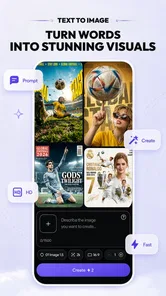
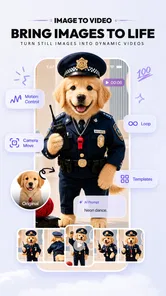
vivago.ai is an AI-powered creative app for generating or transforming visual content. Depending on the tools available in your version, you can create images from text prompts, edit existing pictures, or produce short AI-generated video clips. It is designed for casual experimentation as well as making content to share online. Features and results may change over time, so check the app listing for the latest capabilities.
How do you create an image or video with vivago.ai?
Typically, you choose a creation tool, enter a description or upload an image, select any available style or settings, and submit the request for processing. Clear prompts that explain the subject, setting, and visual style can help guide the result, though outputs are not guaranteed to match your exact intent. Video generation may take longer than image creation, and available options can vary by app version.
Is vivago.ai free to use?
The app may offer free access, limited generation credits, or a trial, while some features or additional usage may require a paid plan or in-app purchase. Pricing, credit limits, and subscription terms can change, so review the current details in the app and on its store page before purchasing. If you start a subscription, check its renewal and cancellation conditions through the relevant app store.
Do you need an account or an internet connection to use vivago.ai?
AI image and video generation generally relies on online processing, so you should expect to need a stable internet connection for creating content. Some functions may also require signing in, particularly when saving creations, managing credits, or using subscription features. Requirements can differ by device and app version; check the sign-in prompts and permissions during setup, and avoid sharing sensitive personal information in prompts or uploaded images.
Can you use and share content created with vivago.ai?
You may be able to save creations to your device or share them through other apps, but usage rights can depend on the app’s current terms, your plan, and the source material you provide. Before using generated content commercially, review the license and any applicable restrictions. Use images you own or have permission to upload, and be mindful of privacy, likeness rights, and the possibility that AI results may contain inaccuracies.
Pros
- Turns text prompts into images and videos without advanced editing skills.
- Offers a convenient way to explore AI-generated visual ideas on mobile.
- Can help create social posts
- concepts
- and other shareable visuals.
- Combines image and video generation in one app.
- Useful for experimenting with different prompts and creative styles.
Cons
- Generated results may not match the prompt exactly.
- Video generation can take longer than creating a still image.
- Free usage may be limited
- with additional features requiring payment.
- Some outputs may contain visual glitches or inconsistent details.
- Creating polished results can require several prompt revisions.












