

Fofi - Fun AI Pet Effects
- 73.00
- 3.9
- Installs
- 100.00K
- Price
- Free

Screenshots
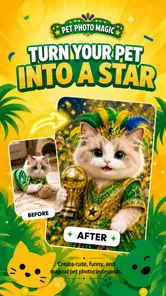

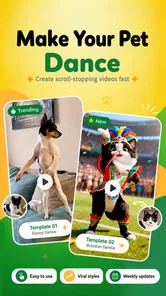

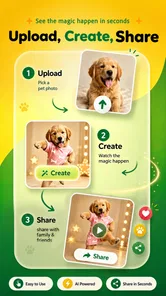
Analysis by Reviewed
Fofi - Fun AI Pet Effects is the kind of video app I would open when I want to turn an ordinary pet clip into something playful without spending a long time learning an editor. Its focus is narrow but appealing: cute effects, costumes, dancing moments, and photo or video transformations built around pets. After using it, my main impression is that Fofi works best as a quick creativity tool, not as a complete video-editing studio.
That distinction matters. If your goal is to make a funny clip of your dog for family chat, experiment with a costume effect for a cat photo, or create a lighthearted post from a short recording, the app has a clear purpose. If you need detailed trimming, layered sound design, captions, color correction, or precise control over every frame, a traditional editor will still be the better choice.
What makes Fofi enjoyable for pet videos
The strongest part of the experience is how quickly the app gets to its central idea. Instead of asking me to build a project from a blank timeline, it encourages an effect-first workflow: choose a pet image or clip, try a playful treatment, and judge the result visually. That makes the app feel less like technical editing software and more like a creative toy with a practical sharing purpose.
This approach is especially useful for people who rarely edit video. A conventional editor can be intimidating because it presents trimming tools, tracks, transitions, filters, and export settings before anything entertaining happens. Fofi puts the personality of the animal at the center. I can think about whether a costume looks amusing or whether a dance effect suits the clip, rather than first learning a complicated interface.
The app belongs to the video players and editors category, but that label does not fully describe its character. It is not primarily for watching videos, organizing a library, or producing polished promotional footage. Its appeal comes from playful visual treatment. The store summary points toward cute pet videos and photos, and that is a fair description of the experience without making it sound like a professional production suite.
One useful workflow is to start with a short clip rather than a long recording. A brief moment in which a pet looks toward the camera, turns its head, or sits still gives an effect enough visual focus to work with. Long clips often contain too much movement or dead time, while a compact source makes the result easier to review and share. I found that choosing the source carefully matters more than repeatedly changing effects.
Photos are also important here. Not every pet moment needs motion, and a clear portrait can be a better starting point for a costume or character-style treatment than a shaky video. I would use a front-facing image with the animal reasonably well lit, especially when the face is the main subject. This is a simple step, but it can save time because a poor source image limits what any effect can do.
More From Our News Desk

 Gmail
GmailGmail in a Busy Inbox: Who Benefits Most?
From first account to crowded workday, Gmail earns its place through dependable search and flexible sorting—but its best fit depends on how much inbox maintenance you can tolerate.

 Prime Video
Switching to Prime Video: What Changes in Your Viewing Routine
Prime Video can make a compelling second home for streaming, but switching means learning a different catalog, rental layer, and route from browsing to playback.

 Universal TV Remote Control
Universal TV Remote Control Works Best as a Reliable Backup
A phone remote earns its place through quick setup and reliable habits. Here is how to get more from Universal TV Remote Control—and where its limits show.

 Weather - By Xiaomi
Weather by Xiaomi Review: Clear at a Glance, Less Clear Up Close
Xiaomi’s weather app makes everyday forecasts quick to scan, but its calm surface can leave useful details and recovery paths harder to find than they should be.

 X
XX Under Pressure: Can It Recover When Posting Goes Wrong?
A resilience-focused review of X, examining setup, mistaken posts, interruptions, weak connections, and the gaps that matter when recovery needs to be dependable.

 Clash of Clans
Clash of Clans Is Won Between the Battles
Its raids are quick; its community is a long-term project of coordination, teaching, rivalry, and shared responsibility—with all the friction that entails.
Latest News



Another practical tip is to keep the original image or clip untouched until the final result has been checked. Playful effects are easy to judge emotionally because the first version may look funny, but small visual problems can become obvious after sharing. Keeping the source available lets me try a different variation without having to recreate the project from memory.
For an everyday example, imagine recording your cat jumping onto a chair while you are preparing dinner. Rather than editing the whole evening into a full montage, you could select the few seconds around the jump, apply a humorous effect, and send the result to relatives. That is where Fofi makes sense: it turns a small, ordinary event into a quick piece of entertainment without demanding a full editing session.
Where the app shows its personality
The app’s creative direction is more specific than a general filter collection. Its effects are aimed at animals and at the emotional reaction people have to their pets. That focus gives the results a natural audience: owners who already take photos and videos of their animals and want a fresh way to present them.
I also like that the concept works for both casual sharing and personal experimentation. You do not need to be trying to build a public channel to get value from it. A silly costume image can be made simply because it makes someone at home laugh. That low-pressure use is one of the app’s genuine strengths.
At the same time, the narrow theme means the app may lose its appeal once you have explored the effects that suit your own pets. It is not designed to replace a broad editor with a large range of unrelated visual tools. The more your needs move away from pet-centered humor, the less convincing the app becomes as your main creative application.
Fofi is free to install, which makes trying the basic experience relatively easy. It is marked for Everyone, so its tone is accessible for a broad audience, including families using it together. There are optional in-app purchases priced from under a dollar to several dollars per item, so I would still pay attention before confirming any extra effect or creative item. The free entry point is helpful, but the overall value depends on how much of the effect collection you actually want to use.
The developer is Sparking Innovations Limited, and the app is currently at version 1.8.0. It requires Android 9 or later, a reasonable consideration if you are using an older phone. On a supported device, I would still recommend keeping the source material modest in length and checking the finished result before sharing, because quick-effect apps are most comfortable when the project stays simple.
The most important limitation: convenience comes with less control
My main criticism is not that Fofi lacks the ambition of a professional editor; it is that the app’s convenience can make the creative process feel narrow. When an effect is doing most of the visual work, I have fewer opportunities to fine-tune the result. That is acceptable for a joke or a casual post, but frustrating if I already know exactly where a transition, crop, or visual change should happen.
This is the central trade-off. Fofi helps me reach a playful outcome quickly, while a conventional editor gives me more responsibility and more control. With a standard mobile editor, I can usually decide the exact beginning and ending of a clip, arrange several moments, add text, adjust audio, and build a more deliberate sequence. Those tools take longer, but they are better when the story matters as much as the effect.
I would not choose Fofi for a pet adoption video, a business account, a carefully edited birthday montage, or anything that needs consistent visual branding. In those situations, the effect should support the message rather than become the message. A general editor is a better fit when I need a clear narrative, controlled pacing, or a finished result that looks intentional rather than spontaneous.
There is also a practical judgment involved in using AI-style effects with animals. A result can look amusing in one moment and visually awkward in another, depending on the animal’s pose, lighting, or movement. I would review every frame before sending a clip to other people, especially if the effect changes the pet’s appearance in a way that could look strange or distracting. The novelty is strongest when the animal remains recognizable and the effect feels like a playful addition.
Another limitation is repetition. If I use the same kind of costume or dance treatment on every clip, the surprise fades quickly. My advice is to treat Fofi as one step in a small creative routine: alternate between a funny effect, a clean original photo, and a short edited sequence made elsewhere. That keeps the app useful without expecting it to provide an endless supply of ideas on its own.
The purchase model also deserves a moment of thought. Because the app is free but offers individual in-app items, I would avoid buying anything immediately. First, I would test the available experience with several different pets, image types, and clip lengths. If the results fit the way I actually share content, an occasional purchase may feel worthwhile; if I only open the app once for a novelty result, staying with the free option is the sensible decision.
Who should use it, and who should skip it
Fofi is a good match for pet owners who want fast, cheerful results and do not want to study editing techniques. It is also suitable for parents and children using a shared device under normal family supervision, since the app is aimed at an Everyone audience and its creative premise is easy to understand. People who enjoy sending funny clips in private messages may get more value from it than creators who need a polished publishing workflow.
I would particularly recommend it to someone who has plenty of pet photos but rarely does anything with them. A small collection of clear images can become a set of playful experiments, and the low effort makes it easier to try ideas that would feel too minor for a full editing project. It can also be useful for a person who wants to test whether a pet-focused social media concept is enjoyable before committing to more advanced software.
I would be more cautious about recommending it to experienced editors. If you already work comfortably with timelines, layers, audio, captions, and manual adjustments, Fofi may feel restrictive rather than liberating. You might still enjoy it as a source of quick visual jokes, but it is unlikely to replace the editor you use for serious projects.
The same applies to users who want one app for every kind of media task. Fofi is not the most sensible choice if you need to edit travel videos, product demonstrations, talking-head clips, or multi-scene stories. Its value comes from being specific. That specificity is a strength when your subject is a pet and a weakness when your subject changes.
Before using it regularly, I would establish a simple routine. Select the clearest source, keep the clip short, preview the entire result, and compare it with the untouched original. Then decide whether the effect improves the moment or merely makes it busier. This last check is surprisingly important: a funny pet expression often needs less decoration than expected, and the best version may be the one with the lightest treatment.
My verdict after weighing the fun against the friction
Fofi - Fun AI Pet Effects succeeds because it understands a very specific kind of mobile creativity. It is not asking me to become a video editor; it is inviting me to make a pet moment more playful in a few steps. That makes it approachable, memorable, and easy to recommend for casual experimentation.
Its rating sits at around 3.9 from roughly 850 ratings, while its reach has passed 100K installs. Those figures suggest a modest but established audience rather than a universal editing platform. I would read that as a reason to set expectations correctly: this is a focused pet-effects app, not a replacement for every tool in the broader video category.
My final recommendation is positive for the right person. Install it if your camera roll is full of dogs, cats, or other pets and you want quick costume, dance, or character-style ideas without a steep learning curve. Try it first with a short, well-lit clip and resist the temptation to buy extra items until you know you will return to the app.
Skip it if your priority is precision, multi-clip storytelling, professional presentation, or broad editing flexibility. For those needs, a conventional mobile editor will serve you better. But for a quick laugh at home or a charming message to friends, Fofi earns its place as a small, focused creative app. I would keep it installed as an occasional source of pet-video surprises rather than depend on it as my everyday editor.
Fofi - Fun AI Pet Effects Frequently Asked Questions
What devices and operating systems can run Fofi - Fun AI Pet Effects?
Fofi is a mobile app in the Video Players & Editors category, developed by Sparking Innovations Limited. Its current version is 1.8.0, and it requires Android 9 or later. If you use iOS, check the app’s compatibility details in the relevant store before downloading. The app is rated for Everyone, so its content is intended for a broad audience.
What is Fofi - Fun AI Pet Effects?
Fofi - Fun AI Pet Effects is a creative entertainment app that uses AI-powered effects to transform photos or videos with playful pet-inspired edits. It is designed for users who want to create amusing images featuring virtual animal elements, expressive filters, and social-media-friendly results. The app focuses on quick experimentation rather than professional photo editing, making it accessible for casual users and families. Its central appeal is making cute pet-themed videos and photos, including playful dance and costume concepts.
How does Fofi create AI pet effects?
After selecting or capturing a photo, you can choose from the available pet-themed effects and allow the app to process the image. Depending on the effect, Fofi may add animal features, expressions, accessories, or other playful visual changes. Processing time can vary according to the effect and your device, and some features may require an internet connection or access to the app’s AI services. The results are best approached as lighthearted creative edits rather than precise or professional transformations.
Is Fofi - Fun AI Pet Effects free to download and use?
Fofi is free to download, though not every feature necessarily comes at no cost. In-app purchases range from $0.99 to $6.99 per item, so check the purchase screen before buying an effect or other content. The app has a 3.9 average from around 849 ratings, which can help set expectations, but individual experiences with its tools may differ.
What permissions does Fofi require, and is my data safe?
The app may request access to your camera, photo library, and possibly storage so you can capture images or select existing media for editing. Certain AI features may process content online, so it is important to review Fofi’s privacy policy before uploading personal photos. Avoid using sensitive images, and verify the requested permissions through your Android or iOS privacy settings. As with any photo-editing app, consider what is visible in an image before choosing to process or share it.
Pros
- Creates playful AI pet effects quickly from ordinary photos.
- Simple interface makes experimenting easy for casual users.
- Offers entertaining results for sharing with friends and family.
- Useful for creating humorous social media posts and profile images.
- Works well as a lighthearted photo-editing app for short sessions.
Cons
- Some effects may produce inconsistent or unnatural-looking results.
- The best effects may require in-app purchases or premium access.
- Processing quality can depend heavily on the original photo.
- AI photo processing may raise privacy concerns for cautious users.
- Results can become repetitive after trying the available effects.












