

Viv Home Care
- 52.00
- 3.8
- Installs
- 10.00K
- Price
- Free

Screenshots
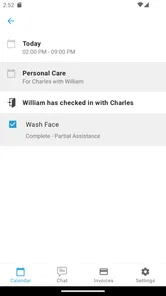
Analysis by Reviewed
When care happens at home, the difficult part is often not one dramatic medical event. It is the chain of small tasks around it: remembering what happened, keeping the right people informed, and making sure the next step is understood. Viv Home Care is designed for that kind of situation. I found it most interesting as a digital layer between a person receiving care, the people helping them, and the wider care process.
Developed by Viv Technologies Inc., this free medical app is aimed at home care rather than general wellness tracking. Its purpose is to use technology to support higher-quality care in a familiar setting. That sounds straightforward, but the real value depends on how consistently the people involved use it and how well it fits their existing routine.
The app has an average rating of 3.8 from around 119 ratings, with roughly 52 written reviews, and it has passed 10,000 installs. Those figures suggest a small but real user base rather than a mass-market health platform. I would approach it as a focused home-care tool, not as a replacement for a hospital portal, an emergency service, or a complete personal health record.
Following a home-care task from concern to outcome
I find it useful to think of a home-care task as a short chain: notice a concern, pass on the relevant context, agree who will act, and check what happened. Keeping those steps distinct can prevent routine updates from being mistaken for urgent requests. From there, I’d look at how that handoff holds up when the day gets busier.
Starting with the situation at home
A realistic use case is a family member recovering at home while another person helps coordinate daily care. Perhaps the person receiving care needs support with a routine, observation, or follow-up task, while a relative is trying to stay informed from elsewhere. In that situation, ordinary alternatives can become messy: phone calls go unanswered, text messages get buried, and handwritten notes are easy to misread.
This is where I see the strongest reason to try Viv Home Care. Instead of treating home care as a private exchange between one patient and one helper, it is intended to make the process more connected. The starting condition is not necessarily an emergency; it is the ongoing uncertainty that appears when several people share responsibility.
I would not open it expecting a diagnostic tool. Its role is more practical and organizational. It can make a care routine easier to follow, but it should sit alongside professional medical advice rather than compete with it. If symptoms are urgent or worsening, contacting the appropriate medical service remains the sensible first action.
More From Our News Desk

 Gmail
GmailGmail in a Busy Inbox: Who Benefits Most?
From first account to crowded workday, Gmail earns its place through dependable search and flexible sorting—but its best fit depends on how much inbox maintenance you can tolerate.

 Prime Video
Switching to Prime Video: What Changes in Your Viewing Routine
Prime Video can make a compelling second home for streaming, but switching means learning a different catalog, rental layer, and route from browsing to playback.

 Universal TV Remote Control
Universal TV Remote Control Works Best as a Reliable Backup
A phone remote earns its place through quick setup and reliable habits. Here is how to get more from Universal TV Remote Control—and where its limits show.

 Weather - By Xiaomi
Weather by Xiaomi Review: Clear at a Glance, Less Clear Up Close
Xiaomi’s weather app makes everyday forecasts quick to scan, but its calm surface can leave useful details and recovery paths harder to find than they should be.

 X
XX Under Pressure: Can It Recover When Posting Goes Wrong?
A resilience-focused review of X, examining setup, mistaken posts, interruptions, weak connections, and the gaps that matter when recovery needs to be dependable.

 Clash of Clans
Clash of Clans Is Won Between the Battles
Its raids are quick; its community is a long-term project of coordination, teaching, rivalry, and shared responsibility—with all the friction that entails.
Latest News



The age rating is Everyone, which makes the app broadly approachable for households with different generations using the same care arrangement. That does not mean every medical situation is suitable for an app. It simply makes the product feel less intimidating for ordinary home-care coordination, especially when a relative is not comfortable with complicated software.
Turning the care need into a repeatable flow
My preferred way to use a tool like this is to begin with one clearly defined responsibility. Instead of trying to move an entire care plan into the app at once, I would start with the task that causes the most confusion. That might be keeping track of a regular check-in, sharing an update, or making sure a handoff does not depend on memory alone.
That narrow starting point matters because home care is already demanding. A system that requires every participant to document every minor detail can create more work than it removes. Viv Home Care makes more sense when it supports a specific routine and gives the people involved a common place to work from.
For a relative helping from another location, the practical question is not simply whether information can be entered. The better question is whether the information leads to a clear next action. A useful update should help someone understand what has happened, what still needs attention, and who is responsible for moving things forward.
The most useful habit is to treat each update as a handoff, not as a diary entry. That means writing or recording information so the next person can act without needing a second explanation. In a busy household, clarity is more valuable than a long stream of detail.
How I would handle a day-to-day handoff
Imagine a family member has spent the morning with a person receiving care. Before leaving, that helper needs to pass relevant information to someone taking over later. With ordinary messaging, the update might be sent as several short texts, mixed with unrelated conversations. The recipient then has to reconstruct the situation.
With Viv Home Care, I would use the app as the central point for that transition, keeping the update focused on the care task and its current state. The person taking over can then begin from the same context rather than relying on a hurried phone call. This is a modest change, but it addresses one of the most common weaknesses in informal home care: information exists, yet it is scattered.
A second useful workflow is the remote check-in. A relative who cannot be physically present may feel pressure to call repeatedly, while the person at home may find those calls tiring. A shared care process can reduce unnecessary interruptions by making routine updates easier to organize. I would still keep direct conversation for anything sensitive or unclear, but the app can help separate routine communication from issues that genuinely need discussion.
The trade-off is that every handoff is only as good as the entry before it. If an update is vague, delayed, or placed in the wrong context, the technology does not solve the underlying problem. This is not a one-tap solution to human coordination; it is a structure that rewards consistent use.
The people involved and the points where responsibility changes
Home care usually involves more than the person receiving support. There may be a partner, adult child, friend, paid helper, or clinician involved at different moments. Each person may know only part of the story. A tool focused on home care is valuable when it helps those partial views connect without forcing everyone into the same physical location.
I would pay particular attention to responsibility changes. Who records the update? Who reads it? Who decides whether the next action is routine or needs professional advice? Who confirms that the task was completed? These questions are easy to overlook when choosing an app, but they determine whether it improves care or merely adds another inbox.
A practical approach is to agree on a simple household rule before relying on the app: routine updates go into the shared workflow, while urgent concerns are escalated immediately through the appropriate medical channel. That prevents a dangerous misunderstanding in which someone assumes that posting information in an app automatically alerts a professional or guarantees a rapid response.
I also think the app is better suited to a stable care circle than to a constantly changing group of helpers. When the same people return to the process, they can develop a shared way of recording information. If participants change every day, the onboarding and communication burden may become more noticeable.
What the workflow can improve
The clearest potential result is continuity. A person may receive care from several helpers, but the experience can feel more consistent when important updates are kept together. That consistency can reduce repeated questions and make it easier to notice when a routine has changed.
Another benefit is mental relief for the coordinating relative. Instead of holding every detail in memory, that person can use a defined process to support the household. This does not remove responsibility, but it can make the responsibility less dependent on one person being available at exactly the right moment.
For the person receiving care, the benefit may be less visible but still important. Better coordination can mean fewer repeated explanations and fewer avoidable interruptions. It may also help preserve independence when care is organized around support rather than constant checking.
Still, I would measure success by outcomes in the daily routine, not by how advanced the app feels. If people understand the next step more quickly, if handoffs become less confusing, and if the main caregiver spends less time chasing information, then the app is doing something useful. If everyone records information but nobody knows who acts on it, the workflow has failed even if the interface looks polished.
Where the process becomes difficult
The first friction point is adoption. A home-care app is rarely used by just one person, so the experience depends on several people learning the same process. One reluctant participant can push the household back toward calls, paper notes, or messaging apps. I would introduce it gradually and explain the specific problem it is meant to solve rather than presenting it as another obligation.
The second issue is the boundary between coordination and clinical care. Viv Home Care belongs to the medical category, but I would not treat that label as evidence that it can assess symptoms, replace a clinician, or provide emergency support. People choosing it should be comfortable keeping professional advice and urgent communication outside the normal app workflow when necessary.
There is also a risk of over-documenting. Caregivers may feel that every observation must be entered, especially when they are worried about missing something. That can make the system tiring and reduce the quality of the information that matters. I would use it selectively, recording details that help the next person understand the situation or complete the next task.
Technical compatibility is another practical consideration. The current version is listed as 2026.7.2, and the minimum operating-system requirement is version 10. Before asking an older relative to depend on it, I would check that their phone meets that requirement and that they are comfortable navigating the device. A free app is not truly convenient if the household needs a new phone or extensive technical help to use it.
How it compares with familiar alternatives
Compared with phone calls, the app offers a more structured way to pass information, but calls remain better when tone, reassurance, or immediate clarification matters. Compared with ordinary messaging, a dedicated home-care tool should be easier to keep separate from family chatter, although messaging apps may win when every participant already uses them confidently.
Compared with paper notes, a digital workflow can be easier to share across locations and less dependent on one notebook staying in the right room. Paper can still be faster for someone uncomfortable with phones, and it may be perfectly adequate for a single caregiver with a simple routine.
Compared with a broad health-tracking app, Viv Home Care feels more relevant when the central issue is coordination between people rather than personal metrics. A general tracker may be better for someone who wants exercise, nutrition, sleep, or symptom charts in one place. I would choose the focused home-care approach when shared responsibility is the main problem.
That comparison also shows who should skip it. If you live alone and only want to monitor your own habits, a personal health app may be a better fit. If your care needs are urgent, clinically complex, or already managed through a formal provider portal, that established professional system should remain the primary channel. The app is most convincing in the middle ground: ongoing home support that needs clearer communication.
Small decisions that make the experience more useful
My first tip is to define the handoff before the first real need arises. Decide what counts as a useful update and who checks it. Without that agreement, users may assume someone else is watching, which weakens the entire process.
My second tip is to keep routine information separate from escalation. A normal update should not be written in a way that hides an urgent concern, and an urgent concern should not wait for the next person to open the app. This distinction protects the app from being used beyond its practical role.
My third tip is to review the workflow after a few days of real use. Look for repeated questions, missing context, and steps that nobody completes. If the same clarification is needed every time, the household should change how the information is recorded rather than simply adding more notes.
A fourth insight is that the best user may be the coordinator, not the person receiving care. The person at home may need only a simple, low-effort interaction, while the remote relative benefits from continuity and visibility. That means the household should judge the app by whether it reduces coordination pressure, not by how many functions any one person uses.
My experience of its overall fit
Viv Home Care presents a sensible idea: home care improves when information and responsibility move more reliably between people. I like that its purpose is specific enough to address a real problem, yet broad enough to apply to different household arrangements. The free price also lowers the barrier for families who want to test a shared workflow before committing to a paid service.
At the same time, I would keep expectations realistic. The app cannot create cooperation where none exists, and it cannot replace medical judgement. Its value grows through repeated, disciplined use, which means the first few days may feel more like setting up a routine than enjoying an instant benefit.
The current version and its Everyone rating make it approachable for a wide range of users, but approachability is not the same as suitability. A person with limited phone confidence may still need help getting started. A household with complicated professional care arrangements may need to confirm that this tool fits alongside the systems already in use.
With around 10,000 installs, it is not as familiar as the largest general-purpose communication platforms. That can be a disadvantage if you need extensive community guidance or a tool that every relative already knows. It can also be an advantage for someone specifically looking for a dedicated home-care space rather than another general app full of unrelated features.
Who I would recommend it to
I would recommend Viv Home Care to families managing ongoing support at home, especially when one person coordinates care and other people need dependable updates. It is a good candidate for households where calls and messages have become fragmented, but the situation is not so urgent or specialized that a professional clinical platform must handle everything.
I would suggest trying it with one routine first. Choose a recurring handoff, involve the people who genuinely need the information, and observe whether the next person can understand the situation without extra chasing. That test tells you more than simply installing the app.
I would not recommend making it the only channel for emergencies, diagnosis, or decisions that require a licensed professional. I would also hesitate if the household cannot agree on who is responsible for reading and acting on updates. In those cases, a direct call, an established provider system, or even a simple shared paper process may be safer and less frustrating.
Final thoughts after following the complete workflow
From the initial concern at home to the final handoff, Viv Home Care is best understood as a coordination aid. Its strongest contribution is not a flashy feature but the possibility of turning scattered care information into a more deliberate sequence: someone records what matters, another person receives the context, responsibility changes clearly, and the outcome can be checked.
That sequence still depends on human judgement and participation. When the household uses it selectively and agrees on escalation, it can reduce confusion and make remote support feel more manageable. When people expect it to replace professional care or automatically solve communication problems, disappointment is likely.
My overall view is positive but measured. I would try it for a shared home-care routine, particularly because it is free and focused on a real everyday difficulty. I would keep the workflow simple, confirm that the devices meet the operating-system requirement, and treat the app as one part of a wider care plan. Used that way, it has a reasonable chance of making the handoff from one caregiver to the next calmer, clearer, and less dependent on memory.
Viv Home Care Frequently Asked Questions
Is Viv Home Care free to download, and what should I check before installing it?
Viv Home Care is a free medical app from Viv Technologies Inc., so you can download it without paying an app purchase price. Before installing, consider whether your home-care provider or organization uses the platform, since access may depend on being connected with a participating service. Also check that your device meets the app’s operating-system requirements and that you are downloading the official app.
What is Viv Home Care, and who is it designed for?
Viv Home Care is a home-care management app intended to help users coordinate and monitor care-related activities from a mobile device. Depending on the available service in your area, it may support communication between clients, family members, caregivers, and care providers. Before downloading, check whether Viv Home Care is offered by your specific organization and whether your role requires an invitation or registered account.
How do I create an account or access Viv Home Care?
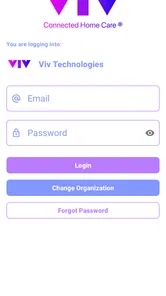
Access to Viv Home Care may depend on the care provider, agency, or organization that uses the platform. In many cases, users receive login details or an invitation rather than registering freely through the app. During testing, it is important to confirm that your email address or phone number matches the information held by your provider. If you cannot sign in, contact the organization managing your care instead of creating multiple accounts.
What features can I expect to find in Viv Home Care?
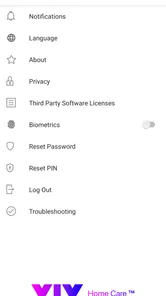
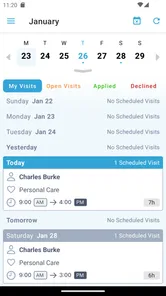
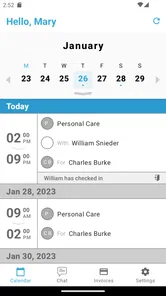
The exact tools available can vary according to your provider, subscription, user role, and app version. Viv Home Care may include care schedules, visit information, task updates, messages, notifications, notes, or access to relevant care records. Some features may be visible only to caregivers or administrators. Users should review the permissions and available menus after signing in, since not every account necessarily includes the same functionality.
Is Viv Home Care safe for storing personal or care-related information?
Because home-care applications can handle sensitive personal information, privacy and security should be considered before use. Viv Home Care may require access to account details, communication records, schedules, or care notes, depending on how it is configured by the provider. Download the app only from an official store or trusted source, use a strong unique password, keep your device updated, and avoid sharing login credentials with other people.
Pros
- Simple interface makes everyday care information easy to find.
- Useful for organizing appointments
- reminders
- and care-related tasks.
- Can improve communication between families and care providers.
- Helpful for monitoring care details in one convenient place.
- Suitable for users who prefer managing care needs digitally.
Cons
- Some features may depend on provider or regional availability.
- Requires personal and health information
- raising privacy concerns.
- Notifications may be missed if background permissions are restricted.
- Older devices may experience slower performance or compatibility issues.
- The app may be less useful without an active Viv Home Care service.











